
Create Amazon listing images and product video from your live catalog.
Amazon Agent Iris is an Amazon listing image and video generator that works from your live catalog. It combines AI image generation and Google Veo 3.1 with real product references, listing facts, Amazon-specific creative guidance, human approval, and the Selling Partner MCP, so your team can create and review visual assets from the AI client it already uses.
 Gemini Nano Banana
 Gemini Nano Banana
 OpenAI gpt-image-2
 OpenAI gpt-image-2 Google Veo 3.1
 Seller Central rules
 Seller Central rules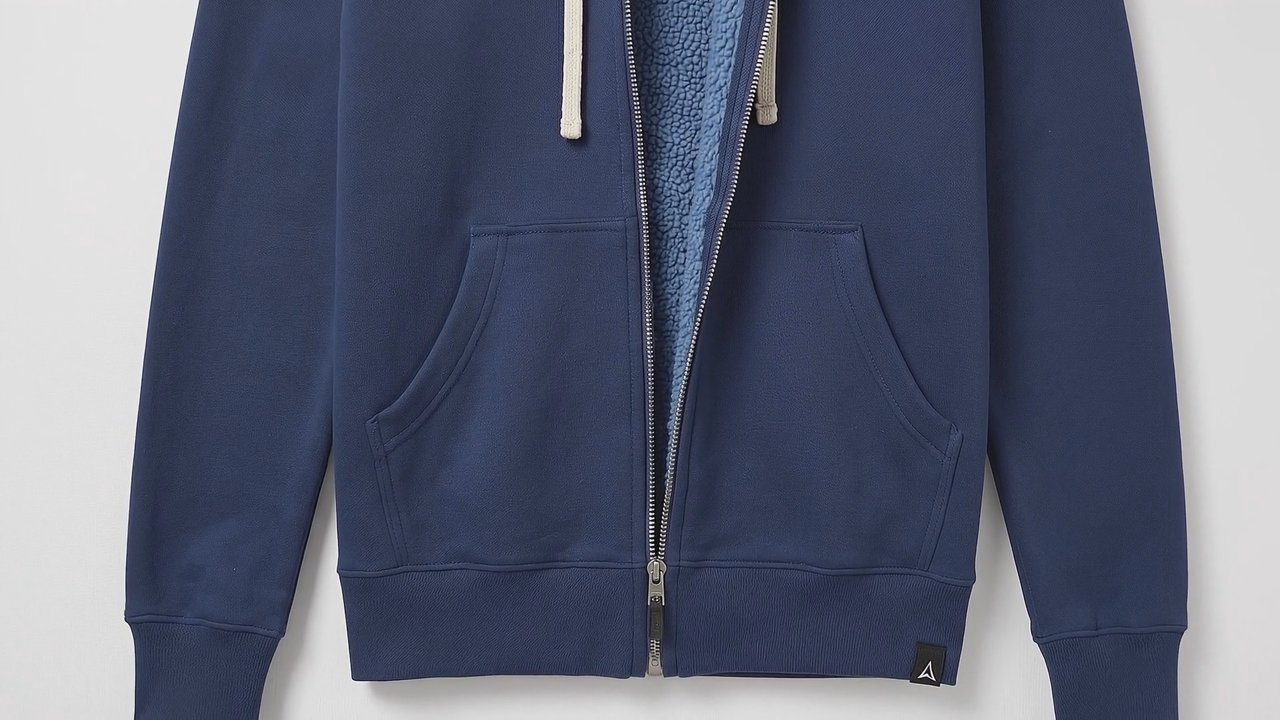
How Amazon listing creative closes the loop.
Read. The Selling Partner MCP reads the live catalog, product facts, current image stack, variation family, and suppression state. Iris begins with the listing Amazon is actually serving.
Plan. Choose the missing visual job: a compliant main image, a richer gallery, a product-overview video, an unboxing, a how-to, a setup sequence, or a troubleshooting shot. The listing supplies the facts; the seller's real images supply the product reference.
Create and review. Iris generates or edits the image, or creates the Veo shots and sequence plan. Images get an Amazon-specific audit. Video gets a product-fidelity review so changed labels, colors, materials, controls, proportions, or included parts do not quietly become listing content.
Deliver. Approved images can publish through the Selling Partner MCP and be checked for ingestion. Video returns as collected clips with a shot order and finishing notes for assembly and Seller Central upload. Nothing reaches the listing until you approve it.
Iris owns visual listing optimization. The Amazon Listing Optimizer handles titles, bullets, search terms, and A+ structure. Both can work from the same live listing through the MCPs.
Turn Amazon listing images into product video.
The same product references that anchor a listing image can anchor motion. Iris uses Google Veo 3.1 to create product-overview, feature, unboxing, how-to, setup, troubleshooting, and brand-story shots while carrying the listing facts and product-fidelity review into every result.


Reference images in. A listing-video shot out.
The front view anchors the navy fleece, cream drawcords, silver zipper, and hem tab. The detail image supplies the pale blue sherpa lining revealed in the generated shot.
A navy full-zip hoodie rotates slowly against a white studio background while the open front reveals its pale blue sherpa lining.

Two pale green Ollie skincare products sit among lemons, avocado, and tropical foliage as the camera moves through the scene.
16:9 · 1080p
Two pale green Ollie skincare products stand in wet tea leaves while rain and sunlight animate the vertical scene.
9:16 · 1080pThese are individual Veo shots, not finished one-minute listing videos. Iris can generate a shot set or extend a Veo sequence and returns the clips, shot order, and finishing notes. Multi-shot editing, required metadata work, and the final Seller Central video upload remain external.
Iris is listing-aware, reference-driven, and connected to the actions around it.
How Iris differs from a standalone image or video generator.
A standalone generator starts with a prompt or uploaded photo and stops at a downloadable file. Iris starts with live Seller Central context, the listing's current media, real product references, and the rules for the visual job. It keeps image publishing connected to the listing and returns video with the plan needed to finish it accurately.
Iris owns the visual work. Run it with the Product Creative Skill for main images, lifestyle scenes, infographics, detail shots, audits, and suppression fixes. For titles, bullets, search terms, and A+ structure, use the Amazon Listing Optimizer. For image and video setup, see the Amazon Agent Iris documentation.
For a named comparison of the whole platform against a listing design tool, using the same criteria and dated sources, see Kuudo vs Pixii.
| Capability | Standalone generator | Amazon Agent Iris |
|---|---|---|
| Listing context | Public ASIN or uploaded photo | Live catalog attributes and current image stack |
| Product reference | One uploaded photo or a blank prompt | Current listing media plus seller-supplied references |
| Creative work | Generates downloadable assets | Images and video shots from real product references |
| Compliance | Template guardrails | Listing-aware rule check with exact fixes |
| Publishing | Manual upload | Approval-gated image publishing through the Selling Partner MCP |
| Video handoff | Stops at download | Video shots, shot order, and finishing notes |
No image credits. No video credits. No Kuudo markup.
Bring your own Google or OpenAI key for images and your Google key for Veo video, then pay the model provider directly. Kuudo does not sell creative-credit packs or add a generation markup. The platform is priced around your team, marketplaces, and Amazon API activity, and it runs in your own infrastructure.
Amazon listing images and video across the creative stack.
The Amazon listing image stack, built by Iris.
Main, lifestyle, angle, and detail images built from the same product reference set that can now drive the listing-video workflow.


› What did Kuudo actually change about how you work? Be specific.
"This is the first time I've seen image generation and live marketplace publishing work as one motion. The Amazon Agent Iris MCP produced lifestyle and infographic images seeded from the real product, and the Selling Partner API MCP wrote them straight onto the listing and let me verify they ingested into Amazon's CDN — no manual uploads, no Seller Central tabs. Just as important were the guardrails: exact measurements pulled from the catalog, a policy validator gating every image, and the judgment calls left to a human. Powerful and careful at the same time."

One listing. The full visual story.
Start with the product already in your catalog. Iris can repair the main image, fill the gallery, or turn the same product references into video shots that show materials, features, setup, and use. Image changes wait for approval before publishing; video comes back as a reviewed shot set and finishing plan.
Explore listing creative in beta- A search-ready main image checked against pure-white background, about 85% product fill, and full-product visibility rules
- Lifestyle, detail, feature, and listing-video shots built from the same real product references
- Know what changed, what needs review, and the exact next step before an asset reaches the listing
One visual standard, applied across every ASIN.
Bring every ASIN up to the same visual standard across stills and motion. Listing facts keep measurements and included parts honest, product references anchor the generated result, and each asset returns with the review and delivery context your catalog team needs.
Explore catalog workflows in beta- Hold one consistent look across the whole catalog, even as you scale to thousands of SKUs
- Review logos, labels, materials, colors, controls, and included parts against the product references
- Move images and collected video through signed URLs, with no key sprawl and configurable retention
More listing creative without another handoff chain.
Run the same listing-aware workflow across client catalogs. Iris pulls the real product context, creates the requested still or video shot, and returns a reviewable asset with the references and decisions attached. Your team keeps the client approval and final call.
Explore agency workflows in beta- Move from one reference set to a complete image gallery and planned video sequence
- Change one scene or shot without rebuilding the entire creative direction
- Keep the approval trail clear across every client, ASIN, and visual asset
How Amazon listing creative works in three steps.
Audit Amazon listing images against the rules that apply.
Point the agent at any image and get a line-by-line read — what passes, what needs changes, and the exact fix — before Amazon ever sees it. Amazon still makes the final call; you just stop being surprised by it.
Built for listing work, honest about the finish line.
Frequently asked questions
The questions teams ask before they ship.
What is an Amazon listing image and video generator?
How is Iris different from a standalone image or video generator?
Can Iris create video for Amazon listings?
Does Iris create a complete Amazon listing video?
Can Iris use existing product photos as video references?
Can Iris create images for A+ Content?
Can Iris publish images directly to Seller Central?
Will this guarantee my image gets approved?
Does it preserve my logo and printed text when editing?
Which models create the images and video?
Does it handle apparel and footwear model rules?
What about multipacks, variants, and used-item offer photos?
Do you charge per image or video?
How do images and videos get in and out securely?
Where does it run?
Create Amazon listing images and product video from the assistant you already use.
Guided onboarding · works in any MCP client · runs in your own infrastructure