
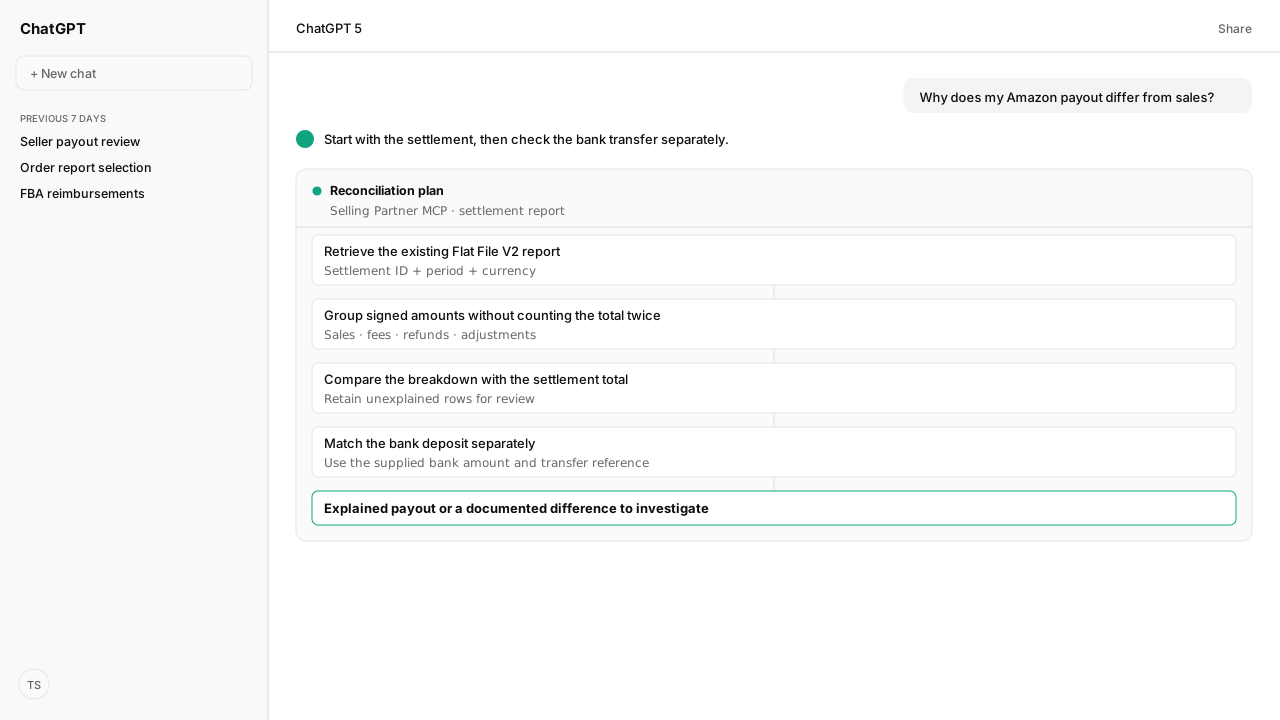
An Amazon settlement report explains the transactions included in a Seller Central payout cycle. Use Flat File V2, preserve signed amounts and currency, and reconcile its rows to the statement total before comparing the bank receipt. Deferred transactions and different reporting dates can explain why monthly sales do not match a payout.
An Amazon settlement report explains the transactions included in one Seller Central payout cycle. Reconcile its signed amounts to the statement total, then compare that total with the matching bank receipt. Kuudo's Selling Partner MCP retrieves the existing report; monthly sales alone cannot explain the deposit.
The question usually arrives after a bank check: “Sales looked healthy. Why is this Amazon payment smaller?” Fees and refunds are part of the answer, but so is timing. A shipped order can appear in an activity report before its proceeds enter a payout.
Your seller identity, settlement period and team's treatment of unfamiliar charges determine whether the explanation is useful. The connected MCP supplies the account's report, while Amazon Agent Atlas supplies Amazon's rules for released and deferred transactions. Keep the source rows beside every conclusion so the next review starts from evidence your team already checked.
The settlement period explains the payout, not monthly sales
A settlement report groups payout activity into a settlement cycle. A Date Range Transaction report answers a different question: what activity occurred within the dates you selected. Those periods and transaction populations need not match.
Amazon's deferred-transactions guidance distinguishes earnings from cash received. In the enhanced reporting experience, Transaction reports include deferred and released transactions by posted date. Statements include released transactions paid during the settlement period. Deferred transactions are not included in those statements merely because the order shipped during the same month.
When an order appears in sales but not in a statement, use Seller Central's Transaction View to check its status, deferral reason and estimated release date. Atlas grounds that check in the account's applicable reporting rules; the agent should not label the amount “missing money” from a sales-to-payout difference alone.
Flat File V2 keeps each charge attached to its source row
Flat File V2 stores monetary detail in amount-type, amount-description and amount. Preserve all three. A summary that keeps only order totals can lose the separate fee, refund or adjustment rows that explain the payout.
Use Amazon's current report type, GET_V2_SETTLEMENT_REPORT_DATA_FLAT_FILE_V2. The settlement report specification (linked under Sources below) identifies it as a tab-delimited file and lists these fields:
| Fields to retain | Reconciliation purpose |
|---|---|
settlement-id, settlement-start-date, settlement-end-date | Identify the statement and its period |
total-amount, currency, deposit-date | Preserve the reported total, its currency and deposit date |
transaction-type, order-id, adjustment-id | Trace a charge to the transaction or adjustment when an identifier exists |
amount-type, amount-description, amount | Explain and sum the signed monetary detail |
posted-date, posted-date-time | Retain the timing recorded on each detail row |
Keep settlements and currencies separate. Preserve each amount's sign instead of turning every fee into a negative number: a reversal may have the opposite sign. Read local decimal formatting correctly; Amazon gives 95,00 as an EU-format example of 95.00. Do not add total-amount to the detail amounts—it is the comparison total, not another sale.
The following is a hypothetical worked example, not a customer result or a live Kuudo run. Assume these are all monetary detail groups in one USD settlement, and the statement reports USD 770. The labels are explanatory groups, not exact Amazon field values or standard fee rates.
| Illustrative group | Signed amount (USD) | Evidence to retain in a real review |
|---|---|---|
| Released product charges | +1,000.00 | Source row numbers and transaction identifiers |
| Selling and fulfillment fees | −150.00 | Original amount types and descriptions |
| Refunds | −100.00 | Refund rows and order references |
| Adjustment | +20.00 | Adjustment row and its identifier |
| Calculated total | 770.00 | 1,000 − 150 − 100 + 20 |
| Reported settlement total | 770.00 | Statement's total-amount |
| Unexplained report difference | 0.00 | Calculated total minus reported total |
A matching USD 770 bank credit would complete the separate receipt check for this example, once its transfer identity and timing match. The equation is not a universal sales-minus-fees formula. Real files can contain other amount types; keep them in the analysis and flag unfamiliar treatment rather than silently excluding rows.
Retrieve the existing report before asking AI to reconcile it
Settlement reports cannot be requested or scheduled through the Reports API; Amazon generates them automatically. Retrieve an existing report with the Selling Partner MCP instead of asking the agent to create one.
First connect the seller account using the Claude setup guide or ChatGPT setup guide. These AI clients need the Selling Partner connection for seller payout records. The Amazon Ads MCP supplies advertising metrics; it is not the source of the seller settlement file. Amazon requires the Finance and Accounting role for the Flat File V2 report.
The connected retrieval follows four steps:
- Identify the seller and marketplace. Ask
reports_getReportsfor existingGET_V2_SETTLEMENT_REPORT_DATA_FLAT_FILE_V2reports with processing statusDONE. Follow pagination when the desired report is not on the first page. - Select the statement. Inspect the report's period and identifiers. A
createdSincefilter refers to report creation time, not the settlement period. Confirm the settlement dates inside the downloaded file. - Retrieve the document location. Pass the selected
reportDocumentIdtoreports_getReportDocument. Amazon returns a download URL and any compression metadata; the tool response alone is not the report's transaction rows. - Read the file. Download and decompress as indicated, then inspect the tab-delimited data. If the AI client cannot access the downloaded artifact, download the report yourself and attach it. Keep reconciliation paused until the actual rows are available.
The manual route is Seller Central Payments → All Statements → the desired settlement period → Download Flat File V2. That export supplies the same kind of source evidence when connected retrieval is unavailable. Amazon documents the report retrieval and download steps in its automatically generated reports tutorial (linked under Sources below); use the V2 report type above rather than its older example type.
Copy this request after connecting your seller account, and provide the requested identifiers when the agent asks:
Reconcile one completed Seller Central settlement report.
Ask me to confirm the seller, marketplace and settlement period first. Find the existing Flat File V2 report through the Selling Partner MCP. Return the report ID, settlement ID, period and currency before analysis. Retrieve and read the file. If you cannot access or parse it, stop and ask me to attach the exported report.
Group every signed detail amount by transaction type, amount type and amount description. Keep source row references and available order or adjustment IDs. Keep unfamiliar rows visible; do not invent classifications.
Compare the calculated detail total with the reported settlement total. Do not add the statement total into the detail amounts. List unresolved differences and the evidence needed to explain each one.
Ask me for the bank receipt amount, currency and date before checking receipt. Keep that check separate from the report reconciliation. Do not change accounting entries or treat this as a profit or tax report.
This prompt specifies the review to perform. The tool contracts and Amazon rules were checked for this guide; the workflow has not been executed against a live seller payout here.
An unexplained difference stays open until its evidence matches
A zero difference within the report and a confirmed bank receipt are separate findings. Record both. A correct breakdown does not prove the funds have arrived, and a familiar-looking deposit does not prove you selected the right settlement.
| Finding | Check next | Evidence to keep |
|---|---|---|
Detail amounts do not match total-amount | Parsing, decimal format, omitted rows, duplicate imports and settlement grouping | Original file, row counts, group totals and unresolved amount |
| An order is absent from the statement | Transaction View status and release timing | Order ID, status, release date and the statement searched |
| Report reconciles but bank credit is absent | Transfer status and bank processing timing | Settlement ID, deposit date and available transfer reference |
| Bank amount or currency differs | Whether the receipt belongs to this settlement and whether conversion or bank charges apply | Bank receipt plus evidence for any conversion or charge |
| An amount description is unfamiliar | Source documentation and the underlying transaction | Unmodified description, signed amount and source row |
Deferred transactions can explain why sales exceed a payout; they do not automatically explain an arithmetic difference within a settlement file. Likewise, do not deduct an estimated reserve from a report already limited to released payout activity. Find the supporting transaction or leave the difference open.
Amazon's payment-report guidance describes using a transfer trace ID when a disbursement is delayed. Retain that reference when available. The agent can organize the evidence you provide, but the seller or finance team resolves the bank inquiry.
What happens next: reconcile one completed statement and review its exceptions
Choose one completed settlement, run the request above and review the report difference before checking the bank receipt. Keep the original export with the resulting table. Close an exception only when the row, transaction status or transfer evidence explains it; an AI-generated explanation without that evidence remains a question.
Once the review works for your account, your team can capture its accepted classifications and escalation rules in Skills. For broader reporting, Amazon Agent Flow is the Amazon Agent Data layer for bringing seller data into your own data lake. This guide does not establish a scheduled settlement import or automatic ledger posting.
For the order activity behind a payout, continue with Seller Central order reports.
Explain your next seller payout from its source rows
Bring your seller payout workflow to a working session with Kuudo. We will map the Selling Partner MCP connection, report access and your team's reconciliation rules for private-beta setup.
Run this workflow in betaWhat you need to run seller payout reconciliation
- MCP
- Amazon Selling Partner MCP: reports_getReports and reports_getReportDocument
- Atlas collection
- amazon_sellers: Settlement reports; Retrieve automatically generated reports; Deferred transactions for accounting and payment reconciliation
- Required subscriptions
- An authorized Seller Central connection whose application has the Finance and Accounting role for settlement reports; a client that can read the downloaded file, or a manually attached export
- Last verified
- 2026-10-20
- verificationScope
- Amazon documentation and generated MCP tool contracts checked; no live seller payout was retrieved for this guide
Keep exploring seller payout reconciliation
Use these companion guides to understand the inputs, follow-on analysis, and adjacent workflows behind this playbook.
FAQ
Is a Seller Central settlement report the same as an Amazon Pay report?
No. This guide covers marketplace seller payouts in Seller Central. Amazon Pay reports cover payments through Amazon Pay and use a different reporting surface. Choose the report for the business receiving the payment.
Can I use a settlement report alone to calculate profit?
No. A settlement report explains payout activity, not every cost of running your business. Product costs, overhead and accounting treatment require additional records. Reconcile the payout here, then use your accounting process for profit and tax reporting.
Can the agent check my bank account automatically?
The Selling Partner MCP retrieves Amazon seller data. The workflow here requires you to supply the bank receipt's amount, currency and date; it does not include a bank connection or permission to post accounting entries.