
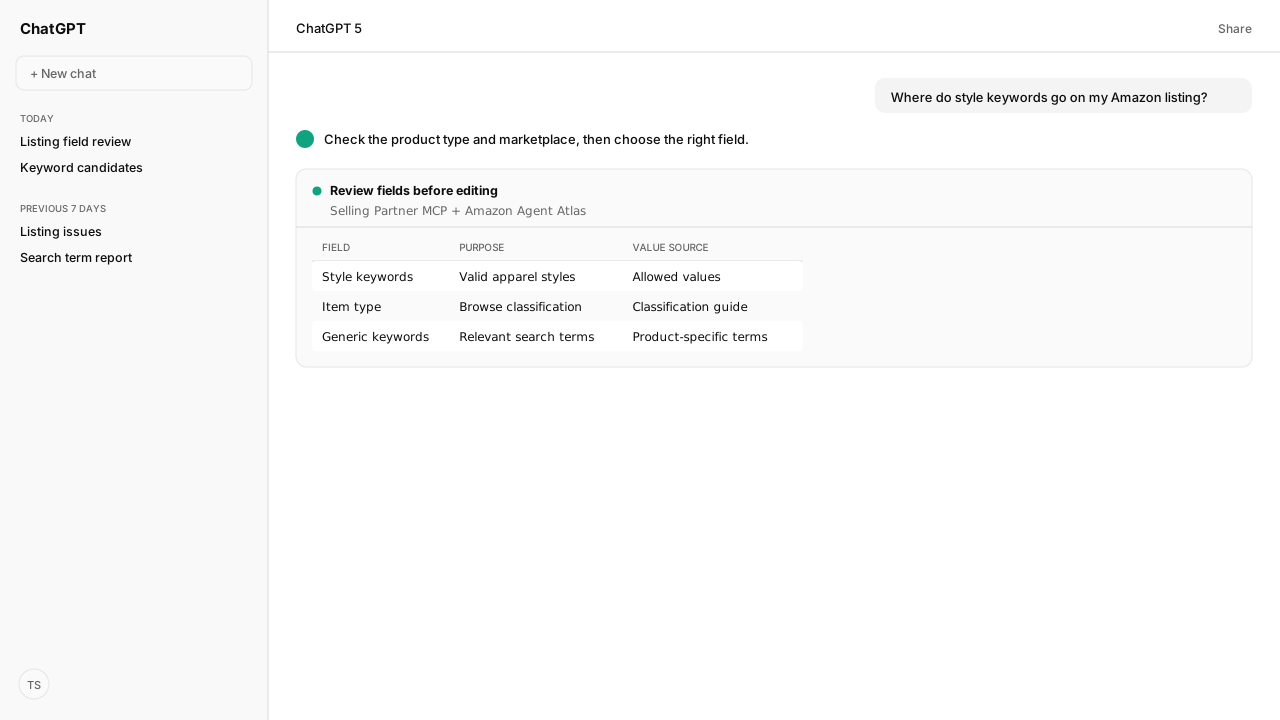
- Amazon's keyword reference describes style_keywords as category-specific apparel attributes. Use an accurate value permitted for the product's category.
- Style attributes, item_type_keyword and generic_keywords have different jobs. Confirm the current attribute name and constraints for the product type and marketplace.
- There is no single keyword count to fill across these fields. Validate the applicable field limits, review the change, then retrieve the listing and its issues after submission.
Amazon style keywords describe category-specific product styles; Amazon's keyword reference uses apparel examples. Choose an accurate value that the relevant category permits. Keep style attributes separate from generic search terms and item-type classification, then check the current field requirements for your product type and marketplace before editing the listing.
A phrase can describe your product perfectly and still belong in the wrong field. Your SKU, marketplace and approved product facts change the answer. Amazon Selling Partner MCP retrieves the listing and its requirements; Amazon Agent Atlas grounds the field interpretation. Together, they give your agent the evidence for a reviewable field map instead of a longer keyword list.
Style keywords and search terms serve different jobs
Style keywords are category-controlled attributes, while generic search terms accept relevant free text. Start with this distinction from Amazon's Keyword attributes explained reference:
| Reference attribute | Job | Input rule |
|---|---|---|
style_keywords | Describe apparel style | Accurate, category-valid values |
item_type_keyword | Assign browse classification | Category-valid item type |
generic_keywords | Supply product search terms | Relevant free text |
These are the names in Amazon's keyword reference. Confirm their current equivalents before using them in a listing submission.
Amazon gives ankle-boots and fur-lined as style examples. Its browse example assigns a product with sport-sandals to the Sports Sandals node. Those examples explain the mechanism; they aren't a list of values approved for every product. A relevant phrase still needs to match the category's permitted value.
Item-type keywords classify the product for browse placement and are primarily used in the US. Generic keywords, often called backend search terms, have a different input rule. Atlas gives the agent that distinction before it proposes which field should receive your phrase. Don't copy one string across all three just because each label contains “keyword.”
Your product type determines whether the field applies
The current product type and marketplace determine which attributes and constraints apply to a listing. A screenshot of somebody else's Keywords tab doesn't establish what your SKU accepts.
In Seller Central, open the listing for editing and inspect Product details. Amazon's Attributes guide describes Required, Recommended and All views. Look beyond required fields when the relevant view is available. For generic search terms, Amazon's Use search terms effectively instructions identify the Generic keyword field under Product details.
If you can't find a style field, take these checks in order:
- Confirm you're editing the intended SKU and marketplace.
- Inspect its product type and available attribute views.
- Retrieve the applicable product-type requirements through Selling Partner MCP.
- Confirm the exact field name, allowed values and conditions before proposing an edit.
Amazon's Mapping product attributes explains why this matters: old flat-file attribute names and values can differ from the JSON representation. A mapping file also doesn't establish whether a field applies. The Product Type Definitions schema supplies the attributes and constraints for that product type and marketplace.
Ask the agent to preserve both the visible label and the exact current attribute key in its review sheet. If applicability remains unclear, hold the proposal. Don't manufacture a field to satisfy an old five-box tutorial, and don't put a style value into an unrelated attribute simply because the edit screen offers it.
Keyword limits belong to each field
Amazon keyword limits are field constraints, not a target number of words to fill. A controlled style field first needs a permitted value. A free-text generic keyword field needs relevant terms that meet its own restrictions.
For generic keywords, Amazon's Use search terms effectively recommends relevant synonyms and alternative names. It also rules out brand names, ASINs, temporary promotions and subjective claims. Remove repetition rather than spending available space on the same term again. Broader Amazon keyword research belongs upstream of this field-selection task.
The limits need the same care as the names:
- Check allowed values and how many values the field accepts.
- Check the applicable length rule and its unit.
- Treat bytes and characters as different measurements.
- Resolve the actual validation message before resubmitting.
Amazon's Keyword attributes explained says generic keywords must be under 250 bytes; its Attributes guide describes error 97779 with a 200-byte limit. Those references do not establish one universal ceiling. Retrieve the applicable requirements and resolve returned errors. Don't assume a 500-byte budget or a fixed number of style keywords.
Have the agent attach the requirement source to each proposed value. Atlas supplies the published rule; Selling Partner MCP supplies the SKU's applicable requirements and returned issues. If those sources conflict for your listing, hold the change and seek clarification from Amazon. A shorter field is not automatically a valid field.
An accepted update still needs a listing readback
Amazon accepting a submission does not mean downstream processing is complete. Manage Listings Issues separates immediate validation from later processing, where further issues can appear.
Start with a field review before authorizing any write. Use this prompt to request a field review in your AI client.
Review one seller listing without changing it.

Ask me for the SKU, marketplace and approved product facts.
Use Amazon Selling Partner MCP to retrieve the current listing
and applicable product-type requirements. Use Amazon Agent Atlas
to explain style, item-type and generic keyword rules.

Return one row per proposed field:
- Visible field label and exact current attribute key
- Applicable allowed values or free-text rule
- Existing value and proposed value
- Product fact that justifies the proposal
- Requirement source and validation result
- Approval status

Hold any proposal with unknown applicability, unsupported values
or conflicting requirements. Do not submit a listing change.
Keep the review anchored to product facts your team approves. A seasonal merchandising phrase doesn't become a product style because an AI suggests it. Record the reason for retaining an existing value as carefully as the reason for changing one; “no change” can be the correct output.
When the proposal is ready, use your Amazon Agent Flows approval policy to control submission. After an approved write, retrieve the listing's current attributes and issues through Selling Partner MCP. Record the returned value and any unresolved issue beside the proposal. Neither acceptance nor a saved attribute proves indexing or improved ranking.
For a broader recurring process, Skills define the workflow and the Amazon Agent Data layer retains your team's context. Amazon Ads MCP can add paid search-term evidence upstream. Neither changes which values the listing field accepts.
What happens next: review one listing's keyword fields
Choose one SKU where the style field is unclear. Produce its field map, settle the allowed values, and approve only the justified changes. If the review exposes a wider listing problem, move into the Amazon listing optimization guide rather than expanding this task into an unbounded rewrite.
Kuudo Community includes 10,000 API calls per month, free. Start with a field map your team can inspect before anything changes. The result is a listing decision tied to your product facts and Amazon's applicable rules.
Next, carry the approved field map into a listing patch workflow that keeps the proposed edit and its outcome together.
Give your AI the listing behind the question
Bring us the listing workflow you want your AI to run. We will map your seller connection and field review during private-beta setup. Community includes 10,000 API calls per month, free.
Request beta accessWhat you need to run Amazon style keywords
- MCP
- Amazon Selling Partner MCP for the SKU's submitted attributes, product-type requirements and listing issues
- Atlas collection
- amazon_sellers: Keyword attributes explained, Use search terms effectively, Mapping product attributes, and Manage Listings Issues
- requiredAccess
- An authorized seller account and the target SKU and marketplace
- artifact
- A field review sheet with current values, proposed values, source evidence and approval status
- Last verified
- 2026-10-14
What success and failure look like for Amazon style keywords
| result | interpretation |
|---|---|
| Style field applicability unknown | Hold the proposal and check the current product-type requirements. |
| Value rejected by an enumeration rule | Choose an accurate permitted value; do not substitute free text. |
| Submission accepted | Retrieve the listing attributes and asynchronous issues before closing the task. |
Keep exploring Amazon style keywords
Use these companion guides to understand the inputs, follow-on analysis, and adjacent workflows behind this playbook.
FAQ
What are Amazon style keywords?
Amazon's Keyword attributes explained reference describes style_keywords as style-specific terms for apparel, with examples such as ankle-boots and fur-lined. The value must match the applicable category's valid values and truthfully describe the product.
What is the difference between style keywords and search terms on Amazon?
Style keywords use category-defined values to describe product style. Generic keywords are a separate free-text search-term field for relevant words and synonyms; an entry suitable for that field is not automatically valid as a style value.
What should I put in Amazon style keywords?
Choose a permitted style value that matches the product's actual facts. Check the current product type, marketplace and allowed values before entering a term, rather than copying a list of popular keywords.
Where do I add style keywords if the field is missing?
Open the listing's Product details and inspect the available attribute views, including All where offered. Check the applicable product-type requirements if the field is absent; old instructions showing a Keywords tab or numbered boxes do not establish that your listing has that field.
How many style keywords does Amazon allow?
There is no universal keyword count across product types and fields. Use the current field's allowed values, cardinality and length constraints, then resolve any validation issues Amazon returns.
Why does Amazon reject my style keyword as an invalid value?
A readable phrase can still fail an enumerated field's valid-value rule. Check the exact attribute name and permitted values for the listing's product type and marketplace, and submit only an accurate permitted value.
Does an accepted style keyword update prove Amazon indexed it?
No. Acceptance records initial submission validation; downstream processing can still produce listing issues. Retrieve the listing's attributes and issues after processing, and do not treat a saved value as proof of indexing or a ranking improvement.