
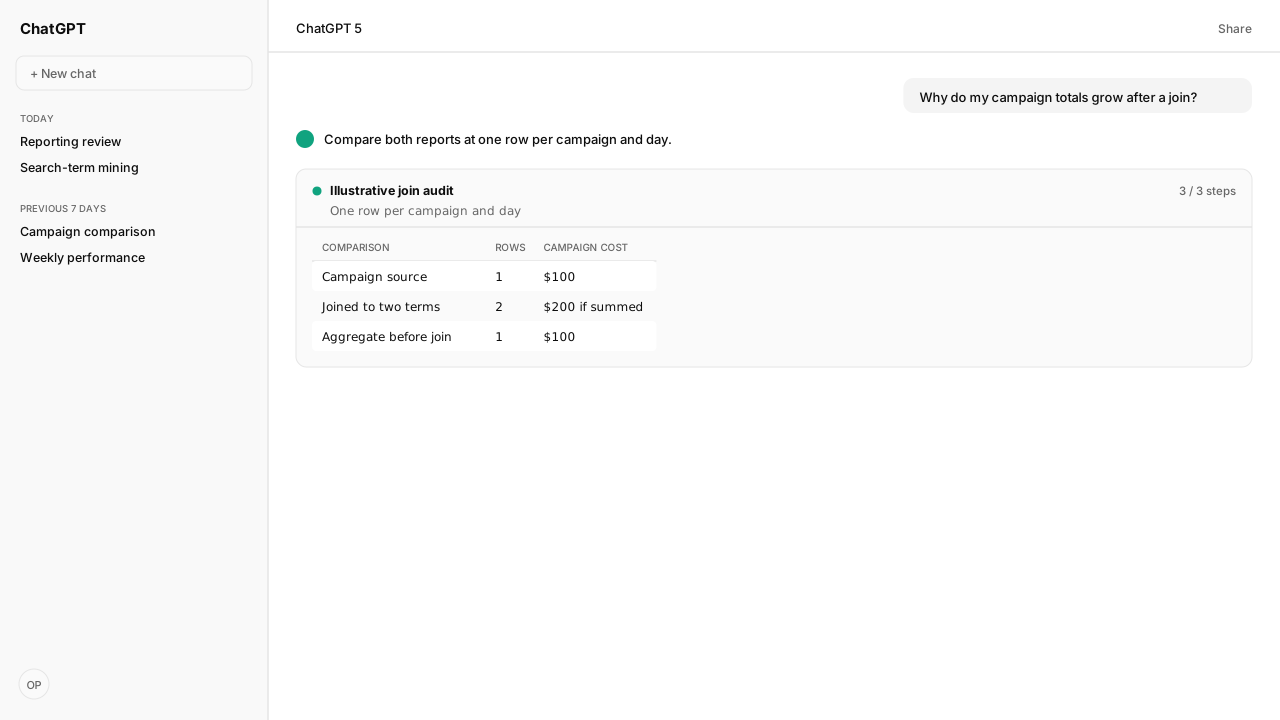
- Aggregate search-term and campaign reports independently to the same campaign/day/account/marketplace/currency key. Check one row per comparison key on both sides before joining.
- A $100 campaign total attached to two search-term rows becomes $200 if summed after the join. The illustrative increase is duplicated data, not additional spend.
- Matching grain does not guarantee matching impressions: Amazon’s search-term report includes terms associated with ad clicks. Check scope, attribution and retrieval timing for other residual differences.
- Return an analysis report with source totals, uniqueness findings, aligned totals, unmatched keys and unresolved gaps. Campaign changes belong to a separate workflow.
A Sponsored Products search term report grain mismatch can inflate campaign spend: joining one campaign total to several search-term rows repeats that total. Aggregate each report separately to the same scoped campaign-and-day key, check uniqueness, then compare. Kuudo’s Reporting Skill supplies the field-validation workflow; the agent performs the reconciliation.
Your team’s daily dashboard may group by campaign while its search-term review keeps ad groups and individual queries. Those choices belong in the comparison, along with your account, marketplace, and currency. The Amazon Ads Reporting Skill makes the requested dimensions explicit so an agent can distinguish duplicated campaign spend from a genuine reporting difference.
The practical question is: “Why did my campaign total grow after I joined the search-term report?” Start with the join. A reporting discrepancy and a duplicated metric require different repairs.
A report’s grain is the meaning of one row
Report grain is the complete set of dimensions that identifies a row, including its time unit. A campaign total for a day is coarser than separate search-term rows within that campaign. The Explorer recipe analyzes daily rows by campaign, ad group, and search term within the resolved account scope. Adding target, placement, or another dimension changes the row contract again; verify actual uniqueness rather than treating that tuple as a universal server key.
Use Amazon Ads MCP to retrieve the authorized account’s reports, with the Reporting Skill’s ad-hoc workflow defining the intended grain first. The Skill checks current field definitions and compatibility rather than assuming that a familiar report name establishes the dimensions.
| Contract item | What the comparison must retain |
|---|---|
| Scope | Advertiser account, marketplace, Sponsored Products, currency |
| Time | Matching dates and daily or summary time grain |
| Detail | Stable campaign IDs and every selected grouping dimension |
| Metrics | Matching definitions, attribution basis, and product scope |
| Provenance | Report IDs, retrieval time, filters, and original row counts |
Use IDs for relationships; retain names for readers. A renamed campaign should not become a new campaign in the comparison. If one report is daily and the other summarizes the whole period, regenerate or aggregate to a shared time grain before comparing them.
Joining finer rows can multiply campaign spend
A campaign metric repeats when one campaign row matches several search-term rows. Summing the repeated campaign column inflates the total even though neither source report changed. This is join fan-out: the relationship adds rows, and a subsequent sum counts the same coarser metric again.
Consider this illustrative single-account, single-marketplace, USD example for one day. Campaign A has $100 of spend. Its search-term report contains two rows, with $60 and $40 of spend.
| Search-term row | Search-term spend | Campaign spend attached by the join |
|---|---|---|
| Query one | $60 | $100 |
| Query two | $40 | $100 |
| Sum after the join | $100 | $200 |
The campaign did not spend $200. The join copied its $100 onto two rows. Keeping a campaign-total column on detailed rows can be useful for context, but that column is no longer additive across those rows.
The Reporting Skill explicitly requires a split-report workflow to state whether its join repeats coarser metrics. For a reconciliation, instruct the agent to aggregate each report independently to account, marketplace, currency, campaign ID, and day. Then require one row per comparison key on each side before joining. Additional scope needed to distinguish your accounts belongs in the key too.
Apply three checks before accepting the comparison:
- Compare source totals with aggregated totals before the join and corresponding columns afterward.
- If the intended key is not unique, inspect remaining dimensions or duplicate inputs.
- Preserve real activity: dropping duplicate-looking rows without understanding their grain can discard it.
Recompute rates from additive totals rather than averaging row percentages:
- Cost per click is total cost divided by total clicks.
- Advertising cost of sales (ACoS) is total cost divided by total sales.
- A zero denominator makes the rate unavailable.
- Budgets, rates, and amounts in different currencies are not additive.
Matching grain does not make every metric equal
The Sponsored Products search-term report covers terms associated with at least one ad click. Amazon states that its impression totals can therefore differ from Campaign Manager. A unique, correctly aggregated join cannot restore impressions excluded by the report’s scope. Amazon’s search-term documentation also notes inferred terms in some non-search contexts and ASIN-valued entries.
Amazon Agent Atlas grounds that distinction in Amazon’s report guidance. The agent should classify the remaining difference rather than force a match: first coverage and filters, then metric definitions and attribution, then report timing. Use Amazon’s campaign-report reference to check the selected grouping, not as a substitute for the current v1 field contract.
For monetary comparisons, ask the agent to confirm:
- The same currency and sales scope.
- The attribution basis, separately from the calendar date range.
- Any unknown attribution; an unsuffixed sales field does not establish a window.
Amazon’s attribution guidance explains that conversions can arrive later and a report date remains incomplete until its lookback window ends. Reports retrieved at different times may consequently disagree even when the join is sound. Record retrieval times and rerun comparable periods before treating the residual as an error.
A reconciliation report needs a validated field contract
The reconciliation deliverable is an analysis report with source totals, duplicate-key findings, aligned totals, and explained or unresolved differences. The Amazon Ads Reporting Skill supplies the ad-hoc reporting method; the reconciliation checks below are the agent request, rather than a named, bundled Sponsored Products reconciliation template.
The documented v1 search-term field set includes date.value, campaign.id, campaign.name, adGroup.id, adGroup.name, searchTerm.value, metric.impressions, metric.clicks, metric.totalCost, metric.sales, metric.purchases, and budgetCurrency.value. Cost and currency belong together. Validate the entire selected set for the comparison’s current reporting path, including the campaign-side fields; do not substitute legacy Console headers or assume a v3 field name works in v1.
With the Reporting Skill installed and Amazon Ads MCP connected, use this request:
Reconcile my Sponsored Products search-term and campaign reports.
Confirm the advertiser account, marketplace, currency, dates,
metrics, attribution basis, filters, and time grain with me.
Use the Reporting Skill's ad-hoc path and validate the fields.
Retain report IDs, retrieval times, and source totals.
Aggregate each report separately to the same campaign/day key,
including account, marketplace, currency, and other required scope.
Check key uniqueness before joining. Preserve unmatched rows.
Return source totals, aligned totals, duplicate-key findings,
and residual differences with their evidence or unresolved cause.
Do not change campaigns, budgets, bids, or targets.
Report creation starts an asynchronous read job. The agent checks its status through MCP; the client downloads the completed file from the returned signed URL. Access, compatible fields, and a client able to download and process the report are prerequisites. This guide documents the workflow; it does not report a customer-account execution.
What happens next: approve the comparison before mining terms
Review the reconciliation report before trusting search-term recommendations. Resolve fan-out first. Keep coverage differences and uncertain attribution visible. Only then move to the search-term mining workflow, whose Explorer Skill aggregates and segments terms for candidate review rather than performing this campaign reconciliation.
Retain the accepted grain contract and reports in the Amazon Agent Data layer. Reuse your comparison rules through Skills so the next review tests the same boundaries. Selling Partner MCP supplies seller-side operational and eligible reporting data; that is a different data context from these paid Sponsored Products reports.
Next, turn reconciled data into search-term candidates you can trace to their evidence.
Bring a report mismatch to a working session
Bring your account scope, report definitions and reconciliation rules. Work with the Kuudo team to connect the reports and make the next campaign review traceable.
Request beta accessWhat you need to run search-term reconciliation
- MCP
- Authorized Amazon Ads MCP access for account resolution, report creation and status checks; the AI client downloads and processes the completed files.
- Skill
- Amazon Ads Reporting version 0.4.2, ad-hoc reporting path; Sponsored Products Search Term Explorer version 0.5.1 for the documented search-term field recipe. Reviewed at KuudoAI/skills commit b1ef5fbc6fd97377dc475792ec4974134860a585.
- Atlas collection
- amazon_ads: Search term report for Sponsored Products; Campaign reports; Ad campaign attribution. Amazon guidance grounds coverage and reporting boundaries.
- prerequisites
- Resolved advertiser account and marketplace, Sponsored Products scope, currency, dates and time grain, compatible field sets, filters, attribution basis, source report provenance, and a client able to download and process files.
- expectedArtifact
- Analysis report: source totals and row counts, grain contract, key-uniqueness findings, separately aggregated totals, unmatched keys, residual differences and unresolved causes.
- Last verified
- 2026-10-22
- verificationScope
- Documentation, pinned Skill and illustrative arithmetic review; no live customer report execution or campaign changes.
What success and failure look like for search-term reconciliation
| condition | interpretation |
|---|---|
| Campaign spend grows only after joining term rows | Check fan-out and repeated coarser metrics before investigating Amazon reporting differences. |
| Either side contains multiple rows for the intended comparison key | Inspect omitted dimensions or duplicate source files; do not join until the comparison grain is understood. |
| Unique aligned rows still show an impression gap | Check clicked-term coverage, filters and scope; equality is not guaranteed by a sound join. |
Keep exploring search-term reconciliation
Use these companion guides to understand the inputs, follow-on analysis, and adjacent workflows behind this playbook.
Sources
- Amazon: Search term report for Sponsored Products
- Amazon: Search term reports and legacy grouping reference
- Amazon: Campaign reports and legacy grouping reference
- Amazon: Ad campaign attribution
- Kuudo: Ad-hoc reporting grain and join rules, pinned source
- Kuudo: Sponsored Products search-term field recipe, pinned source