
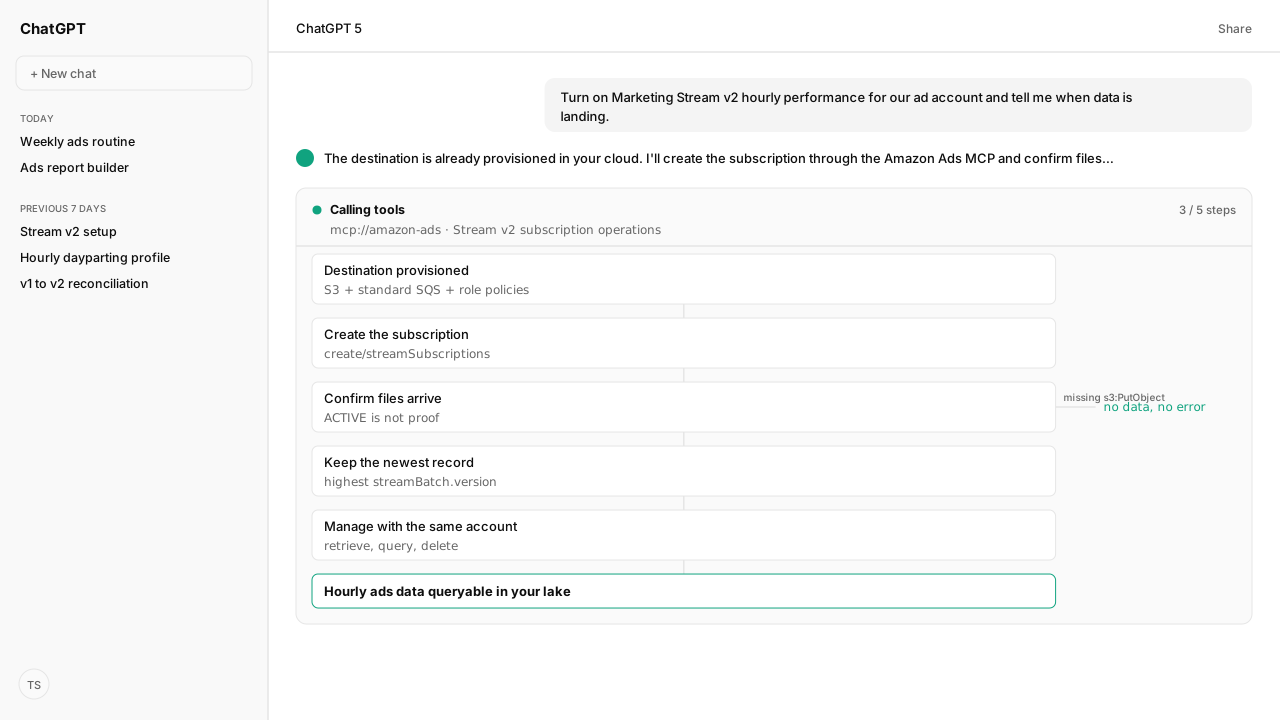
- Stream Version 2 needs a destination: an S3 bucket and a standard SQS queue in the same allowed Region, with policies granting two Amazon roles in account 926844853897.
- A subscription is one POST to /adsApi/v1/create/streamSubscriptions per dataset, advertiser account and destination, and the same combination can't be subscribed twice.
- Stream checks only that the destination exists. A missing write permission leaves the subscription ACTIVE with no data and no error.
- Deliveries are at least once and unordered: keep the highest streamBatch.version per full record key, read it as a 64-bit integer, and treat all-null metrics as deletes.
- Through Kuudo, the destination is provisioned in your cloud and your AI subscribes through the Amazon Ads MCP, in a few minutes.
The Amazon Marketing Stream API sets up Version 2 in four parts: an S3 bucket and SQS queue with Amazon's roles granted, a subscription call, a consumer that keeps the newest version of each record, and subscription management. By hand, that is AWS policy work plus code. Through Kuudo's Amazon Ads MCP, it takes a few minutes.
A brand's data lead asked me: "we want Marketing Stream v2 flowing for our accounts. What do we set up in AWS, how do we create the subscription, and how do we read the files without double counting?" Amazon documents each step across six pages. Every step has a way to fail quietly.
The setup is the same work either way; the question is who does it. Kuudo provisioned the destination in our own cloud, our agent created and checked the subscription through the Amazon Ads MCP, and Kuudo landed the data in our data lake. Amazon Agent Atlas held Amazon's Version 2 rules, which is where each trap below comes from.
| Step | Amazon's manual path | Kuudo's path |
|---|---|---|
| Destination | S3, SQS, two role policies, KMS | Provisioned in your cloud |
| Subscription | One create call per dataset and account | Your AI asks the Ads MCP |
| Check | Retrieve or query with the same account | Your AI reads the status back |
| Processing | Upsert code keyed on every dimension | Kuudo lands it in your lake |
| Querying | Your own warehouse or Athena | Your AI, through Agent Flow |
The manual Stream v2 destination is an S3 bucket, a standard SQS queue and two Amazon roles
Set up your destination treats an S3 bucket and an SQS queue as one destination. Stream writes Parquet files to the bucket and sends a notification to the queue for each delivery. Amazon recommends its CloudFormation template, which creates the bucket, the notification queue and a dead-letter queue, customer-managed KMS keys, access logging, and every policy Stream needs.
By hand, the steps are:
- Create the S3 bucket in a Region allowed for your geography:
us-east-1for North America;eu-west-1,eu-west-2oreu-south-2for Europe;us-west-2orap-southeast-1for the Far East. - Create a standard SQS queue, not a FIFO queue, in the same Region.
- Grant two roles in Amazon's account
926844853897.PublisherRolegetss3:PutObjecton the bucket andsqs:SendMessageon the queue;ReviewerRolegetss3:ListBucketandsqs:GetQueueAttributes. - If the bucket or queue uses a customer-managed KMS key, give
PublisherRolekms:GenerateDataKeyandkms:Decryptin the key policy.
One destination can serve many subscriptions, because each dataset lands under its own streamDatasetId= prefix. An application can register five destinations.
On Kuudo's path this whole section is provisioned in your cloud, with the bucket, queue and Amazon's role policies in place, so the first thing you do is ask your AI for the data.
A missing write permission leaves a Stream v2 subscription ACTIVE with no data
Create a subscription is one call, POST /adsApi/v1/create/streamSubscriptions, carrying the advertiser account in accessRequestedAccounts, the dataset ID, the bucket ARN and the queue ARN. Each call creates one subscription and returns a 207 Multi-Status response, with the result in success or errors at index 0. The subscription is ACTIVE immediately, and history for the dataset's restatement period arrives within about a day.
Two rules from Limits and Data delivery decide whether it works:
- The combination is unique. A second subscription for the same dataset, destination and account fails with "A subscription already exists for this dataset, destination, and account combination."
- Creation doesn't test writes. Stream verifies that the destination exists and is reachable, not that it can write. If a policy lacks
s3:PutObject, the subscription staysACTIVEand nothing arrives, with no error.
The Amazon Ads MCP carries the Version 2 subscription operations. Our agent created the ads-performance-v1 subscription from a single request in the AI client, read the status back, and confirmed files were arriving rather than trusting ACTIVE. The change went through our workspace policy before it reached Amazon.
Reading Stream v2 correctly means keeping the highest streamBatch.version per record
Data delivery sends a notification naming the dataset, the batch and the exact S3 files to read, so a consumer reads the notification instead of listing the bucket. The delivery guarantees are loose on purpose:
- At least once. The same records can arrive again under different S3 keys, so files can't be deduplicated.
- No ordering. Notifications arrive out of order; only
streamBatch.versionsays which record is newer. - Shared files. Several subscriptions to one destination can share a Parquet file.
- Split batches. One batch can span several notifications.
Process your data turns that into four rules. Upsert every record on all of its dimension fields and keep the highest streamBatch.version. Read that version as a 64-bit integer or string, because it can exceed the safe integer range of a 64-bit float. Treat a record whose metric columns are all null as a delete. A changed dimension, such as a renamed placement, arrives as a delete of the old row plus a new row.
On Kuudo's path, Kuudo lands each delivery in your lake and your AI queries it through Amazon Agent Flow. Atlas holds these processing rules, so the agent applies the highest-version rule when it reads instead of summing every file.
Managing a Stream v2 subscription takes the same advertiser account on every call
Manage subscriptions adds three calls: retrieve one subscription, query all of an account's subscriptions (archived ones included), and delete. Each must carry the advertiser account used at creation, and each returns only subscriptions your own application created. A mismatch returns FORBIDDEN.
| Status | Means | What to do |
|---|---|---|
ACTIVE | Delivering | Confirm files arrive |
SUSPENDED | Destination unreachable | Fix it, then create a new one |
ARCHIVED | Deleted by your application | Create a new one to resume |
Stream keeps re-validating the destination. Deleting the bucket or queue, or removing the permission Stream uses to check it, moves the subscription to SUSPENDED for good. A subscription's destination is fixed at creation, so moving it means deleting and recreating the subscription.
The Amazon Ads MCP carries retrieve, query and delete, so the agent can list every subscription on an account, spot a suspended one, and recreate it after approval.
What happens next: ask your AI for the dataset, then check that files arrive
On Kuudo's path the setup is a request in your AI client:
- Subscribe the account to
ads-performance-v1for hourly performance, orads-converted-product-v1for daily ASIN-level conversions. - Confirm Parquet files are landing, not only that the status reads
ACTIVE. - On Version 1 today, run both versions until the totals reconcile, before Version 1 shuts off on June 30, 2027.
- Keep scheduled, stakeholder-ready reports on the reporting API with the Build the Right Amazon Ads Report Skill.
The Selling Partner MCP covers the orders and inventory the ads drive, and the weekly optimization routine is where hourly data earns its place.
Amazon's manual path is a destination, a call, a consumer and a lifecycle to babysit. On Kuudo's, it is one request and a few minutes.
Next: the hourly data put to work, in Amazon PPC dayparting.
Turn on Marketing Stream v2 in minutes
We'll provision the Stream destination in your cloud, connect the Amazon Ads MCP to the AI client your team uses, and land the data in your own lake so your AI can query hourly ads data.
Book a working sessionWhat you need to run Marketing Stream v2 setup
- MCP
- Amazon Ads MCP for the Marketing Stream Version 2 subscription operations: create, retrieve, query and delete. Kuudo provisions the S3 and SQS destination; Amazon Agent Flow lands the data in your lake and queries it.
- Atlas collection
- amazon_ads, the Amazon rules behind this guide (playbooks: Set up your destination; Create a subscription; Data delivery; Process your data; Manage subscriptions; Limits)
- Required subscriptions
- An Amazon Ads account. On the manual path, an AWS account in an allowed Region; on Kuudo's, the destination is provisioned for you.
Keep exploring Marketing Stream v2 setup
Use these companion guides to understand the inputs, follow-on analysis, and adjacent workflows behind this playbook.
FAQ
How do I set up the Amazon Marketing Stream API?
For Version 2, create an S3 bucket and a standard SQS queue in an allowed Region, grant Amazon's two Stream roles access, then call POST /adsApi/v1/create/streamSubscriptions with the advertiser account, the dataset ID and both ARNs. Through Kuudo, the destination is provisioned for you and your AI creates the subscription through the Amazon Ads MCP.
What AWS permissions does Marketing Stream v2 need?
Amazon's PublisherRole needs s3:PutObject on the bucket and sqs:SendMessage on the queue; its ReviewerRole needs s3:ListBucket and sqs:GetQueueAttributes. Both roles are in Amazon's account 926844853897. A customer-managed KMS key also needs kms:GenerateDataKey and kms:Decrypt for PublisherRole.
Why does my Stream v2 subscription show ACTIVE but deliver no data?
At creation, Stream checks only that the bucket and queue exist and are reachable, not that it can write to them. A missing permission such as s3:PutObject leaves the subscription ACTIVE with no data and no error. Fix the policy; if the destination was deleted, the subscription moves to SUSPENDED and needs recreating.
Can I use a FIFO queue for Amazon Marketing Stream?
No. Amazon asks for a standard SQS queue, in the same Region as the S3 bucket.
Which AWS Regions does Stream v2 support?
North America uses us-east-1. Europe uses eu-west-1, eu-west-2 or eu-south-2. Far East uses us-west-2 or ap-southeast-1. A destination outside the allowed Regions is rejected when you create the subscription.
How do I deduplicate Amazon Marketing Stream v2 data?
Upsert every record on all of its dimension fields and keep the row with the highest streamBatch.version. Deliveries can repeat and arrive out of order, so arrival order means nothing, and a record whose metrics are all null is a delete.
How many Stream v2 destinations can I create?
Five distinct S3 bucket and SQS queue pairs per client application. One destination can serve many subscriptions, because each dataset is written under its own streamDatasetId= prefix.