
- The Sponsored Products search term report covers clicked ad activity. It includes ASIN values and can include inferred terms from non-search contexts; it is not a census of shopper searches.
- Separate product targets first, then split keyword rows into your own brand and generic terms. A branded winner belongs in a defense review, not a generic discovery claim.
- Confirm attribution and account thresholds before using efficiency labels. Under the Skill’s default safeguards, a median below five clicks blocks strict negatives even across a long analysis window.
- The Search Term Explorer Skill returns an analysis report. Campaign changes need a separate scoped proposal and the approvals required by your policy.
Use the Amazon search term report for Sponsored Products to separate generic growth candidates, brand defense, product targets, and terms that need more evidence. Kuudo’s Search Term Explorer Skill builds those review lists from paid report data. Confirm attribution and account thresholds before labeling a term for scale or negation; sparse evidence belongs on a watchlist.
A profitable brand query and a profitable category query deserve different decisions. Your brand spellings, acceptable advertising cost of sales (ACoS), and tolerance for spend without sales change the answer. The Sponsored Products search-term Skill applies those rules to your report so the account’s strongest branded traffic doesn’t become a generic expansion recommendation.
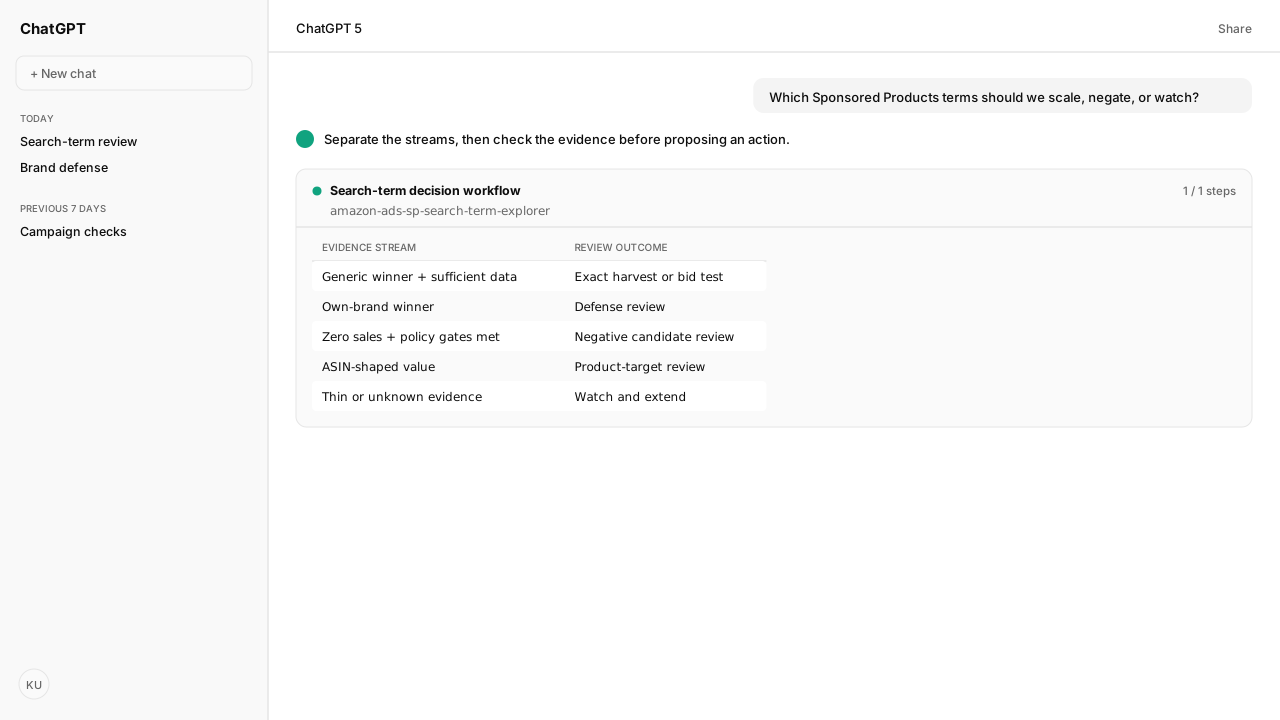
Use this decision matrix to read the output. These are conditional rules, not account results.
| Evidence in the report | Output | Decision to review |
|---|---|---|
| Generic query meets efficiency, click, and sufficiency requirements | Generic scale candidate | Add an exact target or test a bid |
| Own-brand query meets efficiency requirements | Brand-defense candidate | Defend coverage and monitor |
| Keyword query has zero sales and clears spend, click, and sufficiency requirements | Negative candidate | Review a scoped keyword negative |
| Evidence is sparse or attribution is unknown | Watch or directional analysis | Gather evidence before acting |
| Search-term value identifies an ASIN | Separate product-target stream | Review product targeting |
The Sponsored Products report covers clicked ad activity
The Sponsored Products search term report includes terms with at least one ad click. It doesn’t measure all Amazon search demand, and its impression total can differ from Campaign Manager. Amazon also includes inferred terms for some non-search placements, so every row isn’t necessarily something a shopper typed. Amazon’s report documentation establishes these boundaries.
Amazon Ads MCP supplies the paid report through the Model Context Protocol (MCP). The Skill validates current v1 report fields with report_fields, requests Sponsored Products data through CreateReport, then retrieves the completed report. For this workflow, retain searchTerm.value, cost with its currency companion, sales, and clicks. Impressions and purchases are useful for additional rate calculations when available.
The report header should retain:
- Account, marketplace, currency, and Sponsored Products scope.
- Inclusive start and end dates, window length, and report ID.
- Aggregation rule, attribution status, thresholds, and brand markers.
Amazon Agent Atlas grounds the report’s meaning in Amazon documentation. Selling Partner MCP serves a different reporting boundary, including eligible seller reporting. If you need Brand Analytics rather than paid campaign decisions, start with Search Query Performance versus search terms.
ASIN targets and branded queries need separate decisions
Amazon Standard Identification Number (ASIN) values belong in a product-target review, outside keyword scale and negative lists. Amazon documents ASINs in search-term reports for automatic targeting and product-attribute targeting. Those values identify product pages rather than customer query text. The Skill partitions them before keyword aggregation; its detector must account for catalog exceptions because not every ASIN starts with B0.
For the remaining text queries, the Skill sums metrics by searchTerm.value. Calculate ACoS from total spend divided by total sales, rather than averaging row percentages. Keep campaign and ad-group provenance available for the later action review.
Provide the brand markers your team recognizes, including relevant misspellings. The Skill uses token boundaries to avoid matching a brand fragment inside an unrelated word. Queries matching your markers become brand defense; the rest enter generic review. If you opt out of the split, label the output unsplit and avoid presenting it as generic discovery. See the Skill’s segmentation rules.
Attribution and click sufficiency limit confident recommendations
The analysis date range and sales attribution window answer different questions. A report covering 14 calendar days doesn’t establish 14-day sales attribution. An unsuffixed metric.sales field doesn’t establish it either. The Skill requires the attribution basis to be confirmed; otherwise efficiency comparisons remain prominently labeled directional.
For strict negatives, the Skill also checks the analysis window and median clicks after keyword aggregation. Report whether that median covers all terms or only terms with positive clicks. The default baseline minimum median is five; the default minimum window is 14 days when the operator has no preference. These are Kuudo workflow safeguards, not Amazon-mandated statistical cutoffs.
Missing cost creates another boundary: no ACoS, cost per click, or spend-based negative recommendations. With clicks, impressions, and sales or orders present, the Skill can report interest signals, but those signals don’t establish profitable scale.
Account thresholds turn search terms into reviewable candidates
The Skill collects four account decisions before producing segmented lists. Bring brand markers into the same conversation so the report pull starts with the intended classification.
| Input | What the operator supplies |
|---|---|
| ACoS ceiling | Maximum acceptable percentage, aligned to the report’s attribution |
| Negative spend floor | Minimum spend in the account’s currency |
| Minimum negative clicks | Required clicks on an individual term |
| Minimum analysis window | Required days before strict negative recommendations |
These inputs belong in the report header. The Skill asks for missing values rather than silently selecting account targets. Its threshold contract makes that choice explicit.
Generic scale candidates need positive sales, ACoS at or below the ceiling, and the applicable click and sufficiency requirements. Negative candidates need spend above the floor, zero sales, minimum negative clicks, and adequate evidence. A policy for poor ACoS despite sales is a separate operator choice. Each candidate carries confidence; barely clearing a threshold isn’t the same as comfortably exceeding it.
With the Skill installed and Amazon Ads MCP connected, use this request in your AI client:
Run the Sponsored Products search-term Skill for my account.
Ask me for the account, marketplace, date range, brand markers,
and the four account thresholds before creating the report.
Confirm attribution. Separate generic queries, branded queries,
and ASIN product targets. Return scale, negative, and watch
candidates with confidence, provenance, and the rules applied.
Prepare recommendations for review; do not change campaigns.
An aggregate recommendation needs scope before it becomes a write
A term-level recommendation isn’t a campaign change instruction. Before proposing a write, resolve the relevant campaign, ad group, existing targets, and account restrictions. A term aggregated across several campaigns can hide different local performance. Review that scope through Amazon Ads MCP before deciding where any change belongs.
Keyword negatives and product negatives also require different actions. Amazon’s product-negative rules vary by targeting and account context; Atlas supplies those rules for the proposed scope. The analysis Skill ends with recommendations. Any subsequent write follows the applicable approval controls, with the operator reviewing the proposed changes.
What happens next: review candidates before changing targets
Review negative candidates first, then generic tests, brand defense, and product targets. Hold sparse terms for more evidence; a longer pull must still satisfy the click gate. Preserve the accepted thresholds and attribution basis with the report in the Amazon Agent Data layer so the next analysis can use the same team rules through Skills.
The useful output is a decision you can trace: which evidence qualified the term, which account rule applied, and which scope still needs approval.
For the reporting boundary behind these decisions, read Amazon Search Query Performance versus search terms.
Bring your search-term rules into the next review
Connect your Amazon Ads account and run the search-term workflow from your AI client. Bring your brand markers, efficiency target and evidence thresholds to a working session with the Kuudo team.
Request beta accessWhat you need to run search-term mining
- MCP
- Authorized Amazon Ads MCP account access for report validation, generation, polling and export reads.
- Skill
- Sponsored Products Search Terms, amazon-ads-sp-search-term-explorer version 0.4.3. Reference Skill pinned to KuudoAI/skills commit c6576d987fac04e851cea30904a94f4066d4f950.
- Atlas collection
- amazon_ads: Search term report for Sponsored Products; Sponsored Products negative product and brand targeting overview. Atlas grounds report scope and action distinctions; the pinned Skill supplies segmentation and sufficiency rules.
- prerequisites
- Account and marketplace scope, currency, analysis dates, own-brand markers, ACoS ceiling, negative spend floor, minimum negative clicks and minimum analysis window. Confirm attribution separately.
- Last verified
- 2026-10-16
- verificationScope
- Documentation and Skill review; no live customer report execution or campaign changes.
What success and failure look like for search-term mining
| condition | interpretation |
|---|---|
| Report contains ASIN values in a keyword-negative list | Partition failed. Move identified product targets to their own stream before reviewing actions. |
| Attribution is unknown or median clicks fail the chosen gate | Efficiency labels remain directional or exploratory; strict negative decisions are held. |
| Candidate has a rule, confidence, report provenance and resolved action scope | The recommendation is ready for the applicable approval review, not proof of future performance. |
Keep exploring search-term mining
Use these companion guides to understand the inputs, follow-on analysis, and adjacent workflows behind this playbook.
FAQ
Can I upload an Advertising Console CSV to this Skill?
The Search Term Explorer Skill described here generates and downloads its own report through the Amazon Ads MCP. Its parser expects v1 dotted field IDs. A Console CSV with legacy headings needs a separate validated mapping and analysis workflow; renaming a few columns does not establish equivalent attribution or scope.
Is an efficient branded term evidence of incremental sales?
No. A branded term meeting the account’s efficiency target is a brand-defense candidate. The report’s attributed sales do not establish how many purchases would have occurred without the ad. Keep that question separate from generic search-term discovery.