
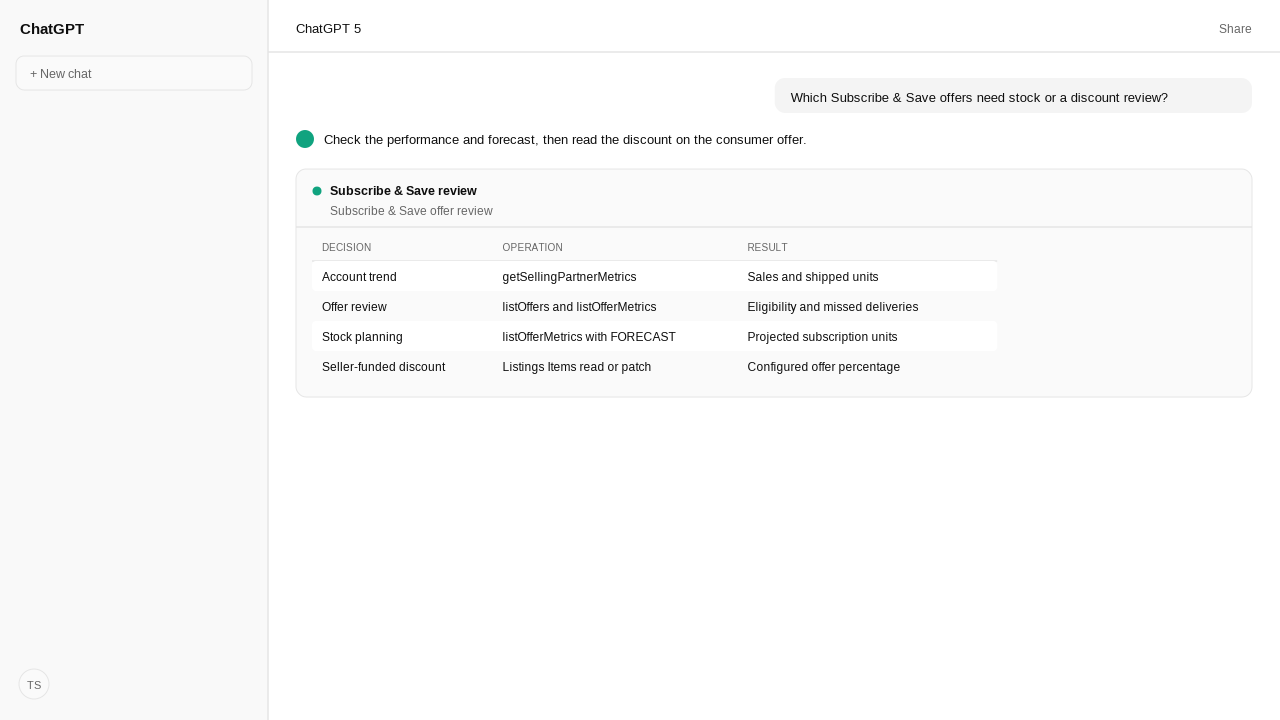
- Connect an authorized seller account to Kuudo’s Selling Partner MCP and select one supported Amazon marketplace.
- Use the Replenishment API to read account performance and offer status. Use offer metrics to see which seller SKUs drove results or missed deliveries.
- Use the seller-only 30-, 60-, or 90-day forecast for subscription units and revenue. Compare projected units with inventory and confirmed inbound dates.
- Use the Listings Items API in the same MCP to read or update the seller-funded discount on an enrolled consumer offer.
The Amazon Replenishment API gives sellers Subscribe & Save performance, offer status, and projected subscription demand. Connect an authorized seller account through Kuudo’s Amazon Selling Partner MCP so your agent can see which products need a stock check. To read or set the discount you fund, use the Listings Items API through the same MCP. Amazon’s Replenishment API overview.
A drop in subscription shipments can send the team straight to a discount discussion. Give your agent the affected seller SKU, your stock coverage rule, and the largest discount your margin can absorb. The Amazon Selling Partner MCP gives it the offer and listing records to check whether you have enough inventory to serve subscribers before you decide to fund a higher discount.
Account metrics show how Subscribe & Save performed in one marketplace
Connect an authorized Seller Central account to Managed Selling Partner MCP, connect your AI client, and select a supported Amazon marketplace. Amazon lists Brand Analytics or Inventory and Order Tracking as the API roles for Replenishment reads. Use getSellingPartnerMetrics with SUBSCRIBE_AND_SAVE and PERFORMANCE for a completed calendar month. Amazon’s Replenishment API roles and account metrics tutorial.
Read subscription revenue, shipped subscription units, active subscriptions, and out-of-stock measures where Amazon returns them. Active subscriptions is a count at the end of the period. Compare it with the prior period’s count. Keep the marketplace, dates, and currency with every result. Amazon’s Replenishment API model.
Offer status and offer metrics tell you which SKUs to investigate
Use listOffers to check eligibility, available inventory, and upcoming delivery conditions where returned. A suspended offer can still fulfill existing subscriptions. Use listOfferMetrics with PERFORMANCE to find which offers shipped units, generated revenue, or missed deliveries because of stock. Amazon allows one aggregation interval per offer metrics request. For a monthly comparison, request each month separately and page through both results. Amazon’s offer filters and offer metrics tutorial.
| Decision | What to check |
|---|---|
| Can the offer take new subscribers? | Eligibility from listOffers. Keep the exact status Amazon returns. |
| Did a SKU miss deliveries? | The out-of-stock percentage and estimated lost revenue from listOfferMetrics, where available. |
| Which offer should I review first? | Match the marketplace and seller SKU, then look at shipped units and missed deliveries together. Label missing metrics as unavailable. |
Seller forecasts give you a window for the inventory check
Request FORECAST from listOfferMetrics for projected shipped subscription units and subscription revenue over the next 30, 60, or 90 days. These are the two forecast metrics Amazon documents, and forecasts are available to sellers. Pick the horizon that fits your inbound lead time. For Fulfillment by Amazon (FBA) offers, compare projected units with fulfillable inventory and expected receipts, leaving room for one-time purchases. Use one horizon at a time because the windows overlap. Amazon’s seller forecast instructions.
Listings Items reads and changes the seller-funded discount
The Listings Items API reads and writes the Subscribe & Save discount you fund on an offer. Kuudo’s Selling Partner MCP supports both APIs, so your agent can check subscription performance and then work with the discount on the same SKU. Use an authorization with Product Listing access and match the SKU, marketplace, and currency to the offer you intend to review. Amazon’s Manage purchasable offer and Kuudo’s Listings Items tools.
- Read the configured discount. Call
getListingsItemfor one seller SKU orsearchListingsItemsfor multiple listings. IncludeoffersinincludedDataand readreplenishmentDiscounton the consumer (B2C) offer. - Prepare a targeted change. For an enrolled Subscribe & Save offer, use
listings_patchListingsItemto mergereplenishment_discountunder/attributes/purchasable_offer. UsegetDefinitionsProductTypefor the listing’s product type and marketplace schema. Include the marketplace, currency, andALLaudience selectors. - Preview and verify. Run
VALIDATION_PREVIEWand review the validation issues, SKU, and proposed percentage. Once you approve that change, submit the patch with preview mode omitted. After Amazon accepts it for processing, read the same SKU and consumer offer back to verify the configured discount. Amazon’s Listings APIs FAQ.
What happens next: run one offer review
Start with a marketplace and a few enrolled products. Run the read first, then use the results to decide which SKUs need an inventory check and which, if any, need a funding review.
For my authorized seller account in [marketplace], review [seller SKUs]. Show last complete month’s subscription revenue, shipped units, active subscriptions, and missed deliveries where available. Add current eligibility, the next 30 days of projected subscription units, and the seller-funded percentage from each consumer offer. Keep past results and forecasts in separate columns. Show missing values, then stop after the reads.
For replenishment decisions, pair the review with the Amazon FBA restock guide. For subscriber cohort comparisons, see the Subscribe & Save analytics guide.
Review your Subscribe & Save offers
Bring one marketplace and the seller SKUs you want to review. We’ll map your performance report and discount checks to the Selling Partner tools.
Request beta accessWhat you need to run Subscribe & Save offer reviews
- connection
- Amazon Selling Partner MCP and an authorized Seller Central account.
- scope
- One supported Amazon marketplace, with seller SKU for a listing update.
- reportingAccess
- Brand Analytics or Inventory and Order Tracking for Replenishment API reads.
- listingAccess
- Product Listing permission for the purchasable offer workflow.
- Last verified
- 2026-11-25
Keep exploring Subscribe & Save offer reviews
Use these companion guides to understand the inputs, follow-on analysis, and adjacent workflows behind this playbook.
- Amazon Listing Audit Checklist: Preview Every Patch
Read the listing, preview the change, and verify what Amazon applied.
- Amazon FBA Restock
Compare stock, demand and inbound dates before planning a replenishment.
FAQ
Can vendors use the Replenishment API for Subscribe & Save?
Amazon supports sellers and vendors in supported stores. The forecast metrics and seller SKU filters are for sellers. This guide uses a Seller Central account and the seller’s listing.
How do I stop funding my Subscribe & Save discount?
Set the seller-funded percentage to zero with the Listings Items API. Read it back on the consumer offer. Amazon-funded discounts follow the program’s separate terms.
Does a discount read-back confirm that shoppers can use it?
The read-back confirms the configured percentage. Amazon stores the change for a listing that is currently unbuyable and applies it when the listing becomes buyable.
Sources
- Amazon’s Replenishment API overview and roles
- Get a selling partner’s replenishment business metrics
- Get replenishment business metrics for each offer
- Get a selling partner’s filtered replenishment offers
- Amazon’s published Replenishment API model
- Manage purchasable offer and Subscribe & Save discount
- Validate listing changes before submitting