
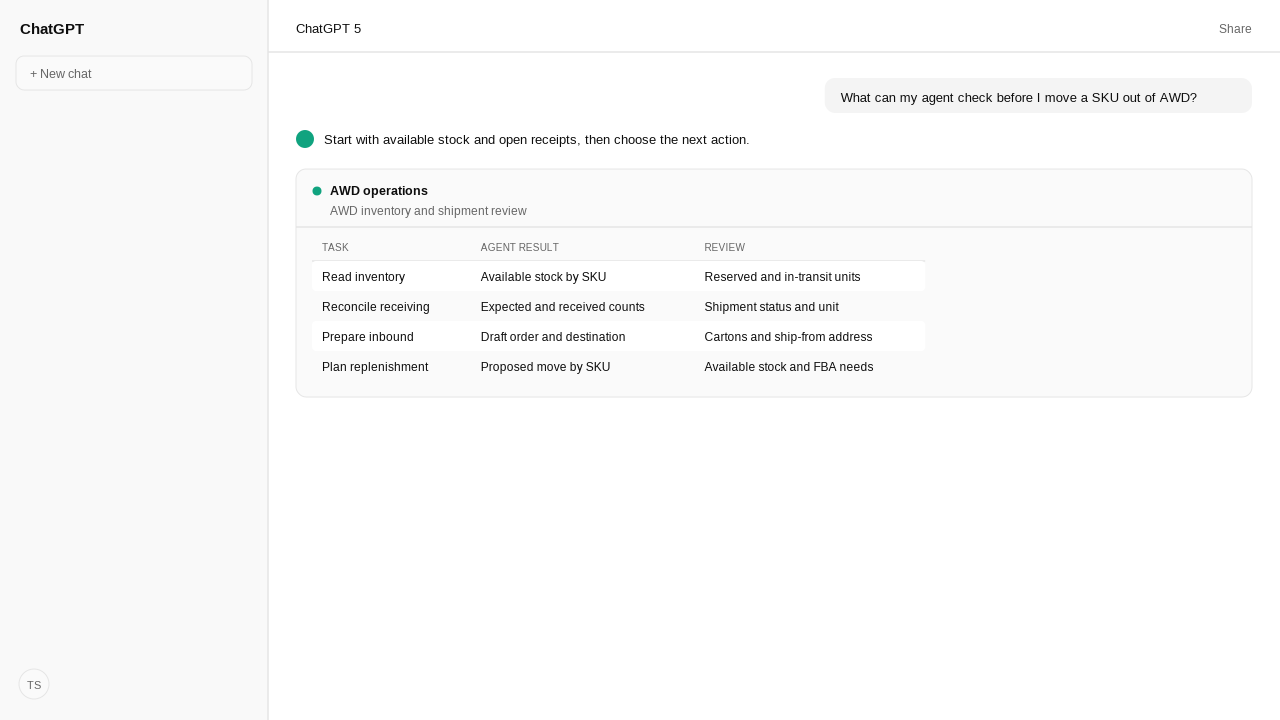
- Authorize a U.S. Seller Central account with AWD access through Kuudo’s Selling Partner MCP and test the connection with an inventory read.
- Use the AWD inventory and shipment tools to see what’s available for distribution and compare expected and received quantities by seller SKU.
- For a seller-managed inbound shipment, check the packages, create and review the draft order, then confirm it and retrieve the box labels.
- Use AWD and Fulfillment by Amazon inventory together to plan replenishment. Verify downstream tool access for your account before placing a move.
The Amazon Warehousing and Distribution API lets U.S. Amazon sellers read bulk inventory and create and track inbound shipments. Connect an AWD-authorized Seller Central account through Kuudo’s Amazon Selling Partner MCP. Your AI agent can report stock by SKU, flag differences between expected and received quantities, and draft an inbound order for review. Amazon’s AWD API overview.
Suppose your warehouse shipped a replenishment batch and your team needs to decide whether to move more stock to Fulfillment by Amazon (FBA). With the Amazon Selling Partner MCP, an agent can read the shipment receipt and the amount available to distribute. Give it your packing list and the minimum stock you want to keep in AWD, so the proposed move reflects both Amazon’s records and your allocation rules.
An authorized U.S. seller account gives the agent access to AWD
Amazon Warehousing and Distribution (AWD) holds bulk inventory and distributes it downstream to FBA and other channels. Amazon offers its AWD Selling Partner API (SP-API) for sellers in the U.S. store. The connected application needs the Amazon Warehousing and Distribution role, and the seller must authorize that application. If an application adds the role later, Amazon requires the seller to reauthorize it. Amazon’s AWD API roles.
- In Kuudo, connect Amazon Selling Partner under Authorizations, select Seller Central and the U.S. marketplace, and complete Amazon’s consent flow.
- In a client that supports Model Context Protocol (MCP), add
https://sp.kuudo.com/mcpas a remote server. Sign in to Kuudo and select the organization with that seller authorization. - Select the authorized seller and look for the AWD tools. Ask for inventory on one seller SKU you already stock in AWD. If the request is denied, check the selected account, marketplace, and AWD permission. Managed Selling Partner MCP setup.
AWD inventory shows what’s available to distribute
Use listInventory for the latest stock snapshot. Filter by seller SKU or page through the catalog until Amazon stops returning a continuation token. Request details=SHOW to get inventory breakdowns and expiration information where available. Use the breakdown when deciding whether there’s enough stock for a move. Amazon’s inventory summary tutorial.
| Question | AWD field | How to read it |
|---|---|---|
| What can I allocate? | availableDistributableQuantity | Stock available for downstream distribution. |
| What’s already committed? | reservedDistributableQuantity | Stock reserved for a replenishment Amazon is preparing to ship. |
| What’s on the way to AWD? | totalInboundQuantity | Stock traveling from the seller that AWD has yet to receive. |
| What’s already at AWD? | totalOnhandQuantity | Stock physically present in AWD distribution centers. |
| What’s on the way to FBA? | replenishmentQuantity | Stock in transit from AWD that FBA has yet to receive. |
Keep the fields in separate columns and label a missing value as unavailable. For a stock-move recommendation, start from available distributable stock. See Amazon’s definitions for inventory quantities and details.
Inbound shipment details show which SKUs are short on receipt
To track inbound shipments, find recently updated ones with listInboundShipments. Narrow the list by status or update date, then call getInboundShipment with each relevant shipment ID. Compare expected and received quantities by seller SKU using the same unit of measure. Flag missing quantities and use the shipment status to tell ongoing receiving from completed receiving. Amazon’s shipment filters and shipment tracking tutorial.
Give the connected agent one account, one SKU list, and one receipt window to start.
In my authorized U.S. seller account [account], read detailed AWD stock for [seller SKUs]. Return a stock table with available, reserved, inbound to AWD, and in transit to FBA in separate columns. Return a receipt exceptions table for AWD shipments updated since [date], with shipment ID, status, SKU, unit of measure, expected count, received count, and difference. Calculate differences only for matching units. Flag missing fields and stop after the reads.
An AWD inbound order stays editable until you confirm it
Use this sequence for a seller-managed inbound shipment. Give the agent the ship-from address, carton contents by merchant SKU, package counts, dimensions, and weight. Include expiration and preparation details where applicable. Amazon allows up to 150 unique SKUs per inbound order and requires separate orders for multiple expiration dates of the same SKU. Amazon’s inbound-order tutorial.
| Stage | Operation | Result to review |
|---|---|---|
| Check the packages | checkInboundEligibility | Which packages are eligible and the reasons Amazon gives for failures. |
| Create and review the draft | createInbound, then getInbound | The order ID, package quantities, origin, and assigned destination. |
| Correct the draft | updateInbound, then getInbound | The updated order and destination. Amazon may assign a different address after an edit. |
| Confirm and label | confirmInbound, then getLabelPageTypes and getInboundShipmentLabels | The shipment ID and, once the labels are generated, a download for the warehouse. |
| Record carrier details | updateInboundShipmentTransportDetails | The transportation information attached to that shipment. |
Review the draft before confirming and use the returned shipment ID for labels and tracking. Wait for GENERATED before handing off the labels. Download the ZIP as soon as the link is available. Amazon documents a 10-minute validity window. Amazon’s box label instructions.
Replenishment starts with a stock recommendation for the destination
For an FBA replenishment, pair AWD’s available, reserved, and in-transit quantities with the same seller SKU’s FBA inventory, open replenishments, and your demand forecast. Ask the agent for a proposed quantity and destination based on runway and lead time. When Amazon replenishes FBA for you, check what’s already on the way before requesting an additional move. Amazon’s FBA replenishment guidance.
Kuudo’s tool catalog includes listReplenishmentOrders for AWD-to-FBA moves and listOutbounds for outbound distribution orders. Integrations that plan to write these orders should verify that the authorized account can read the relevant order type and has access to its create and confirm tools. Kuudo’s AWD tools.
For a manual FBA transfer in Seller Central, Amazon documents Move from AWD. For bulk shipments to another channel, check the eligible destination in Amazon’s Multi-Channel Distribution program. Amazon’s AWD program.
What happens next: run one stock and receipt check
Start with one SKU and one recent shipment. Check available stock against Seller Central, and verify the expected quantity and unit of measure against your packing list. Keep any shortage on an open shipment on your receiving watchlist until Amazon posts the final counts.
Use the FBA restock guide to turn the FBA side of that check into a replenishment decision.
Work with your AWD inventory from your AI client
Bring the fields from your stock and receipt check to a working session. We’ll map them to the Selling Partner tools and show what to review before confirming an inbound order.
Request beta accessWhat you need to run AWD inventory operations
- sellerAccount
- Authorized U.S. Seller Central account with access to Amazon Warehousing and Distribution.
- connection
- Amazon Selling Partner MCP and a client that can connect to a remote Model Context Protocol server.
- amazonPermission
- The connected Selling Partner API application needs the Amazon Warehousing and Distribution role.
- apiVersion
- AWD v2024-05-09.
- Last verified
- 2026-11-24
Keep exploring AWD inventory operations
Use these companion guides to understand the inputs, follow-on analysis, and adjacent workflows behind this playbook.
- Amazon FBA Restock
Use Fulfillment by Amazon stock and demand to decide when to replenish.
- Set Up Managed Selling Partner MCP
Authorize the seller account and connect it to your AI client.
FAQ
Does the AWD API return the Inventory Ledger or fee reports?
Use listInventory for current stock and getInboundShipment for receipt details. Check current AWD pricing and fees in Seller Central, where you can also download the AWD Inventory Ledger, Inbound Shipment report, and Fee Reports.
Can an agent see an AWD shipment I created in Seller Central?
Yes. Use listInboundShipments or getInboundShipment after the shipment is created. An API-created inbound shipment becomes visible in Seller Central after confirmation.
Can I book an Amazon partnered carrier through the AWD inbound API?
Create a shipment using the Partner Carrier Program in Seller Central. Amazon documents seller-managed transportation for AWD inbound API creation.
Sources
- Amazon Warehousing and Distribution API overview and roles
- Amazon Warehousing and Distribution API reference
- Create an AWD inbound order for shipment
- Retrieve and filter AWD inbound shipments
- Track expected and received quantities for an AWD shipment
- Read AWD inventory summaries
- Replenishment from AWD to Fulfillment by Amazon