
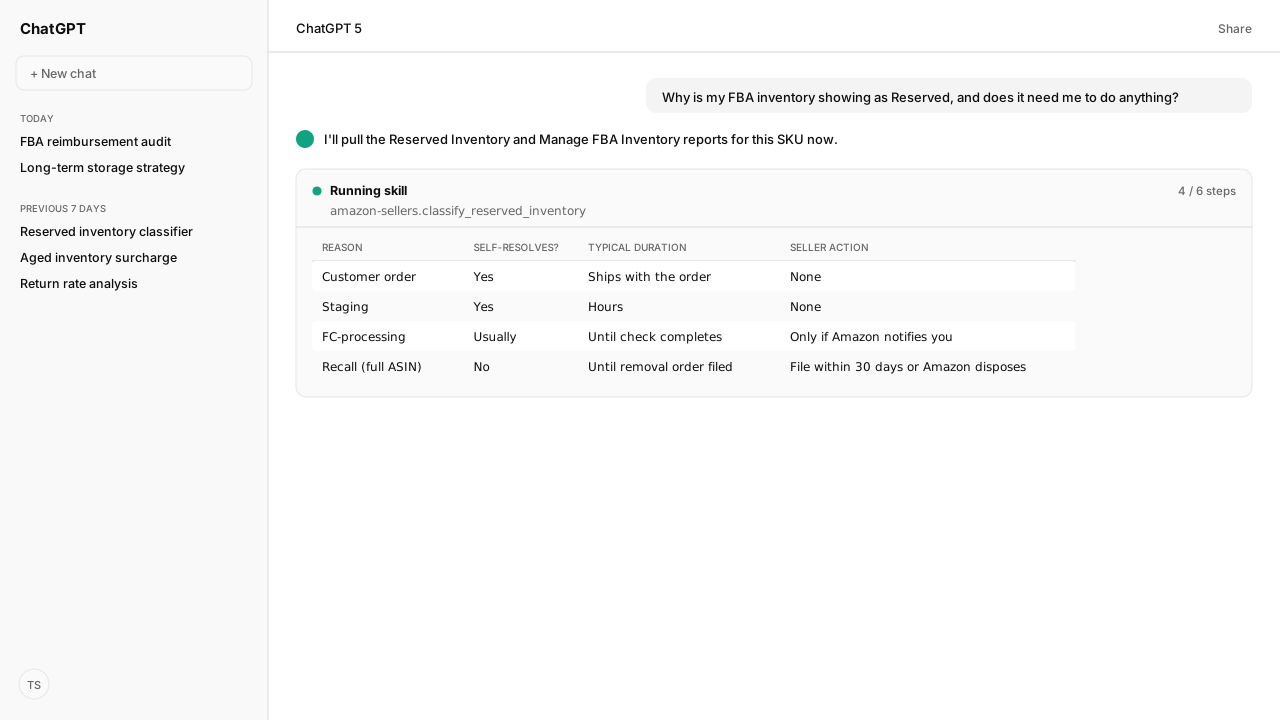
- Seller Central's help names three reasons a unit is Reserved: a customer order, staging for fulfillment speed, or FC-processing (verification, an investigation, or a pending removal). The first two need no action from you.
- The SP-API reserved report and the FBA Inventory API split Reserved into customer orders, FC transfers and FC processing. They have no staging bucket, so the agent names which view each number comes from.
- Reserved is excluded from On-Hand and Unsellable: On-Hand + Unsellable + Reserved + Inbound is the total for a SKU in shipments sent to fulfillment centers.
- A reserve covering every unit of one ASIN can be a recall, because Amazon reserves all units of a recalled ASIN. Confirm the recall notice: you have 30 days from it to file a removal order, or Amazon disposes the units.
Amazon FBA reserved inventory, in Fulfillment by Amazon, means Amazon set a unit aside, and it no longer counts as On-Hand or Unsellable. Seller Central names three reasons: a customer order being fulfilled, staging for fulfillment speed, and FC-processing. The first two need nothing from you, and FC-processing needs you only when Amazon says so.
I asked our agent why a Reserved spike had shown up on a bestselling ASIN the week before a promotion. The Slack message that started it was blunt: "why is 400 units of our best SKU suddenly Reserved, are we about to run out before the promo?" The agent read the reserved breakdown and the Manage FBA Inventory report through the Selling Partner MCP, grounded by Amazon Agent Atlas, and matched every unit to a reason.
A generic support article says reserved status "usually resolves itself." That holds for most reserves and misses the dangerous one: a reserve covering every unit of an ASIN can be a recall, and the 30-day removal window runs from the recall notice, not from when someone notices. The agent reads which bucket applies to this SKU today, and Atlas supplies the path Amazon documents for it, so the operator hears "wait" or "act" instead of the same reassurance.
Reserved has three reasons, and two need nothing from you
Amazon's Reserved Inventory help page names three reasons a unit sits in reserved status:
- Customer order: units reserved to fulfill orders. They clear when the order ships.
- Staging: units Amazon holds temporarily to ensure optimal fulfillment speed. Amazon says no action by you is required.
- FC-processing: units set aside for additional processing, such as verification of item dimensions and weight, pending investigations, or pending removal orders. Amazon notifies you if any action is required.
The agent reads the per-SKU total from afn-reserved-quantity on the Manage FBA Inventory report, then the reason split from the reserved breakdown, and returns a classification rather than a bare number:
{
  "asin": "B0EXAMPLE99",
  "sku": "TOTE-CANVAS-14",
  "reserved_qty": 42,
  "reserved_customerorders": 0,
  "reserved_fc-transfers": 0,
  "reserved_fc-processing": 42,
  "reason": "fc_processing",
  "requires_seller_action": false,
  "note": "FC-processing covers dimension/weight verification, investigations and pending removals; Amazon notifies you if action is needed."
}Seller Central and the Selling Partner MCP split Reserved differently
Amazon describes Reserved one way in Seller Central's help and another way in the Selling Partner API, which is what the agent reads through the Selling Partner MCP. Both views have three buckets, but not the same three:
| Bucket | Seller Central help | SP-API Reserved Inventory report | FBA Inventory API |
|---|---|---|---|
| Customer orders | reserved_customerorders | reserved_customerorders | pendingCustomerOrderQuantity |
| Staging | reserved_staging | Not reported | Not reported |
| Moving between fulfillment centers | Not a reserved column | reserved_fc-transfers | pendingTransshipmentQuantity |
| FC processing | reserved_fc-processing | reserved_fc-processing | fcProcessingQuantity |
So staging can't be read through the API, and FC transfer is a reserved sub-bucket there. In Seller Central, afn-fc-transfer-quantity is its own Manage FBA Inventory column, counted in On-Hand rather than Reserved. Amazon's pages don't say whether the two transfer counts cover the same units, so the agent reports each number with its source instead of adding them together.
Either way, transfer units stay buyable. Amazon says customers can find and buy them, though they might see a future ship date, and transfers typically take 1 to 25 days, longer if delayed by weather or other factors. The Reserved Inventory help page says the same: inventory being shipped to another fulfillment center is still available for purchase.
One more column gets confused with all of these. afn-reserved-future-supply counts units customers already bought through In-Stock Head Start while your inbound shipment is still on its way. The agent reads it and afn-reserved-quantity from the Manage FBA Inventory report, and the transfer count from the reserved breakdown, so none of them collapses into one "held back" bucket.
Reserved is excluded from On-Hand: the formula the agent checks
The Reserved Inventory report's note states the line most sellers reconciling a spreadsheet miss: reserved quantity is not included in On-Hand or Unsellable quantities. The total units for a SKU in a shipment sent to a fulfillment center equal On-Hand + Unsellable + Reserved + Inbound.
Amazon's FBA Inventory overview breaks On-Hand down further, to Available + FC-transfer. A seller who compares On-Hand to the quantity shipped to Amazon comes up short by the Unsellable, Reserved and Inbound amounts, and can read that gap as missing inventory.
The agent can pull the four terms through the Selling Partner MCP and check the identity. A discrepancy the formula can't explain gets flagged as a real problem, instead of being buried under a reconciliation gap that was never a bug.
When Reserved may be a recall, and the 30-day clock that follows
A reserve that covers every unit of one ASIN, not a partial count, can be a recall. Amazon's removal help says that when an ASIN is recalled, all units of that product are reserved and can't be moved. A whole-ASIN reserve can also be an FC-processing hold on a low-quantity SKU, and the column total looks the same either way.
So the agent treats a whole-ASIN reserve as a possible recall and asks you to confirm the recall notice. If it is one, you have 30 days from that notification to create a removal order; miss the window and Amazon disposes of the units. Once you file, the order appears on the Removal Order Detail report, where In Process Qty shows the units for that order still in process.
Reserved is also not the only status that looks like this. A separate Researching status covers units misplaced or damaged at a fulfillment center while Amazon confirms them, and it never exceeds 60 days. Once the units are reimbursed or pass 60 days, the adjustment appears in the Inventory Ledger's detailed view. The claim windows and valuation rules are in Amazon Reimbursement Audit: Check FBA Claims.
What happens next: send only the holds that need you to your queue
Once the agent classifies a Reserved spike, customer-order and transfer reserves clear on their own and get logged, not escalated. Only two cases reach your queue:
- An FC-processing hold that Amazon flagged for action.
- A whole-ASIN reserve that may be a recall, with the notice to confirm.
Amazon Agent Flow lands your Selling Partner inventory data in your own lake on a schedule, next to the Amazon Ads data your Amazon Ads MCP works with. A recall-driven stockout then shows up next to the ad spend still bidding on an ASIN that's about to go unsellable. If your team wants the same check on every run, write it as a Skill your agent follows.
The three-reason split is simple once you have it in front of you. What isn't simple is remembering it the rare time the number is actually a recall.
Next: what a Researching investigation costs you if it never comes back, and how to prove Amazon owes you for it, in Auditing FBA Reimbursements.
Stop guessing which Reserved units need you
Bring us your FBA inventory workflow. In a private-beta session we'll map the Selling Partner MCP read, the Atlas-grounded reason check, and how the agent flags a possible recall before the removal window closes.
Run this workflow in betaWhat you need to run FBA reserved inventory checks
- MCP
- Amazon Selling Partner MCP for live reads of the reserved inventory breakdown (the Reserved Inventory report and the FBA Inventory API's reserved quantities), the Manage FBA Inventory report, and the Removal Order Detail report
- Skill
- No published Kuudo Skill covers reserved inventory. The reason check here is one the agent runs on request, or a Skill your team writes: match each reserved unit to its bucket and flag a whole-ASIN reserve for a recall-notice check
- Atlas collection
- amazon_sellers, the rule corpus with the reserved-status reasons and their resolution paths (playbooks: Reserved Inventory report; Manage FBA Inventory report; FBA Inventory overview; Remove inventory overview; Removal Order Detail report)
What success and failure look like for FBA reserved inventory checks
| condition | interpretation |
|---|---|
| reserved_qty > 0, reason: customer_orders or fc_transfers | Self-resolving. No seller action; customer-order units clear when the order ships, and units moving between fulfillment centers stay buyable. |
| reserved_qty > 0, reason: fc_processing, Amazon notification present | Seller action required. Follow the specific instruction Amazon sent; FC-processing is the one reason that isn't automatically safe to ignore. |
| Reserved quantity equals 100% of an ASIN's total units, no notification | Possible recall, not a confirmed one. Amazon reserves every unit of a recalled ASIN, but a whole-ASIN reserve can also be an FC-processing hold on a low-quantity SKU. Confirm the recall notice before filing anything; the 30-day removal-order window runs from that notification. |
| Units in a separate 'Researching' status | Researching never exceeds 60 days. Once the units are reimbursed or pass 60 days, check the Inventory Ledger's detailed view for the adjustment. |
Keep exploring FBA reserved inventory checks
Use these companion guides to understand the inputs, follow-on analysis, and adjacent workflows behind this playbook.
What happens when a Researching investigation doesn't return your units to sellable: the claim windows and valuation rules once that happens.
FAQ
Why does my Amazon FBA inventory show as 'Reserved'?
Seller Central's help names three reasons: a customer order being fulfilled, staging (Amazon briefly holding units for fulfillment speed), or FC-processing (dimension and weight verification, an investigation, or a pending removal order). The first two need no action from you. The SP-API reserved report splits reserved units into customer orders, FC transfers and FC processing instead.
How long does reserved inventory stay reserved?
Amazon gives no fixed window for customer-order or staging reserves; they clear when the order ships or the staging step finishes. FC-processing reserves clear once Amazon completes the check, and Amazon notifies you if action is required.
What's the difference between afn-reserved-quantity, afn-fc-transfer-quantity, and afn-reserved-future-supply?
afn-reserved-quantity is the Reserved count. afn-fc-transfer-quantity is units moving between fulfillment centers (typically 1-25 days, longer if delayed by weather or other factors); customers can still buy them, with a possible future ship date. afn-reserved-future-supply is units customers already bought through In-Stock Head Start while your inbound shipment is still arriving. In the SP-API reserved report, transfers sit inside Reserved as reserved_fc-transfers.
Does reserved inventory count toward my On-Hand quantity?
No. Amazon's FBA Inventory overview defines On-Hand as Available plus FC-transfer. The Reserved Inventory report's note gives the total: On-Hand + Unsellable + Reserved + Inbound equals the units for a SKU in shipments sent to a fulfillment center.
My whole catalog for one ASIN just went to Reserved overnight. Why?
It can be a recall: Amazon reserves every unit of a recalled ASIN, and those units can't be moved. It can also be an FC-processing hold on a low-quantity SKU, so confirm the recall notice first. If it is a recall, file a removal order within 30 days of that notification, or Amazon disposes of the units.
If reserved inventory never comes back, is it a reimbursement case?
It can be. Usually through Researching status, which covers units misplaced or damaged at a fulfillment center and lasts at most 60 days; after that, the adjustment shows in the Inventory Ledger's detailed view. For other lost or damaged units, file a claim within 60 days of the date the item was reported lost or damaged in the Inventory Defect and Reimbursement portal or the Inventory Ledger. See the FBA reimbursement audit for valuation rules.
Where do I see reserved units broken out by reason?
The Reserved Inventory report gives the reason-level breakdown. The Manage FBA Inventory report's afn-reserved-quantity column gives the per-SKU total without the reason split.
Sources
- Reserved Inventory report
- Manage FBA Inventory report
- Manage FBA Inventory report: Archive
- FBA Inventory overview
- Remove inventory overview
- Removal Order Detail report
- FBA inventory reimbursement policy: Fulfillment center operations claim
- SP-API FBA report type values (GET_RESERVED_INVENTORY_DATA)
- SP-API FBA Inventory API model (reservedQuantity fields)