
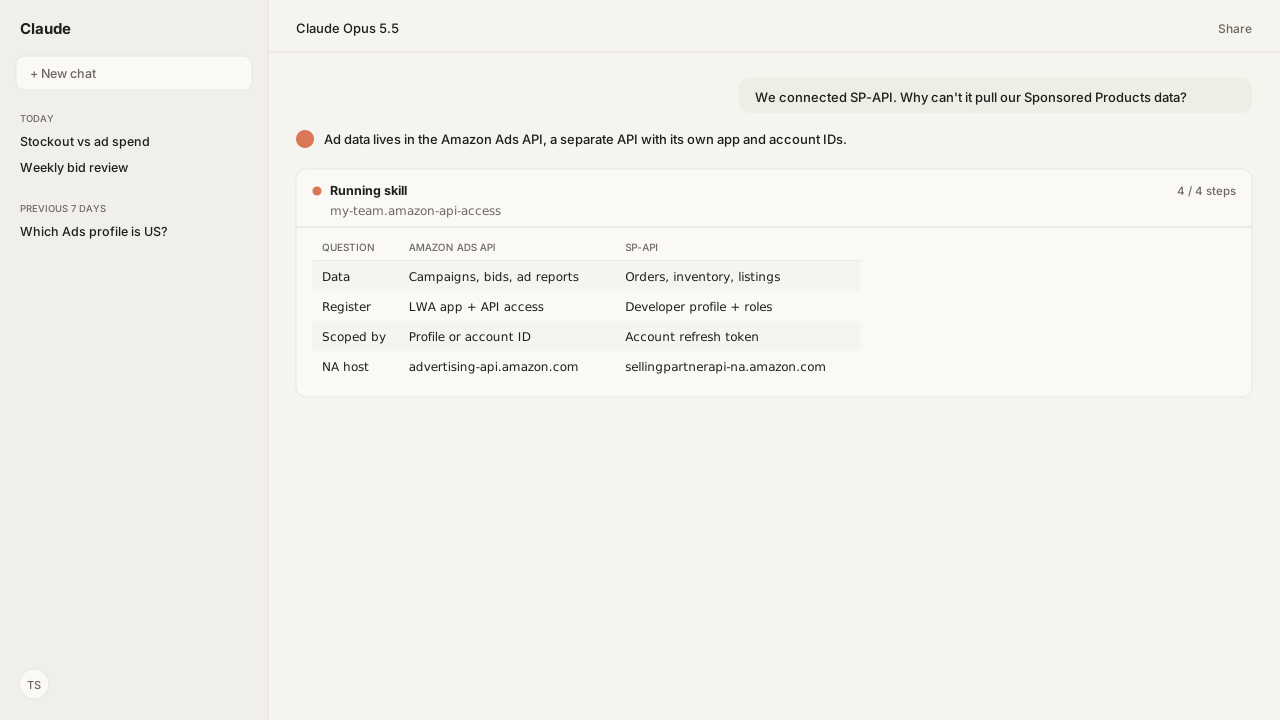
- The Amazon Ads API is separate from the Selling Partner API (SP-API). Campaigns, bids, budgets and ad reports come from the Ads API; orders, inventory, listings and payments come from SP-API.
- The Ads API needs its own Login with Amazon (LWA) application and approved API access. SP-API needs a developer profile in the Solution Provider Portal and the roles each operation requires.
- Profile-scoped Ads API calls, such as the sponsored ads APIs, name a profile in the
Amazon-Advertising-API-Scopeheader, one advertiser account in one marketplace; newer Ads API v1 calls identify the advertiser account instead. SP-API calls use a refresh token for each authorized selling account. - Both APIs serve North America, Europe and the Far East from different hostnames, so a marketplace maps to one host in each.
Yes, the Amazon Ads API is separate from the Selling Partner API (SP-API). Campaigns, bids, budgets and ad reports come only from the Ads API, which needs its own Login with Amazon (LWA) application and approved access. SP-API covers orders, inventory, listings and payments. One agent can use both through the Amazon Ads MCP and the Selling Partner MCP.
A seller asked me: "We already connected the Selling Partner API. Why can't it pull our Sponsored Products data?" Because Amazon runs selling and advertising as two programs, with two APIs, two approvals and two ways of naming the account.
The question behind it was whether to keep spending on an ASIN that is about to stock out, which needs both APIs on the right account. On Kuudo Pro and Scale, Kuudo's managed, verified apps cover the Ads API and SP-API, so neither needs an app of your own, and each account, advertising or selling, consents once. The Resolve the Right Amazon Ads Account Skill picks the marketplace profile, so the answer lands on the account the team runs.
The Amazon Ads API holds advertising data, and SP-API holds selling data
The Amazon Ads API and SP-API split one Amazon business by program. Amazon describes the Ads API as the way "Amazon advertisers and members of the Partner Network" can "programmatically manage advertising operations." It describes SP-API as REST APIs for selling operations, "such as order processing, shipment tracking, and payment management." Amazon Agent Atlas holds both definitions, from Amazon Ads help and the SP-API docs.
| Data | Comes from |
|---|---|
| Campaigns, ad groups, keywords | Amazon Ads API |
| Bids, budgets, ad reports | Amazon Ads API |
| Amazon DSP (demand-side platform), Amazon Marketing Cloud | Amazon Ads API |
| Orders, shipments, payments | SP-API |
| Inventory, listings, pricing | SP-API |
| Brand Analytics reports | SP-API |
So an SP-API connection, however complete, never returns a Sponsored Products campaign. The Amazon Ads MCP carries the advertising operations and the Selling Partner MCP carries the selling ones. The tools references list each one: Amazon Ads and SP-API.
Each API has its own registration: an approved LWA app for Ads, a developer profile for SP-API
The Amazon Ads API starts with a Login with Amazon application. Amazon's onboarding has two steps: create the LWA application, then apply for permission to access the API. The application covers how your business will use the API, the Amazon Ads API License Agreement and the Amazon Ads Data Protection Policy. To link the LWA app to the Amazon Ads Partner Network, the signed-in user needs the admin role on both.
SP-API starts with a developer profile in the Solution Provider Portal, which defines your organization and how it will use the API. Amazon sorts developers into two kinds:
- Public developers build applications for many selling partners. Those apps appear in the Selling Partner Appstore and need a complete security review.
- Private developers build for their own organization, with a streamlined review.
On top of the profile, SP-API grants access through roles. "Roles are the mechanism by which the Selling Partner API (SP-API) determines whether a developer or application has access to an operation or resource." Restricted roles cover personally identifiable information (PII) and ask for details of your data use and security controls, under Amazon's Acceptable Use Policy and Data Protection Policy.
On Kuudo Pro and Scale, the Amazon Ads MCP and the Selling Partner MCP call Amazon through Kuudo's managed, verified apps, so neither registration is yours to run.
An Ads API call names a profile or account; an SP-API call carries a selling account's token
An Amazon Ads API request names who it acts for in one of two ways, so check which model an operation uses before you call it:
- Profile-scoped calls, such as the sponsored ads APIs, send
Amazon-Advertising-API-ClientId(your LWA application's client ID),Authorization(the access token) andAmazon-Advertising-API-Scope(a profile ID). Amazon defines a profile as "an advertiser account in a specific marketplace," with a separate one for each marketplace. - Account-identified calls are newer. The Ads API v1 advertiser-accounts query sends only
Amazon-Ads-ClientIdandAuthorization, and version 3 reporting requests add anAmazon-Ads-AccountIdheader.
GET /v2/profiles lists your profiles with only the client ID and access token, since it is how you get a profile ID in the first place.
SP-API names the account through authorization instead. A private application is authorized from Seller Central (Apps and Services, then Develop Apps), Vendor Central (Integration, then API Integration) or the Solution Provider Portal. Each Authorize app generates a refresh token for that selling account, which the application exchanges for an access token at runtime.
On the Ads side, the Resolve the Right Amazon Ads Account Skill lists the profiles a grant can reach, asks you to choose when more than one fits, and keeps that choice for the session.
Both APIs serve the same three regions from different hosts
Both APIs divide marketplaces into North America, Europe and the Far East, and each region has its own host. A marketplace therefore maps to one Ads API host and one SP-API host:
| Region | Amazon Ads API | SP-API |
|---|---|---|
| North America | advertising-api.amazon.com | sellingpartnerapi-na.amazon.com |
| Europe | advertising-api-eu.amazon.com | sellingpartnerapi-eu.amazon.com |
| Far East | advertising-api-fe.amazon.com | sellingpartnerapi-fe.amazon.com |
The membership is close but not identical. Amazon's Ads API table puts India and the United Arab Emirates in Europe, and the SP-API table does the same, adding Ireland and South Africa to its European list. The Amazon Ads MCP and the Selling Partner MCP each cover every marketplace their granted accounts reach, across North America, Europe and Asia-Pacific.
What happens next: connect both APIs once and let one agent use them
A question that crosses the two programs needs both connections in the same client. On Kuudo:
- Both servers, one client. The Amazon Ads MCP and the Selling Partner MCP run in your own cloud and connect to the AI client your team already uses.
- One consent per account. On Pro and Scale each account authorizes Kuudo's managed apps once; an agency can send a client an invitation link, with no login shared. On Community you bring your own Amazon app credentials.
- Amazon sets the pace. Each server passes Amazon's current state to your AI with every call, including the rate limit, when to retry and how long a report usually takes, so the agent decides when to wait: see rate limits, throttling and long-running jobs.
- Both histories, your storage. Amazon Agent Flow, the Amazon Agent Data layer, can land advertising and selling history in your own storage.
Skills for advertising and for selling then run in the same conversation, on the profile and the selling account the agent was granted.
Two APIs, two grants, one agent.
Next: How to Integrate Amazon Seller Messages API With AI walks through one SP-API integration end to end.
Run Amazon Ads and Seller Central from one agent
Bring the question that needs both APIs, such as ad spend on an ASIN that is about to stock out. We will connect the Amazon Ads MCP and the Selling Partner MCP to the AI client you use, with one consent per account.
Request beta accessWhat you need to run Amazon API access
- MCP
- Amazon Ads MCP for advertising (profiles, campaigns, reports, DSP and AMC) and Selling Partner MCP for selling operations, in the same AI client
- Skill
- Resolve the Right Amazon Ads Account 1.0.0, to pick the advertiser profile before any Ads work
- Atlas collection
- amazon_ads and amazon_sellers: Amazon Ads API onboarding, access and profiles; SP-API registration, roles, self-authorization and endpoints
- Required subscriptions
- An active Amazon Ads account for the Ads side; for SP-API, a Seller Central or Vendor Central account, with a Professional selling plan to develop a private seller application. On Kuudo Pro and Scale, Kuudo's managed, verified apps replace your own app registration.
FAQ
Is the Amazon Ads API separate from the Selling Partner API?
Yes. The Amazon Ads API manages advertising operations: campaigns, bids, budgets, reports and profiles. The Selling Partner API covers selling operations such as orders, inventory, listings, shipping and payments. Each has its own registration, authorization and endpoints.
Can I get Sponsored Products data from SP-API?
No. Sponsored Products campaigns, keywords and ad reports are advertising data, and they come from the Amazon Ads API. SP-API covers the selling account: orders, inventory, listings, pricing and payments.
Do I need a separate developer account for the Amazon Ads API?
You need a Login with Amazon application and approved Amazon Ads API access, which you apply for separately from SP-API registration. Linking that app to the Amazon Ads Partner Network takes the admin role on both. On Kuudo Pro and Scale, Kuudo's managed, verified apps cover both APIs, so you register no app of your own.
What is a profile ID in the Amazon Ads API?
A profile is an advertiser account in one marketplace, and an advertiser who runs ads in several marketplaces has a profile for each. You list them with GET /v2/profiles, which needs only your client ID and access token, and send the chosen one in the Amazon-Advertising-API-Scope header on profile-scoped calls such as the sponsored ads APIs. Newer Ads API v1 calls identify the advertiser account instead of a profile.
Why does my SP-API call return a 403 error?
The usual cause is a missing role. SP-API roles decide which operations an application may call, and calling an operation without the role it requires returns a 403. Request the role through your developer profile, then re-authorize the application, because adding roles requires a new authorization.
Do I need a Professional selling plan to use SP-API?
For a private seller application, yes: Amazon's SP-API registration overview says you must have a professional selling account to develop one, and individual accounts are not eligible. It lists private vendor applications and public applications for the Selling Partner Appstore separately. Amazon's pages disagree on scope: the Selling Partner API overview in Seller Central says apps for your own selling account, the Appstore or vendors all need a Professional selling plan.