
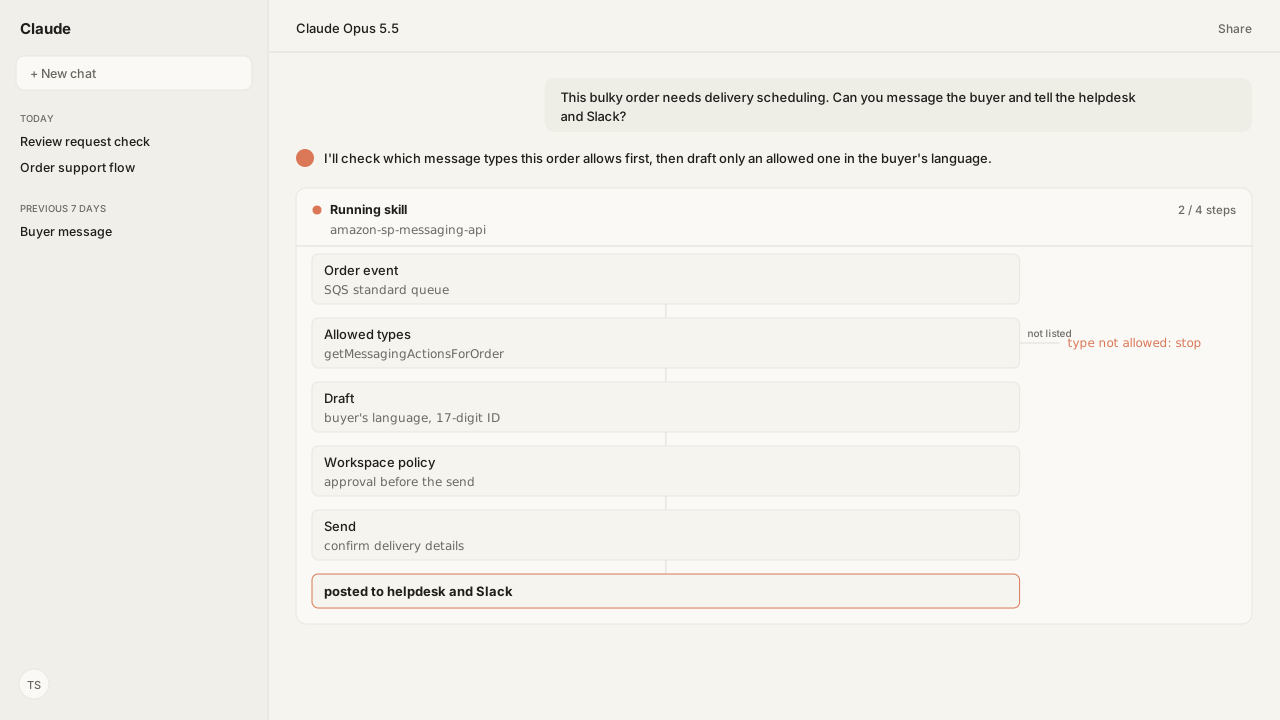
- The Messaging API sends a set of message types for an order. Of its 12 operations, two read (the allowed message types and the buyer's language) and ten send; none reads the buyer's messages.
getMessagingActionsForOrderreturns the message types an order allows, so check it before anything is written.- Amazon's Communication policy limits proactive messages to listed purposes, sent within 30 days of order completion with the full 17-digit order ID, in the buyer's language of preference.
- Review requests go through the Solicitations API: one template-based email per order, asking for a product review and seller feedback together.
- Order events such as
ORDER_CHANGEarrive as Selling Partner API (SP-API) notifications in an Amazon SQS (Simple Queue Service) standard queue; Amazon EventBridge carries only listing and brand notification types.
To integrate the Amazon seller messages API, check what each order allows with getMessagingActionsForOrder, send only the message types Amazon permits for that order, and request reviews through the Solicitations API once per order. Then subscribe to Selling Partner API (SP-API) notifications so each order event reaches your helpdesk and Slack.
A support lead asked me: "can our AI send the right Amazon message for an order, and tell the helpdesk and Slack it did, without breaking Amazon's rules?" It can, within limits the API sets: the order decides which message types it may receive, and your rules decide what the text says.
Our agent worked through it with the Selling Partner MCP, which exposes the Messaging, Solicitations and Notifications operations over MCP (Model Context Protocol). It runs in the same AI client as the Amazon Ads MCP, which covers the ad side of the account. It checked each step against the Communication policy that Amazon Agent Atlas holds from Seller Central, and every send went through the account's workspace policy before it reached Amazon.
The Messaging API sends set message types and reads none of the buyer's messages
The Messaging API has 12 operations. Two read: getMessagingActionsForOrder lists the message types an order allows, and GetAttributes returns the buyer's language of preference (buyer.locale). The other ten each send one type of message, and the agent calls all 12 through the Selling Partner MCP:
| Message type | What Amazon says it is for |
|---|---|
| Confirm order details | An order-related question before shipping |
| Confirm delivery details | Arranging a delivery or confirming contact details for it |
| Confirm customization details | Name spelling, images, initials and similar details |
| Confirm service details | Arranging a Home Services call |
| Unexpected problem | A critical message that a problem affects completing the order |
| Legal disclosure | Documents the seller is legally required to provide |
| Invoice | Sending the buyer an invoice |
| Digital access key | A key the buyer needs to use digital content |
| Warranty | Warranty details for a purchase (policy limits these to what the detail page shows) |
| Amazon Motors | Order details, for Amazon Motors sellers only |
None of the 12 reads the buyer's inbox. A reply to a message the buyer started belongs on that message thread, not in a new proactive message.
Buyers can opt out of unsolicited messages from all sellers, and Amazon bounces a blocked message back with instructions. The opt out doesn't cover replies on a thread the buyer started, or Amazon's critical proactive message templates.
getMessagingActionsForOrder decides what an order may receive
Amazon's own workflow starts with the order: call getMessagingActionsForOrder, show only the message types it returns, then send. Message types that carry a file, such as an invoice or a legal disclosure, upload it first through the Uploads API. Your SP-API application needs the Buyer Communication role for these operations.
The Communication policy sets the rest. Proactive messages must go out within 30 days of order completion, include the complete 17-digit order ID, be in the buyer's language of preference, and serve a listed purpose, such as fulfillment problems, customization details, invoices or bulky-item delivery. Sellers are not permitted to send proactive messages for:
- order or shipping confirmations
- confirmations of order receipt or "thank you" messages
- introductions to your customer service team
- warranty details that are not on the product detail page
The agent calls getMessagingActionsForOrder before it writes a word, reads GetAttributes for the buyer's language of preference, and holds the draft against the policy text in Atlas. If the order doesn't allow the type, it stops.
Review requests go through the Solicitations API, once per order
The Solicitations API sends non-critical solicitations: one template-based email that asks for a product review and seller feedback together. Call getSolicitationActionsForOrder, and send productReviewAndSellerFeedback only if the order lists it.
The limit is on the review request: Amazon allows feedback to be requested once per customer per order, and a Buyer-Seller message may ask for a review only if Request a Review wasn't used for that order. Permitted messages about the order itself, such as delivery, customization or an invoice, are a separate matter.
Automating review requests stays inside the same limits. Amazon's review guidance says to ask for delivered orders, within the allowed time frame, and you cannot:
- selectively seek positive reviews
- ask a buyer to change an existing review
- offer rewards or incentives
Amazon already sends automated review requests for most products. The agent runs the eligibility check per delivered order and sends only where the action is listed, so the seller never sends a second request for the same order.
Notifications carry the order event to your helpdesk and Slack
The Notifications API is how an event leaves Amazon. createDestination sets where notifications go, and createSubscription subscribes that destination to a notification type. Order events such as ORDER_CHANGE use the Amazon SQS workflow. Amazon EventBridge carries only listing and brand types, such as listing status and listing issues changes, so it is not the route for order support.
Amazon's SQS guidance shapes the consumer. The SP-API does not support FIFO (first in, first out) queues, only standard ones, and a standard queue can deliver a notification more than once or out of order. Check each event's notificationId before acting on it, so a duplicate can't send a second message.
From there, a workflow triggered by the queue runs the agent on the event instead of a prompt. An n8n AI Agent workflow reaches the Selling Partner MCP through the MCP Client Tool node. An Activepieces Run Agent step adds it under Agent Tools, beside apps such as Slack. One flow checks the order, sends the allowed message, and posts what it did where your team works.
What happens next: the Buyer Messaging Skill runs the send, and your rules decide what to say
The Buyer Messaging Skill (amazon-sp-messaging-api, Reference) runs this flow on the Selling Partner MCP. It checks the types an order allows, reads the buyer's language, drafts within Amazon's content rules, and sends nothing the seller hasn't approved word for word. Like the API, it doesn't request reviews or read the inbox.
Your team decides what each order should receive: which events get a message, the wording, and when to leave it to Amazon's own emails. Save those rules as a custom Skill beside it. The Amazon Agent Data layer keeps the account's Amazon data in your own storage, so those rules are built on your history, not a vendor's. For Amazon's own route into Claude, see the Seller Central Claude plugin guide.
Next: which SP-API notification types are worth subscribing to for order support.
Send the right buyer message from the AI you already use
Bring the order events your team answers by hand. We will map the Selling Partner MCP's Messaging, Solicitations and Notifications operations, Atlas grounding on Amazon's Communication policy, and private-beta setup with you.
Get beta accessWhat you need to run Buyer messaging
- MCP
- Selling Partner MCP for the Messaging API (12 operations), the Solicitations API (2) and the Notifications API (8)
- Skill
- amazon-sp-messaging-api 0.1.0 (Reference) for the send flow, with your team's own messaging rules as a custom Skill beside it
- Atlas collection
- amazon_sellers, the Amazon rules behind this guide (Communication program policy; Buyer-Seller Messages FAQ; Messaging and Solicitations API use-case guides; Notifications API setup with Amazon SQS)
- Required subscriptions
- A Professional seller account, and an SP-API application with the Buyer Communication role, and the Buyer Solicitation or Product Listing role for review requests.
FAQ
How do you integrate the Amazon seller messages API?
Call getMessagingActionsForOrder for the order to see which message types it allows, choose one that fits a permitted purpose, read GetAttributes for the buyer's language of preference, then call that type's send operation. Your SP-API application needs the Buyer Communication role.
Can the SP-API read buyer messages?
No operation in the Messaging API reads the buyer's messages. Of its 12 operations, two read (the allowed message types and the buyer's language) and ten send a message. A reply to a message the buyer started stays on that message thread.
Why does my Amazon buyer message fail to deliver?
One reason is a buyer opt-out: buyers can opt out of unsolicited messages from all sellers, and Amazon returns a bounce-back with instructions. The opt-out does not apply to replies on a thread the buyer started, or to Amazon's critical proactive message templates. Amazon can also block a message that breaks its Communication policy.
Can I automate Amazon review requests?
Yes, through the Solicitations API. Call getSolicitationActionsForOrder, and if productReviewAndSellerFeedback is listed, send it. That sends one template-based email asking for a product review and seller feedback. Amazon allows one review request per order, by this route or a Buyer-Seller message, and you cannot seek only positive reviews.
What messages are sellers not allowed to send on Amazon?
Amazon's Communication policy does not permit proactive order or shipping confirmations, thank-you messages, introductions to your customer service team, or warranty details that are not on the product detail page.
How do SP-API notifications reach a helpdesk or Slack?
Create an Amazon SQS standard queue as the destination and subscribe it to an order notification type such as ORDER_CHANGE; Amazon EventBridge carries only listing and brand types. A flow triggered by the queue can then run an agent with the Selling Partner MCP, in n8n or Activepieces, beside apps such as Slack.