
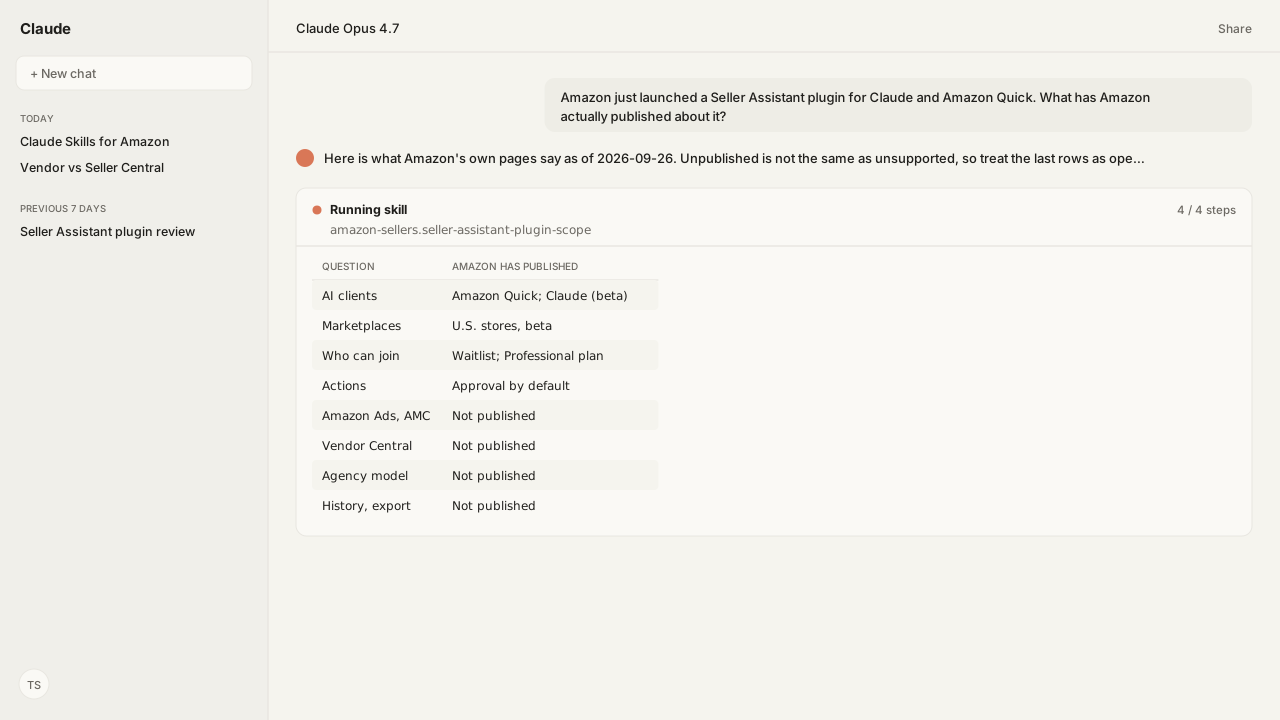
- Amazon Seller Assistant's selling partner plugin is an MCP server plus Amazon-written skills that bring a seller's live Amazon data into Amazon Quick and, in beta, Claude.
- As of September 26, 2026 it is a U.S. beta with a waitlist, for sellers on a Professional selling plan.
- Actions need approval by default and you can limit it to answers only, but you are responsible for every action the agent takes.
- Amazon has not published a fee for the plugin itself. The Quick path is priced per person after a free Quick Plus offer that ends December 31, 2026, and each seller account authorizes separately.
- Amazon has not published Amazon Ads, Vendor Central, an agency model, history or a full tool list for the plugin.
Amazon Seller Assistant's selling partner plugin, Amazon's Seller Central plugin for Claude and Amazon Quick, connects a seller's live Amazon data and Amazon's selling skills to an AI assistant. Amazon announced it in September 2026 in Amazon Quick and, in beta, Claude, for sellers in Amazon's U.S. stores on a Professional selling plan, with access rolling out through a waitlist.
Seller Assistant already lives inside Seller Central, where Amazon's help page says that "with your permission, Seller Assistant can also take actions on your behalf." The plugin carries it out to the AI client, and Amazon's reason is plain: "Today, 90% of Amazon selling partners already use third-party AI tools to run their businesses." I read what Amazon has published so far to answer the questions sellers are asking this week: should I connect it, what does it cover, and what does it leave out?
The decision the plugin puts in front of you is which connection your AI assistant should hold for the business. If your week lives in Seller Central, Amazon's connector answers from the source. If the same week includes a Sponsored Products bid review or a Vendor Central purchase order, the answer changes: Kuudo's Selling Partner MCP, Amazon Ads MCP and Vendor Central MCP run in your own cloud and connect from any MCP client, and one assistant reads all three consoles in the same conversation.
Amazon's selling partner plugin for AI assistants brings seller data and Amazon's skills into Claude and Quick
"Selling partner plugin for AI assistants" is the name on Amazon's Seller Central help page (sign-in required), and that page states the promise in two lines: "Connect your Amazon business data to an AI assistant. Get answers about sales, inventory, traffic, and listings without returning to Seller Central." Amazon's announcement says the plugin connects "a seller's Amazon data, including their listing contributions, real-time performance metrics, inventory levels, and sales analytics, directly to their preferred AI agent."
The clearest statement of what it covers is Amazon's own table of example requests on that help page, quoted here as Amazon wrote it:
| Area | What you can ask | What the assistant does |
|---|---|---|
| Sales and traffic | "What were my sales last week?" | "Returns your sales data for the requested period." |
| Sales and traffic | "How is my traffic trending over the last 8 weeks?" | "Shows sessions, page views, and ordered units over time." |
| Inventory | "Which of my ASINs are at risk of stocking out?" | "Checks stock levels, days of supply, and demand forecasts." |
| Inventory | "When should I restock, and how much?" | "Provides restock quantities and recommended order dates." |
| Listings | "Show me all my listings that have errors or are suppressed." | "Searches your listings filtered by status and flags issues." |
| Listings | "Update the bullet points on a SKU without changing anything else." | "Proposes a partial update for your approval before taking action." |
| Pricing | "What price do I need to win the Featured Offer?" | "Shows the Featured Offer expected price for your SKUs." |
| Pricing | "Show me the competitive landscape for an ASIN." | "Returns the Featured Offer, reference price, and lowest offers." |
| Fees | "Estimate the fees if I price this product at $29.99." | "Calculates referral and FBA fees at the price you specify." |
| Inbound shipments | "Start an inbound plan for 400 units across 6 SKUs." | "Creates an FBA inbound plan and walks through packing, placement, and transportation." |
| Inbound shipments | "What prep does Amazon require for these ASINs before I send them in?" | "Returns prep and labeling requirements per ASIN." |
| Selling on Amazon | "How does the Subscribe and Save program work?" | "Searches Amazon selling documentation and returns relevant guidance." |
The connection behind that table is an MCP server. Amazon's toolkit README calls it the "Amazon Selling Partner Connector (MCP)", registers it at https://sellingpartner-ai.amazon.com/mcp, and has you authorize it through the Seller Central OAuth consent flow, limited to the tools your Seller Central roles allow. It speaks the same Model Context Protocol as any other MCP server.
The instructions that sit on top of it are public, which is a real plus: you can read every one before it runs, fork it, and add your own beside it in Claude. Amazon published its skills on GitHub as amzn/selling-partner-agentic-toolkit under Apache-2.0: eleven readable skills and three commands (/sp-stockout-check, /sp-fix-listing and /sp-sales-drop) as of commit bc33734 on September 25, 2026. They cover seller analytics, stockout prevention, Fulfillment by Amazon (FBA) inbound management, five listing skills, secondary-user access, Seller Support cases and Selling Partner API knowledge. Every skill ships with behavioral evals, most run against a mock MCP server, including a negative case that the stockout skill "never proposes a price increase on its own". Amazon goes deep where it matters most to a seller: the FBA inbound skill walks the whole plan from creation through packing, placement and transportation to confirmation. Kuudo publishes the same jobs in its public Skills collection, with an FBA inbound Skill that pauses at every fee-charging or irreversible step and a stockout-prevention Skill that checks whether inbound shipments land in time. One caution when you read the repository: it documents what the skills call, not everything the connector can do. Amazon has not published the connector's full tool list.
Approval is on by default, and you answer for every action the agent takes
Control is where Amazon's design is strongest. Amazon's Seller Central help page for the plugin says "Actions require approval by default", that "You can limit the assistant to answers only", and that account owners and administrators authorize the plugin from a Manage Agents page. The toolkit README says "Write actions are always human-in-the-loop (drafted for your approval)." Inside Seller Central, Seller Assistant also runs Workflows, and Amazon's announcement applies the same stance there: "Sellers describe what they need in plain language, set guardrails, and the workflow goes to work." They start from scratch or from "Prebuilt templates that monitor account health, summarize orders, analyze pricing trends". A workflow is built step by step in a Builder tab and runs on a schedule or when triggered, sellers "choose whether it just surfaces recommendations or takes actions on their behalf", and "Every action is logged with a complete audit trail." Amazon has not published whether Workflows run through the plugin in Quick or Claude.
Responsibility does not move with the approval button. The same help page says: "You are responsible for all actions taken by the agent, whether or not you directly initiated them", and revoking access "will not reverse prior actions or data access." When I asked our agent what Amazon's seller terms say about agents in general, Amazon Agent Atlas retrieved Section 19 of the Amazon Services Business Solutions Agreement, "Use of Agents." It defines an Agent as "any software or service that takes autonomous or semi-autonomous action on behalf of, or at the instruction of, any person or entity", requires agents to identify themselves as automated systems, and reserves Amazon's right "to limit or restrict Agent access to Amazon Services." Those terms apply to any agent you authorize, Amazon's or anyone else's.
Plugin data leaves Amazon's control once it reaches your AI assistant
Where your data goes depends on which Seller Assistant you use. Inside Seller Central, Amazon's announcement says Seller Assistant "keeps seller data within Amazon's infrastructure and never shares it outside of Amazon." The plugin works differently by design, because its purpose is to reach an outside AI client. Amazon's Seller Central help page for the plugin says the account data "is sent to and processed on systems outside of Amazon's control, subject to your AI assistant's terms of service and privacy policy", and that "Amazon is not responsible for how your AI assistant handles your data once accessed."
The toolkit README draws the same line from the other side: "Your prompt text is processed by your AI assistant per its own terms", while the skills themselves "do not persist your account identifiers or data beyond the session."
That holds for every MCP connection, Kuudo's included: whatever a tool returns enters the AI client's context under that client's terms. So the first evaluation step is the same for both. Read the data and retention terms of the AI client plan your team actually uses before you connect a live account. What differs is what exists after the session ends. The plugin's pages describe live data and publish no history or export. Kuudo's servers run in your own cloud account, and Amazon Agent Flow, the Amazon Agent Data layer, lands orders, listings, inventory and Ads data in lake storage you control, so last quarter is still there to query next quarter.
Amazon publishes no plugin fee, so the cost you can see is your AI assistant's seat, and each seller account authorizes it separately
What the plugin costs depends on the AI assistant that carries it, because Amazon has not published a separate fee for the plugin itself. On the Amazon Quick path, Amazon's Seller Central help page for the plugin says: "Connect with Amazon Quick to get a free Quick Plus subscription. Primary sellers get 1 year free (up to $720 value). Other sellers get 30 days free. This offer is available through December 31, 2026." The announcement adds that primary account holders can designate "two additional co-workers to receive a free year". After the offer, Quick Plus is priced per person: AWS lists it at "$20 /user/month (annually)" or "$25/user/month billed monthly", which matches three annual seats at that rate, the primary seller and two co-workers. On the Claude path, each person uses their own Claude plan, as they would with any connector.
Authorization is per seller account and per user. Account owners and administrators grant access from each seller account's Manage Agents page, and Amazon has not published an agency or partner model for running many seller accounts through the plugin. Third-party apps on the Selling Partner API (SP-API) work differently: a seller authorizes an app at no charge, and Amazon has said "we will not move forward with the SP-API usage and annual fees at this time." Kuudo works on that side of the line. It bills one thing, the Amazon API calls it makes on your behalf, with team seats and several organizations included in each plan, and it connects to any MCP client (see pricing).
Amazon has not published Ads, Vendor Central or history support for the plugin
The plugin's public pages describe seller data for sellers. Everything else is unstated, which is different from impossible, and Amazon says "more integrations" and "international expansion" will follow. Read this table as a dated snapshot:
| Question | Published as of 2026-09-26 |
|---|---|
| AI clients | Amazon Quick; Claude in beta |
| ChatGPT, Cursor, other clients | "More integrations to follow" |
| Marketplaces | U.S. stores, beta |
| Who can join | Waitlist; Professional selling plan |
| Amazon Ads and AMC | Not published for the plugin |
| Vendor Central | Not published for the plugin |
| Agency or multi-account model | Not published |
| Seller Assistant Workflows in the plugin | Not published |
| History, export or warehouse | Not published |
| Full connector tool list | Not published |
Amazon runs its other agents as separate products per console. Atlas retrieved Amazon's help page for Ads Agent, "currently in beta", which lives inside the Amazon Ads console, including campaign manager and Amazon Marketing Cloud (AMC), and where "You review and approve recommendations before Ads Agent makes any changes." Amazon also runs an Amazon Ads MCP Server for advertisers and partners with Ads API credentials. And Vendor Central has its own AI assistant, "also known as Amazon Business Coach", opened from a chat widget on Vendor Central pages. None of these is part of the selling partner plugin as Amazon describes it today, so a team that runs ads, seller and vendor work would hold a separate Amazon agent per console.
That split is what Kuudo removes. Kuudo's Amazon Ads MCP, Selling Partner MCP and Vendor Central MCP connect in one session from Claude, ChatGPT, Cursor or any client that speaks MCP, with the same Amazon data, auth and audit trail in each. It is good to see Amazon publish reference skills for its plugin, and Workflows take plain-language rules inside Seller Central. Both cover seller operations. Kuudo's Skills are one of the most comprehensive public Amazon Skill collections: workflows your agent runs across ads, Amazon Marketing Cloud, Amazon DSP (demand-side platform) launches, creative, profitability and seller jobs, with your own written in the same format.
What happens next: test the plugin against one week of your real questions
Test the plugin on the questions your team asked last week, not on a demo prompt. Seven steps decide it:
- Sort last week's questions by console. Seller Central, Amazon Ads, AMC, Vendor Central. The plugin's published scope covers the first column.
- Note who asked them, and in which AI client. Quick and Claude are published. Anything else is waiting on Amazon's next integration.
- Start in answers-only mode. Amazon says you can limit the assistant to answers. Check its answers against Seller Central for a week; Amazon's own Seller Assistant help page says to "Independently verify any critical details before making decisions."
- Turn on actions for one workflow.
/sp-fix-listingis a good first one, because every write is drafted for your approval. - Count the seats and the accounts. The Quick path is a seat per person once the free offer ends, and every seller account authorizes separately.
- Read your AI client's data terms. The plugin hands your data to that client once accessed, so its plan decides retention.
- Decide where history should live. If you will want this quarter's numbers next year, the plugin's pages do not say where they would be kept.
If every question lands in Seller Central and your team already works in Claude or Quick, Amazon's plugin is a sensible place to start: it is built by Amazon, Seller Assistant in Seller Central is free, and primary sellers who connect Quick by December 31, 2026 get a year of Quick Plus free. If the week spans ads, vendor and seller work across more than one client, Kuudo vs. Amazon Seller Assistant puts the two side by side, row by row.
Amazon opening Seller Central to outside AI assistants is good news for every seller: it confirms the assistant you already use is where the work belongs. I will update this page as Amazon publishes more.
Next: the public Claude Skills for Amazon library, and which Skills run before you connect an account.
Bring the questions the plugin does not cover yet
If your week spans Seller Central, Amazon Ads and Vendor Central, bring us those questions. We'll set up the Selling Partner MCP, the Amazon Ads MCP and the Vendor Central MCP in your own cloud, connected to the AI client your team already uses, during the private beta.
Book a working sessionWhat you need to run Seller Assistant plugin tests
- amazonPlugin
- Amazon Selling Partner Connector (MCP) at sellingpartner-ai.amazon.com/mcp, with the skills in amzn/selling-partner-agentic-toolkit (Apache-2.0, commit bc33734, 2026-09-25)
- access
- Amazon Quick, or Claude in beta; U.S. stores; waitlist; Professional selling plan; authorized by account owners and administrators from Manage Agents
- kuudoAlternative
- Selling Partner MCP, Amazon Ads MCP and Vendor Central MCP in your own cloud, from any MCP client, with Amazon Agent Flow keeping history in your storage
- atlasGrounding
- amazon_sellers, amazon_ads and amazon_vendors: Seller Assistant (Seller Central help), Amazon Services Business Solutions Agreement Section 19 and the Selling Partner API Terms, Understand Ads Agent, AI assistant in Vendor Central
- notPublished
- Clients beyond Quick and Claude, marketplaces beyond the U.S., Amazon Ads and Amazon Marketing Cloud, Vendor Central, an agency or multi-account model, history or export, and the connector's full tool list
- Last verified
- 2026-09-26
Keep exploring Seller Assistant plugin tests
Use these companion guides to understand the inputs, follow-on analysis, and adjacent workflows behind this playbook.
- Best Claude Skills for Amazon Ads and Operations
The public Kuudo Skills library, and which Skills run before you connect an account.
- Everyone in Your Category Has the Same AI Now
Why the model is shared and the account context, judgment and controls are the edge.
FAQ
Is Amazon's Selling Partner plugin an MCP server?
Yes. Amazon's toolkit README names it the Amazon Selling Partner Connector (MCP) and registers it at https://sellingpartner-ai.amazon.com/mcp, authorized through the Seller Central OAuth consent flow. Amazon has published it for Amazon Quick and, in beta, Claude.
Does Amazon Seller Assistant work with ChatGPT?
Amazon has not published ChatGPT support as of September 26, 2026. Amazon's pages name Amazon Quick and Claude, in beta, and say more integrations will follow. Amazon has not said which clients come next or when.
Can Amazon Seller Assistant manage Amazon Ads or Vendor Central?
Amazon has not published Amazon Ads, Amazon Marketing Cloud or Vendor Central support for the plugin; its pages describe seller data for sellers. Amazon runs separate assistants for those consoles: Ads Agent in the Amazon Ads console, and an AI assistant in Vendor Central also known as Amazon Business Coach.
Is Amazon Seller Assistant free?
Seller Assistant inside Seller Central is free to use, per Amazon's help page. The plugin has no separately published fee; your AI assistant's own plan still applies. Through December 31, 2026, primary sellers who connect Amazon Quick get a year of Quick Plus free (up to $720 value) and can give two co-workers a free year, and other sellers get 30 days; AWS then lists Quick Plus at $20 per user per month billed annually. On Claude, each user needs their own Claude plan.
How do I connect Amazon Seller Central to Claude?
Install Amazon's Selling Partner plugin from Claude's plugin directory: search for Selling Partner plugin, select Install, sign in with your Amazon selling account, review what the plugin can access, and confirm to authorize it. As of September 26, 2026 it is a beta for sellers in Amazon's U.S. stores on a Professional selling plan, access opens through a waitlist, and by default only account owners and administrators can authorize it, from the Manage Agents page in Seller Central.
Why does my account not show the Seller Assistant plugin yet?
Access is rolling out over time. As of September 26, 2026 the plugin is a beta for sellers in Amazon's U.S. stores, it needs a Professional selling plan, access opens through a waitlist, and by default only account owners and administrators can authorize it, from the Manage Agents page in Seller Central.
Where does my data go when I connect the plugin to Claude?
To Claude, under Claude's terms. Amazon's help page for the plugin says the data is sent to and processed on systems outside Amazon's control, subject to your AI assistant's terms of service and privacy policy, and that Amazon is not responsible for how the assistant handles it once accessed.
Sources
- Amazon gives sellers an even smarter Seller Assistant and a new plugin for Amazon Quick and Anthropic's Claude
- amzn/selling-partner-agentic-toolkit (Amazon's plugin skills, Apache-2.0)
- Amazon Selling Partner connector in the Claude marketplace
- Seller Central help: Selling partner plugin for AI assistants (sign-in required)
- Seller Central help: Seller Assistant, Seller Central's agentic assistant
- Amazon Services Business Solutions Agreement
- GeekWire: Amazon opens its seller tools to outside AI agents, starting with Anthropic's Claude
- Amazon Quick pricing (AWS)
- Cancellation of SP-API fees (Amazon Selling Partner developer notice)
- PYMNTS: Amazon seller AI graduates from chatbot to operating system