
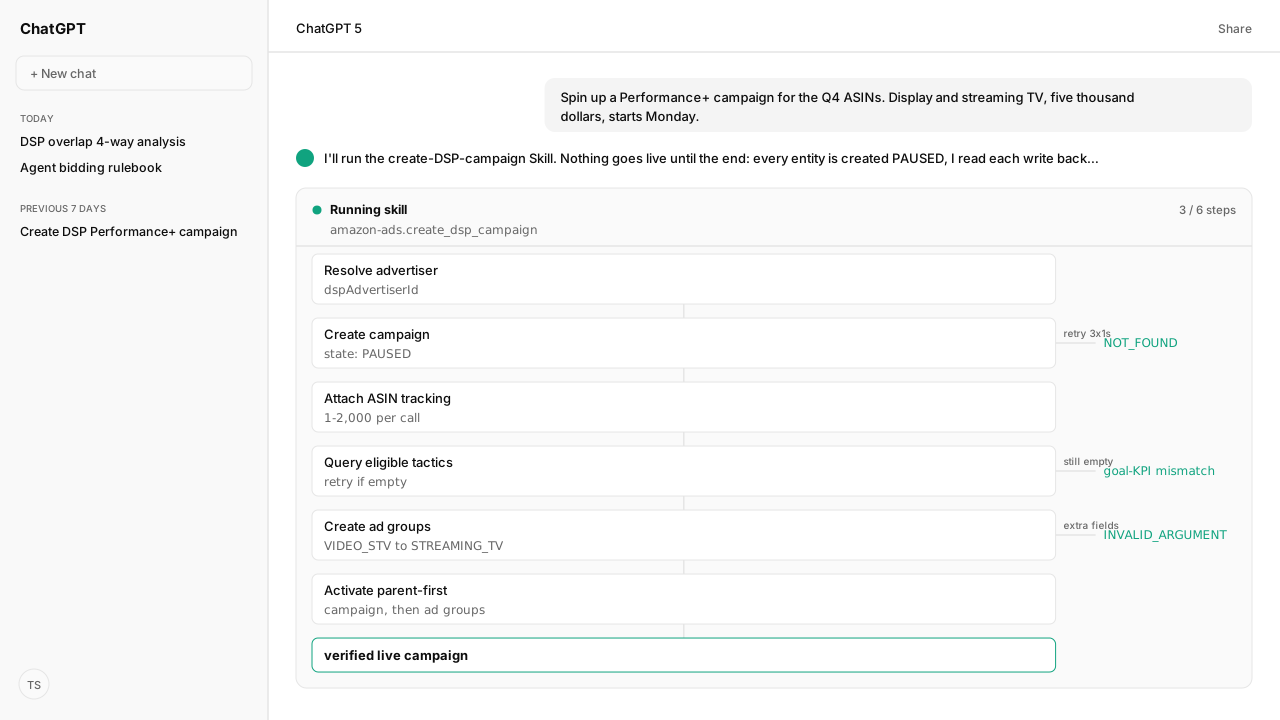
- The Skill reads back every entity it creates before the next step depends on it. It treats the Amazon Ads API v1 as eventually consistent: wait 100ms, query the new entity, retry up to three times at one-second intervals, then stop and report.
- Zero eligible tactics after the retries most often means the campaign's goal KPI does not fit the tactic. PROSPECTING (Brand+) needs REACH, FREQUENCY_AVERAGE, COST_PER_VIDEO_COMPLETION, or VIDEO_COMPLETION_RATE. CUSTOMER_ACQUISITION, REMARKETING, and RETENTION need ROAS; MAXIMIZE_PERFORMANCE needs COST_PER_DETAIL_PAGE_VIEW or DETAIL_PAGE_VIEW_RATE.
- The same inventory type is spelled differently at each level. Campaign VIDEO_STV becomes ad group STREAMING_TV, and VIDEO_OLV becomes ONLINE_VIDEO.
- Tactic ad groups get six fields. The Skill sends nothing else, because bid, budgets, and pacing are auto-managed for tactic ad groups and an extra field is rejected with INVALID_ARGUMENT.
- The campaign and ad groups are created PAUSED and activated campaign first. Delivery is a separate check afterwards, in Amazon Marketing Cloud's dsp_impressions, dsp_views, and dsp_clicks tables.
Launching an Amazon DSP (demand-side platform) Performance+ or Brand+ campaign is one ordered write sequence. The campaign and its ad groups are created paused, each create is read back before the next step depends on it, and activation runs campaign first, then ad groups. Our Create DSP Campaign Skill runs that sequence through the Amazon Ads MCP.
The request is usually short: a Performance+ campaign for a set of ASINs, display and streaming TV, a budget and a start date. The risk is a half-built launch. A campaign exists, some ad groups do not, and an activation call returns NOT_FOUND on an ad group the API confirmed creating seconds earlier.
What prevents that is not a better prompt. It is your live advertiser account, read through the Amazon Ads MCP, and a Skill that holds the order, the enum translations, and the stop conditions on every run. The create and activate calls are write tools, so your workspace policy decides which of them wait for a person. Amazon Agent Atlas grounds the delivery check afterwards in Amazon Marketing Cloud (AMC).
The Create DSP Campaign Skill creates the campaign paused on the Amazon Ads MCP and reads each create back
Nothing the Skill creates in its required steps starts live. The campaign and every ad group are created with state: "PAUSED", and activation is a deliberate final step, so a failure halfway through leaves nothing spending. Ads and ad-group associations are an optional step: the Skill creates them enabled, and they deliver only once their ad group is enabled.
Each step maps to an operation on the Amazon Ads MCP:
| Skill step | Amazon Ads MCP operation | Read-back |
|---|---|---|
| Resolve the DSP advertiser ID | AdsAPIv1All_QueryAdvertiserAccount | (read) |
| Create the campaign, paused | AdsAPIv1All_CreateCampaign | AdsAPIv1All_QueryCampaign |
| Attach ASIN conversion tracking | CampaignConversionTracking_DspPostProductConversionTrackingV1 | CampaignConversionTracking_DspGetCampaignConversionTrackingProductsV1 |
| Query eligible tactics | AdsAPIv1All_QueryCampaign | retry if empty |
| Create one ad group per inventory type and tactic | AdsAPIv1All_CreateAdGroup | AdsAPIv1All_QueryAdGroup |
| Optional: create ads and associations | AdsAPIv1All_CreateAd, AdsAPIv1All_CreateAdAssociation | AdsAPIv1All_QueryAd, AdsAPIv1All_QueryAdAssociation |
| Activate campaign, then ad groups | AdsAPIv1All_UpdateCampaign, AdsAPIv1All_UpdateAdGroup | none |
Before the first call, the Skill sets the active Amazon Ads profile, and it stops if a tool a step needs is missing. The budget lives on the flight, not the campaign. There is no campaign-level budget field, so the single budget, start date, and end date map to one flight:
{
  "Amazon-Ads-AccountId": "<dspAdvertiserId>",
  "campaigns": [
    {
      "adProduct": "AMAZON_DSP",
      "name": "DSP|PB|Campaign 2026-08-20_14-02-11",
      "countries": ["US"],
      "state": "PAUSED",
      "flights": [
        {
          "startDateTime": "2026-08-24T00:00:00Z",
          "endDateTime": "2027-08-24T00:00:00Z",
          "budget": {
            "budgetType": "MONETARY",
            "budgetValue": {
              "monetaryBudgetValue": {
                "monetaryBudget": { "value": "5000" }
              }
            }
          }
        }
      ],
      "optimizations": {
        "bidSettings": { "bidStrategy": "SPEND_BUDGET_IN_FULL" },
        "goalSettings": { "kpi": "ROAS" },
        "primaryInventoryTypes": ["DISPLAY", "VIDEO_STV"]
      }
    }
  ]
}
Every datetime carries the Z suffix because the API rejects naive datetimes.
Then the Skill does not move on. It waits 100 milliseconds, queries the campaign it just created, and retries up to three times at one-second intervals if the record is not visible yet. The Amazon Ads API v1 does not guarantee read-after-write consistency, so a create can succeed and the next call can still fail to find it. Worst case, this adds about 3.1 seconds per step.
If the campaign is still not visible after the retries, the Skill stops and reports the campaign ID. Nothing downstream is attempted.
Zero eligible tactics after the Skill's retries usually means a goal-KPI mismatch, not an outage
Once the campaign exists, the Skill attaches ASIN conversion tracking in one batch: between 1 and 2,000 products per call, with a campaign ceiling of 500,000 products. Each entry carries the product ID, a domain derived as AMAZON_ plus the country code, and the product association FEATURED.
Eligible tactics are computed asynchronously from those products, with their own propagation lag. So the Skill verifies the ASINs landed, then re-queries the campaign for eligibleAutomatedTargetingTactics, and retries three times at one-second intervals if the list is empty.
When the list is still empty, the Skill's checklist names three causes: propagation that needs a few more seconds, a goal key performance indicator (KPI) that fits none of the requested tactics, or ASINs that never landed. The second is the one its error table calls most likely. These are the five tactics the Skill supports:
| Tactic | Compatible KPIs | Goal |
|---|---|---|
| CUSTOMER_ACQUISITION (P+) | ROAS | Conversions |
| REMARKETING (P+) | ROAS | Conversions |
| RETENTION (P+) | ROAS | Conversions |
| MAXIMIZE_PERFORMANCE (P+) | COST_PER_DETAIL_PAGE_VIEW, DETAIL_PAGE_VIEW_RATE | Conversions |
| PROSPECTING (B+) | REACH, FREQUENCY_AVERAGE, COST_PER_VIDEO_COMPLETION, VIDEO_COMPLETION_RATE | Awareness (Amazon's help page also allows Consideration) |
ROAS is return on ad spend. The KPI is set when the campaign is created, which is why this failure surfaces two steps after the decision that caused it. Ask for Brand+ prospecting on a campaign built with a ROAS goal and PROSPECTING comes back ineligible, with the reason code NOT_ELIGIBLE_GOAL.
Amazon lets you change the KPI after launch, but its help page warns that doing so resets the campaign's performance learnings. Choosing the KPI for the tactic before the create is the cheaper fix, and the Skill infers it from the tactic you ask for, defaulting to ROAS when you name neither.
The Skill translates the inventory type the campaign used before it creates each ad group
The same inventory type has one spelling at the campaign level and another at the ad-group level. The Skill's reference calls this an API naming inconsistency, not a different concept, and names it as the most common source of INVALID_ARGUMENT on the ad-group create:
| Intent | Campaign field | Ad group field |
|---|---|---|
| Display | DISPLAY | DISPLAY |
| Streaming TV | VIDEO_STV | STREAMING_TV |
| Online video | VIDEO_OLV | ONLINE_VIDEO |
| Live events | LIVE_EVENTS | LIVE_EVENTS |
| Audio | AUDIO | AUDIO |
The eligible-tactics response hands back campaign-level names, so the value you receive is not the value you send one call later. The Skill translates on the way through, which is the kind of mechanical rule that belongs in a workflow rather than in someone's memory.
The second trap is the field allowlist. A Performance+ or Brand+ tactic ad group gets six fields and nothing else:
{
  "Amazon-Ads-AccountId": "<dspAdvertiserId>",
  "adGroups": [
    {
      "adProduct": "AMAZON_DSP",
      "campaignId": "<campaignId>",
      "name": "DSP|PB|STREAMING_TV|CUSTOMER_ACQUISITION 2026-08-20_14-02-11",
      "state": "PAUSED",
      "inventoryType": "STREAMING_TV",
      "targetingSettings": {
        "automatedTargetingTactic": "CUSTOMER_ACQUISITION"
      }
    }
  ]
}
Bid, budgets, pacing, optimization, start and end times, creative rotation, viewability: the system auto-manages all of them for tactic ad groups, and the Skill's reference says any of them in the payload gets the request rejected with INVALID_ARGUMENT. So when a create fails, check two things: the inventory spelling, then extra fields. Stripping fields fixes the second, not correcting their values.
The Skill creates one ad group per call and reads each back. It stops at the first failure and names the inventory type and tactic that failed, because a partial set of ad groups is hard to clean up.
The Skill activates on the Amazon Ads MCP campaign first, and skips the ad groups if the campaign fails
Activation is two moves in a fixed order: the campaign flips to ENABLED first, then each ad group, one update call per ad group so each result is attributable. The earlier verification reads pay off here. Activation immediately follows creation, and an update against a record the API cannot see yet is how NOT_FOUND appears on an entity you watched get created.
If the campaign fails to activate, the Skill does not touch the ad groups. Its report marks each one "Skipped (parent failed)". The Skill's reference notes that enabling an ad group under a paused campaign is technically allowed, but it will not deliver until the campaign is enabled, and a partial state is harder to reason about.
Both updates are write tools on the Amazon Ads MCP, so your workspace policy may require explicit human approval before they reach Amazon. The Skill then closes with a summary:
- the profile, the DSP advertiser, and the campaign with its ID, goal KPI, and inventory types
- the conversion tracking status
- each ad group's ID, inventory type, tactic, and state
- the tactics it skipped, with their reason codes
- the ads and associations it created, or a note that creatives were skipped
Amazon Agent Atlas grounds the delivery check in the AMC DSP tables, not the create response
A successful activation call means the entities are enabled. It does not mean a single impression has served. The Skill stops at its summary, so delivery is a separate check, run against Amazon Marketing Cloud.
AMC's three DSP traffic tables hold events from all Amazon DSP campaigns in the accounts added to the instance, across ad product types such as display, online video, streaming TV, and audio. Conversions live in separate tables:
| Table | What it answers |
|---|---|
dsp_impressions | Did each ad group serve? |
dsp_views | Were the impressions measurable and viewable, by the Media Rating Council (MRC) standard? |
dsp_clicks | Which impressions were clicked? It is a subset of dsp_impressions. |
amazon_attributed_events_by_traffic_time, amazon_attributed_events_by_conversion_time | Which conversions are attributed to that traffic? |
The dimension that makes this readable per tactic is line_item, the name of the DSP line item responsible for the event. Amazon's DSP API FAQ says campaigns and ad groups are alternative names for orders and line items, so line_item carries the ad group names the Skill created, such as DSP|PB|STREAMING_TV|CUSTOMER_ACQUISITION 2026-08-20_14-02-11.
Read delivery at that grain and a tactic that never served shows up on its own row instead of hiding inside a campaign total.
What happens next: re-run the launch as a Skill and schedule the delivery check
Launching the DSP campaign is the easy half. The sequence is a Skill rather than a runbook, so it re-runs the same way for the next campaign. The delivery check can run on a schedule instead of when someone remembers: the Amazon Ads MCP creates AMC workflow schedules with AMCWorkflow_createSchedule.
The Amazon Agent Data layer keeps the aggregated results of that check next to the rest of your Amazon data, alongside the Selling Partner MCP pulls behind your catalog and order history. AMC returns aggregated results only, so the per-tactic delivery counts are what land there, not the event rows.
The decision rule is simple. Give each tactic a defined window after activation, then check delivery by line_item:
- No impressions in the window: look at eligibility and inventory rather than wait longer.
- Impressions, no rows on the attributed events tables yet: the ad group is serving; judge its results once conversions have had time to attribute.
- Impressions and attributed conversions: compare the tactic with everything else running.
Once the campaign has enough delivery to compare, the next question is usually how much of it is incremental rather than overlapping what your sponsored ads already reached.
Next: the four-way sponsored ads and DSP overlap audit, which measures exactly that.
Launch your own DSP campaigns without half-built entities
Bring us the DSP launch you want your agent to run. We'll map the Create DSP Campaign Skill, the Amazon Ads MCP wiring and your approval policy, Atlas grounding, and private-beta setup with you.
Run this workflow in betaWhat you need to run DSP campaign launches
- MCP
- Amazon Ads MCP: AdsAPIv1All_QueryAdvertiserAccount, AdsAPIv1All_QueryCampaign, AdsAPIv1All_QueryAdGroup and CampaignConversionTracking_DspGetCampaignConversionTrackingProductsV1 (reads); AdsAPIv1All_CreateCampaign, CampaignConversionTracking_DspPostProductConversionTrackingV1, AdsAPIv1All_CreateAdGroup, AdsAPIv1All_UpdateCampaign and AdsAPIv1All_UpdateAdGroup (write tools, under your workspace approval policy); optional AdsAPIv1All_CreateAd and AdsAPIv1All_CreateAdAssociation
- Skill
- amazon-ads-create-dsp-campaign (Create DSP Campaign Skill) v2.1.3, reference status: the ordered create, verify, and activate loop for Performance+ and Brand+ tactic campaigns. Automated tactics only; manual audience or supply targeting is out of scope.
- Atlas collection
- amazon_ads, the corpus behind the post-launch delivery check (Amazon Marketing Cloud data sources; Amazon DSP impressions table; Amazon DSP views table; Amazon DSP clicks table; Amazon attributed events; ADSP Campaign Management API FAQ)
- Required subscriptions
- An Amazon Ads profile ID and an Amazon DSP advertiser account reachable from it. The post-launch delivery check additionally needs that DSP account added to your Amazon Marketing Cloud instance.
- Last verified
- "2026-09-29T00:00:00.000Z"
What success and failure look like for DSP campaign launches
| scenario | success | failure |
|---|---|---|
| Ad-group create returns INVALID_ARGUMENT | Inventory type translated to the ad-group spelling and only the six allowlisted fields sent | Campaign-level VIDEO_STV sent to the ad group, or bid and pacing included |
| Eligible tactics come back empty | Conversion tracking verified first, then retried, then the goal KPI checked against the wanted tactic | The workflow reads the empty list as an outage and creates nothing |
| Activation returns NOT_FOUND on a just-created ad group | The verification read confirmed the ad group before activation was attempted | Activation fired immediately after create and raced the API's eventual consistency |
Keep exploring DSP campaign launches
Use these companion guides to understand the inputs, follow-on analysis, and adjacent workflows behind this playbook.
- The Four-Way Sponsored Ads and DSP Overlap Audit
Measures how the newly launched DSP campaign overlaps with your sponsored ads once it has delivered enough impressions to compare.
FAQ
Why does my DSP campaign return zero eligible automated targeting tactics?
The Skill checks three causes. Eligibility recomputes asynchronously after conversion tracking lands, so it retries three times at one-second intervals, and a further wait of 5 to 10 seconds can still clear it. If the list stays empty, the campaign's goal KPI may not fit the tactic, or the ASINs never landed on the campaign.
Why does my ad group create fail with INVALID_ARGUMENT?
Usually an extra field or the wrong inventory spelling. Tactic ad groups take only adProduct, campaignId, name, state, inventoryType, and targetingSettings.automatedTargetingTactic; bid, budgets, pacing, startDateTime, and creativeRotationType are auto-managed and rejected. inventoryType also needs the ad-group spelling, such as STREAMING_TV rather than VIDEO_STV.
What is the difference between VIDEO_STV and STREAMING_TV?
Nothing conceptually. They are the same inventory type spelled differently at two levels of the API. The campaign field primaryInventoryTypes takes VIDEO_STV, and the ad group field inventoryType takes STREAMING_TV. VIDEO_OLV becomes ONLINE_VIDEO the same way, while DISPLAY, AUDIO, and LIVE_EVENTS are unchanged.
Why does activation return NOT_FOUND on an entity I just created?
The Amazon Ads API v1 does not guarantee read-after-write consistency, so an update can arrive before the record is visible. The fix is a verification read after every create: wait 100ms, query the entity, and retry up to three times at one-second intervals before depending on it.
Where do I set the budget on a DSP Performance+ campaign?
On the flight, not the campaign. There is no campaign-level budget field. A single budget with a start and end date maps to one flight inside the campaign, and additional flights are a separate update operation afterwards.
How many ASINs can I attach to DSP conversion tracking?
Between 1 and 2,000 products per call, and a campaign can track up to 500,000 products in total. Each entry carries the product ID, a domain derived as AMAZON_ plus the country code, and a product association; the Skill sets FEATURED for every ASIN you give it.
Why do I see no rows for my new campaign in the DSP tables?
The Amazon DSP traffic tables in Amazon Marketing Cloud hold events only from the DSP advertising accounts added to that instance. If the advertiser was never added, the campaign can deliver normally and still return no rows. Confirm the account is on the instance before treating an empty result as a delivery problem.
Sources
- ADSP Campaign Management API FAQ (campaigns and ad groups are orders and line items)
- Create a campaign with Brand+ or Performance+
- Create an Amazon DSP campaign (goal and KPI)
- Amazon Marketing Cloud data sources
- Amazon DSP impressions table
- Amazon DSP clicks table
- Amazon DSP views table
- Amazon attributed events
- Amazon DSP