
- Amazon ACoS equals ad spend divided by attributed ad sales, multiplied by 100. A $250 spend that produces $1,000 in attributed ad sales has a 25% ACoS.
- Amazon's own reports never tag
data_modethemselves, a reusable data-mode-router Skill applies that logic every run, grounded by Amazon Agent Atlas, and tags the datasetads,organic, ormixedfrom the columns present before any metric runs. - ACoS and ROAS compute only in
adsmode, or formixedrecords backed by real ad cost and revenue, never on organic totals. - Computing ACoS in organic mode is ranked the single highest-priority rule in the decision-precedence ladder, above thin-data holds and safety negatives.
- Mixed datasets emit two separate records, one ads-backed and one organic-backed, instead of one blended and wrong number.
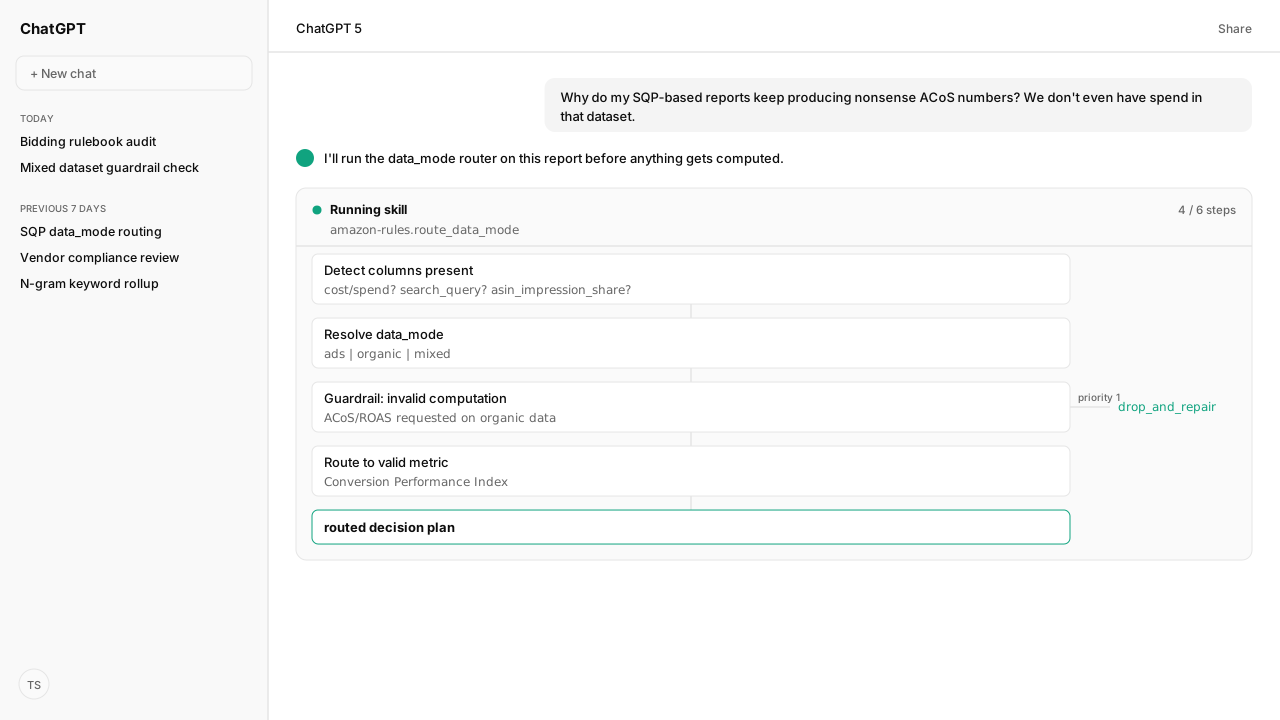
Your SQP report produces nonsense ACoS because the export has no cost or revenue fields. The data-mode-router Skill fixes that before any metric runs: it resolves an SQP export to organic mode, blocks ACoS and return on ad spend (ROAS), and routes to Conversion Performance Index (CPI) plus share-funnel diagnostics instead of spend-based metrics.
The raw Amazon report does not label the dataset for downstream calculations. Grounded in Amazon Agent Atlas's Keyword Analysis Decision Framework, the Skill inspects the columns, assigns data_mode as ads, organic, or mixed, and blocks ACoS or ROAS unless a record contains ad-backed cost and revenue. An SQP export pulled through the Amazon Selling Partner MCP therefore resolves to the framework's organic mode.
ChatGPT, Claude, Perplexity, Microsoft Copilot, and whatever comes next know nothing about your business out of the box. Your competitors use those tools too. Kuudo gives those same tools your edge: your data, your rules, and the way your business operates. That means your account as it is right now, your judgment running every time, and your call before anything changes. The Amazon Ads MCP and Selling Partner MCP supply live campaign and retail signals, Skills enforce your routing rules on every run, Amazon Agent Atlas supplies Amazon-specific guidance, and approval controls keep material changes in your hands.
| Mode | Required evidence | Allowed output |
|---|---|---|
ads | Cost and revenue | ACoS and ROAS |
organic | SQP fields, no spend | CPI and share gaps |
mixed | Both column families | Two tagged records |
How do you calculate Amazon ACoS?
Calculate Amazon advertising cost of sales (ACoS) by dividing ad spend by attributed ad sales and multiplying by 100:
ACoS = ad spend / attributed ad sales × 100
If an Amazon Ads report shows $250 in spend and $1,000 in attributed ad sales for the same scope, the ACoS is 25%. The numerator and denominator must describe the same campaigns, dates, marketplace, currency, and attribution context. A spend value from one report joined to total sales from another does not produce Amazon ACoS.
A good ACoS is account-specific. Break-even ACoS comes from the product's contribution margin, while a target can move above or below that point based on growth, launch, rank, or profit goals. Kuudo keeps those account rules in a Skill and pairs them with live Amazon Ads data. That combination lets an agent apply the formula consistently even when the use case is temporary, the account scales, or the AI client changes.
The formula is simple; deciding whether the inputs are valid is the hard part. Search Query Performance (SQP) has search-funnel activity and share fields, but it does not contain the advertiser's actual spend and attributed ad sales. That is why the router below checks the data mode before it allows the calculation.
The router tags every dataset ads, organic, or mixed before a metric runs
Before the agent computes anything, the data-mode-router Skill runs its Quick Router logic to look at which columns a dataset actually has. This step doesn't exist in the raw Amazon data, it's the Skill applying Atlas's codified rules as a structured process, the same way every time. Ad signals are cost or spend, campaign_id, ad_group_id, keyword, match type, placement, the columns that exist because the Amazon Ads MCP mirrors those fields straight out of your live account, not because someone typed labels into a spreadsheet. SQP signals are search_query, total_impressions, asin_impression_share, and the rest of the Search Query Performance schema. If a dataset has ad signals and no SQP ones, it's tagged ads. If it has SQP signals and no ad ones, it's tagged organic by the Skill. Both together, it's mixed.
That tag isn't a note in a log somewhere, it's required on every record the Skill emits. Here's what an ads-mode row looks like coming out of the n-gram rollup:
{
  "data_mode": "ads",
  "ngram": "wireless headset",
  "n": 2,
  "imp": 12450,
  "clk": 386,
  "cost": 782.14,
  "orders": 41,
  "revenue": 4312.0,
  "metrics": {
    "ctr": 0.031,
    "cvr": 0.1061,
    "cpc": 2.027,
    "roas": 5.514,
    "acos": 0.181
  }
}
Notice data_mode comes before the metrics that depend on it, not after. This is also the point where the router's job ends and a different rulebook picks up. Once a keyword resolves to ads, whether to actually change a bid on it is a separate question, governed by a different Quick Router keyed on bidding_state, not data_mode, over in the Sponsored Ads Bidding Configuration Decision Framework. The data_mode router decides what a signal even means. That framework decides whether to act on it.
ACoS in organic mode triggers the Skill's priority-one guardrail
Kuudo's data-mode-router Skill doesn't treat "don't compute ACoS on organic data" as a soft preference, it enforces it as code, every run. It's rule one of seven in the decision-precedence ladder the Skill applies, grounded by Atlas, ranked above thin-data holds, safety negatives, pull-back actions, scale moves, and mining or hygiene work. Invalid computations get dropped and repaired before any other business rule even gets evaluated. Nothing outranks it, and nothing in Amazon's own reporting enforces this ranking for you.
The Skill's config defaults reinforce the same rule structurally, not just procedurally: target_acos, target_roas, and break_even_acos only exist under the ads branch of the targets config. There's no organic branch for an ACoS target to live in, because organic data was never going to have spend to target against. Those same three constants (0.25, 4.0, 0.30 in Kuudo's defaults) are actually anchored at the ad-group level by the Sponsored Ads Bidding Configuration Decision Framework mentioned above, the data-mode-router Skill just reads them, it doesn't own them.
precedence:
  1: invalid_computation   # drop/repair, e.g. ACoS computed in organic mode
  2: hold_thin_data
  3: safety_negative
  4: pull_back
  5: scale_unlock
  6: mining_hygiene
  7: creative_ops
targets:
  ads:
    target_acos: 0.25
    target_roas: 4.0
    break_even_acos: 0.30
# organic has no target_acos / target_roas key at allMixed data doesn't get blended into one number, it gets split into two
Some exports carry both column families at once, a keyword report joined against a campaign report, say. When that happens, the Skill's mixed-dataset guardrail doesn't average the two into one blended figure. It computes ads metrics only where ads-backed cost and revenue actually exist, applies organic rules only to signals backed by SQP, and emits two separate records for the same keyword, each carrying its own data_mode tag, with no cross-mixing of numerators and denominators between them.
For "wireless headset," that looks like this:
[
  {
    "data_mode": "ads",
    "ngram": "wireless headset",
    "n": 2,
    "imp": 12450,
    "clk": 386,
    "cost": 782.14,
    "orders": 41,
    "revenue": 4312.0,
    "metrics": { "ctr": 0.031, "cvr": 0.1061, "cpc": 2.027, "roas": 5.514, "acos": 0.181 }
  },
  {
    "data_mode": "organic",
    "ngram": "wireless headset",
    "search_query": "wireless headset",
    "total_impressions": 58210,
    "total_clicks": 1904,
    "conversion_performance_index": 96,
    "share_funnel_gaps": { "impression_to_click_gap_pp": -0.4, "click_to_purchase_gap_pp": 0.6 }
  }
]
Two records, two tags, nothing shared between their numerators and denominators. The alternative, one blended row with an ACoS computed against a mix of real spend and organic volume, is exactly the invalid computation rule one exists to catch.
Organic mode routes to Conversion Performance Index, not ACoS
Blocking ACoS on organic data is only half the rule, the Skill also has to route to something valid, and for organic that's Conversion Performance Index and the impression-to-click-to-purchase share funnel. Neither is a field Amazon's Search Query Performance report gives you directly, the Skill calculates both from the shares Amazon does report. CPI is (your_purchase_rate / market_purchase_rate) x 100, banded under 80 as underperforming, 80 to 120 as competitive, and above 120 as outperforming. Alongside it, impression_to_click_gap_pp and click_to_purchase_gap_pp show exactly where your ASIN is losing share against the market baseline for that query.
Below the CPI sufficiency floor (asin_clicks >= 20 and total_clicks >= 100), the Skill holds the decision instead of guessing on thin data. The framework also requires at least 100 total impressions and 10 total clicks for organic claims, rising to 200 impressions for 2-grams. Organic actions cool down for 7 days and operations actions for 14, so the same finding doesn't refire every day. Here's a full routed decision for one query, including the guardrail check that blocked ACoS on the way in:
{
  "report_id": "sqp-ngram-2026-08-07",
  "routing": {
    "columns_detected": ["search_query", "total_impressions", "total_clicks",
      "asin_impression_share", "asin_click_share", "asin_purchase_share",
      "total_median_click_price"],
    "ads_signals_present": false,
    "organic_signals_present": true,
    "resolved_data_mode": "organic"
  },
  "guardrail_checks": [
    {
      "rule": "invalid_computation",
      "precedence_rank": 1,
      "trigger": "ACoS/ROAS requested but data_mode=organic (no cost/spend columns)",
      "result": "blocked",
      "action": "drop_and_repair",
      "repair": "substitute Conversion Performance Index + share funnel gaps"
    }
  ],
  "decisions": [
    {
      "data_mode": "organic",
      "search_query": "dog bed large",
      "asin": "B00XYZ...",
      "market": { "total_impressions": 123456, "total_clicks": 1000, "total_purchases": 20, "purchase_rate": 0.020 },
      "asin_metrics": { "clicks": 155, "purchases": 2, "purchase_rate": 0.0129, "impression_share": 0.024, "click_share": 0.031, "purchase_share": 0.020 },
      "conversion_performance_index": 64.5,
      "share_funnel_gaps": { "impression_to_click_gap_pp": 0.7, "click_to_purchase_gap_pp": -1.1 },
      "flags": { "thin_data": false },
      "recommendations": ["pdp_update"]
    }
  ]
}
A CPI of 64.5 lands below 80, underperforming the market, which is exactly why recommendations queues pdp_update rather than a bid change. Behind that field sits the ASIN-level diagnostic layer, running its own IF-THEN rules on top of the share funnel: high query volume with low impression share routes to seo_update plus pdp_update, purchase share trailing click share alongside slow shipping routes to shipping_speed_fix. ACoS was never going to point you at any of that.
What happens next: push the routed decision into the Amazon Agent Data layer
When Kuudo runs this against a fresh batch of reports, the agent doesn't just resolve data_mode, fire the guardrail check, and hand back a JSON blob to stop there. It pushes the routed decision into the Amazon Agent Data layer, where routed decisions sit alongside the raw SP-API (Selling Partner API) and Ads API pulls they came from, so next week's report starts from the same schema instead of guessing again. The recommendation it queued, pdp_update, seo_update, shipping_speed_fix, becomes a scheduled run of the same Skill that reruns on the 7-to-14-day cooldown instead of a one-off answer the operator has to remember to request again.
If the resolved mode had come back ads instead, the same decision hands off to a different ladder entirely, applied by a different Skill: the bid-thrash precedence covered in the bidding rulebook guide, which decides whether to actually move a bid once the signal underneath it is already confirmed valid. The data-mode-router Skill decides what a number means. The bidding rulebook's Skill decides what to do about it once it does.
That's the pattern underneath the whole rulebook: validate the signal before you ever act on it, structured Skill logic doing work Amazon's raw reports never do on their own, and never let the two ladders answer each other's questions.
Next in the series: how the ASIN-level diagnostic decision object turns a Conversion Performance Index gap into a queued PDP or SEO fix.
Stop shipping reports with the wrong metric on the wrong data
Bring Kuudo the report-routing workflow the agent should run. Kuudo will map the data-mode-router Skill, Amazon MCP pulls, Atlas grounding, and private-beta setup.
Run this workflow in betaWhat you need to run data-mode routing
- MCP
- Amazon Ads MCP for ads-mode signals; Amazon Selling Partner MCP for the Search Query Performance pulls behind organic mode
- Skill
- data-mode-router Skill, run against any n-gram or ASIN-level rollup before a metric is trusted
- Atlas collection
- amazon_sellers and amazon_ads for SQP and Ads context; decision routing applied by the data-mode-router Skill
- Required subscriptions
- None beyond an Amazon Ads MCP or Selling Partner MCP connection; Search Query Performance data ships free through Brand Analytics for brand-registered sellers
- Last verified
- "2026-08-20T00:00:00.000Z"
What success and failure look like for data-mode routing
| scenario | success | failure |
|---|---|---|
| SQP export requested as ACoS | Router tags data_mode=organic, blocks ACoS, and returns Conversion Performance Index instead | A report shows ACoS computed against an export that never carried a cost column |
| Mixed export with both ads and organic columns | Two tagged records emitted, one ads-backed with ACoS/ROAS, one organic-backed with Conversion Performance Index | One blended number mixing ad spend with organic volume |
| Thin organic sample below the CPI sufficiency floor | hold_thin_data emitted, no Conversion Performance Index claim asserted | A CPI computed on a handful of clicks and presented as a confident claim |
Keep exploring data-mode routing
Use these companion guides to understand the inputs, follow-on analysis, and adjacent workflows behind this playbook.
- The Agent Bidding Rulebook That Prevents Bid Thrash
Decides whether to actually move a bid once the data-mode-router Skill has confirmed the signal is ads-backed and valid.
FAQ
What is the Amazon ACoS formula?
Amazon ACoS equals ad spend divided by attributed ad sales, multiplied by 100. For example, $250 in ad spend divided by $1,000 in attributed ad sales produces a 25% ACoS. Both inputs must come from advertising data for the same reporting scope and attribution context.
What is a good ACoS on Amazon?
There is no universal good ACoS. The useful ceiling depends on contribution margin, growth goals, product maturity, and the account's objective. A break-even ACoS should come from the economics of the product and account; it should not be copied from a generic benchmark.
Why can an SQP report not produce ACoS?
Search Query Performance does not contain the account's actual ad spend and attributed ad sales. Kuudo's data-mode-router Skill applies that check, grounded by Amazon Agent Atlas, and blocks ACoS and ROAS on organic data instead of substituting a market click-price estimate.
What is data_mode, and is it something Amazon provides?
No. It is a tag Kuudo's data-mode-router Skill applies, ads, organic, or mixed, based on the columns a dataset actually contains. Amazon's Ads and Selling Partner APIs do not include this tag natively. The tag is required on every decision record the Skill emits.
How is Conversion Performance Index calculated?
CPI equals your purchase rate divided by the market purchase rate, times 100, where your purchase rate is asin_purchases divided by asin_clicks and the market rate is total_purchases divided by total_clicks. Under 80 is underperforming the market, 80 to 120 is competitive, and above 120 is outperforming.
What happens when a dataset has both ads and organic columns?
The router treats it as mixed and never blends the two into a single number. It computes ads metrics only where ads-backed cost and revenue exist, applies organic rules only to SQP-backed signals, and emits two separate records, one per data_mode, so nothing shares a numerator or denominator across the two.
Why can total_median_click_price not be used to calculate ACoS?
It's a market CPC proxy from Search Query Performance exports, an estimate of typical click price across all sellers on a query, not your actual ad spend. The router excludes it from every ACoS/ROAS gating decision by name, because treating a market proxy as real spend produces exactly the invalid computation the router exists to block.