
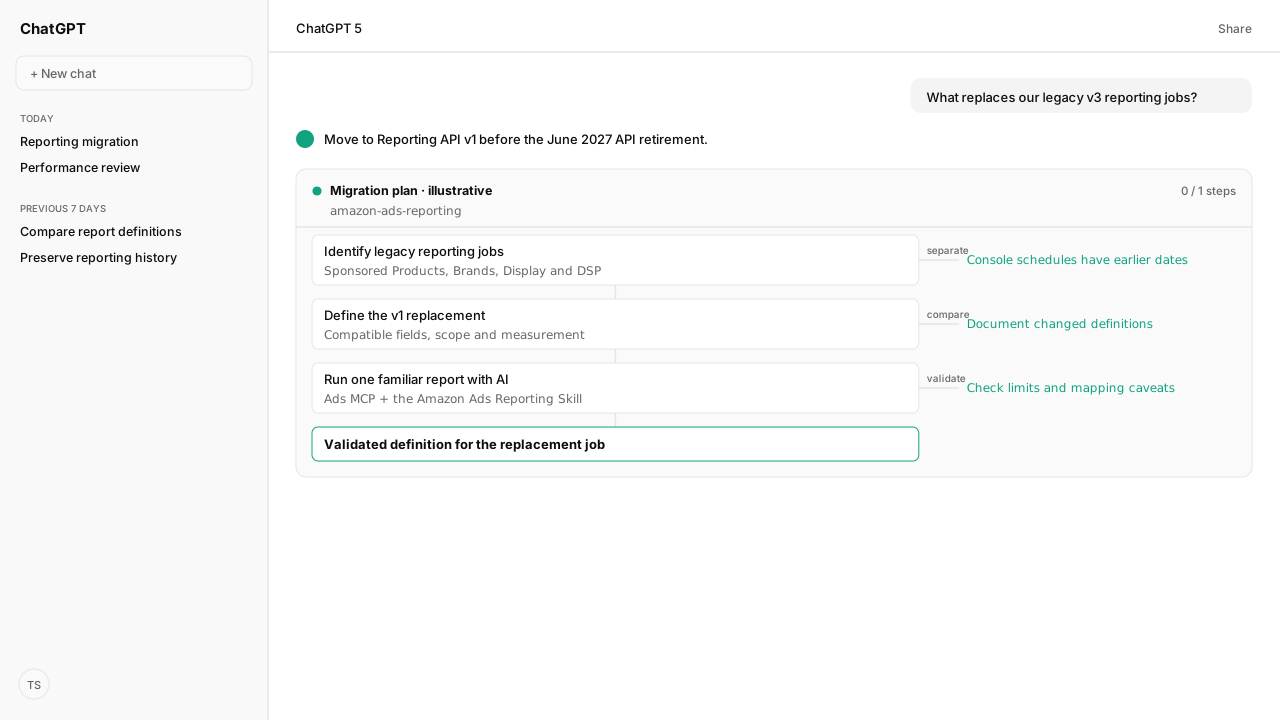
- Amazon lists June 30, 2027 as the hard shutoff for legacy v3 reporting across sponsored ads and DSP. Move affected API workflows before that date.
- Reporting API v1 uses compatible fields instead of fixed report types and supports multidimensional, cross-product and authorized cross-account reports.
- Ads MCP supports v1; the Reporting Skill supplies familiar template mappings and the report lifecycle. Compare definitions before replacing jobs.
Amazon Ads reporting v3 deprecation means legacy sponsored ads and Amazon DSP (demand-side platform) API reporting workflows need a replacement before Amazon's June 30, 2027 shutoff. Reporting API v1 is the successor for ad hoc and periodic reports. Inventory affected jobs, preserve their definitions and compare a v1 result before switching production reporting.
An agency's weekly sales number may exclude particular accounts or count only the advertised products. An endpoint change cannot preserve those rules by itself. Bring the old field list, account exclusions and sales definition to the Amazon Ads MCP and Reporting Skill, so the replacement report gets checked against the number your team has agreed to deliver.
The API sunset covers v3 sponsored ads and DSP reports
Amazon's reporting deprecation covers v3 report types for Sponsored Products, Sponsored Brands, Sponsored Display and DSP. Sponsored ads v2 reporting is also affected. The September 2026 announcement applies across API regions and advertiser types, and identifies June 30, 2027 as the shutoff date. Migrate before that date; the notice does not establish a cutoff hour or timezone. Amazon's deprecation announcement.
Start by finding the integration behind each recurring report. An agency platform, internal script or warehouse connector may own the job even when its output arrives as an ordinary spreadsheet. Record the responsible owner and whether the provider has a migration plan. Campaign metadata exports are outside this reporting retirement.
The legacy console report pages have an earlier December 2026 transition. That is a separate deadline: follow the console migration guide for saved schedules and historical downloads.
Reporting API v1 selects fields instead of fixed report types
Reporting API v1 defines reports through compatible dimensions and metrics. Amazon supports multidimensional, cross-ad-product and cross-account reporting, allowing combinations previously divided across separate report types. Account access and field availability still constrain each request. The v1 overview explains the replacement model.
| Legacy starting point | Reporting API v1 starting point |
|---|---|
| Pick a predefined report type | Select compatible fields and row grain |
| Separate product or account reports | Use supported cross-product and authorized account scope |
| Product-specific metric labels | Use standardized Traffic, Engagement and Conversion categories |
Traffic describes delivery and cost, Engagement describes interaction with the ad, and Conversion describes attributed outcomes. Flexibility does not make every field combination valid. Dimensions, attributes and metrics have compatibility rules; some financial metrics also require currency fields. Amazon's reporting concepts describe those constraints.
Standardized metrics need a comparison before replacement
The same business label can produce a different total after migration. For DSP, conversions now follow the traffic date, when the ad interaction occurred. Base purchases and detail-page-view metrics also include promoted and halo conversions. A promoted-only legacy comparison needs the corresponding promoted metric. Attribution interval suffixes leave metric names; campaign-default windows apply. Amazon's measurement changes explain these differences.
Compare old and new definitions before interpreting a discrepancy as a campaign performance change:
- Match account, campaign, product and date scope.
- Keep row grain, campaign timezone, currency and filters consistent.
- Document attribution and promoted-versus-halo meaning.
- Identify missing fields, derived calculations and required joins.
Track affected reporting jobs in a migration register:
| Record | Capture for each job |
|---|---|
| Legacy job | Report name and integration |
| Owner | Responsible team or provider |
| Definition | Account scope, grain, fields and formulas |
| Replacement | v1 request and field gaps |
| Acceptance | Comparison decision |
Completion alone does not establish legacy-column parity.
One checked v1 report provides a practical migration starting point
Kuudo's Amazon Ads MCP supports v1 report creation and retrieval. The Amazon Ads Reporting Skill adds premade Sponsored Products, Sponsored Brands and Sponsored Display definitions, with mapping notes for partial coverage and split requests. These templates reduce the work of assembling a new field definition; they do not promise exact legacy parity.
Choose one important report, capture its business definition and select the matching template. The connected AI client can prepare the request, create the asynchronous job, preserve its report ID and retrieve the completed files. The practical AI reporting guide provides the full template inventory, reusable reporting brief and copyable request.
Pace automated jobs within Amazon's rate, concurrency and report-size limits. The current v1 guidance applies limits per client ID across advertiser accounts. For continuous, high-volume or near-real-time acquisition, Amazon points teams toward Marketing Stream. Limits and best practices distinguish those use cases.
What happens next: compare one legacy report with its v1 replacement
Assign an owner to the first comparison. Keep its old definition, v1 request, field differences and acceptance decision together, then use that checked pattern for the remaining jobs before the API deadline. Follow the AI migration and reporting workflow when you are ready to run the comparison through Ads MCP and the Skill.
If your team also relies on console schedules, preserve those reports through the earlier unified reporting migration.
Start with a familiar report
Use Amazon Ads MCP and the Reporting Skill to prepare and run a v1 replacement. The practical guide lists the bundled templates and a request you can adapt to your reporting rules.
See the AI reporting workflowWhat you need to run reporting API migration
- scope
- Legacy v3 sponsored ads and DSP API reporting; console schedules have a separate December 2026 timeline
- replacement
- Amazon Reporting API v1; compatible dimensions and metrics with standardized measurement
- automation
- Amazon Ads MCP with authorized access and amazon-ads-reporting v0.4.4 in a compatible AI client
- verification
- Primary Amazon documentation and Kuudo tool/Skill sources checked November 6, 2026; no account report executed for this announcement
Keep exploring reporting API migration
Use these companion guides to understand the inputs, follow-on analysis, and adjacent workflows behind this playbook.
FAQ
Is Reporting API v1 the same as the old sponsored ads v1 reporting API?
No. This announcement concerns the new Amazon Ads Reporting API v1 with flexible field-based report definitions. Use the current v1 documentation and compatible reporting tools rather than infer behavior from an older endpoint version label.
Does an unchanged campaign guarantee matching legacy and v1 totals?
No. Check the date basis, attribution window, currency, report grain and promoted-versus-halo scope. DSP conversion reporting now follows traffic date, and standardized base purchases and detail page views include promoted plus halo conversions.