
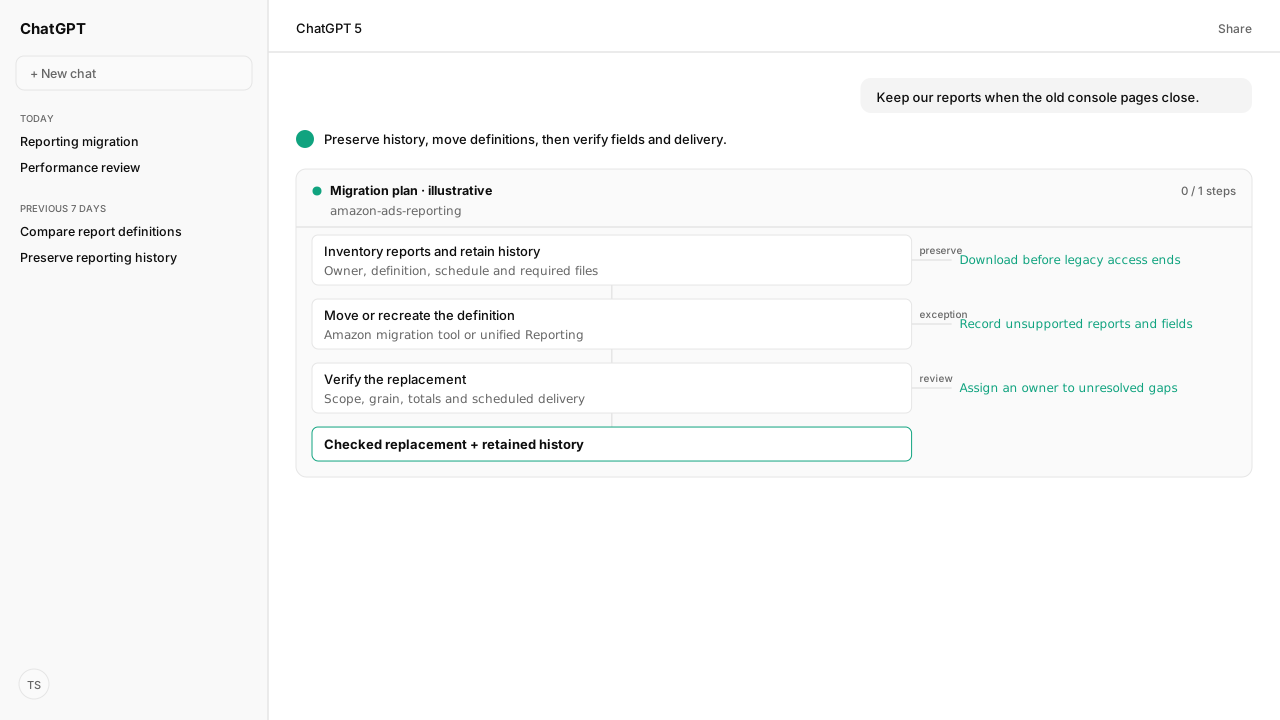
- Legacy console report creation and editing stop December 17, 2026. The old report centers and remaining saved reports, schedules and history close December 31.
- Download required history, move eligible reports with Amazon’s migration tool or recreate them, then check columns, grain and delivery.
- The June 30, 2027 reporting API sunset is separate. Ads MCP and the Reporting Skill offer a v1 automation workflow; they do not migrate console subscriptions.
Amazon unified reporting migration requires moving saved reports and schedules to Reporting, preserving needed historical files, and checking the replacement reports before the old centers close. Amazon plans to disable legacy report creation and editing on December 17, 2026, then remove the legacy centers and remaining saved reports, schedules and history on December 31.
A finance workbook may depend on a particular sales definition, column order or weekly delivery. Record those commitments alongside the legacy report's headers and formulas. AI can help compare that supplied reporting contract with the replacement definition, so a migration marked successful still gets checked against the work your team actually needs.
The December deadlines affect console reports and their history
The legacy sponsored ads and Amazon Demand-Side Platform (DSP) report centers are being replaced by unified reporting. Amazon's migration timeline separates the creation freeze from the final loss of access:
| Date | Planned console change |
|---|---|
| December 17, 2026 | New creation and editing disabled; existing legacy reports become read-only |
| December 31, 2026 | Legacy centers close; remaining saved reports, schedules and history are deleted |
Dates are subject to change; check the current migration guidance and migrate before shutdown.
The separate June 30, 2027 reporting API deadline concerns programmatic integrations. It does not extend access to the old console pages. Teams maintaining API jobs should also read the v3 reporting retirement and v1 replacement guide.
Preserve the reporting contract and download the history you need
Report migration needs an inventory of what the team relies on, including reports that feed someone else's spreadsheet. For each report, record its owner, account and campaign scope, columns, grain, reporting period and downstream use. Capture its frequency, delivery time, timezone, end date and recipients.
Download required historical files while legacy Actions → History remains available. A migrated report definition is not an archive of past downloads. Keep the files in a location your team controls and record the date span retained.
Use a migration register like this blank template:
| Record | Capture for each report |
|---|---|
| Report | Name, owner and downstream use |
| History | File location and date span |
| Replacement | New report and field/grain gaps |
| Delivery | Cadence, timezone, end date and recipients |
| Sign-off | Owner and acceptance date |
A report stays open in the register until its replacement, history and delivery have been checked. Assign an owner to every exception.
Migrate supported reports and recreate the exceptions deliberately
Amazon's self-service migration tool moves eligible active saved or scheduled reports from the past 24 months. Amazon says the tool migrates all saved or scheduled reports; review the full status list.
- Open the legacy sponsored ads or Display, Video, and Audio reports page.
- Select Start migration in the blue banner, then Confirm in Start subscription migration.
- Inspect the status table. Hover over failed migration statuses for the explanation.
- Find successful migrations on Reporting and review their settings.
The current migration limitations exclude some report types and features, including Sponsored Products Video, Sponsored Products or Sponsored Brands prompt reports, benchmark reports and budget reports. Check the current list for your inventory. An available Kuudo Skill mapping does not establish support in Amazon's console migration tool or exact legacy equivalence.
For a manual replacement, open Reporting → Create report or Create report with template. Set the name, account, campaign, country and ad-product filters, columns and reporting period. Amazon requires at least one time dimension, one detail dimension and one metric. Creating unified reports explains these controls.
Under Delivery settings, set recurring daily, weekly or monthly delivery explicitly, including time, timezone, end date and recipients. Check defaults carefully: a one-time report or a broader account scope may not match the old schedule. Select Submit, then confirm that the report appears on Reporting.
Verify report meaning and delivery before switching the team over
A successful migration can still omit columns or remove metrics incompatible with the selected grain. Run old and new reports for the same completed comparison period where possible, and inspect scope and row meaning before totals.
| Check | Question to resolve |
|---|---|
| Scope and grain | Same accounts, campaigns, products, countries, dates and detail level? |
| Fields and calculations | Missing columns, changed formulas or campaign-only metrics repeated across rows? |
| Measurement | Same currency, campaign timezone, attribution and promoted-versus-halo meaning? |
| Delivery | Correct cadence and recipients; does the delivered file or link work? |
For example, legacy top-of-search impression share at keyword or targeting grain becomes campaign-level in unified reporting. Do not sum a campaign-level share repeated across detail rows. Other fields may be omitted, require replacement or have limited history. Missing values are not automatically zero. Field availability and compatibility explains the constraints.
Unified reporting also uses the traffic date for conversions. DSP base purchases and detail page views include promoted plus halo conversions; promoted-only comparisons need the corresponding promoted metrics. Check campaign-default attribution windows when reconciling totals. Amazon's unified measurement explanation covers these definition changes.
For teams choosing programmatic reporting, the Amazon Ads MCP and Reporting Skill support v1 report definitions and retrieval. The practical AI reporting guide provides the templates and request workflow. That is a separate reporting option: the Skill does not move console subscriptions or preserve legacy history automatically.
What happens next: migrate one report and verify its next delivery
Start by manually recreating or checking an important recurring report. Retain its historical files, confirm its replacement definition, document field gaps and verify the next delivery with its intended recipient. Have the owner sign off, then apply that checked process to the remaining inventory before the console deadlines.
For an API-based alternative, follow the AI reporting workflow with premade v1 definitions.
Keep the reporting rules your team relies on
Use your legacy definitions and reporting checks to plan a v1 workflow with Amazon Ads MCP and the Reporting Skill. Follow the practical guide before replacing an existing report.
See the AI reporting workflowWhat you need to run console report migration
- access
- Amazon Ads console access to the relevant accounts and reports; account permissions and report eligibility still apply
- source
- Amazon console migration guidance, updated October 19, 2026; verified November 6, 2026
- automation
- Amazon Ads MCP and amazon-ads-reporting v0.4.4 support the linked programmatic alternative, not migration of saved console schedules
Keep exploring console report migration
Use these companion guides to understand the inputs, follow-on analysis, and adjacent workflows behind this playbook.
FAQ
Does a successfully migrated report preserve every legacy field?
No. Some fields are omitted or incompatible with the new reporting grain. Check the replacement definition and downloaded result against the legacy report and the formulas your team uses.
Do I have until June 2027 to move my saved console reports?
No. The legacy console changes occur in December 2026. June 30, 2027 concerns legacy reporting APIs and does not extend access to the old console pages.