
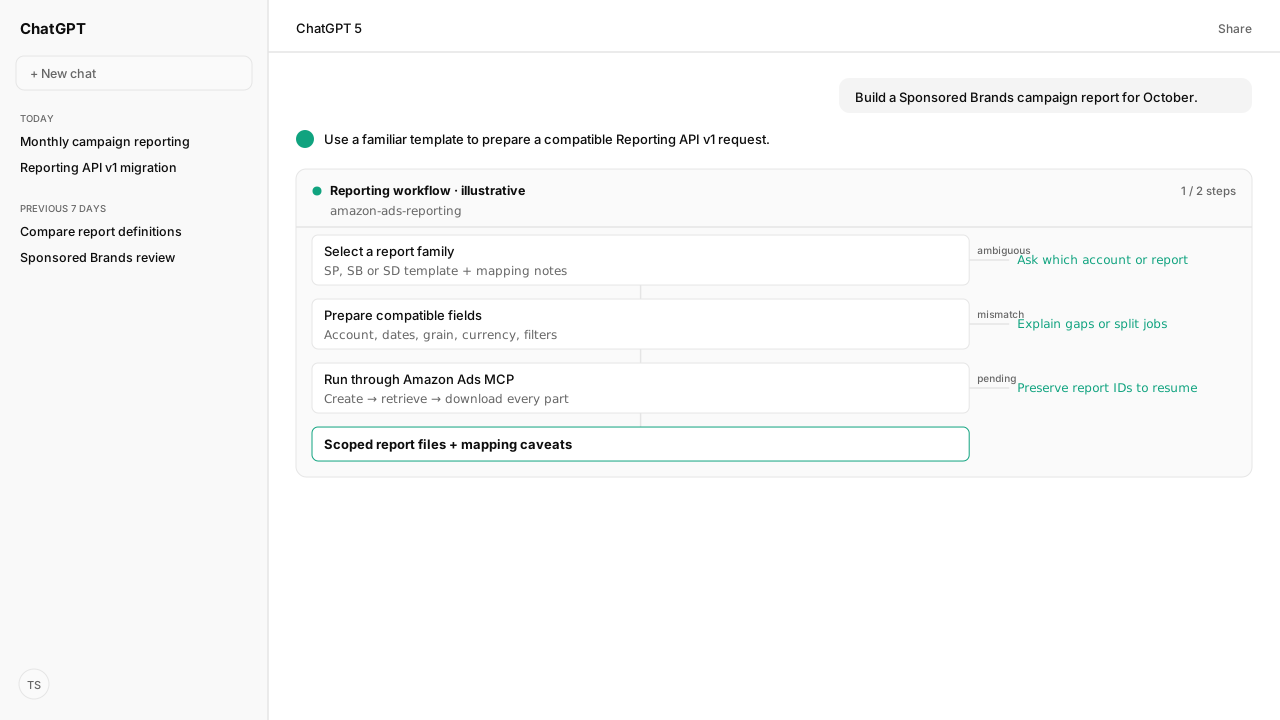
- Amazon Ads MCP supports Reporting API v1. The Amazon Ads Reporting Skill supplies templates, field checks and the asynchronous creation-to-download workflow.
- Start with 17 SP, SB and SD report families. Some mappings are partial or split across jobs; a template is not a guarantee of legacy-column parity.
- Legacy console changes arrive in December 2026, ahead of the June 2027 API sunset. Use the linked announcements to plan schedule migration and historical-file preservation.
- Compare attribution, traffic date, currency and report grain before replacing old reports. Automate ad hoc and periodic requests within Amazon's limits.
Amazon Ads Reporting API v1 reports can be automated with Kuudo's Amazon Ads MCP and Amazon Ads Reporting Skill. Choose a premade template, confirm the account and dates, and let the connected AI client create, retrieve and download the report. Check documented mapping differences before replacing a legacy report.
Your team's definition of “campaign sales” matters as much as the field list. Bring the legacy export, account exclusions and promoted-versus-halo rule into the request. The MCP supplies authorized account access; the Skill applies template mappings to that brief. A missing column or changed conversion definition then becomes an explicit migration decision instead of an unexplained performance swing.
A valid v1 report starts with account scope, grain and compatible fields
Amazon Ads Reporting API v1 builds reports from compatible dimensions and metrics instead of a fixed report type. Dimensions determine how rows aggregate; attributes add context. Before requesting data, settle which authorized accounts and campaigns belong in the report, what each row represents, and which measures answer the business question. Amazon's v1 overview describes the model.
| Definition choice | What to confirm |
|---|---|
| Account scope | Authorized advertiser or supported manager scope and marketplace |
| Row grain | Daily campaign results, search terms, targets or another supported combination |
| Fields | Compatible dimensions, attributes and measures |
| Money | Currency fields and any conversion policy |
| Filters | Ad product, campaign and other intended exclusions |
Amazon groups metrics into Traffic, Engagement, and Conversion categories: delivery and cost, interaction with the ad, and attributed outcomes. Sales metrics require the appropriate budget-currency field. Not every dimension works with every metric; validate custom selections against Amazon's compatibility guidance.
For the retirement dates and what they affect, read the separate legacy API deprecation announcement and console reporting migration guide. The December 2026 console changes and June 2027 API sunset are different deadlines. This guide focuses on using AI to prepare and operate v1 reports.
The Reporting Skill supplies definitions for 17 report families
The Amazon Ads Reporting Skill includes premade definitions for 17 Sponsored Products, Sponsored Brands and Sponsored Display report families. These are the report types operators already ask for, expressed as packaged v1 templates with mapping notes. They save the work of assembling every field list from scratch. They are Skill templates, not fixed report-type selectors imposed by Amazon's new API.
Each family below links to its canonical template. The report catalog connects each template to its detailed mapping reference.
Sponsored Products templates
| Report family | Template |
|---|---|
| Campaign | SP Campaign |
| Audience | SP Audience |
| Purchased Product | SP Purchased Product |
| Targeting | SP Targeting |
| Video | SP Video |
Sponsored Brands templates
| Report family | Template |
|---|---|
| Campaign | SB Campaign |
| Campaign Placement | SB Campaign Placement |
| Keyword | SB Keyword |
| Keyword Placement | SB Keyword Placement |
| Search Term | SB Search Term |
| Search Term Impression Share | SB Search Term Impression Share |
| Attributed Purchases | SB Attributed Purchases |
| Prompts | SB Prompts |
Sponsored Display templates
| Report family | Template |
|---|---|
| Campaign | SD Campaign |
| Advertised Product | SD Advertised Product |
| Targeting | SD Targeting |
| Matched Target | SD Matched Target |
The 17-family count includes partial mappings. Read the package's caveats before choosing a template:
- SB Search Term Impression Share omits legacy per-search-term impression rank and share. Account-wide metrics are not substitutes. SB Prompts provides ad-level performance without the legacy Prompt details dimension.
- SB Category Benchmark has no bundled equivalent. The Skill identifies the gap rather than inventing a definition.
- SP Campaign, SP Targeting and SB Keyword use wrappers containing separate report requests. The SP Campaign prior-year comparison is optional; requested component results need the documented joins. Campaign-grain impression share repeated across detail rows must not be summed.
- DSP has no bundled template in this set. Custom v1 reports remain an option when supported fields and account scope fit the question.
These are v1 starting points with documented omissions, not proof that Amazon's console migration tool reproduces these report types. Console migration coverage and Kuudo template coverage differ. Package mapping boundaries also do not establish that a legacy column is impossible across Amazon's entire API. The mapping references document omissions, derived metrics and join keys.
The MCP and Skill carry a report through creation and delivery
The Amazon Ads MCP supports v1 report creation and retrieval. The Reporting Skill supplies the instructions and templates that make those operations repeatable: resolve account scope, prepare the definition, submit the job, track its status and deliver the files. An MCP connection provides live access; installing the Skill provides the reporting method.
Start with an authorized Managed Amazon Ads MCP connection. Install the full amazon-ads-reporting package, including its references and template assets, in a compatible client using the Skills setup guidance. The Skills library explains how reusable instructions fit alongside account connections. Offline definition generation is possible without a live connection; requesting Amazon data needs one.
Use this editable brief to make the reporting decision explicit:
| Request input | Example choice |
|---|---|
| Business purpose | Monthly campaign performance review |
| Product and family | Sponsored Brands / Campaign |
| Scope | One confirmed authorized advertiser and marketplace |
| Period | October 1–31, 2026, inclusive |
| Grain | Daily campaign results; retain identifiers and currency |
| Measures | Spend, impressions, clicks, purchases, sales and return on ad spend (ROAS) |
| Comparison rule | Document attribution and promoted-versus-halo meaning |
| Delivery | Report IDs, all files, field caveats and any derived columns |
Copy this request into a client with the Skill installed and Ads MCP connected. Replace the period when using it for a later review:
Use the amazon-ads-reporting Skill and my connected Amazon Ads MCP.

Create a Sponsored Brands Campaign report for October 1 through
October 31, 2026, inclusive, with daily results. Resolve the advertiser
account and marketplace first. If the scope is ambiguous, ask me.

Start from the canonical SB Campaign template and mapping. Preserve
its field set and product filter. Include spend, impressions, clicks,
purchases, sales and ROAS in the delivered summary, keeping campaign
IDs and currency. Explain the attribution meaning and any omissions.

State the resolved account, dates, grain, filters and request count,
then run the reporting job. Retrieve its status with bounded polling
and download every completed report part. Return report IDs, files,
warnings and mapping notes. If it is still running when the wait ends,
keep the IDs so we can resume. Do not change campaign settings.
The Skill must resolve the reporting advertiser identifier rather than substitute a numeric marketplace profile ID. It preserves canonical template fields or validates custom fields against the current catalog; when the integration lacks a catalog operation, it consults Amazon's current field documentation. Wrapper templates become individual requests, with documentation-only keys removed before submission. Skill workflow.
Amazon generates reports asynchronously. A submitted job can be PENDING or PROCESSING; COMPLETED and FAILED are terminal states. Completion can return multiple files and field warnings. Download every part and distinguish a completed empty result from a failed or unfinished job. The prompt above is an instruction template, not evidence that a report was run for this guide. Amazon quickstart.
Migration depends on matching definitions and respecting report limits
Legacy report migration is complete when the new output answers the same business question with documented differences. Compare definitions before explaining a changed total as better or worse campaign performance.
| Comparison check | What to preserve or explain |
|---|---|
| Scope | Accounts, marketplace, campaigns and product filters |
| Row meaning | Dimensions, grain, dates and campaign timezone |
| Money | Currency and any conversion method; avoid mixed-currency sums |
| Attribution | Traffic date, campaign-default window and promoted/halo scope |
| Mapping | Missing fields, derived columns and split-report join keys |
| Completeness | Every output part, field warnings and nulls distinct from zero |
Two Amazon DSP (demand-side platform) changes deserve particular attention. Conversion metrics now follow the traffic date, the date of the ad interaction. Base metrics such as purchases and detail page views now include promoted and halo conversions. A promoted-only legacy comparison needs the appropriate promoted metric. Neither change is resolved by renaming a CSV column. Amazon's measurement changes.
Attribution intervals also leave metric names: base metrics follow campaign defaults. Amazon documents seven days for Sponsored Products sellers and fourteen for vendors; most other products use fourteen days, while DSP flexible windows follow campaign configuration. Preserve the applicable definition in the comparison rather than assuming every reporting request can override it.
Automate the reporting work within Amazon's operating limits
Reporting API v1 suits ad hoc and periodic reports. Amazon's v1-specific guidance applies rate and concurrent report limits per client ID across advertiser accounts. Those limits do not create a separate guaranteed reporting allowance for every customer or advertiser. Pace requests, back off on throttling and split oversized reports into smaller date ranges or field sets. Limits and best practices.
For continuous, high-volume or near-real-time acquisition, Amazon recommends Marketing Stream. The reporting Skill automates the definition and delivery work; it does not remove Amazon's quotas. Keep the validated report brief with the files so a later run can reuse the intended scope and measurement rules.
What happens next: replace one legacy report with a checked v1 definition
Choose one report your team already uses. Select its template, supply the reporting brief and compare a completed v1 result with the legacy definition for the same period. Keep the request, mapping decisions and reconciliation notes together. Once the comparison is understood, reuse that definition for subsequent periodic requests within the available reporting capacity.
A useful migration preserves the business meaning of the report as well as the ability to generate it.
For the next diagnostic, see why search-term report grain changes the totals you can compare.
Run familiar reports on the new API
Connect Amazon Ads MCP and add the Reporting Skill to your AI client. Bring your account scope and reporting rules; start with a template and check the output against the decisions your team needs to make.
Request beta accessWhat you need to run v1 report automation
- MCP
- Amazon Ads MCP with authorized advertiser-account access and v1 report creation/retrieval tools
- Skill
- amazon-ads-reporting v0.4.4; install the full package, including references and template assets, in a compatible AI client
- Required subscriptions
- Kuudo account, Amazon Ads authorization and permissions for the requested account and fields
- verification
- Verified November 6, 2026 against Amazon documentation, the public Skill package and Kuudo's MCP tool/schema catalog; no authenticated report was run for this guide
What success and failure look like for v1 report automation
| signal | meaning |
|---|---|
| Definition prepared; no job submitted | Offline output only. No Amazon performance data has been retrieved. |
| PENDING or PROCESSING with a report ID | Preserve the ID and resume bounded retrieval; do not submit a duplicate job. |
| COMPLETED with report parts | Download every part, inspect warnings, then reconcile fields and totals. |
| FAILED or incompatible fields | Inspect the returned reason and repair the request before retrying. |
Keep exploring v1 report automation
Use these companion guides to understand the inputs, follow-on analysis, and adjacent workflows behind this playbook.
FAQ
Does the Reporting Skill move my saved Amazon console schedules?
No. Use Amazon's console migration tool or recreate those schedules in unified reporting. The Kuudo Skill builds and operates v1 API reports; keep schedule migration and historical-file preservation as separate tasks.
Can I use the Skill without connecting Amazon Ads MCP?
The Skill can prepare report definitions offline. Live account discovery, report submission, retrieval and downloads need a configured v1-capable integration and authorized account access.
What if my v1 report is still processing?
Keep the report ID and resume retrieval with bounded polling. A still-processing report is different from a failed job or a completed report with no rows.