
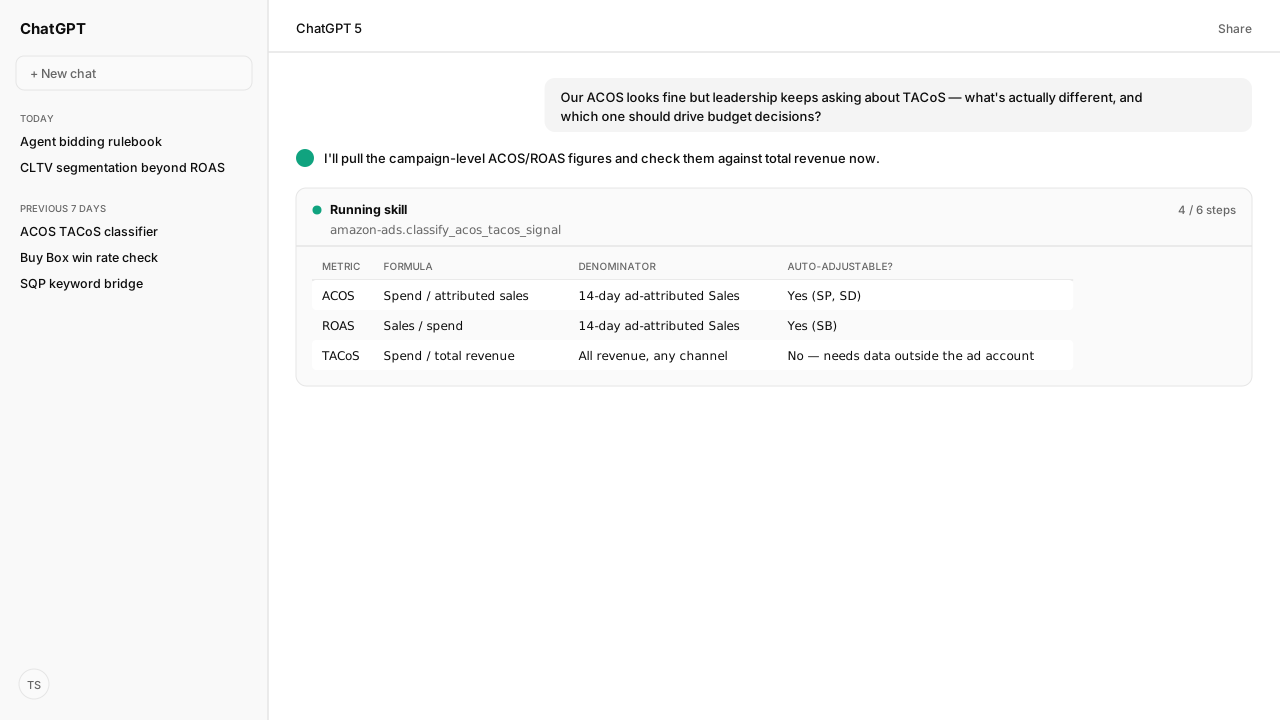
- ACOS (Advertising Cost of Sales) equals ad spend divided by attributed sales. It's the exact metric Amazon's Ads API automates budget rules on for Sponsored Products and Sponsored Display.
- TACoS (Total Advertising Cost of Sale) equals ad spend divided by total revenue, not the same ad-attributed Sales figure ACOS uses. Same spend number, a different, bigger denominator.
- Amazon can automatically raise a Sponsored Products or Sponsored Display campaign's budget when ACOS meets a threshold you set. There's no equivalent automated rule for TACoS, because TACoS needs revenue data that lives outside the ad account.
- Sponsored Brands automation runs on ROAS (Return on Advertising Spend) instead of ACOS. Same underlying spend-to-sales relationship, a different metric name and a different threshold direction.
TACoS vs ACoS is a comparison of denominators. ACOS (Advertising Cost of Sales) is the percent of attributed sales spent on advertising, calculated by dividing total spend by attributed sales. TACoS (Total Advertising Cost of Sale) is the same spend number divided by a different, bigger denominator: your total revenue across every channel, not the 14-day ad-attributed Sales figure ACOS uses.
The ACOS formula is Amazon's own definition, and the exact metric its Ads API automates budget rules on for Sponsored Products and Sponsored Display. A brand lead asked me on Slack: "our ACOS looks fine on every campaign, so why does leadership keep asking about TACoS like something's wrong?" ACOS and TACoS aren't the same question asked twice. They're two different questions that share a numerator.
A generic answer stops at "TACoS looks at total sales, ACOS doesn't," which is true and useless for deciding what to do about it. What changes the answer for a specific account is which of the two moved and why:
- ACOS fine, TACoS climbing usually means organic sales are softening, not that the campaigns got worse.
- No per-campaign budget rule can see that, because a per-campaign rule only ever reads that campaign's own attributed sales.
I asked our agent to pull both numbers side by side through the Amazon Ads MCP, grounded by Amazon Agent Atlas against Amazon's own metric definitions, so the two figures get compared on purpose instead of getting noticed separately by two different people in two different meetings.
ACOS has an exact formula, and Amazon automates budget decisions on it directly
Amazon's own documentation defines ACOS precisely: total spend divided by attributed sales, supported for Sponsored Products and Sponsored Display campaigns specifically. This isn't a community approximation — it's a named metric in Amazon's Ads API that a budget rule can reference directly by its metricName.
The agent reads the live rule contract through the Amazon Ads MCP and can set one up the same way Amazon's own documentation demonstrates it:
{
  "budgetRulesDetails": [
    {
      "name": "SAMPLE_BUDGET_RULE_ACOS",
      "ruleType": "PERFORMANCE",
      "duration": {
        "dateRangeTypeRuleDuration": { "startDate": "20201121" }
      },
      "recurrence": { "type": "DAILY" },
      "budgetIncreaseBy": { "type": "PERCENT", "value": 10 },
      "performanceMeasureCondition": {
        "metricName": "ACOS",
        "threshold": 20,
        "comparisonOperator": "LESS_THAN_OR_EQUAL_TO"
      }
    }
  ]
}
That rule increases a Sponsored Products or Sponsored Display campaign's budget by 10% automatically the day its ACOS is at or below 20%, no manual check required.
TACoS asks the same question against a bigger number
ACOS's denominator, Amazon's "Sales" column, is explicitly scoped: the total product sales you've received on your ads within 14 days from the date your ad was clicked. That's ad-attributed revenue, inside a fixed window. TACoS keeps the same spend number as its numerator but swaps in total revenue across every channel, ad-attributed or not, as the denominator.
That's why the two can genuinely disagree. A product with strong organic sales can carry a mediocre ACOS on paper while its TACoS stays low, because ads are a small slice of a large total. A product losing organic traction can hold a perfectly healthy ACOS on every campaign while its TACoS climbs steadily, because ads are covering a growing share of a shrinking total. Neither number is wrong. They're measuring the same spend against two different totals.
Total revenue is the piece an ad account can't see on its own, since it lives in order and settlement data, not in ad reporting. The agent reads it through the Selling Partner MCP and computes TACoS against that figure directly, rather than approximating total revenue from ad-attributed sales alone, which would just recompute ACOS with extra steps.
Sponsored Brands has no ACOS option at all, automated or otherwise
ROAS, return on ad spend, is total product sales divided by total advertising spend, the mirror of ACOS's spend-divided-by-sales relationship, expressed as a multiplier instead of a percentage.
Amazon's performance-based rules documentation scopes each metric to specific ad types: ACOS, click-through rate, and conversion rate are available for Sponsored Products and Sponsored Display only. Sponsored Brands isn't offered ACOS, click-through rate, or conversion rate as a rule metric at all; its options are impression share, new-to-brand percentage, and ROAS, which is the one metric available across all three ad types.
The agent checks which metric a given ad type actually supports before it proposes a rule, rather than assuming ACOS is universal across every campaign type, which would produce a rule Amazon's API rejects outright.
Efficiency ratios can be scoped, not just totaled
ACOS and TACoS aren't limited to whole-account totals. Amazon Marketing Cloud queries define ntb_ACOS, a new-to-brand-scoped version: ad spend divided by new-to-brand sales only, multiplied by 100. It answers a narrower question than portfolio ACOS does: how efficiently is this campaign specifically acquiring first-time customers, separate from repeat buyers padding the overall number.
The agent pulls this scoped definition from the same Atlas-grounded corpus as the portfolio-level formula, rather than guessing that a segment-level metric follows the same math by assumption. Amazon Marketing Cloud's own query templates spell out ntb_ACOS explicitly, so the scoped ratio is retrieved, not inferred.
A campaign can carry a fine blended ACOS while its ntb_ACOS is considerably worse, if most of its attributed sales are repeat customers who would likely have bought anyway. That's a different finding than a bad blended ACOS, and it calls for a different fix: better targeting for acquisition, not a lower bid across the board.
Amazon advertising ROI reads at two levels: ROAS for each campaign, TACoS for the business
To analyze Amazon advertising ROI, read it at both levels. Amazon's ROAS divides ad revenue by ad spend and, in Amazon's words, "tells you how much money you earn for every dollar you invest in advertising." That is a campaign's return on its own ad-attributed sales. TACoS is the business's view: the same spend against everything the store sold.
Neither one is profit. Return on investment in the accounting sense also subtracts what the product cost, and product cost isn't in the ad account. The ACoS formula guide turns contribution margin into a break-even ACoS, the line where ad spend stops paying for itself.
Improving the return works on the same levels:
- Spend less for the same sales. Cut spend on searches that don't convert, and pay less on clicks less likely to convert. The Amazon PPC guides cover each lever.
- Give more budget to what returns the most. A performance-based budget rule raises a budget when ROAS or ACOS meets your threshold, measured over the previous 7 days for sellers and 14 for vendors. It only raises budgets, so a campaign that stops returning needs a person or an agent to cut it.
- Measure what ads outside Amazon return. Amazon Attribution shows how search, social, display, video and email ads drive shopping activity and sales on Amazon, which Amazon describes as understanding the ROI of that marketing.
What happens next: set the budget rule on the metric each ad type supports and track TACoS separately
The agent sets the automated budget rule on the metric the ad type actually supports, ACOS for Sponsored Products and Sponsored Display, ROAS for Sponsored Brands, and tracks TACoS separately as a recurring Skill through the Amazon Agent Data layer, since no budget rule can watch a number that lives outside the ad account.
When ACOS holds steady but TACoS starts climbing, that's the flag that the real problem isn't the campaign, it's the organic sales the campaign used to have help from. Two metrics, one spend number, and the gap between them is the actual signal. Everything else is a rounding argument.
Next: the same performance-based rule mechanics applied to bids instead of budget, in Amazon PPC Bidding Rules That Prevent Bid Thrash.
Stop reconciling ACOS and TACoS by hand
Bring us your budget-rule workflow. In a private-beta session we'll map the Amazon Ads MCP read, the Atlas-grounded metric classifier, and the recurring Skill that tracks TACoS alongside the ACOS/ROAS rules Amazon already automates.
Run this workflow in betaWhat you need to run TACoS reporting
- MCP
- Amazon Ads MCP for live ACOS/ROAS reads and Sponsored Products/Display budget-rule automation
- Skill
- acos-tacos-portfolio-check, a recurring comparison of per-campaign ACOS/ROAS against portfolio-level TACoS
- Atlas collection
- amazon_ads, the rule corpus with the exact ACOS/ROAS formulas and budget-rule API contract (playbooks: Performance-based rules; Performance metrics; Advertised product report for Sponsored Products; Use case: New-to-brand customers)
What success and failure look like for TACoS reporting
| condition | interpretation |
|---|---|
| ACOS within target, TACoS also within target | Ad spend is efficient and isn't carrying an outsized share of total revenue. No action needed. |
| ACOS within target, TACoS climbing | Each campaign looks efficient on its own ad-attributed sales, but ads are becoming a bigger share of total revenue than before. Check whether organic sales are declining, not whether the campaigns are. |
| ACOS over target, TACoS flat or healthy | One campaign is inefficient, but total revenue isn't dependent on it. Fix the campaign; this isn't a portfolio-level problem yet. |
| ACOS over target, TACoS also climbing | Both signals agree, and it is the case a budget rule can't handle, because Amazon's budget rules only raise budgets. Cut the campaign's wasted spend first, then check whether organic sales are falling. |
Keep exploring TACoS reporting
Use these companion guides to understand the inputs, follow-on analysis, and adjacent workflows behind this playbook.
The same performance-based rule mechanics this guide's budget-rule example uses, applied to bids instead of budget.
FAQ
What does ACOS stand for and how is it calculated?
Advertising Cost of Sales (sometimes written ACoS). Amazon's own definition: the percent of attributed sales spent on advertising, calculated by dividing total spend by attributed sales. It's supported for Sponsored Products and Sponsored Display campaigns.
What does TACoS stand for and how is it different from ACOS?
Total Advertising Cost of Sale. Same idea as ACOS, spend divided by sales, but the denominator is your total revenue across every channel, not just the 14-day ad-attributed Sales figure ACOS uses. A product can have a healthy ACOS and a rising TACoS if organic sales are falling.
Can Amazon automatically adjust my budget based on ACOS?
Yes, upward, for Sponsored Products and Sponsored Display. A performance-based budget rule can specify ACOS as the metric name with a threshold and comparison operator, and it raises the daily budget by the percentage you set when the condition is met. Budget rules only increase budgets; when the condition isn't met, the campaign's normal daily budget applies.
Is there an automated rule for TACoS the way there is for ACOS?
No. TACoS needs total revenue data that doesn't live inside the ad account, so Amazon's budget-rule API has no TACoS metric option. Tracking it requires pulling revenue from outside the ads system and comparing it yourself.
Why does Sponsored Brands use ROAS instead of ACOS for automation?
Sponsored Brands has no ACOS option in Amazon's performance-based rules; its available metrics are impression share, new-to-brand percentage, and ROAS. ACOS, click-through rate, and conversion rate are scoped to Sponsored Products and Sponsored Display only. ROAS is the one metric available across all three ad types, expressed as a multiplier instead of ACOS's percentage.
What is ntb_ACOS?
A new-to-brand-scoped version of ACOS used in Amazon Marketing Cloud queries: ad spend divided by new-to-brand sales only, times 100. It answers how efficiently a campaign is acquiring first-time customers specifically, separate from its overall ACOS.
What's a reasonable ACOS threshold to automate on?
Amazon's own documented example rule increases Sponsored Products or Sponsored Display budget by 10% when ACOS is at or below 20%. That's an example threshold from Amazon's API guide, not a universal target; the right number depends on your margin structure.