
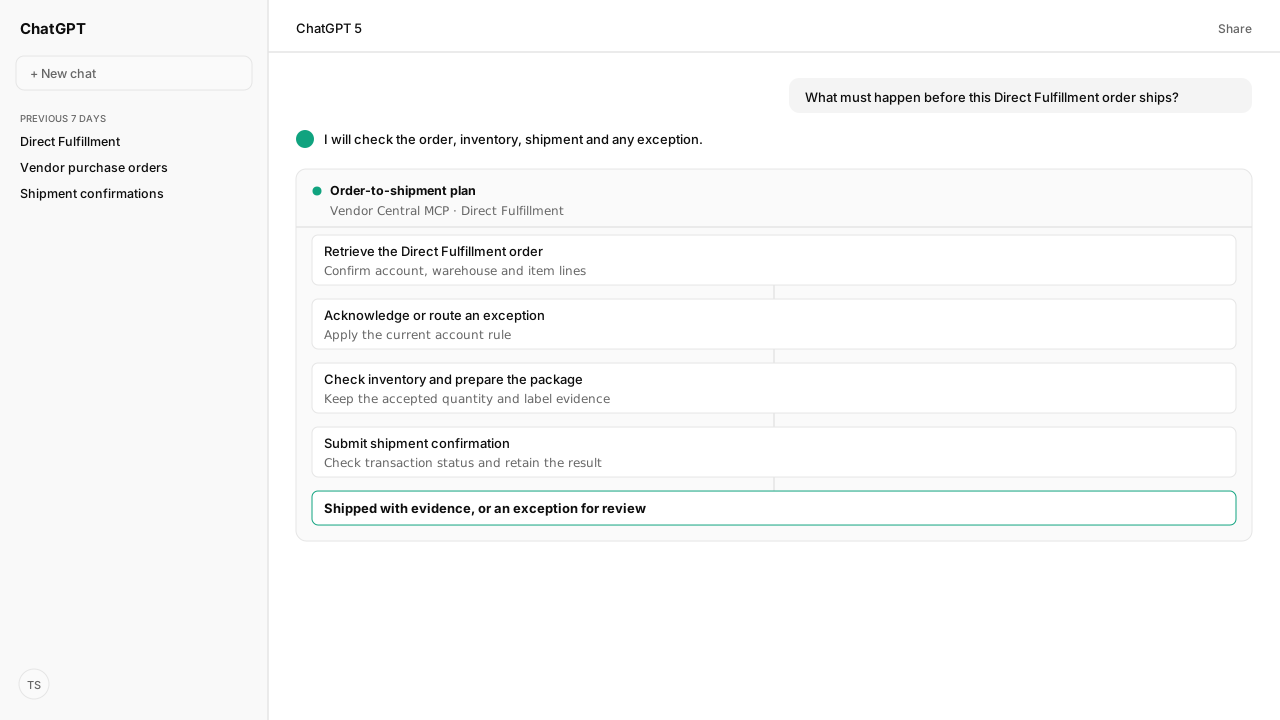
- Amazon Direct Fulfillment is a 1P vendor program: the customer buys from Amazon, and the vendor ships the order directly to that customer.
- Check program and API access, retrieve the order, decide whether the whole order can ship, acknowledge it, keep each warehouse inventory feed current, and confirm the shipment.
- Amazon pages disagree on some acknowledgement, inventory and confirmation timings. Use the current policy for your vendor account, and keep transaction status and shipment evidence with the order.
Amazon Direct Fulfillment is a Vendor Central program: Amazon takes the customer order and the vendor ships it from its warehouse. Enrollment is a separate account step; the API runs an enabled workflow. For each order, retrieve and accept or reject the whole order, update warehouse inventory, then confirm shipment and verify Amazon processed it. Use the account’s current deadlines.
The operator question is practical: “Amazon sent us the order. What must happen before the parcel leaves, and how do we know Amazon accepted each message?” An order visible in a feed is only the beginning. A sent acknowledgement or shipment confirmation can still fail processing.
One unavailable line forces a decision on the whole order. A shipment message that Amazon has not processed leaves a second, quieter gap: the parcel can be gone while the order still looks unfinished. With authorized Vendor Central MCP access, the agent checks the actual lines and transaction results. Amazon Agent Atlas supplies the whole-order and confirmation rules; your warehouse cutoff decides when the exception reaches a person.
Direct Fulfillment starts with an enabled vendor account, not an API enrollment call
Direct Fulfillment is a first-party vendor flow: Amazon takes the customer order and the vendor ships it from its own facility on Amazon’s behalf. It is distinct from Fulfillment by Amazon, where Amazon holds seller inventory in its network. Amazon’s vendor API directory lists orders, inventory, shipping, payments and transaction-status APIs for vendors already in the program. Those operations do not enroll a vendor.
Before an agent reads orders through the Vendor Central MCP, confirm the vendor code and warehouse are enabled for Direct Fulfillment in Vendor Central. Then verify that the connection has the operations and roles this workflow needs. Amazon's workflow guide, listed under Sources, marks getOrders as restricted and requiring a Restricted Data Token.
Labels and packing slips can have separate restricted access requirements too; one authorized operation does not prove access to every step. The EDI or API setup guide covers the connection routes and their testing.
Each Direct Fulfillment order needs a whole-order acknowledgement
Amazon’s Vendor Direct Fulfillment Orders API retrieves new purchase orders with getOrders and the details of one order with getOrder. The order’s lines, quantities, ship window and warehouse are the starting evidence. The vendor-specific Orders API documentation is listed under Sources below; the seller Orders API is a different surface.
Check every line against physical availability before sending submitAcknowledgement. Amazon’s Direct Fulfillment workflow treats an order as a unit: if one line cannot be fulfilled, the whole order has to be rejected. Record the reason and route the case to the operator; do not quietly accept the available lines and assume a partial order can ship. The Vendor Central MCP gives the agent the order and acknowledgement tools, subject to the workspace policy for writes.
Keep the original order, decision time, acknowledgement payload, transaction ID and final status together. An API submission is asynchronous. getTransactionStatus tells the agent whether Amazon processed it; a successful request alone is not an accepted order state. If the whole order is rejected, update the inventory that made it unfulfillable before another customer order arrives.
Warehouse inventory and package documents must reflect the accepted order
Direct Fulfillment availability is warehouse-specific. Amazon’s Inventory API guide, listed under Sources below, distinguishes partial updates for changed items from a full warehouse update. In a full update, items omitted from that warehouse feed become unavailable; an accidental omission can zero stock. The agent should name the warehouse and update type in its evidence record before sending submitInventoryUpdate, then check the transaction result.
Amazon’s inventory guidance does not state one universal cadence. One page says to update at least daily; another calls for three updates a day. Set the schedule from the current agreement and account policy. For an accepted order, compare the warehouse’s available quantity with the ordered quantity and any pending allocations. If stock is short, route the exception before preparing a parcel rather than substituting a different item.
The Vendor Central MCP also exposes Direct Fulfillment shipping operations for labels and packing slips, subject to authorization. Check the order number, line identifiers, item counts and required documents against the order before the warehouse hands off the package. Customer data in a packing slip or label may require restricted access and a Restricted Data Token; do not assume the managed connection holds that role for every account.
Shipment confirmation needs a processed result and the account’s deadline
After the parcel leaves, submitShipmentConfirmations sends the purchase order number, shipped items, ship date, expected delivery date and tracking information to Amazon. Amazon’s shipment-confirmation tutorial, listed under Sources below, requires every purchase-order line to appear; partial fulfillment is not allowed. A floor denial is a separate exception path when the order cannot be shipped.
The Vendor Central MCP can then check getTransactionStatus, or the operator can use Vendor Central’s Direct Fulfillment Orders view. Amazon says status can take up to ten minutes to appear after submission. Keep the order open until processing succeeds; on failure, retain the returned reason and escalate it with the tracking record.
A missed Required Ship Date does not itself create the Direct Fulfillment chargeback described in Amazon’s program policy, though late fulfillment can still hurt customer service and operational standing. Other violations remain separate, so do not copy a Retail purchase-order chargeback rule into this flow.
What happens next: run one order-to-shipment decision check
Use the following checklist for one purchase order. It is a proposed operating artifact, not a record of an executed customer order. Keep the actual source values and policy version beside each result; the agent can fill it from authorized Vendor Central MCP reads and prepare writes for the applicable approval review.
| Check | Evidence to keep | Continue when | Otherwise |
|---|---|---|---|
| Program and access | Vendor code, warehouse, Direct Fulfillment enablement, authorized operations | The order can be read in the correct account | Resolve enrollment or access before treating the feed as empty |
| Order receipt | Purchase order ID, lines, quantities, required ship date and route | Every line and warehouse is identified | Re-read the order or route an incomplete record |
| Whole-order decision | Physical stock, line check, acknowledgement time and transaction status | The entire order is accepted and the status succeeds | Reject or escalate the whole order under the account policy |
| Inventory | Warehouse, full or partial update, submitted quantities and status | Availability reflects the accepted commitment | Correct the feed; check omitted items on a full update |
| Package handoff | Required labels or packing slip, item count, carrier and handoff time | Package matches the accepted order | Stop handoff and resolve the mismatch |
| Shipment confirmation | Confirmation payload, tracking, transaction ID and final status | Amazon processed it inside the applicable clock | Investigate failure or late submission and retain the exception |
Give the operator a dated decision plan: ready to ship, needs a whole-order decision, or needs a failed submission repaired. The result is useful only when it names the order, warehouse, next owner and policy deadline. A recurring team Skill can preserve those checks, while the operator decides how exceptions and consequential writes are approved.
The pattern is simple: source order, physical stock and processed Amazon status must agree before a Direct Fulfillment order is called complete.
For the connection route behind these steps, read Amazon Vendor Central EDI: Set It Up or Use the API.
Put your Direct Fulfillment order checks in one place
Bring one Vendor Central order flow to a working session. We will map the Vendor Central MCP access, your account deadlines and the approval points for acknowledgements and shipment confirmations.
Book a working sessionWhat you need to run direct fulfillment orders
- MCP
- Amazon Vendor Central MCP for Direct Fulfillment orders, inventory, shipping and transaction status. Available reads and writes depend on the authorized vendor account and the roles granted to the connection.
- Atlas collection
- amazon_vendors: Direct Fulfillment orders, inventory, shipping, transaction status, electronic communications policy and program policies.
- prerequisites
- An active Vendor Central Direct Fulfillment relationship, the relevant warehouse and vendor code, authorized access to the Direct Fulfillment operations, and the account’s current policy deadlines. Customer-data operations can require restricted authorization.
- Last verified
- 2026-10-23
- verificationScope
- Amazon documentation and Atlas review; the checklist and example are illustrative. No customer order was retrieved or shipment submitted.
What success and failure look like for direct fulfillment orders
| condition | interpretation |
|---|---|
| The order is absent or the vendor code or warehouse is wrong | Stop before acknowledgement. Check program enrollment, account scope and the order feed in Vendor Central. |
| Any line cannot be fulfilled | Route the whole order to the applicable rejection or floor-denial path; do not treat a partial shipment as an accepted order. |
| A submitted acknowledgement, inventory update or shipment confirmation has no successful transaction status | Keep the order open, inspect the transaction result and resolve the rejection before calling the step complete. |
Keep exploring direct fulfillment orders
Use these companion guides to understand the inputs, follow-on analysis, and adjacent workflows behind this playbook.
FAQ
Is Amazon Direct Fulfillment the same as FBA?
No. In Direct Fulfillment, a Vendor Central supplier ships an Amazon customer order from its own facility on Amazon’s behalf. FBA uses inventory stored in Amazon’s fulfillment network for seller orders.
Can the Vendor Central API enroll my account in Direct Fulfillment?
The published API operations manage an existing Direct Fulfillment relationship; they do not establish program enrollment. Confirm eligibility and enablement with your Vendor Central account team before connecting an order workflow.
Does missing a Required Ship Date automatically create a Direct Fulfillment chargeback?
Amazon’s Direct Fulfillment program policy says the Required Ship Date violation does not itself carry a chargeback, but missed dates can still affect customer experience and operational standing. Do not apply a Retail procurement chargeback rule to this order; check the current policy and any separate violation on the account.
Sources
- Amazon: Vendor Direct Fulfillment Orders API
- Amazon: Vendor Direct Fulfillment workflow guide
- Amazon: Vendor Direct Fulfillment Inventory API
- Amazon: Submit shipment confirmations
- Amazon: Get transaction status
- Amazon: Direct Fulfillment Electronic Communications Policy (Vendor Central sign-in)
- Amazon: Direct Fulfillment operations compliance (Vendor Central sign-in)
- Amazon: Direct Fulfillment program policies (Vendor Central sign-in)