
- Amazon Vendor Central EDI is the standardized exchange of purchase orders, ASNs and invoices with Amazon. Amazon offers it and the Selling Partner API (SP-API) as two automation routes: neither is required, they can run side by side, and the portal stays available for manual work.
- Amazon's options table lists new purchase orders, PO changes, PO confirmations, ASNs and invoices on both routes, and no API option for Retail item cost and inventory feeds. It lists none for remittance advice either, but Amazon's SP-API documentation publishes a vendor-only Finance Remittance API.
- An EDI connection runs over AS2, Amazon's hosted SFTP or a VAN, and each message passes Amazon's structure and content tests before production. The API route starts with developer registration and app authorization.
- For Retail, both routes answer to the same deadlines: confirm or reject every PO within 24 hours, and get the ASN to Amazon before the shipment arrives.
- On the API, each acknowledgement, ASN and invoice returns a transaction ID that Amazon processes asynchronously, and invoices start with parallel testing against Amazon's Accounts Payable team.
Amazon Vendor Central EDI (electronic data interchange) is the standardized exchange of purchase orders (POs), acknowledgements, advance shipment notifications (ASNs) and invoices between a vendor and Amazon, and it is optional. The Selling Partner API (SP-API) runs those steps instead of EDI or beside it. For Retail, Amazon's options table lists no API option for item cost or inventory feeds.
An IT lead at a brand that sells to Amazon as a vendor asked me for a yes or no: "Do we need EDI for Vendor Central, or can the API handle our purchase orders, ASNs and invoices?" Amazon answers it one business process at a time, and so does this plan.
The acknowledgement is where the choice carries risk. On the API, Amazon implicitly rejects any line an acknowledgement leaves out, and a line first rejected can't be updated to accepted. The team's rule records which ASINs it is discontinuing and which it only backorders. So the acknowledgement that reaches Amazon lists every line and marks only the discontinued ASINs Rejected: the agent drafts it from the live PO, and a planner approves it first.
Amazon's options table puts purchase orders, ASNs and invoices on both routes, and keeps item cost and inventory feeds off the API
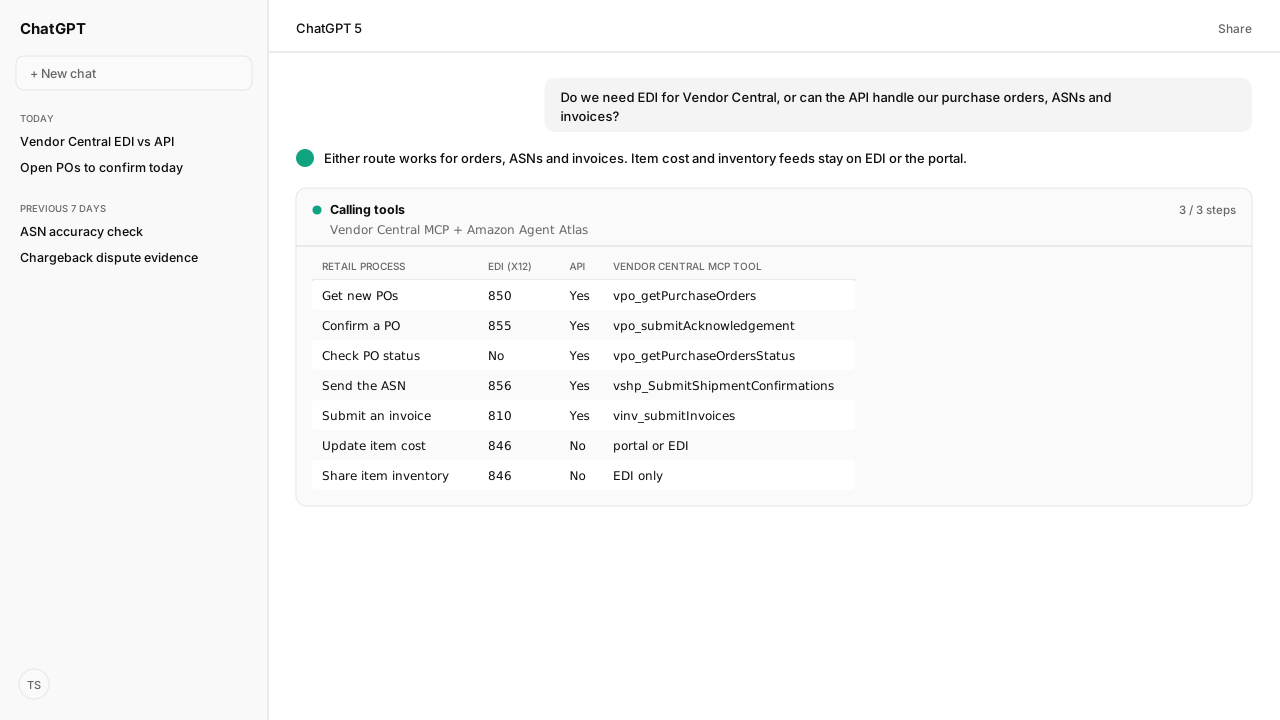
Amazon's "EDI and API options per business type" table answers the question process by process, with columns for the Vendor Central portal, EDI and the API (application programming interface). The Retail rows, with the Vendor Central MCP tool for each API row:
| Retail process | EDI message (X12 / EDIFACT) | API | Vendor Central MCP tool |
|---|---|---|---|
| Get new POs | 850 / ORDERS | Yes | vpo_getPurchaseOrders |
| Get PO changes and cancellations | 860 / ORDCHG | Yes | vpo_getPurchaseOrders |
| Confirm a PO | 855 / ORDRSP | Yes | vpo_submitAcknowledgement |
| Check PO and confirmation status | No EDI option | Yes | vpo_getPurchaseOrdersStatus |
| Send the ASN | 856 / DESADV | Yes | vshp_SubmitShipmentConfirmations |
| Submit an invoice or credit note | 810 / INVOIC | Yes | vinv_submitInvoices |
| Update item cost | 846 / INVRPT, or flat file | No | None: EDI or portal |
| Share item inventory | 846 / INVRPT | No | None: EDI only |
| Get remittance advice | 820, North America only | Not on the table; Finance Remittance API | finance-remittance-2026-03-17_getRemittanceHeaders, _getRemittance (Selling Partner MCP) |
Amazon's "Automation at Amazon" page sets the frame: EDI and the API are two automation options for Retail and Direct Fulfillment (DF) vendors, chosen by your system capabilities. They can run in parallel, with the portal kept for manual work during connectivity issues, and vendors without in-house systems can hire a third-party service.
Marking items temporarily unavailable is portal and EDI only, with no API. In the other direction, four rows have no EDI option: PO status, PO confirmation status, shipment confirmation status and sales data reports. Sales data moved to the API when Amazon stopped publishing the X12 852 and 830 Amazon Retail Analytics (ARA) feeds after June 30, 2022, which the ARA warehouse guide covers.
Amazon Agent Atlas holds both tables and the Automation at Amazon page, so the agent cites Amazon's own table when it says which route a process allows.
A Vendor Central EDI connection runs over AS2, SFTP or a VAN and passes Amazon's message tests before production
A Vendor Central EDI connection is self-serve: Amazon's "EDI Integration overview" says you run the full integration cycle on your own timeline, without contacting Amazon. It accepts X12, a standard EDI format used mainly in North America, and EDIFACT, used mainly by Retail vendors in EMEA (Europe, the Middle East and Africa) and also in Australia and Brazil. Direct Fulfillment adds XML.
Setup runs in three sections under the Integration (EDI/API) tab:
- Home. Click Start EDI for a parent vendor code; Retail child codes inherit its settings. Set up a new connection, or reuse one from another EDI-enabled vendor account.
- Messages dashboard. Complete Global settings and promote every setting to test or production by hand, or it can't exchange messages. Then test each message type and schedule it for production, in any order. Not all are mandatory.
- Connection dashboard. Add a test or production connection over AS2 (Applicability Statement 2), Amazon's hosted SFTP (Secure File Transfer Protocol) or a VAN (Value Added Network) provider, and pass the receiving and sending connectivity tests.
Every transmission must carry all the required data elements in Amazon's EDI specifications, and each message must pass tests of its structure and content. The specification packages, with mapping guides and sample files, are on the Resources page in Vendor Central. For Retail X12 they cover the 850, 855, 860, 856, 810, 846, 820, 753, 754, 824 and 997. Three limits apply:
- Invoices. EDI invoices are for Retail accounts only, not Amazon Advantage vendor codes.
- Remittance advice. Only Retail vendors in North America receive it, as the X12 820.
- Functional acknowledgement (FA). Amazon generates it, as the X12 997. Its Direct Fulfillment page says vendors need not send one.
The EDI route needs an EDI system, or a third-party provider if you have none in-house. Amazon's Resources page lists EDI service providers, and its hosted SFTP server is free of charge for file transfer. Once live, Operational Analytics tracks each transmission and its validation and processing failures.
The Selling Partner API route starts with an authorized app, and Amazon processes each submission asynchronously
The Selling Partner API route starts in the same Integration tab, under API Integration. Amazon's API Integration Overview lists five stages:
- Developer registration. Register a developer profile.
- App authorization. Authorize the app and download its credentials.
- App development. Build the app, or use a third-party developer.
- Testing. Test the app and its calls in Amazon's sandbox.
- Production. Move the integration live.
Roles decide which operations an app can call: Amazon's Vendor Orders reference lists Amazon Fulfillment or Inventory and Order Tracking for reading and acknowledging orders. Direct Fulfillment needs an additional set of roles. Amazon's restricted roles contain personally identifiable information, and restricted Direct Fulfillment operations take a Restricted Data Token.
On Kuudo, the Vendor Central MCP carries the vendor order, shipment, invoice and transaction operations, and the Selling Partner MCP carries the shared SP-API resources, Finance Remittance among them. You authorize your own Vendor Central account, and the operations are already tools your AI calls: through Kuudo's managed, verified SP-API app on Pro and Scale, with no app registration, or your own app on Community.
Writes on this route are asynchronous. POST operations such as submitAcknowledgement and submitShipmentConfirmations return a transaction ID, and Amazon reports the final status through getTransaction for Retail or getTransactionStatus for Direct Fulfillment. A valid transmission doesn't always meet Amazon's vendor performance policies, so chargebacks can still apply.
For Retail, both routes face the same deadlines: confirm each PO within 24 hours and send the ASN before the shipment arrives
Amazon's order deadlines don't change with the route. Its "Confirm purchase orders" page says you must confirm or reject every PO within 24 hours of the order being placed, and confirming commits you to the assigned shipping window. On EDI, the page lists the ORDRSP/855 segments: QTY+12 to confirm, QTY+185 for temporarily out of stock and QTY+182 for no longer available.
For an item you no longer supply, two consecutive rejection codes at least 48 hours apart stop Amazon ordering those ASINs from your vendor code. On the API, submitAcknowledgement adds its own rules:
- Every line. Amazon implicitly rejects any line left out, and rejects an acknowledgement with no code (
Accepted,BackorderedorRejected). - Cost. The unit cost must match the invoiced unit cost, or payment may be delayed.
- Quantity. Lower than the PO is allowed; higher is not.
- Changes. A quantity, price or date change needs an updated acknowledgement within 48 hours. After that, Amazon expects only ship and delivery date updates.
An ASN is required for every shipment, regardless of size or payment terms, and must reach Amazon before the shipment arrives at the fulfillment center, one ASN per truckload. EDI vendors edit an ASN only through EDI, resending it whole with the BSN "05" replacement qualifier. On the API, you can replace an earlier shipment confirmation with an updated one.
A missing, inaccurate or late ASN triggers the ASN accuracy chargeback, and the vendor chargeback rules cover the rest. Amazon's API invoice rules add unique invoice numbers that are never reused, payment terms that match the buyer's, and a remit-to address that matches Amazon's records.
Amazon Agent Atlas returns these rules from "Confirm purchase orders" and "Advance shipment notification". vpo_getPurchaseOrdersStatus returns each item's acknowledgement history and received quantity, so the agent checks a draft against what Amazon already holds.
The Vendor Central MCP runs the API route from an AI client, and a person approves each acknowledgement, ASN and invoice
The Vendor Central MCP is a Model Context Protocol (MCP) server: the vendor operations become tools an agent calls from the AI client a team already uses. A Retail order runs in five steps:
- Read.
vpo_getPurchaseOrderslists POs created or changed in a time window, andvpo_getPurchaseOrderreturns their lines, quantities and cost. - Draft. The agent checks each line against the team's rule and Amazon's, then drafts
vpo_submitAcknowledgementwith a code for every line. - Approve. A planner approves the draft before it reaches Amazon, which returns a transaction ID for
vts_getTransactionto read. - Route. Collect (WePay) vendors in North America and the EU request a pickup of standard pallets with
vshp_SubmitShipmentsand get routing instructions fromvshp_GetShipmentDetails. Unconfirmed POs make the request fail. - Ship and bill.
vshp_SubmitShipmentConfirmationssends the ASN andvinv_submitInvoicesthe invoice, each approved the same way.
Direct Fulfillment follows the same pattern, with tools for orders, shipping labels, shipment confirmations, inventory, invoices and transaction status; for orders, shipping and transaction status, the Vendor Central MCP carries Amazon's current 2021-12-28 versions. Amazon's table lists no API for Retail item cost or inventory sharing, and the MCP has no tool for them. Remittance is the exception: the Selling Partner MCP's remittance read lets the agent see what Amazon paid and deducted per invoice.
Every write tool applies workspace policy, which can require a person's approval (how write tools work), and this team's policy requires it for every acknowledgement, ASN and invoice. For the daily run, Amazon Agent Flow schedules each status check, and the close-out lists every send with what Amazon reported:
| Sent | What Amazon reports | What it means |
|---|---|---|
| Retail acknowledgement or invoice | Processing or Failure | Processing past 15 minutes means processed |
| Retail ASN or shipment request | Success in North America and the EU | Processed |
| Direct Fulfillment acknowledgement or ASN | Success or Failure | Processing past 15 minutes means not completed |
| Direct Fulfillment invoice | Always Processing | Not supported; check Vendor Central |
What happens next: move PO acknowledgements to the API first and invoices last
The plan sends each process to the route Amazon allows, in the order its clocks reward:
- Keep item cost and inventory feeds on EDI or the portal. Amazon's table lists no API for them. Remittance advice can move to the Finance Remittance API whenever the team is ready.
- Run Direct Fulfillment on the API, Amazon's recommended method. The policy's two-hour window is the same on EDI.
- Move Retail acknowledgements first. The 24-hour clock and line-level rules reward a checked, approved draft, while EDI carries everything else in parallel.
- Move ASNs next. Each must reach Amazon before the shipment does.
- Move invoices last. Either route starts them in parallel testing with Accounts Payable.
Save the team's confirmation rule as its own Skill; no published Kuudo Skill covers vendor order exchange. When the team discontinues an ASIN, the same agent can read its campaigns through the Amazon Ads MCP, because an ASIN Amazon stops ordering can still be buying ad traffic.
The pattern is one route per process: Amazon's pages decide what can move, the agent drafts, a person approves, and Amazon's status confirms.
Next: how to prevent Amazon vendor chargebacks, the clocks and thresholds a late acknowledgement or a missing ASN runs into.
Confirm purchase orders from the AI your team already uses
Bring the purchase orders your team confirms by hand. We will connect the Vendor Central MCP to your AI client, set your workspace policy to hold every acknowledgement, ASN and invoice for approval, and leave your EDI connection carrying the processes that stay on it.
Book a working sessionWhat you need to run Vendor Central order exchange
- MCP
- Amazon Vendor Central MCP. Retail: vpo_ (purchase orders, acknowledgements, PO status), vshp_ (shipment requests, routing instructions, ASNs), vinv_ (invoices and credit notes), vts_ (transaction status). Direct Fulfillment: orders, shipping labels and shipment confirmations, inventory, invoices and transaction status, with orders, shipping and transaction status on Amazon's current 2021-12-28 versions. Remittance: the Amazon Selling Partner MCP's Finance Remittance 2026-03-17 tools.
- Skill
- No published Kuudo Skill covers vendor order exchange. Save your confirmation rule (which ASINs you discontinue, which you backorder, the cost on file) as a Skill your team writes.
- Atlas collection
- amazon_vendors and amazon_sellers (playbooks: Automation at Amazon; EDI and API options per business type; EDI Integration overview; API Integration Overview; Confirm purchase orders; Advance shipment notification; Retail API use cases; Troubleshoot API transmissions; Resources)
- Required subscriptions
- A Vendor Central account. The API route needs an SP-API app authorized for that account: Kuudo's managed app on Pro and Scale, or your own app on Community. Direct Fulfillment needs an additional set of roles, and Amazon's docs list the Finance and Accounting role for the Finance Remittance API. The EDI route needs your own EDI system or provider; Kuudo does not translate or transmit EDI.
- Last verified
- 2026-10-19
What success and failure look like for Vendor Central order exchange
| result | meaning |
|---|---|
| A Retail getTransaction status still reads Processing after 15 minutes | Processed. Retail status reports only Processing and Failure for acknowledgements and invoices, and adds Success only for shipments in North America and the EU. |
| A Direct Fulfillment getTransactionStatus still reads Processing after 15 minutes | Not completed. Direct Fulfillment reports Success or Failure, except for invoices, which always read Processing; check those in Vendor Central. |
| A SubmitShipments pickup request fails | Unconfirmed purchase orders cause the request to fail. Acknowledge the PO first. |
| An updated acknowledgement tries to turn a rejected line into Accepted | Amazon keeps the first Rejected code for that line, so the first acknowledgement is the one that needs the approval. |
Keep exploring Vendor Central order exchange
Use these companion guides to understand the inputs, follow-on analysis, and adjacent workflows behind this playbook.
Know which side of Amazon each order runs through before you choose how to exchange it.
Check each acknowledgement and quantity change against the chargeback rules before it is sent.
Purchase orders, shipments, invoices and transaction status as tools your AI calls.
FAQ
What is Amazon Vendor Central EDI?
It is the electronic exchange of purchase orders, acknowledgements, ASNs, invoices and related messages between a vendor and Amazon in a standard format: X12, used mainly in North America; EDIFACT, used mainly by Retail vendors in Europe, the Middle East and Africa and also supported for Australia and Brazil; and XML for some Direct Fulfillment messages. Amazon offers it as one of two automation options; the Selling Partner API is the other.
Do I need EDI to work with Amazon Vendor Central?
No. Amazon says its API can be used instead of EDI or alongside an existing EDI setup, and the Vendor Central portal handles orders, confirmations, ASNs and invoices by hand. For Retail, Amazon's options table lists no API option for item cost or inventory feeds, so those stay on EDI or the portal. Amazon's pages disagree on remittance advice: the table lists no API, while its SP-API documentation publishes a vendor-only Finance Remittance API. For Direct Fulfillment, Amazon calls API integration its preferred method.
What are Amazon's EDI requirements and specifications?
Every EDI transmission must contain all the required data elements defined in Amazon's EDI specifications, and each message integration ends with tests that validate its structure and content. The specification packages, with mapping guides and sample files, are on the Resources page in Vendor Central; for Retail X12 they cover the 850, 855, 860, 856, 810, 846, 820, 753, 754, 824 and 997.
How do I activate the 855 purchase order acknowledgement?
In Vendor Central, open EDI integration under the Integration (EDI/API) tab. In the Messages dashboard, complete Global settings and promote them to test and production, then select the purchase order acknowledgement, pass its tests and schedule it for production. Amazon's Confirm purchase orders page tells EDI vendors to enable the response message, ORDRSP EANCOM D96A, the EDIFACT form of the 855. On the API route, submitAcknowledgement sends the same confirmation with Accepted, Backordered or Rejected per line.
Does Amazon send a 997, and do I have to send one?
Amazon generates the functional acknowledgement (FA) and supports it only in X12, as the 997. Its Direct Fulfillment page says Amazon does not require vendors to support or send FA messages.
Why does my EDI message fail with a gateway routing failure?
Amazon's gateway could not identify the incoming message. Amazon lists an incorrect sender or receiver ID, and a message configuration not yet promoted to production, among the causes. Operational Analytics in Vendor Central tracks your transmissions and their validation and processing failures.
Can I change an Amazon purchase order through the API?
No. Amazon's documentation says submitting a change to an order through the API is not possible; after an order is placed, changing it is a manual process in Vendor Central. The API does return Amazon's own changes and cancellations through getPurchaseOrders.
Sources
- Vendor Retail Procurement Orders API (Selling Partner API)
- Submit order acknowledgement (Selling Partner API)
- Submit shipment confirmation (Selling Partner API)
- Submit invoices (Selling Partner API)
- Get transaction status (Selling Partner API)
- EDI and API options per business type (Vendor Central help, sign-in required)
- EDI Integration overview (Vendor Central help, sign-in required)
- API Integration Overview (Vendor Central help, sign-in required)
- Finance Remittance API (Selling Partner API)