
- Amazon runs sponsored ads, display, video, and streaming TV from one campaign budget. Check access in your U.S. advertiser account and budget for Amazon’s $100 daily minimum.
- Review the brand, products, dates, optional return on ad spend threshold, and creative in Amazon Ads Agent before launching.
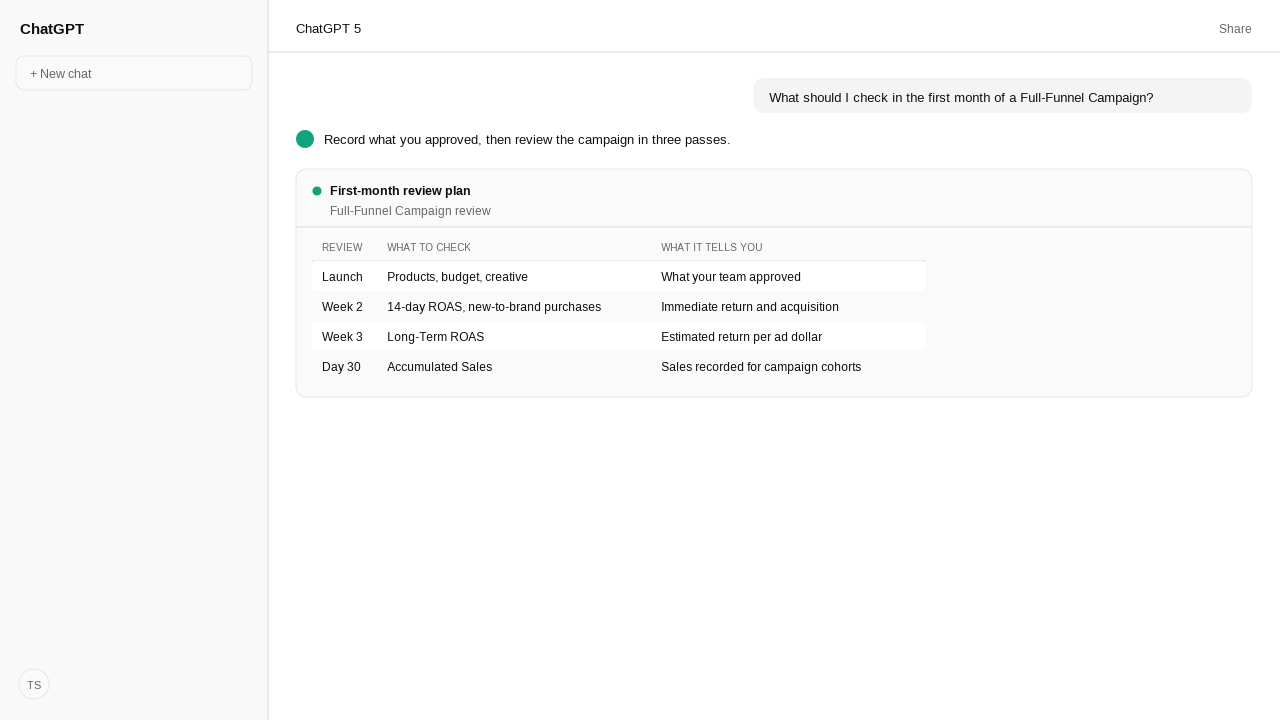
- Around week two, review short-term return on ad spend and new-to-brand activity. From week three, add long-term return on ad spend. At day 30, check Accumulated Sales.
- Use Kuudo’s Amazon Ads MCP to look up the FULL_FUNNEL campaign and request a unified v1 report for that campaign ID.
Amazon Full-Funnel Campaigns combine sponsored ads, display, video, and streaming TV under one daily budget. Eligible U.S. advertisers launch in Amazon Ads Agent after reviewing the products and creative. After launch, use Kuudo’s Amazon Ads MCP to find the campaign and request a report that shows attributed sales, new-to-brand purchases, and estimated long-term sales. Amazon’s product overview.
If you manage several brands, the first-month review starts with the advertiser account and campaign ID. Use Kuudo’s Amazon Ads MCP to find the campaign in the authorized account, then give your AI client the spend limit and short-term return on ad spend (ROAS) your team agreed to track. The same campaign can look promising on new-to-brand purchases and still be too expensive for your current budget.
Full-Funnel Campaigns give Amazon one budget to allocate across formats
Full-funnel advertising reaches shoppers at every stage of the path to purchase. A Full-Funnel Campaign gives Amazon’s AI one daily budget to allocate across those stages. Streaming TV and online video can reach shoppers in the upper funnel, while sponsored ads reach people as they shop. Amazon uses its shopping signals to choose formats and audiences and adjusts the mix as the campaign runs. Amazon’s Full-Funnel Campaign launch announcement.
Amazon announced open beta for eligible U.S. advertisers that sell on Amazon. Its setup help describes access as limited to some advertisers and lists a $100 daily minimum. Check for Full-Funnel Campaigns under Create campaign in the correct account. Amazon bills by cost per click or cost per thousand impressions, depending on the placement. Amazon’s campaign setup instructions and pricing FAQ.
The launch checklist covers products, budget, dates, and creative
The Full-Funnel Campaign builder in Amazon Ads Agent pre-fills settings that you can review before launch. Use the checklist below to give the campaign a clear brief and give your team a record of the settings it approved. Amazon’s campaign setup instructions.
| Check before launch | What to record |
|---|---|
| Advertiser, brand, and products | Confirm the U.S. advertiser account, brand, and Amazon Standard Identification Numbers (ASINs). Check those products have enough stock to advertise through the first review. |
| Budget and optional ROAS threshold | Record the daily budget, the amount your team is willing to spend during the first month, and any ROAS threshold you enter. |
| Dates | Save the start date and book the first review. Amazon recommends at least 30 days of run time and suggests starting without an end date. |
| Creative | Check the logo, headline, and the image and video previews. Upload your own assets or use Amazon’s creative tools. Amazon recommends an image and a video for each product. |
| Launch and handoff | When the settings and assets are ready, approve the creative and launch in Amazon Ads Agent. Save the campaign ID and the baseline dates you’ll use for comparison. |
Kuudo’s campaign-management reference documents lookup via the unified campaign query. The Amazon Ads Agent campaign builder is the documented path for creating this specific campaign type. Kuudo’s Full-Funnel campaign-management reference.
The first month tracks acquisition and two measures of return
A Full-Funnel Campaign’s first review should distinguish short-term attributed return, new-to-brand demand, and the longer-term sales estimate. Amazon describes an initial learning period of about two weeks and says significant budget or product changes can restart it. Its immediate performance metrics use a 14-day attribution window. A new-to-brand purchase comes from a shopper who hasn’t bought from the brand in the preceding 12 months. Amazon’s campaign review milestones.
| Timing | Check | How to read it |
|---|---|---|
| Around week two | Spend, attributed sales, and 14-day ROAS | Read immediate sales attributed to ads per dollar spent. Recent interaction dates can still pick up conversions as the attribution window progresses. |
| From week two | New-to-brand branded searches, detail page views, and purchases | Look for signs of discovery and use purchases to track acquisition. |
| From week three | Long-Term Sales (LTS) and Long-Term ROAS | LTS combines attributed sales with modeled future value from new-to-brand engagement over the next 12 months. Long-Term ROAS divides LTS by ad spend. Keep LTS in its own column. |
| At day 30 | Accumulated Sales | In the Full-Funnel Campaigns tab, open View long-term contribution to compare the estimate with sales recorded for campaign cohorts so far. |
Amazon’s unified reports assign conversions to the traffic date, the date of the ad interaction. When you compare weeks, flag recent dates that can still receive conversion credit. Keep the report date range, currency, and campaign ID beside the results so the next reviewer can repeat the pull. Amazon’s guide to unified reporting.
Ads MCP can pull a unified report for one Full-Funnel Campaign
Use the Amazon Ads MCP to look up FULL_FUNNEL campaigns in the authorized advertiser account. Take the campaign ID from the lookup into a custom Reporting API v1 request. Amazon documents Full-Funnel eligibility for metric.longTermSales and metric.longTermRoas. The Long-Term Sales field requires the budget currency dimension. Check field compatibility for the requested report, especially before adding new-to-brand or product-level breakdowns. Amazon’s Long-Term Sales field reference.
Once you’ve connected the Amazon Ads MCP, copy this request into your AI client and fill in the account and dates.
In my authorized U.S. Amazon Ads account [account name], find the Full-Funnel Campaign [campaign name] and confirm its campaign ID. For [start date] to [end date], check which metrics are compatible with a daily, campaign-level Reporting API v1 report. Request spend, attributed sales, ROAS, new-to-brand purchases, Long-Term Sales, and Long-Term ROAS where available. Include budget currency when requesting Long-Term Sales. Retrieve the report and label unavailable fields. Keep attributed sales and Long-Term Sales in separate columns. Make this a reporting request only.
If a field comes back blank or unavailable, check the account, campaign ID, date range, and field eligibility before interpreting it. Use the Full-Funnel Campaigns tab for Accumulated Sales. For recurring portfolio ingestion, Amazon recommends Marketing Stream v2. The legacy v3 reporting API lacks coverage for this campaign type. Amazon’s developer reporting guidance.
For repeatable report setup, the Amazon Ads Reporting Skill checks your account and custom field selections and retrieves the report job.
What happens next: book the first spend review
Put the dates for the week-two check and day-30 review on the calendar before you launch. If your goal is to grow the customer base, use new-to-brand results and Accumulated Sales to decide whether to keep funding acquisition. Check spend and attributed ROAS against your agreed limits before raising the budget.
For the report-job workflow, read how to automate Amazon Ads Reporting API v1.
Report on your Full-Funnel Campaign
Bring your Full-Funnel Campaign reporting workflow to a working session. We’ll map your account and the metrics you want in your first report.
Request beta accessWhat you need to run Full-Funnel Campaign reporting
- amazonAccount
- An eligible U.S. Amazon Ads advertiser account. Confirm Full-Funnel Campaigns appears in the campaign builder.
- reportScope
- One authorized advertiser account, one campaign ID, and an explicit date range.
- reportingSurface
- Amazon Ads MCP with Reporting API v1 for campaign reporting. Amazon Marketing Stream v2 for recurring ingestion at scale.
- attribution
- 14-day attribution window for immediate performance. Unified reports assign conversions to the date of the ad interaction.
- Last verified
- 2026-11-22
Keep exploring Full-Funnel Campaign reporting
Use these companion guides to understand the inputs, follow-on analysis, and adjacent workflows behind this playbook.
- What Is Amazon Ads Agent?
See where Full-Funnel Campaigns fits alongside sponsored ads and Display, Video, and Audio.
FAQ
Why is Full-Funnel Campaigns missing from my Amazon Ads account?
In Amazon Ads Agent, open Create campaign and check See all campaign types. Amazon announced a U.S. open beta, and its current setup help says access can vary by advertiser. Check that you selected the intended U.S. advertiser account.
Can I use Full-Funnel Campaigns alongside Sponsored Products?
Yes. Amazon designed Full-Funnel Campaigns to run alongside existing campaigns. Keep existing campaign spend in your account baseline so you can review the new campaign in the context of the brand’s total advertising spend.
Do I need Amazon Marketing Cloud to report on Full-Funnel Campaigns?
You can review results in Amazon Ads Agent or request supported fields with Reporting API v1. Amazon recommends Marketing Stream v2 for recurring reporting across a portfolio.
Sources
- Full-Funnel Campaigns product overview
- Create a Full-Funnel Campaign
- Full-Funnel Campaigns open beta announcement
- Long-term sales and Long-Term ROAS fields in Reporting API v1
- Understand unified reporting and traffic-date attribution
- Amazon Marketing Stream v2 documentation
- Full-Funnel Campaign reporting options in Amazon’s developer repository