
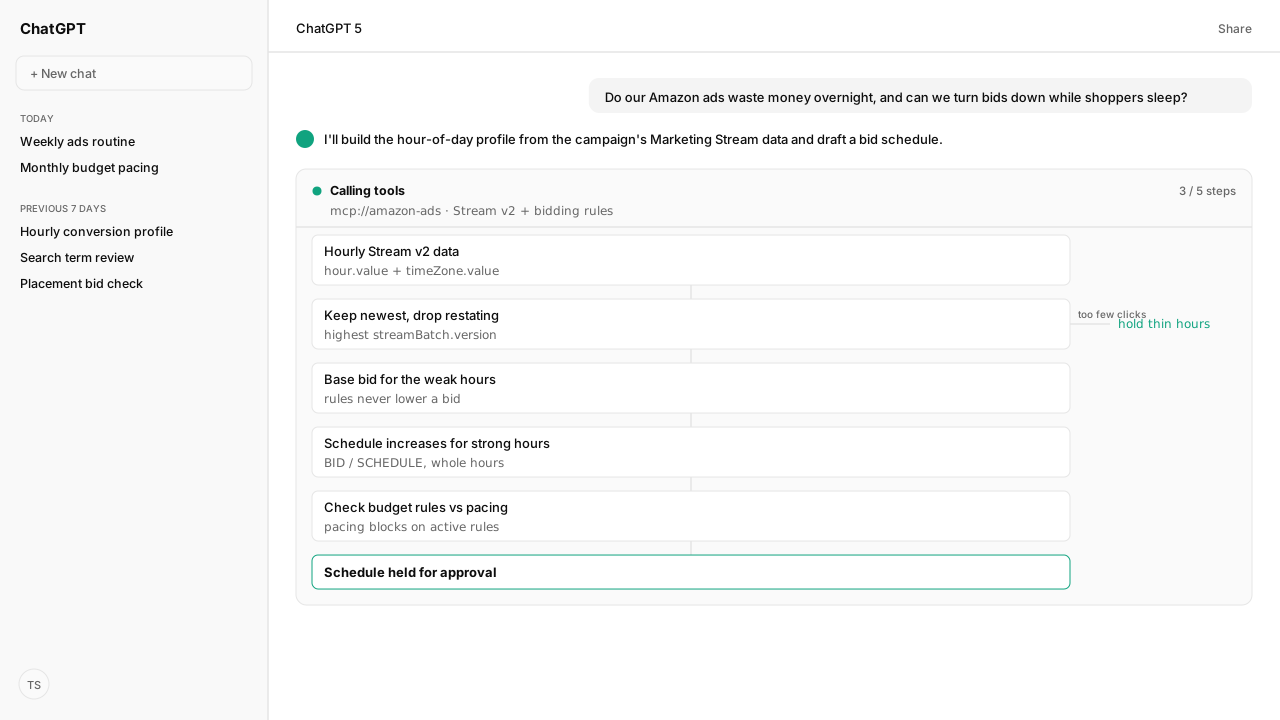
- Amazon's schedule bid rules raise Sponsored Products bids by a percentage for chosen times of day, days of the week, date ranges or events. They never lower a bid, so the base bid has to fit your weakest hours.
- Two rules on the same hours add up: 20% plus 10% raises the bid 30%. The increase is added on top of any placement adjustment.
- Schedule bid rules go on hold while a campaign uses rule-based bidding.
- Amazon Marketing Stream Version 2 delivers hourly ads performance in the advertiser's time zone, as often as every 15 minutes, and restates conversions for up to 70 days.
- Amazon pairs bid rules with schedule-based budget rules, and the budget pacing Skill stops while a budget rule is active.
Amazon PPC dayparting means raising Sponsored Products bids in the hours your ads convert, using Amazon's schedule bid rules. The rules only increase bids, so set the base bid for your weakest hours and schedule increases for the strongest. Find those hours in hourly Amazon Marketing Stream data, read in the advertiser's own time zone.
A brand's pay-per-click (PPC) manager put the question to me: "do our ads waste money overnight, and can we turn bids down while shoppers sleep?" The search results answer with heatmaps from other accounts and tools that promise to daypart for you. Amazon's own answer is narrower: a rule type that raises bids on a schedule, and hourly data to decide where.
Which hours deserve a higher bid is a fact about one campaign, not about Amazon shoppers in general. Our agent subscribed the account to Marketing Stream Version 2 through the Amazon Ads MCP, and Kuudo landed the hourly data in our own data lake, so the schedule came from this campaign's history. Amazon Agent Atlas supplied the rule mechanics, and our monthly pacing plan decided which rules could go live.
Amazon's schedule bid rules only raise bids, so dayparting starts with the base bid
Before proposing changes, check the advertiser's marketplace separately for bid schedules and hourly budget schedules. Stream availability does not establish eligibility for either rule type. Amazon's published availability lists, checked October 13, 2026, name:
- Schedule bid rules: United States, Canada, Mexico, Germany, Spain, France, Italy, United Kingdom and India (Amazon's bid-rule announcement).
- Hourly schedule-based budget rules: United States, Canada, United Kingdom, India and Japan (Amazon's hourly-budget announcement).
These are launch announcements, so confirm current account eligibility in Amazon's console or API documentation before a write. If bid schedules are unavailable or eligibility is unconfirmed, return the hourly analysis and recommendations for review without changing the base bid or creating scheduled rules. If bid schedules are supported but hourly budget rules are not, omit the budget-rule write and leave the existing budget policy unchanged.
Bidding rules for Sponsored Products defines schedule bid rules: a Sponsored Products feature that raises bids by a percentage for times of the day, days of the week, date ranges or high-traffic events such as Black Friday. You add one from the campaign's bidding strategy settings, as Apply Schedule bid rules for Sponsored Products describes, and Amazon applies the increase on each ad opportunity.
| Rule behavior | What Amazon's pages say |
|---|---|
| Direction | Increases only, as a percentage |
| Bidding strategies | Dynamic up and down, down only, fixed |
| Rule-based bidding | Schedule rules go on hold |
| Two rules, same hours | They add: 20% + 10% = 30% |
| Placement adjustment | Added on top of it |
Amazon's placement example: a $1.00 bid with a 10% top-of-search adjustment and a 20% Monday rule bids $1.30 for top of search on Mondays and $1.20 for other placements. The rest of the week it bids $1.10 and $1.00.
That answers the overnight question. No schedule rule lowers a bid for the hours that don't convert. Set the base bid at what the weak hours are worth, and schedule increases for the hours that earn more.
The Amazon Ads MCP carries the same rule type: a Sponsored Products optimization rule in the bid category with a schedule subcategory, days of the week, whole-hour start and end times, and an increase between 1% and 100%. The agent drafts each rule, and the change set goes through our workspace policy before anything reaches Amazon.
Hourly Marketing Stream v2 data shows which hours convert, in the advertiser's time zone
Amazon Marketing Stream Version 2 delivers ads-performance-v1, an hourly dataset of traffic, cost and attributed conversions across Sponsored Products and the other ad products, as Parquet files to an S3 bucket you own. Amazon recommends Stream v2 for intraday optimization: adjusting bids, budgets or campaigns through the day. Deliveries arrive as often as every 15 minutes, with no report calls to get throttled.
Each Ads performance record carries date.value, hour.value and timeZone.value: the time zone the advertiser uses for reporting and ad serving. That may not be the time zone your team works in, so read it before you name an hour.
| Source | Grain | Hourly history |
|---|---|---|
| Console campaign report | Hourly, Sponsored Products | 30 days, 14 per download |
| Ads API reports | Hour dimension | 14 days |
| Marketing Stream v2 | Hourly, delivered to your bucket | 70 days backfilled, then kept |
The Amazon Ads MCP creates the Stream v2 subscription from the AI client, and Kuudo lands the data in the data lake. A new subscription backfills the dataset's 70-day restatement window, so the hour-of-day profile starts with weeks of weekday evenings to compare instead of 14 days.
An hour-of-day profile needs settled totals before it moves a bid
Stream v2 records are totals, not deltas. Process your data keeps the row with the highest streamBatch.version for each record key, then aggregates from that staging layer, because a restated hour changes every total above it. Summing every delivery instead would count the same hour several times.
Conversions are restated as attribution matures, within the dataset's 70-day restatement window, so the newest hours always look worse than they will. The agent leaves recent days out of the profile, the way the budget pacing Skill ends its return on ad spend (ROAS) lookback at least two completed days before a run.
An hour with a handful of clicks is noise, not a pattern. The agent holds thin hours at the base bid, the same sufficiency logic the bidding rulebook applies to keywords. It also checks stock on the advertised products through the Selling Partner MCP: a scheduled increase on an item about to run out buys clicks it can't convert. The proposal it returned looked like this:
| Hours (advertiser time zone) | What the settled data showed | Proposal |
|---|---|---|
| Converting above campaign average | Enough clicks, steady across weeks | Scheduled bid increase |
| Clicks without orders | Steady across weeks | Base bid sized for these |
| Too few clicks | Not enough to judge | Hold at base bid |
| The most recent days | Conversions still restating | Left out |
| Prime Day, Black Friday | Amazon's recommended events | Event-based schedule rule |
Schedule-based budget rules keep the strong hours funded, and they pause budget pacing
Amazon's tip on the bidding rules page: "Apply a schedule-based budget rule to ensure that your campaign doesn't exceed your budget due to bid increases." Schedule-based rules raise a campaign's budget by a percentage over a date range, recurring daily or on chosen days of the week, and can be limited to times of day. Amazon's example raises the budget from 5:00 PM to 10:00 PM on Mondays.
Two reads show whether the strong hours run out of money:
- The budget usage API returns each campaign's or portfolio's spend for the day as a percent of its budget, in near real time, including increases from budget rules. The Amazon Ads MCP carries it for Sponsored Products, Sponsored Brands and Sponsored Display.
Budget recommendations and missed opportunitiesreports the share of time a campaign stayed in budget over the past seven days and the sales Amazon estimates it missed.
What happens next: approve the schedule, then re-read the hours after the review window
For campaigns that pass the marketplace eligibility checks, the agent hands back one change set, and after approval it creates the supported rules through the Amazon Ads MCP:
- the base bid for each campaign, sized for its weak hours
- each scheduled increase, with its days, hours and percentage
- any eligible hourly budget rule, and which campaigns leave budget pacing because of it
- a flag on any campaign using rule-based bidding, where the schedule would sit on hold
Amazon Agent Flow keeps the Stream history in the lake and refreshes the hour-of-day profile on a schedule, so the next review reads the same windows against new weeks. For the weekly routine around the schedule, see how to optimize Amazon ads.
Dayparting on Amazon is a base bid plus scheduled increases, decided from your own settled hourly data.
Next: what Amazon Marketing Stream delivers, dataset by dataset.
Daypart from your own hourly data
Bring the campaigns you want to schedule. We'll connect the Amazon Ads MCP and Marketing Stream to the AI client your team uses, land the hourly data in your own lake, and route every rule change through your workspace policy.
Book a working sessionWhat you need to run Amazon PPC dayparting
- MCP
- Amazon Ads MCP for Marketing Stream Version 2 subscriptions, Sponsored Products schedule bid rules, schedule-based budget rules and budget usage, with the Selling Partner MCP for stock on the advertised products
- Skill
- amazon-ads-budget-pacing 0.2.1 (certified) for the monthly plan the schedule has to fit; it blocks while active Amazon budget rules are present
- Atlas collection
- amazon_ads, the Amazon rules behind this guide (playbooks: Bidding rules for Sponsored Products; Apply Schedule bid rules for Sponsored Products; Schedule-based rules; Amazon Marketing Stream Version 2 overview; Ads performance; Process your data; Budget recommendations and missed opportunities)
- Required subscriptions
- An Amazon Ads account with live Sponsored Products campaigns in a marketplace eligible for schedule bid rules, and a Marketing Stream Version 2 subscription to ads-performance-v1 delivering to your S3 bucket. Hourly budget rules need a separate marketplace eligibility check.
Keep exploring Amazon PPC dayparting
Use these companion guides to understand the inputs, follow-on analysis, and adjacent workflows behind this playbook.
FAQ
What is dayparting on Amazon?
Dayparting on Amazon is changing bids by time of day. Amazon's tool for it is schedule bid rules, a Sponsored Products feature that raises bids by a percentage for chosen times of day, days of the week, date ranges or events such as Black Friday.
Does Amazon have a dayparting tool?
Yes, in eligible marketplaces. Schedule bid rules sit in campaign manager under the campaign's bidding strategy settings, and the same rule type is available through the Amazon Ads API. Hourly schedule-based budget rules have a separate availability list. Check both for your advertiser's marketplace before creating rules; Stream access alone does not establish eligibility.
Can you lower Amazon PPC bids at night?
Not with a schedule rule. Schedule bid rules only increase bids, so set the base bid at what your weakest hours are worth and schedule increases for the hours that convert.
What time zone does Amazon dayparting use?
Marketing Stream v2 records carry hour.value with timeZone.value, the time zone the advertiser uses for reporting and ad serving, which may not be the time zone your team works in. Read it before naming an hour in a schedule.
Why is my schedule bid rule on hold?
The campaign is using rule-based bidding. Amazon puts schedule bid rules on hold when a campaign's bidding strategy changes to rule-based bidding, and you can't add one to a campaign that already uses it.
How do schedule bid rules work with placement adjustments?
They add together. In Amazon's example, a $1.00 bid with a 10% top-of-search adjustment and a 20% Monday rule bids $1.30 for top of search on Mondays and $1.20 for other placements.
Where do I get hourly Amazon ads data?
The campaign report in the Amazon Ads console has an hourly time period for the last 30 days, 14 days per download. Ads API reports keep hourly data for 14 days. Marketing Stream Version 2 delivers hourly ads performance to your own S3 bucket, backfills 70 days when you subscribe, and keeps as long as you keep it.
Sources
- Amazon Ads: schedule bid rule marketplace availability
- Amazon Ads: hourly budget rule marketplace availability
- Amazon Ads: bidding rules for Sponsored Products
- Amazon Ads: apply schedule bid rules for Sponsored Products
- Amazon Ads API: schedule-based budget rules
- Amazon Ads API: Amazon Marketing Stream Version 2 overview
- Amazon Ads API: Stream v2 Ads performance dataset