
- Amazon DVA+ is a simplified workflow inside Amazon Ads Agent for creating Display, Video, and Audio campaigns; it is in beta and access varies.
- You choose the objective, promoted products or brand URL, creative, duration and budget. In the default workflow, Amazon automates targeting, bidding, inventory and delivery toward the objective.
- DVA+ with advanced settings gives eligible advertisers more control over targeting, media, deals, bidding and other campaign settings.
- Amazon says DSP capabilities are moving into DVA+ with advanced settings. Existing DSP processes and report migrations still need to be checked individually.
- Amazon's September 2026 announcement targeted DVA+ campaign API availability for Q1 2027; do not assume an existing DSP API workflow can create DVA+ campaigns today.
Amazon DVA+ is a campaign-creation and buying experience inside Amazon Ads Agent for Display, Video, and Audio advertising. You provide the objective, budget, promoted products or brand URL, and creative. In the default workflow, Amazon automates delivery decisions toward that objective. DVA+ is in beta, and the experience available to you depends on your account and marketplace.
For teams accustomed to Amazon DSP (demand-side platform), the useful question is not just what the product is called. It is which choices Amazon makes for you, which controls remain available, and whether your existing reporting and API workflows carry over.
Our team uses Amazon Agent Atlas to check Amazon's documentation, and connects a chosen AI client to supported advertising workflows through the Amazon Ads MCP. The distinction matters here: an existing DSP workflow is not proof that DVA+ campaign creation is already available through an API.
DVA+ moves campaign setup from individual settings toward an objective
Amazon describes DVA+ as a simplified way to create campaigns across display, online video and streaming TV, on Amazon properties and the open internet. Its product page also includes audio in the DVA+ name but labels audio as coming soon. Check the media options in your account before planning a launch.
The default workflow is:
- Choose an objective. Decide whether the campaign should build awareness, consideration or conversions. The objective tells the system what to optimize for; it should match the business outcome you intend to measure.
- Choose what to promote and measure. Depending on the objective, select products or provide a brand URL and an off-Amazon conversion event. Verify the selected event represents the action your team actually values.
- Supply and review creative. Upload creative, use your creative library or review assets generated by Amazon where available. Check the message, imagery, landing destination and format before approving them.
- Set the dates and budget. Choose a start date, end date and budget appropriate to the test and your account's constraints.
- Launch and assess the results. Amazon says the default experience optimizes targeting, inventory, format allocation and bidding toward your chosen objective. Review performance against that objective and your broader business measures.
These steps summarize Amazon's campaign guide and launch announcement. The exact options and generated assets can vary by objective and availability. An automated campaign still depends on the inputs you choose: optimizing toward the wrong event can make a campaign look successful against the wrong goal.
Amazon Agent Atlas contains Amazon's earlier DSP documentation on Brand+ and Performance+, which helps explain the background to the new experience. Amazon says DVA+ is powered by Brand+ and Performance+. Brand+ is oriented toward awareness, reach and engagement; Performance+ toward consideration and conversions. In the simplified experience, Amazon selects the optimization approach based on the objective. This is a continuation of familiar DSP concepts, not a reason to treat the two names as synonyms for DVA+.
Advanced settings let eligible advertisers make more of the campaign decisions
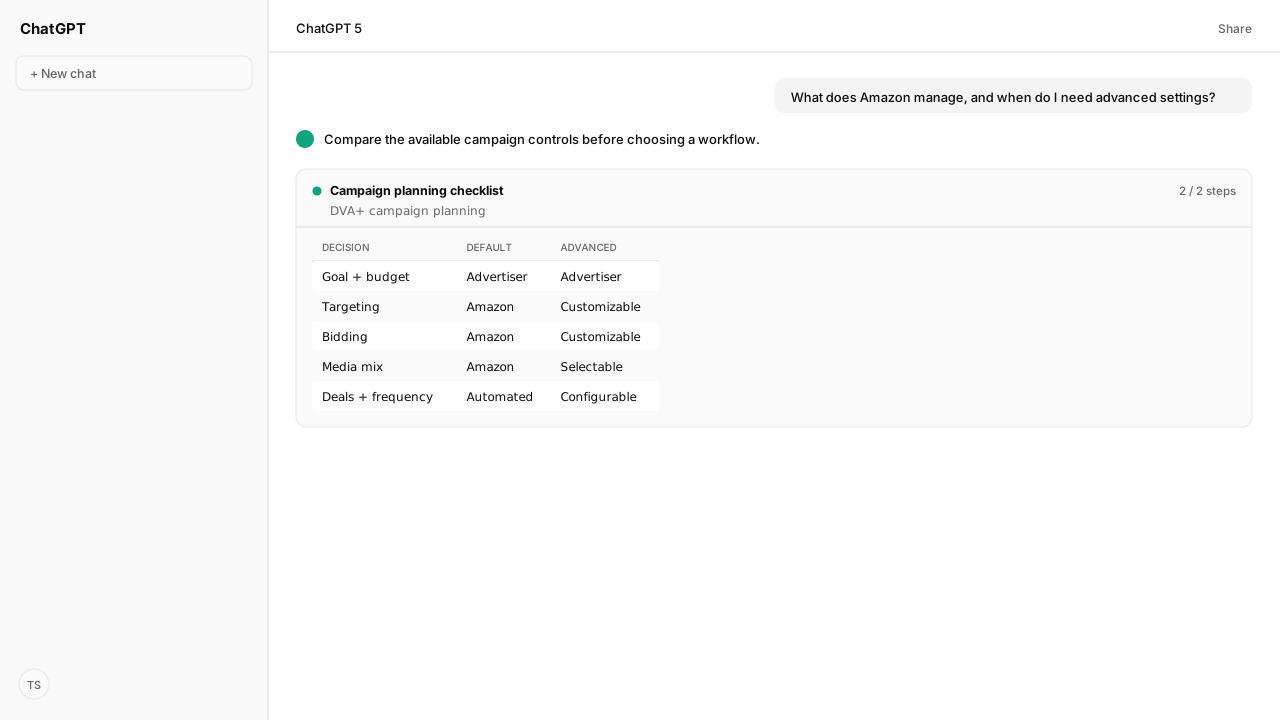
The DVA+ launch announcement contrasts the default workflow with DVA+ with advanced settings. Advanced settings combine campaign setup in one connected form while exposing more configuration. Availability is limited and individual controls can depend on the account.
| Decision | Default DVA+ | DVA+ with advanced settings |
|---|---|---|
| Objective, budget and creative | Advertiser supplies or approves the inputs | Advertiser configures the inputs with additional options |
| Audience and bidding | Amazon manages them toward the objective | Advertiser can customize targeting and bidding |
| Media and inventory | Amazon chooses allocation | Advertiser can select media and use available inventory controls |
| Deals and frequency | Managed through the simplified experience | Controls such as deals and frequency caps are available to configure |
| Optimization approach | Amazon selects based on the objective | Advertiser can configure Brand+, Performance+ or neither |
Choose the default workflow when the objective and conversion signal are clear and you are comfortable with Amazon managing delivery. Consider advanced settings when you need a specific media mix, audience, deal, frequency limit or bidding approach. Keep your team’s creative approval step in either workflow. Neither choice guarantees better results: compare outcomes against a consistent objective, account for differences between campaigns, and avoid treating a single early change as proof of causation.
Amazon DSP capabilities are moving, but existing workflows need separate checks
Amazon says it brought sponsored ads and Amazon DSP into Amazon Ads Agent. It places programmatic capabilities such as audience targeting, frequency management, deals and custom bidding in DVA+ with advanced settings. That does not establish a one-to-one mapping for every old campaign setting or mean that every advertiser has the new interface today.
As of November 1, 2026, Amazon's product page says DVA+ with advanced settings is available to limited US advertisers and lists marketplaces where advertisers continue to use the Amazon DSP experience. Amazon's rollout is phased. Check your account and marketplace, and confirm a control is present before retiring an existing process.
Reporting deserves its own workstream. Amazon has announced the retirement of legacy sponsored ads and DSP report centers, with saved reports and schedules requiring migration to unified reporting. This does not establish that every DSP metric or API will disappear. Our Amazon Ads Agent guide covers the announced dates and the checks to make before replacing reports.
Keep DVA+ API plans separate from existing DSP integrations
Amazon's September 29, 2026 announcement said DVA+ campaign creation was available in Amazon Ads Agent and targeted general API availability for Display, Video and Audio campaigns in Q1 2027. That was a target, not a guarantee. Confirm the current API documentation, permissions and account eligibility before relying on it.
Kuudo supports existing Amazon Ads and DSP workflows through its Amazon Ads MCP. For example, the DSP campaign creation guide explains a workflow for the existing DSP API. It should not be read as a claim that Kuudo can already create DVA+ campaigns or that an existing DSP operation maps to a DVA+ operation. We will need to verify Amazon's released API and the applicable Kuudo support for each new workflow.
Your team chooses the AI client, Skills and access it grants; Kuudo provides the connection and does not operate that client's agents on your behalf. Review permissions and proposed changes in the workflow you choose. For teams also working with seller data, Amazon Agent Flow describes the Amazon Agent Data layer and how Amazon Ads and Selling Partner MCP connections fit together.
What happens next: choose your campaign controls
Open your Amazon Ads account and record whether DVA+ and advanced settings are available for the marketplace you manage. For a candidate campaign, write down the objective, conversion event, budget, creative approval owner and any required audience, media or frequency controls. Use that list to decide whether the default workflow meets your requirements or whether you need advanced settings.
Keep a separate inventory of DSP reports, integrations and campaign-creation processes. Check each against Amazon's current rollout and API documentation before changing it. For the broader naming changes and reporting timeline, start with What Is Amazon Ads Agent?.
Next: understand the Amazon Ads Agent platform and its reporting transition.
Bring your Amazon Ads workflows into your AI client
Connect a compatible AI client to Amazon Ads through Kuudo, and choose the Skills and access your team needs.
Talk with KuudoWhat you need to run Amazon DVA+ campaign setup
- Campaign availability
- DVA+ is a phased beta inside Amazon Ads Agent; advanced settings are limited to eligible advertisers.
- Campaign decision
- Choose a measurable objective and conversion source, then compare default automation with advanced settings before launch.
- API timing
- Amazon's September 29, 2026 launch announcement targeted Display, Video and Audio campaign API general availability for Q1 2027; availability and timing can change.
- Last verified
- 2026-11-01
Keep exploring Amazon DVA+ campaign setup
Use these companion guides to understand the inputs, follow-on analysis, and adjacent workflows behind this playbook.
- What Is Amazon Ads Agent?
Understand the platform rename and reporting transition.
- Create an Amazon DSP campaign
See the existing DSP campaign workflow and its review steps.
FAQ
What is Amazon DVA+?
DVA+ is Amazon's simplified buying and campaign-creation workflow for Display, Video, and Audio in Amazon Ads Agent. Advertisers set a goal and campaign inputs; the default experience automates delivery decisions toward that goal. Availability and media support vary.
Is DVA+ the same as Amazon DSP?
No. DVA+ is the newer buying experience inside Amazon Ads Agent. Amazon says programmatic capabilities previously associated with DSP are available in DVA+ with advanced settings for eligible advertisers, while some marketplaces continue using the DSP experience.
What does DVA+ automate?
In its default workflow, Amazon says DVA+ automates audience targeting, inventory and format allocation, bidding, and optimization toward the campaign objective. Advertisers still choose the objective, budget, promoted products or brand URL, and review creative.
Who can use Amazon DVA+?
Amazon describes DVA+ as a phased beta. Its public product page says advanced settings are available to limited US advertisers, and some other marketplaces continue to use the Amazon DSP experience. Check the options available in your account.
Can I create DVA+ campaigns through an API?
Amazon's September 29, 2026 announcement said campaign creation was available through Amazon Ads Agent and targeted general API availability for Display, Video and Audio campaigns in Q1 2027. That target may change; verify current API support before building a DVA+ workflow.