
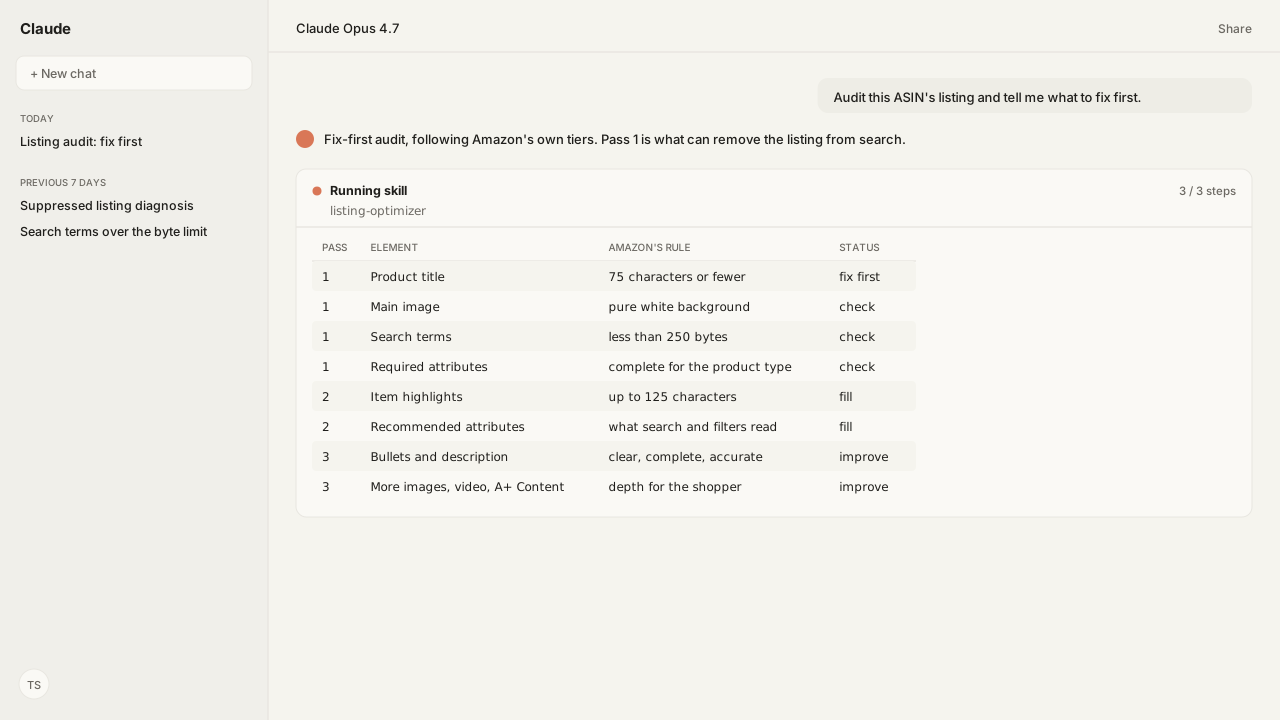
- Work in three passes: what can remove the listing from search, what Amazon search and filters read, then what persuades the shopper. Amazon's Listing Quality Indicator tiers run the same way, with Poor for a policy violation and Fair for missing information.
- Product titles: 75 characters including spaces, for all product types except media, in all stores except Saudi Arabia, Egypt, Türkiye and the United Arab Emirates. Item highlights add 125 characters as comma-separated phrases shown below the title.
- Backend search terms: one Generic Keyword field, less than 250 bytes. Spaces and punctuation are not counted, and a field over the limit is ignored by Amazon Search.
- Bullets: at least three, up to five, 10 to 255 characters each. Images: 500 to 10,000 pixels on the longest side, 1,000 or more for zoom, main image on pure white.
- Amazon's title policy says 75 characters while its Listings Items API documentation lists a 200-character maximum for
item_name. A title the API accepts is not the same as a title the policy allows.
Amazon listing optimization starts with whatever can take the listing out of search or void a field: a product title over 75 characters, a main image that breaks the image rules, and backend search terms that are not less than 250 bytes. Fix those first, then complete the attributes search and filters read, then rework bullets, images and A+ Content.
That is the order I give when a seller asks which parts of a listing matter and where to start. Amazon names the parts itself. Its listing quality guidelines describe "seven key components":
- title
- bullet points
- attributes
- images
- video
- A+ Content
- search
Its Best Practices for Listing Quality page says a high-quality detail page needs "the product title, images, brand, description, and bulleted lists." Amazon also gives the reason to bother: "Customers often return products due to a lack of critical product information."
The parts are public. Which one is broken on your listing today is not. That depends on two things a published checklist does not hold: the live listing's own values, and Amazon's rule as it reads now. The Listing Optimizer Skill reads the live title, the search terms field and Amazon's active warnings on the stock keeping unit (SKU), and Amazon Agent Atlas retrieves the category rules to hold them to.
Fix what removes a listing from search before you touch the copy
The first pass of Amazon listing optimization is a compliance pass, because four listing problems can take a product out of search results before a shopper reads a word. This is the audit I run on one Amazon Standard Identification Number (ASIN) at a time.
| Fix order | Element | Amazon's rule or guidance | What to check |
|---|---|---|---|
| 1 | Product title | Maximum 75 characters, spaces included | Length, banned characters, repeated words |
| 1 | Main image | Pure white, 85% fill, 500+ pixels | Background, crop, text, placeholders |
| 1 | Search terms | Less than 250 bytes, one field | Byte count, brand names, ASINs |
| 1 | Required attributes | Missing values can suppress | Fix tab, suppressed listings view |
| 2 | Item highlights | 125 characters, comma-separated phrases | Present once title complies |
| 2 | Recommended attributes | Fill the Recommended view | Filters shoppers use, brand field |
| 2 | Item type keyword | Most specific Browse Tree value | Exact spelling from the guide |
| 3 | Bullet points | Three to five, 10 to 255 characters | Fragments, no emojis or claims |
| 3 | Description | Plain text, line breaks only | No code, contact details, pricing |
| 3 | More images and video | Six more images, one video | Zoom at 1,000+ pixels |
| 3 | A+ Content | Brand Registry role required | Published on brand-owned ASINs |
| After | Listing Quality Indicator | Refreshes within 15 minutes | Tier moved from Poor or Fair |
Fix order 1 can remove the listing from search or void the field. Order 2 is what Amazon search and filters read. Order 3 is what persuades the shopper.
Amazon states each first-order consequence in hedged words, quoted here:
- A non-compliant title on a listed product "might be automatically corrected or it might not appear in our search results."
- Without a compliant main image, "we may temporarily remove the product listing from search until a compliant main image is provided."
- Prohibited search terms "may result in your ASIN being suppressed and may put the health of your selling account at risk", and a search terms field over the length limit "is completely ignored by Amazon Search."
- On missing data, the Suppressed listings page says Amazon "will hide (or suppress) from search and browse non-media listings that do not meet certain standards."
The order follows Amazon's own tiers. Amazon's Listing Quality Indicator rates a listing Poor when it "violates Amazon detail page policies" and Fair when it "lacks some key product information," so policy fixes come before content fixes.
The Listing Optimizer Skill reads the live listing through the Selling Partner MCP, leads with the warning that is hiding the listing, and groups the cosmetic fixes behind it. If the ASIN is already out of search, start with how to diagnose a suppressed listing and come back.
An Amazon product title is 75 characters, and item highlights hold the next 125
Amazon product titles must not exceed 75 characters, including spaces, for every product type except media. The scope is exact: "Title requirements apply to all product types, except media product types, listed in all stores, except for Saudi Arabia, Egypt, Türkiye, and the United Arab Emirates." Media product types include books, music, movies, software and video games. Bundles follow the same 75.
The detail that used to sit in a long title has its own home. Amazon says "a new field called Item highlights has been introduced," and that item highlights "provide an additional 125 characters for product details like materials or recommended use cases. These should be written as comma-separated phrases, instead of full sentences."
They display "below titles in search results and on product detail pages," and Amazon lets you add them once the title is updated to the 75-character limit. On a variation family, keep the most important variating attributes in the title and move the rest to item highlights.
Amazon's own example: a compliant and a non-compliant title
Amazon's own title example shows the difference. Compliant: "Amazon Essentials Women's Fleece Jacket, Black, Medium". Non-compliant: "Amazon Essentials Super Comfortable Women's Winter Fleece Jacket with Pockets and Zipper Closure Perfect for Cold Weather and Outdoor Activities, Available in Black Color, Size Medium for Women". Amazon's explanation: "75 or fewer characters is required because mobile screens truncate long titles."
The rest of the title rules are short:
- Promotional phrases such as "free shipping" are out. So are the characters
!, $, ?, _, {, }, ^, ¬, ¦. - "Titles must not contain the same word more than twice," with prepositions, articles and conjunctions exempt and brand names not exempt.
- Amazon's recommended order is "Brand name, flavor or style, product type, key attribute, color, size or pack count, model number."
- Capitalize the first letter of each word, skip all capitals, and use numerals.
- A product with no brand takes "generic" in the Brand name field, not in the title.
The Listing Optimizer Skill applies Amazon's title limit itself, and Atlas grounds the category formula a rewrite follows. It checks the live title, flags what is over, and drafts a tighter title for you to approve.
How many keywords fit in an Amazon listing: one field, less than 250 bytes
Amazon's limit is in bytes, not in keywords: the backend search terms field, the Generic Keyword attribute, must be less than 250 bytes. There is one field, not five: "The field for search terms was reduced from five fields to one field."
Bytes are not characters. For a to z and 0 to 9, "one byte corresponds to one character," but "more complex characters, such as umlauts in German (for example, ä), can correspond to two or more bytes per character." Spaces and punctuation are free: "Amazon search does not count spaces or punctuation." In Seller Central the field "stops accepting inputs when the byte limit is reached." You edit it under Manage products, Edit, Product details, Generic keyword.
What Amazon documents about the search terms field, one part of listing search engine optimization (SEO), is matching. Search terms "are keywords that are used by the search engine for lexical matching between an ASIN and a query," and shoppers cannot see them. Amazon's guidance for the field:
- synonyms
- spelling variations but no common misspellings
- abbreviations
- all lowercase
- spaces instead of punctuation
- singular or plural but not both
- no articles or prepositions
- no repetition
Prohibited: your brand or other brand names, ASINs, profanity, temporary statements such as "new" or "on sale now," and subjective claims such as "best" or "amazing."
Visible copy works the same way, with the same caveat. Amazon says it "may not use the search terms that you supply for any reason," and that it reserves "the right to not use all supplied content from the product description, including bullet points, for retrieving products in customers' shopping search results." Write the title and bullets for the shopper, and spend the hidden bytes on terms the visible copy does not already carry.
The byte count of your live field is an account fact a checklist cannot see. I ask the Skill to audit the SKU's search terms and strip out brand names, duplicates and anything over the limit. Which queries earn those bytes is a Search Query Performance question.
Bullets, description and attributes are held to completeness, not one limit
Bullet points, the product description and product attributes carry no single headline limit the way titles and search terms do; Amazon's guidance for them is about count, length range and completeness.
Amazon's bullet point guideline is at least three bullets of 10 to 255 characters each, and the detail page allows "up to five descriptive points." Amazon labels these best practices. Start each bullet with a capital letter, write a sentence fragment with no end punctuation, separate phrases with semicolons, and use the header, colon, description pattern Amazon shows: "Cotton fabric: Made from 100% cotton".
The description is "presented in paragraph form" and "should provide an elaboration on the key features and uses." Keep code out of it: "Don't use HTML, JavaScript, or other types of code in your product detail pages. As a special case, you can use line breaks </br> in the description."
Attributes do the most work and get the least attention. Amazon says "Product attributes help index your products" and "power the refinement options (the filter check boxes in the left panel)," and that complete attributes "enable Rufus (Amazon's AI shopping assistant) to provide more accurate context to customers."
Seller Central shows Required, Recommended and All views: "We recommend that you provide all attributes in the Recommended view." Put the brand in the brand field ("The brand allows customers to filter their search results") and pick the item type keyword "at the most specific subcategory available," spelled as the Browse Tree Guide spells it.
The account-specific layer is where the fields disagree with each other. The Skill checks the title against the bullets, the description and the structured attributes and flags the contradictions. The full list of what it checks is in the Listing Optimizer documentation.
The main image carries the rules that affect search; more images, video and A+ Content add depth
The main image carries most of the image rules that affect search, because it is the image Amazon shows in search results. Amazon's main image must sit on a "pure white background (RGB color values: 255, 255, 255)," where RGB is red, green, blue, with the product at 85% of the frame.
Show the whole product once, as one unit, out of its packaging unless the packaging is a feature. Placeholders are out: "the first image uploaded defines the product identity."
The file rules apply to every image: "Minimum 500 pixels and maximum 10,000 pixels on the longest side," and "Images with 1,000+ pixels on the longest side enable the zoom function." JPEG is the recommended format. Every image must match the product's title and carry no review imagery, claims, badges such as "Amazon's Choice," or Amazon logos.
More images, video and A+ Content come after the main image
Depth comes after that. "We recommend that you upload at least six additional images and one video," and Seller Central takes "one main image and up to eight additional images." Amazon does not promise placement: "Uploading an image doesn't guarantee it will be displayed on the product detail page." A+ Content needs a professional seller with a Brand Representative or Reseller role assigned through Brand Registry, carries no fee for Basic A+ and Brand Story, and "doesn't support HTML tags."
This section states the rules only. When the audit flags an image, the replacement is a separate job: rebuild the listing images from your own photos with Amazon Agent Iris.
What happens next: run the fix-first audit on one ASIN, then re-check Listing Quality
Pick one ASIN and run the table against it. With the Listing Optimizer Skill, the agent works the same order from the live listing, leads with whatever is hiding it, and shows each proposed change (which field, from what, to what) before it waits for your approval. Approved changes go out through the previewed write path.
Then re-check on Amazon's clock:
- A title or item highlights update "can take 24 to 48 hours to be processed and displayed."
- Images "can take up to 24 hours."
- Amazon says "The listing quality refreshes within 15 minutes of publishing updates."
The Enhance tab in Manage Products lists what still needs work, and Amazon recommends a weekly review. Read the tier the way Amazon asks you to: "the score should be used as a directional indicator rather than a predictor of visibility or sales." Brand owners can test a rewritten title, image or bullet set in Manage Your Experiments, where "Experiments do not impact search rankings."
Make the audit recurring
To make the audit recurring, the Agent Flow MCP pulls the merchant listings report on a schedule and lands it in your agent-ready data lake, part of the Amazon Agent Data layer, so the next audit reads listing state that is already there. A compliant listing is also the page Sponsored Products traffic lands on, which is where the Amazon Ads MCP picks up. If you want the tool more than the checklist, see the Amazon listing optimization tool page.
The pattern is rule first, then the listing's own state, then the rewrite. Amazon decides what shows in search; the audit decides what you fix first.
Next: preview the listing patch before it goes live.
Find out what to fix first on your own ASIN
Bring us the listing audit you want your agent to run. We'll map the Selling Partner MCP, the Listing Optimizer Skill, Atlas grounding, and private-beta setup with you.
Run this workflow in betaWhat you need to run listing optimization audits
- MCP
- Amazon Selling Partner MCP for the live listing, its attributes, and Amazon's active warnings on the SKU
- Skill
- Listing Optimizer, the Skill that audits the listing, proposes each change, and waits for approval before it submits
- Atlas collection
- amazon_sellers, grounded in Product title requirements and guidelines, Use search terms effectively, Product bullet point requirements, Product image guide, Best Practices for Listing Quality, and Enhance Listings
- requiredAccess
- Seller listing access; a Brand Registry role for A+ Content
- Last verified
- 2026-09-21
What success and failure look like for listing optimization audits
| result | interpretation |
|---|---|
| Title at 75 characters or fewer, no word used more than twice | The title meets Amazon's length and repetition rules. Move the extra detail into item highlights. |
| Search terms field over the byte limit | Amazon Search ignores the whole attribute. Cut the field to less than 250 bytes before adding any term. |
| Main image flagged in the Fix tab | Amazon may remove the listing from search until a compliant main image is provided. Replace the image before editing copy. |
| Listing Quality Indicator reads Poor | The listing violates a detail page policy; Amazon's examples are a banned character in the title or missing key information. Find that violation before adding depth. |
| Listing Quality Indicator reads Fair | Policies are met and key product information is missing. Fill the Recommended attribute view. |
Keep exploring listing optimization audits
Use these companion guides to understand the inputs, follow-on analysis, and adjacent workflows behind this playbook.
FAQ
What is Amazon listing optimization?
Amazon listing optimization is improving the parts Amazon says make a quality listing, its "seven key components": title, bullet points, attributes, images, video, A+ Content and search. Amazon's stated goal for them is that customers can find, evaluate, and purchase the product.
How long can an Amazon product title be?
75 characters including spaces, for all product types except media, in all stores except Saudi Arabia, Egypt, Türkiye and the United Arab Emirates. Item highlights add 125 characters of detail below the title.
How many keywords can I use in an Amazon listing?
Amazon's limit is in bytes, not in keywords. The Generic Keyword (search terms) field must be less than 250 bytes, spaces and punctuation are not counted, and a field over the limit is completely ignored by Amazon Search.
How many bullet points should an Amazon listing have, and how long should they be?
Amazon's guideline is at least three bullet points, with up to five on the detail page, at 10 to 255 characters each. Write them as sentence fragments without end punctuation.
What size do Amazon product images need to be?
Between 500 and 10,000 pixels on the longest side, and 1,000 pixels or more to enable zoom. The main image sits on a pure white background (RGB 255, 255, 255) with the product at 85% of the frame.
How long do Amazon listing changes take to show?
A title or item highlights update can take 24 to 48 hours to be processed and displayed, and images can take up to 24 hours. The Listing Quality Indicator refreshes within 15 minutes of publishing updates.
Why did Amazon change my product title, or why is my listing missing from search?
Amazon says a non-compliant title on a listed product might be automatically corrected or might not appear in search results. Check Search suppressed and inactive listings in Manage All Inventory and fix the violation; Amazon re-checks the title and lifts the suppression if it meets the requirements.