
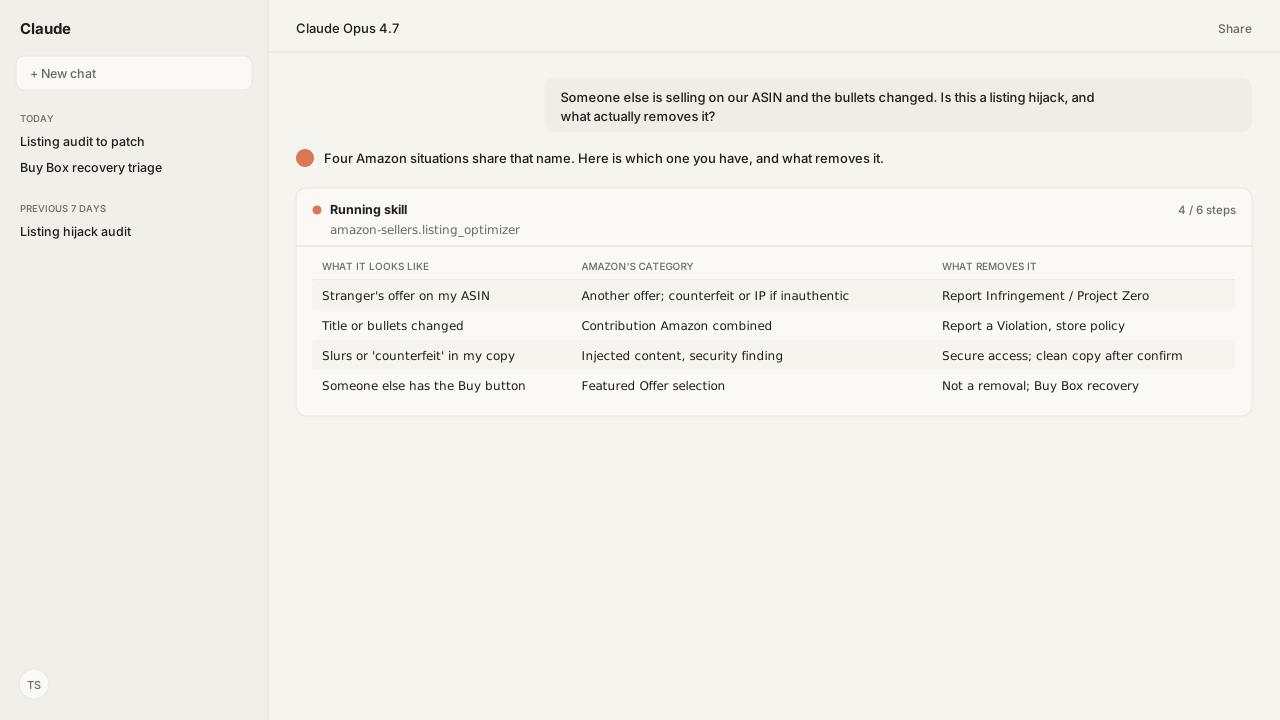
- Four situations get called an Amazon listing hijack: another seller's offer on your ASIN, a detail page rewritten by a contributor Amazon chose, sabotage copy injected into your listing, and a lost Featured Offer. Amazon's help pages use the word for none of them, and each takes a different remedy.
- Another seller's offer is allowed "as long as they aren't infringing on any intellectual property." Removal exists for counterfeit (Project Zero's Self-Service Counterfeit Removal tool, registered trademark only), infringement (Report Infringement, Rights Owner or Registered Agent), and store-policy violations (Report a Violation, no rights ownership required).
- Copy that changed without you is a contribution Amazon selected: it "automatically combines the best product data from various seller submissions", and on brand-registered ASINs the Brand Representative's contribution is displayed. A verified contribution shows within 48 hours; if yours does not, Amazon picked someone else's.
- Slurs or "counterfeit" in your own bullets is a security finding, not a typo. The Listing Optimizer Skill scans title, bullets, description and search terms early in the audit, leads the review with any hit, and drafts clean copy only after you confirm.
- Losing the Featured Offer is competition, not removal: "As of September 2026, Amazon no longer maintains a seller eligibility requirement, and offers from all sellers are now eligible to be evaluated for the Featured Offer."
An Amazon listing hijack is one of four Amazon problems under one name: another seller's offer on your Amazon Standard Identification Number (ASIN), detail-page copy replaced by a contributor Amazon chose, sabotage text injected into your listing, or the Featured Offer going to someone else. Amazon's help pages use none of that vocabulary, and each form takes a different remedy.
The question reaches me as four messages in the same week:
- a stranger's offer on our best ASIN
- a title nobody on the team touched
- "counterfeit" in bullet five
- the Buy button on someone else's offer
Each gets called an Amazon hijacking, and the instinct is to report the hijacker. Amazon's own Report Infringement tool answers that instinct: "We allow other sellers to list their items for sale against ASINs as long as they aren't infringing on any intellectual property." So the first job is not removal. It is naming which of the four forms you have.
Naming it takes two things a forum thread cannot see: who else is on the ASIN this morning, and whether the live detail page still matches what you submitted. The Listing Optimizer Skill reads both through the Selling Partner MCP, the Model Context Protocol (MCP) server for your seller account, and leads the review with any tamper hit before it grades a bullet.
Amazon Agent Atlas supplies the Amazon rule that decides which category a finding falls in and which Brand Registry role can file it.
The report the agent returns is one table per ASIN, and it is also the matrix above:
| What I call it | Amazon's category | Read this to confirm | What removes it, and who |
|---|---|---|---|
| A stranger's offer on my ASIN | Another seller's offer; counterfeit or infringement if inauthentic | Offers on the ASIN: seller, condition, landed price | Project Zero or Report Infringement; none if genuine |
| My title or bullets changed | Contribution Amazon combined; unauthorized update is store policy | Live catalog values against your submitted values | Report a Violation, no rights ownership |
| Slurs or "counterfeit" in my copy | Injected content aimed at suppression or trust | Tamper scan of title, bullets, description, search terms | Seller secures access; Skill drafts clean copy |
| Someone else has the Buy button | Featured Offer selection, no eligibility gate | Featured Offer holder, percentage, Pricing Health | Not a removal; Featured Offer recovery |
The fourth column answers the question everyone asks first: two of the four are removable, one is a security incident, and one is competition.
Another seller's offer on your ASIN is allowed unless it is counterfeit or infringing
What sellers call an Amazon hijacker is, to Amazon, another seller's offer, and shared pages are the catalog's design: "While multiple sellers share the detail page and each have their own offer, one offer wins the Buy Box on the product detail page." A reseller with genuine stock is not removable for being there. What is removable falls into three Amazon categories, each with its own tool, its own role, and its own precondition.
| Amazon's category | Tool | Who can file | Precondition |
|---|---|---|---|
| Counterfeit | Project Zero Self-Service Counterfeit Removal | Rights Owner enrolled in Project Zero | Mark identical or near-identical to registered trademark |
| Intellectual property (IP) infringement | Report Infringement | Rights Owner or Registered Agent | One IP type per notice |
| Store-policy violation | Report a Violation | No rights ownership needed | Concise explanation, supporting documentation |
| Prevention, not removal | Transparency | Enrolled brand | Every unit labeled with a code |
I asked our agent which offers were on the ASIN before anyone decided what to file. Through the Selling Partner MCP, the competitive summary (getCompetitiveSummary) "returns all featured offers", with "the seller, item condition, listing price, and shipping costs" for each, covering "the top 20 lowest priced offers".
On ASINs where you hold an active offer, Amazon's ANY_OFFER_CHANGED notification fires "whenever there is a change to any of the top 20 offers" and "if there is a change to which offer wins the BuyBox"; the limit is that "You will only receive ANY_OFFER_CHANGED notifications for items for which you have active offers."
Atlas grounds what each row means in Amazon's terms, so the report calls the row another seller's offer, with its condition and landed price, rather than a hijacker.
Project Zero is the fast path for counterfeits, and a narrow one
Project Zero is the fast path, and it is narrow. The policy behind it is blunt: "Products offered for sale on Amazon must be authentic". Enrolled brands can "immediately remove products you believe are counterfeit" with the Self-Service Counterfeit Removal tool, where a counterfeit is a product using a mark "identical to or substantially indistinguishable from a registered mark".
Amazon lists what the tool is not for, including a product that "violates an Amazon selling policy, but it is not a counterfeit." Amazon says "It is free to enroll in Project Zero", enrollment requires a 15-minute training, and a removal "will take effect within a few minutes."
The discipline is strict:
- When some offers on the ASIN are authentic, "you must remove only the counterfeit product offers from specific sellers"; removing the whole ASIN in that state "will be considered a misuse of the tool".
- To keep access, "you must maintain an accuracy rating of 99% or higher."
- A mistaken removal must be retracted "immediately" from Submission history.
- A reinstated product gets left alone ("do not remove it again").
- The other side can act: "Selling partners are able to dispute a listing removal if they believe it was made in error", after "A notice of complaint is sent to each seller associated with the removal."
If the tool answers "Our automated detection system is unable to confirm the presence of the trademark on the selected ASINs", Amazon's answer is Report a Violation as an IP report, provided the trademark is on the detail page or in the product's look and feel.
Report Infringement is the IP path, gated by Brand Registry role
Report Infringement is the intellectual property path, and the role gate is explicit: "To report an IP infringement, you must be a Brand Registry user with either the Rights Owner role or the Registered Agent role." The form lets you report "All sellers who list on the ASIN" or "Specific offers from sellers", and it generates the seller list itself once you give it the ASIN.
The rules that shape a notice:
- One claim per notice: "Do not submit more than one type of IP violation per notice."
- A brand that is not enrolled in Brand Registry can still "submit a notice" through Amazon's public infringement form, "which is available for all selling partners."
- Common-law trademark claims are accepted in the "United States, Canada, and South Africa stores" and, in general, nowhere else.
- If you have an offer of your own on the ASIN, the tool will not let you select the complete ASIN because it is connected to you or your brand; you report the infringing offers instead.
The same tool sets the limit of what any report can do: "Once a product has been legally purchased or acquired by another owner, it may subsequently be sold and resold without restriction."
After a report is accepted, Submission history shows the other seller's contact details to "Rights Owners and Registered Agents approximately 20 days after a report is accepted", because "It takes approximately 20 days to process potential appeals from affected sellers." That is for "IP infringement cases" only, and it is not a resolution time; Amazon's report pages give none. Reports stay visible for "the past twelve months".
A rejected report costs you a test buy
The test buy is what a rejected report costs you next, and a wrong-category report comes back not accepted. Once "an increasing number of your recent reports of intellectual property violations were not accepted and found to be invalid", Amazon says "you are temporarily required to conduct a test purchase for reported items and provide the associated order number."
A design-right claim against a specific seller's offer needs a test purchase for each offer reported, and for copyright Amazon says "We recommend that you complete a test buy".
Transparency stops the next unit instead of removing anyone
Transparency does not remove anyone; it stops the next unit. "Whether they’re fulfilled by us or shipped directly by you, products that are enrolled in Transparency can’t be sold in Amazon stores without a valid code", and "Items without a valid code are put aside for further investigation".
Detail-page copy that changed without you is a contribution Amazon chose, and brand registration tilts who wins
A title or bullet you did not write is, in Amazon's words, a contribution it selected. "When multiple sellers sell the same product through a single detail page, Amazon automatically combines the best product data from various seller submissions", and "When evaluating contributions, we consider sales volume, refund rate, buyer feedback, and A-to-z guarantee claims."
Registration tilts the selection: "ASINs registered for a brand will most likely show the brand owners contributions", and where several brand-role sellers contribute, "the contribution from the seller with a Brand Representative role is displayed". Amazon's own advice when a brand-registered page shows wrong values is to reach out "to the brand Administrator", and "Only the Administrator can manage roles."
The seller's own test is a clock: "If your contribution is verified by Amazon, they will show on the product detail page within 48 hours. If, after the allotted period, your contributions do not show on the product detail page, it means Amazon's system has selected another contributor's information that best describes the product based on the guidelines set by Amazon."
Detection is a diff of live against submitted
Detection is a comparison, not a notification. I asked the agent for the live detail page against what we submitted; the Listing Optimizer Skill reads the live catalog record (catalog_getCatalogItem) and the listing we sent (listings_getListingsItem), because "catalog tells you what's live; listings tells you what you sent and any open warnings."
Neither listings notification fires when another contributor's content wins: LISTINGS_ITEM_ISSUES_CHANGE covers issues on your listing, and LISTINGS_ITEM_STATUS_CHANGE fires when a listing "is created, deleted, or its buyability changes." I found no change history to pull, either. The diff is the detection, which is why the report carries both columns.
The remedy is a store-policy report, and it needs a seller's name
The remedy is Report a Violation under store policy, and it needs no rights ownership. Amazon's list of store-policy violations includes "making unauthorized updates to a product detail page", and the page says outright: "Unlike with IP infringement reports, you do not need to be the rights owner of the reported ASIN to submit a store policy or regulatory compliance violation report."
The form asks for:
- "The store or business name of the seller that you are reporting"
- the ASIN and product title
- the stores affected
- "A concise explanation of the violation based on the policy"
- supporting documentation
That first field is the catch: the diff proves the page changed, not who changed it. Amazon combines contributions from the sellers on the page, so the offers read from the first section is the list of candidates, and on a brand-registered ASIN the brand Administrator can say which account holds a selling role and what it submitted.
If neither names a store, there is no seller to report; the page is fixed through your own contribution and the Administrator, and the report waits until a name exists. Expect silence on the outcome: "For privacy reasons, the results of our investigations can't be disclosed".
The generic advice to just re-edit the title loses again the next time Amazon combines contributions; the brand role or the report is what changes who wins. Atlas is what put the store-policy list in front of me, which is the only reason the report went in as unauthorized updates rather than as an infringement notice that would have been rejected.
Injected copy is a security finding, not a copy-quality issue
Text in your own listing that says "do not buy", "scam" or "counterfeit" is a compromise signal, and the Listing Optimizer Skill treats it that way before it grades a single bullet.
The Skill's policy reference says a listing's copy "can be altered by someone other than the legitimate owner", naming "a hijacker on a shared/variation listing, a compromised account, or a bad actor exploiting a contribution path", and that the injected content is designed either to "get the listing suppressed" or to "destroy buyer trust". Its instruction is to "treat any hit as critical".
The scan covers "title, all 5 bullets, product description, and backend search terms (generic_keyword)", because the low-visibility fields are where the text hides. Three categories:
- adult or sexual content wedged into an unrelated product
- abusive or offensive language meant to force a takedown
- sabotage phrases such as "do not buy", "scam", "fake product", "counterfeit" and "not authentic"
It judges in context; "Damascus steel" is not a slur, and a medical product may use clinical terms.
What the Skill does on a hit, and what it leaves to you
What happens on a hit is the part I care about. The Skill leads the review with it and does not clean it up on its own: "Do not silently rewrite the field; the user needs to know their listing was tampered with." It frames the finding as "a possible compromise, not a typo", and points at the questions only you can answer:
- who has account and contributor access
- whether the ASIN is shared or sits in a variation family someone joined
- what the listing's change history shows, which is a Seller Central look, since I could pull none through the MCP
Then it stops. "Escalation is the user's." Securing the account, reporting, and opening a case are your actions; "this skill diagnoses and drafts the clean replacement copy, but does not contact Amazon."
The clean draft is written "Only after the user confirms", and it goes out through the same preview, confirm, submit loop as any other edit, after the Skill has verified with listings_searchListingsItems that you own a stock keeping unit (SKU) on the ASIN at all. The prompt from the Listing Optimizer documentation is the one I used: "Is there anything in [SKU]'s copy that looks tampered with or hijacked?"
Where the text came from decides the Amazon-side remedy:
- If it arrived as a contribution on a brand-registered ASIN, the fix is the previous section's.
- If it came through your own account, securing access is the step, and no report replaces it.
- If it already tripped a listing-quality suppression, remember that "An ASIN may not be indexed if it is removed from the detail page or search suppressed due to listing quality issues", and diagnose the suppression before you re-list.
Paste the bullet into a plain chat and it will tidy the wording and lose the evidence.
Losing the Featured Offer is competition, not a hijack, and the eligibility gate ended in September 2026
Another seller holding the Buy button on your ASIN is Amazon's selection among offers, not something Amazon removes. "The Featured Offer is the offer that appears with Add to Cart / Buy Now buttons in the Offer Display on a product detail page", and "Amazon selects the Featured Offer for a product by evaluating all offers to determine which is the most attractive for the customer."
Older pages and the pricing notifications still call it the Buy Box. Your share is in Business Reports as the Featured Offer percentage.
The rule changed in September 2026. Amazon's Becoming the Featured Offer page: "As of September 2026, Amazon no longer maintains a seller eligibility requirement, and offers from all sellers are now eligible to be evaluated for the Featured Offer." The former Featured Offer eligibility page now reads "This page has been removed."
I treat the September 2026 statement as current, and the audit's Featured Offer row reads accordingly: the other seller was evaluated, and won.
The reads for this row come through the Selling Partner MCP and Seller Central. getCompetitiveSummary names the featured offer holder; Amazon's ASIN Performance Alerts recommend an alert on "Large changes in featured offer percentage (competitive position changes)".
If Sponsored Products campaigns run on the ASIN, the Amazon Ads MCP shows what they spent over the days the button belonged to someone else. Everything else on this row is the Featured Offer recovery workflow, which I am not re-teaching here.
What happens next: run the hijack audit on one ASIN, then file by category
Pick the ASIN that prompted the message and ask the agent for the audit. With the Listing Optimizer Skill on the Selling Partner MCP, it reads the offers, diffs live against submitted, runs the tamper scan and leads with any hit, and reads the Featured Offer state, then the agent returns the four-row table I asked for, with Amazon's category and the role each remedy needs.
Atlas supplies the rule text beside each row. Nothing is filed and nothing is written; a tamper hit waits for your confirmation before a clean draft exists, and any approved edit goes out through the normal preview, confirm, submit path.
Then file by category, in the tool the row names, with the role the row names:
- Counterfeit through the Self-Service Counterfeit Removal tool, on the specific offer, with the test-buy order number in the Removal summary, never the whole ASIN while an authentic offer sits on it.
- Infringement through Report Infringement, one IP type per notice.
- An unauthorized detail-page update through Report a Violation.
- A tamper hit starts with access, not a form.
- The Featured Offer row goes to the recovery guide.
Schedule the merchant listings report through Agent Flow, the Amazon Agent Data layer, and last week's submitted values are in your own data lake when next week's diff runs, instead of in someone's memory. The rest of the listing is the listing optimization pass, which starts after the page is yours again.
The pattern is name the category, read the evidence, then file with the role that can. Amazon's help pages do not say hijack; the audit says what they do say.
Next: Amazon Buy Box Eligibility: Recover the Offer.
Find out which kind of hijack is on your own ASIN
Bring us the ASIN. We'll map the Selling Partner MCP, the Listing Optimizer Skill, Atlas grounding, and private-beta setup with you. The filing stays yours.
Run this workflow in betaWhat you need to run listing hijack audits
- MCP
- Amazon Selling Partner MCP for the offers on the ASIN, the Featured Offer holder, the live catalog values, and the listing you submitted
- Skill
- Listing Optimizer, the Skill that compares live against submitted, runs the tamper scan early in the audit, leads the review with any hit, and drafts clean copy only after you confirm
- Atlas collection
- amazon_sellers, grounded in Report a violation, Report store policy, compliance, and safety violations, Intellectual property for Rights Owners and Registered Agents, Report Infringement error messages, Project Zero: Guidelines and training, Project Zero FAQ, Protect your brand with Transparency, Suggest changes to your product detail page, Becoming the Featured Offer, Featured Offer eligibility, and Account health rating
- requiredAccess
- Seller listing access for the audit. Rights Owner or Registered Agent role for Report Infringement; a Rights Owner enrolled in Project Zero for Self-Service Counterfeit Removal; any seller for a store-policy Report a Violation; the brand Administrator to change selling roles
- Last verified
- 2026-09-22
What success and failure look like for listing hijack audits
| result | interpretation |
|---|---|
| Another seller's offer on the ASIN, product genuine | Not removable. Other sellers may list against the ASIN as long as they are not infringing, and a legally purchased product may be resold without restriction. Transparency codes are the prevention path. |
| Test buy shows your registered mark on an inauthentic unit | Counterfeit. Use Project Zero's Self-Service Counterfeit Removal on that seller's offer only, with the order number in the removal summary. Removing the whole ASIN while other offers are authentic counts as misuse. |
| Live title differs from your submitted title on a brand-registered ASIN | A contribution Amazon selected. Ask the brand Administrator which account holds the Brand Representative role; report an unauthorized detail-page update through Report a Violation, which needs no rights ownership. |
| Tamper scan hit: "counterfeit" in bullet five | Security finding. Secure account and contributor access first, then confirm the clean draft. If the injected copy tripped a listing-quality suppression, diagnose the suppression before re-listing. |
| Another seller holds the Featured Offer, every offer genuine | Competition, not a removal. Amazon maintains no seller eligibility requirement as of September 2026. Run Featured Offer recovery on price, stock, shipping and returns. |
Keep exploring listing hijack audits
Use these companion guides to understand the inputs, follow-on analysis, and adjacent workflows behind this playbook.
FAQ
What is Amazon listing hijacking?
Seller vocabulary, not Amazon's. Amazon's help pages file what sellers call a hijack under four categories: another seller's offer on your Amazon Standard Identification Number (ASIN), allowed unless it infringes intellectual property; a detail-page contribution Amazon selected; a store-policy violation for unauthorized detail-page updates; and Featured Offer selection. The remedy follows the category, and two of the four are not removable.
How do I remove a hijacker from an Amazon listing?
By the category it falls in. Counterfeit goes through Project Zero's Self-Service Counterfeit Removal tool. Infringement goes through Report Infringement, filed by a Rights Owner or Registered Agent. A store-policy violation such as an unauthorized detail-page update goes through Report a Violation, which does not require you to be the rights owner. A genuine resale is not removable.
Can Amazon remove a hijacker who is selling my genuine product?
Not for that reason alone. Amazon's Report Infringement guidance states that once a product has been legally purchased or acquired by another owner, it may subsequently be sold and resold without restriction. Transparency is the prevention path: enrolled products cannot be sold in Amazon stores without a valid code.
Why does my Amazon title or bullet text change when I never edited it?
Amazon combines detail-page content from every contributor and picks what it judges best, weighing sales volume, refund rate, buyer feedback and A-to-z guarantee claims. On brand-registered ASINs, the contribution from the seller with a Brand Representative role is displayed. A verified contribution shows within 48 hours; if yours does not, Amazon selected another contributor's information.
How long until Amazon shows me who the listing hijacker is?
Approximately 20 days after a report is accepted, and only in Submission history for Rights Owners and Registered Agents. Amazon uses that window to process potential appeals from affected sellers. Contact details are shown for intellectual property infringement cases only; store-policy reports do not display them.
Do I need Brand Registry to report Amazon listing hijackers?
For Report Infringement inside Brand Registry and for Project Zero, yes. A brand that is not enrolled can use Amazon's public infringement form, which is available for all selling partners. Store-policy reports through Report a Violation need no rights ownership at all.