
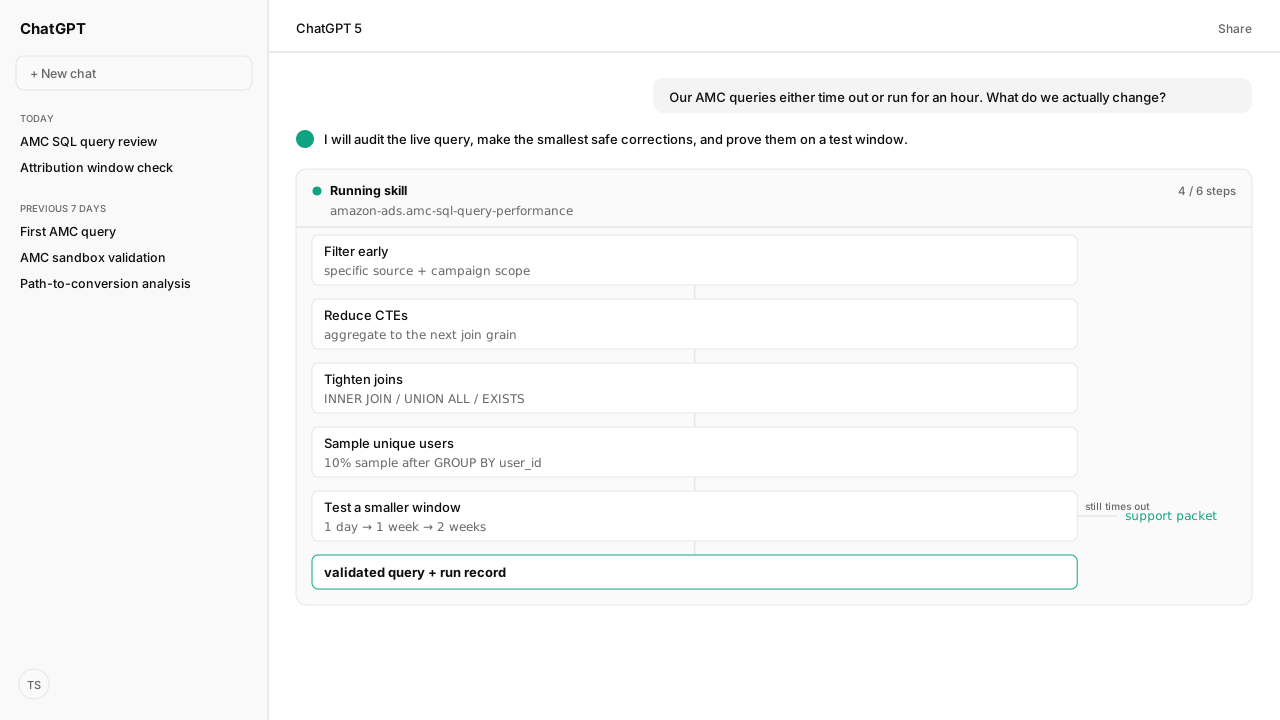
- Filter the correct source as early and specifically as possible. Sargable predicates reduce the records carried into joins and aggregations.
- Aggregate or deduplicate every CTE to its smallest useful grain before joining. The wrong grain can make a query slow and multiply metrics.
- For exploration, sample unique users after grouping. On a 10% sample, counts should be near 10% while averages and rates stay similar.
- Test one day first, then widen the window. If a reduced query still times out, send AMC support the SQL ID, Instance ID, screenshots, and query.
The answer to a slow Amazon Marketing Cloud (AMC) query is not one clever SQL trick. It is a fixed sequence: filter earlier, reduce rows before joins, sample exploratory work correctly, and shrink the test window until you know whether the problem is the SQL or the workload.
Run the slow AMC query through a query-performance Skill that reads the live query context with the Amazon Ads MCP, checks each change against Amazon Agent Atlas, and returns a smaller query you can test before another long run.
The question that kicked this off was blunt: "Our AMC queries either time out or run for an hour. What do we actually change?" I gave our agent the SQL, the AMC instance, and the date range. It came back with the exact expensive operations, a rewritten query, and a validation plan instead of a generic list of database tips.
ChatGPT, Claude, Perplexity, Microsoft Copilot, and whatever comes next know nothing about your business out of the box. Your competitors use those tools too. Kuudo gives those same tools your edge: your data, your rules, and the way your business operates. That means your account as it is right now, your judgment running every time, and your call before anything changes. The Amazon Ads MCP reads and tests against your authorized instance, Skills preserve the rules your team expects, Amazon Agent Atlas supplies Amazon-specific guidance, and approval controls keep activation and other consequential changes with you.
Early, sargable filters remove work before joins begin
AMC reads sources, applies WHERE filters, performs joins and aggregations, then applies HAVING. That makes early filtering the first place I look. A filter that wraps a field in a function can force the engine to evaluate far more records than a narrow, sargable predicate.
Atlas retrieved this documented before-and-after pair from Optimize AMC SQL queries and How to optimize AMC SQL queries. The first query is functionally valid, but ARRAY_CONTAINS makes the filter non-sargable:
SELECT
  campaign_id_string,
  COUNT(DISTINCT user_id) AS users
FROM
  amazon_attributed_events_by_traffic_time
WHERE
  ARRAY_CONTAINS(ARRAY [ '1234567', '2345678' ], campaign_id_string)
  AND user_id IS NOT NULL
GROUP BY
  1
The documented correction defines the campaign scope once and joins to it:
WITH campaigns (campaign_id_string) AS (
  VALUES
    ('1234567'),
    ('2345678')
)
SELECT
  a.campaign_id_string,
  COUNT(DISTINCT user_id) AS users
FROM
  amazon_attributed_events_by_traffic_time a
  INNER JOIN campaigns c ON (a.campaign_id_string = c.campaign_id_string)
WHERE
  user_id IS NOT NULL
GROUP BY
  1
The Skill does not declare victory because the SQL looks cleaner. The Amazon Ads MCP runs the corrected block, the Skill verifies that the output grain is still campaign-level, and the run record shows whether it completed on the same test window.
Smaller CTEs and stricter joins prevent row multiplication
CTEs are useful structure, not a performance guarantee. The gain comes from reducing each intermediate result to the smallest useful grain before the next join. An unaggregated CTE can carry duplicate rows forward, and a later join can turn that extra work into wrong metrics.
The agent's audit uses four checks:
| Finding | Why it costs | Correction |
|---|---|---|
| Unfiltered CTE | Carries irrelevant rows | Add early WHERE |
| Duplicate join grain | Multiplies later metrics | Aggregate before joining |
| Unneeded outer join | Preserves unused rows | Use INNER JOIN |
| Filter-only joined table | Returns unused columns | Use EXISTS |
Amazon's example is a useful warning: joining 10 impressions to two purchases at the wrong grain can report 20 conversions and 20 impressions. That is not merely slow SQL. It is a fast route to a confident, wrong decision. The Skill checks selected columns, grouping grain, join predicates, and whether compatible metric streams can use UNION ALL before it proposes a rewrite.
Random sampling speeds exploration only after deduplication
Random sampling belongs in exploratory analysis, before you spend hours testing a full population. The order matters: define the eligible population, deduplicate to one row per user, and only then apply random(). Sampling event rows first gives frequently active users more chances to enter the sample.
This complete Atlas-reconstructed query samples 10% of unique users, then applies the same user filter to impressions and clicks:
-- Instructional Query: Join Impressions and Clicks using UNION ALL with random sampling--
WITH
  user_filter AS (
    SELECT
      user_id
    FROM
      (
        SELECT
          user_id
        FROM
          dsp_impressions
        WHERE
          campaign_id IN (111111111111)
          AND impressions > 0
          AND user_id IS NOT NULL
        GROUP BY
          1
      )
    WHERE
      random() <= 0.1
  ),
  imp AS (
    SELECT
      campaign_id,
      campaign,
      SUM(impressions) AS impressions,
      0 AS clicks
    FROM
      dsp_impressions
    WHERE
      campaign_id IN (111111111111)
      AND user_id IN (
        SELECT
          user_id
        FROM
          user_filter
      )
    GROUP BY
      1,
      2
  ),
  clicks AS (
    SELECT
      campaign_id,
      campaign,
      0 AS impressions,
      SUM(clicks) AS clicks
    FROM
      dsp_clicks
    WHERE
      campaign_id IN (111111111111)
      AND user_id IN (
        SELECT
          user_id
        FROM
          user_filter
      )
    GROUP BY
      1,
      2
  ),
  combined AS (
    SELECT
      campaign_id,
      campaign,
      impressions,
      clicks
    FROM
      imp
    UNION ALL
    SELECT
      campaign_id,
      campaign,
      impressions,
      clicks
    FROM
      clicks
  )
SELECT
  campaign_id,
  campaign,
  SUM(impressions) AS impressions,
  SUM(clicks) AS clicks,
  /*
  ------- Customization Instructions -------
  Adding CTR calculation
  */
  (SUM(clicks) / SUM(impressions)) AS CTR
FROM
  combined
GROUP BY
  1,
  2
The validation rule is practical. On a 10% sample, counts and sums should land near 10% of the full run, while averages and rates should remain similar. I run both versions over the same small window first. Sampling is a diagnostic accelerator; the final decision still gets the full-population run.
A shorter window separates SQL problems from capacity limits
I test a compute-heavy query on one day before asking it to scan weeks of data. If it still struggles, the Skill narrows the advertiser, campaign set, ad product, or geography. Amazon's optimization guide then recommends reducing a one-month run to two weeks or one week when the query continues to time out.
That sequence produces a useful escalation instead of "AMC is slow." If the reduced query still fails, the Skill assembles the SQL ID, Instance ID, screenshots, and the query for AMC support. One documented compute-heavy use case calls out a six-hour timeout window, but the workflow treats that as context for that example, not a promise that every AMC workload gets the same limit.
What happens next: test the corrected SQL, then widen the date range one step at a time
The output is a query-performance review: the expensive operations, the exact rewrite, the test window, the validation result, and the escalation packet if the problem remains. I run the corrected SQL through the Amazon Ads MCP, compare its grain and core rates with the original, then widen the date range one step at a time.
Once the query holds, I save the audit as a recurring Skill and attach its run evidence to the Amazon Agent Data layer. That turns a late-night timeout hunt into the same review every time. It also fits the broader platform: the Amazon Ads MCP handles AMC, the Selling Partner MCP can supply adjacent retail context, Skills preserve the workflow, and Atlas keeps the rules current. If you are still building the query itself, start with the first AMC SQL queries before optimizing it.
A slow AMC query becomes manageable when the agent can show what is expensive, prove the correction on live data, and preserve the reasoning for the next run.
Next in the series: validate the corrected query safely in the AMC SQL sandbox before you widen the window.
Turn the next timeout into a repeatable review
Bring us the AMC query your team keeps troubleshooting by hand. We will map the Amazon Ads MCP, the performance Skill, and Atlas grounding with you.
Run this workflow in betaWhat you need to run AMC query performance reviews
- MCP
- Amazon Ads MCP for live AMC query context, execution, validation, and result retrieval
- Skill
- amc-sql-query-performance, the reusable filter, reduce, sample, test, and escalate review
- Atlas collection
- amazon_ads (playbooks: Optimize AMC SQL queries; How to optimize AMC SQL queries; Improve query performance with random sampling)
- Required subscriptions
- A standard AMC instance for the tables shown. Replace example campaign IDs with IDs present in your instance.
What success and failure look like for AMC query performance reviews
| result | interpretation |
|---|---|
| Query runs slowly across a long window | Test one day, then inspect early filters and source scope before changing joins. |
| CTEs return far more rows than the final report | Aggregate, deduplicate, and remove unused columns before later joins. |
| A sampled query changes rates materially | The sample may be applied to duplicate events. Group to unique users before random sampling. |
| The reduced query still times out | Prepare the SQL ID, Instance ID, screenshots, and query for AMC support. |
Keep exploring AMC query performance reviews
Use these companion guides to understand the inputs, follow-on analysis, and adjacent workflows behind this playbook.
FAQ
Why does my AMC SQL query keep timing out?
The usual causes are a long date window, broad or non-sargable filters, large unaggregated CTEs, and joins that preserve or multiply unnecessary rows. Audit them in that order because early reductions compound through every later operation.
What should I change first in a slow AMC query?
Run one day of data and apply the most specific source and campaign filters as early as possible. Then confirm each CTE returns only the rows and columns required by the next operation.
Do CTEs make AMC SQL queries faster?
Not by themselves. A CTE helps when it filters, aggregates, or deduplicates data before later joins; an unfiltered CTE can carry the same expensive row volume forward.
How do I randomly sample users in AMC SQL?
Group to one row per eligible user_id, then apply random() <= 0.1 for a 10% sample. Do not apply the random filter to duplicate event rows.
Why did my AMC join inflate impressions or conversions?
The two sides were probably joined at different grains. Amazon's optimization example shows that 10 impression rows joined to two purchase rows can become 20 of each; aggregate both sides to the intended reporting grain first.
How do I validate that an AMC sample is representative?
Run the full and sampled versions over the same small window. For a 10% sample, counts and sums should be near 10% of the full result while averages and rates remain similar.
What should I send AMC support after a query timeout?
After testing a shorter window such as two weeks or one week, send the SQL ID, Instance ID, relevant screenshots, and the full query if it still times out.