
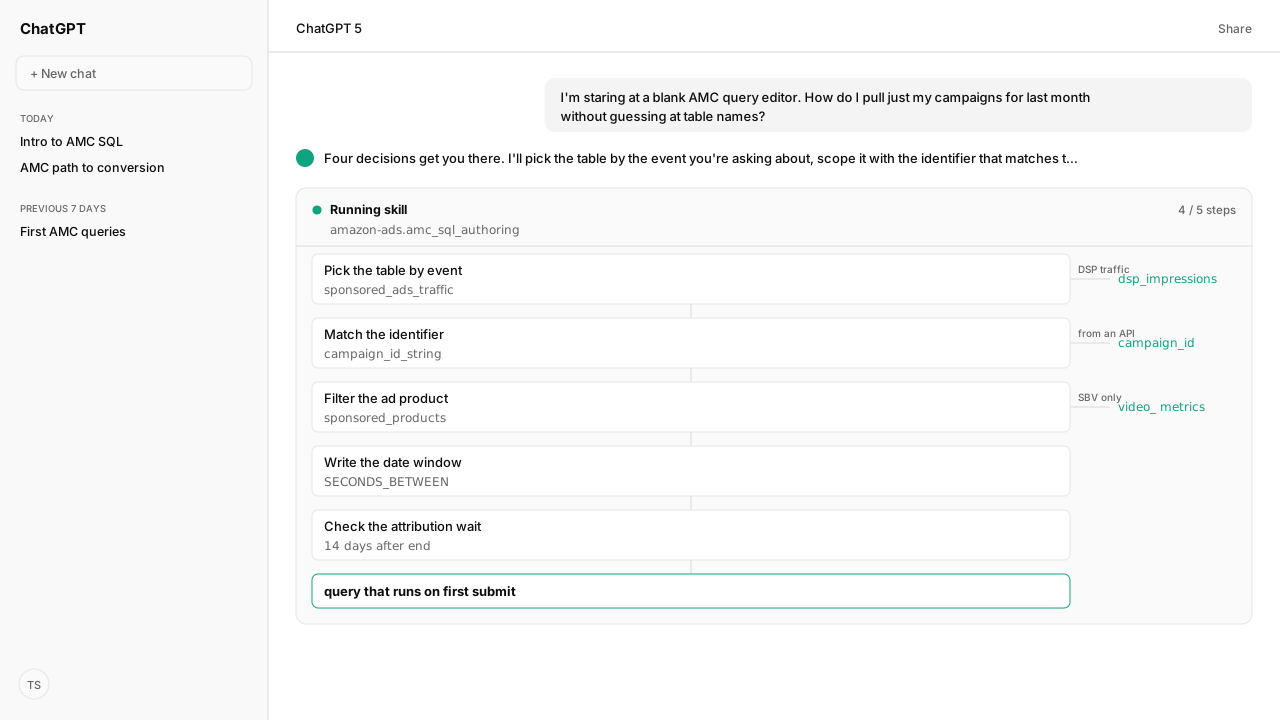
- Pick the table by the event, not the metric.
sponsored_ads_trafficholds sponsored ads impressions and clicks;dsp_impressionsholds Amazon DSP; attributed conversions live in theamazon_attributed_events_by_*tables. - There are three campaign identifiers.
campaignis the name,campaign_id_stringis the ID you see in the ads console,campaign_idis the ID the Ads API uses. ad_product_typeseparates the sponsored ads families:sponsored_products,sponsored_brands,sponsored_display,sponsored_television. It does not separate ad formats.- The date range is set on the run, not in the SQL. SQL filters, such as a cast date comparison or
SECONDS_BETWEEN, narrow the events inside it. - Wait two weeks after a campaign ends before trusting attributed conversions. Amazon's AMC playbooks cite a 14-day attribution window.
Useful Amazon Marketing Cloud (AMC) SQL query examples begin with four choices: the event table, the campaign identifier, the ad product type, and the date range. Get one wrong and a syntactically valid query can return zero rows or answer a different question. This guide turns those choices into first queries you can adapt.
None of these is a syntax error, so the query can run and still answer the wrong question. The common case: campaign IDs pasted out of the ads console and matched against campaign_id. For sponsored ads, the console ID lives in campaign_id_string, and the two can differ, so the filter misses the campaigns you meant.
ChatGPT, Claude, Perplexity, Microsoft Copilot, and whatever comes next know nothing about your business out of the box. Your competitors use those tools too. Kuudo gives those same tools your edge: your data, your rules, and the way your business operates.
- Your account, as it is right now. The Amazon Ads MCP lists the data sources in your authorized AMC instance and runs queries against it.
- Your judgment, running every time. The amazon-ads-marketing-cloud Skill preserves the rules your team expects, and Amazon Agent Atlas supplies Amazon's own documentation and playbooks.
- Your call, before anything changes. Approval controls keep activation and other consequential changes with you.
AMC SQL query examples start with the event table the Amazon Ads MCP lists
The instinct is to look for a table with the number you need. AMC is organized the other way: tables hold events, and your metric is an aggregate over them. The Amazon Ads MCP can list the data sources in your instance, so the agent starts from the tables you actually have.
| Table | What it holds |
|---|---|
sponsored_ads_traffic | Impression and click events from Sponsored Products, Sponsored Brands, Sponsored Display and Sponsored TV, one record per event |
dsp_impressions | Amazon DSP (demand-side platform) impressions |
amazon_attributed_events_by_traffic_time | Traffic and conversion pairs whose traffic happened inside the run's date range; the conversions can land up to 30 days after it |
amazon_attributed_events_by_conversion_time | Pairs whose conversion happened inside the date range; the traffic can be up to 14 days earlier |
conversions | AMC conversion events more broadly; ad-attributed when the user was served a traffic event in the 28 days before |
One rule travels with the attributed tables: wait two weeks past the end of a campaign before trusting the totals. Amazon's AMC playbooks cite a 14-day attribution window, and Amazon notes that output from the traffic-time table may change over time as late conversions arrive.
Atlas settles which of three campaign identifiers you hold
Atlas retrieves Amazon's How to identify your campaigns and campaign IDs playbook for this. The first thing it settles is that AMC exposes the same campaign three ways, and they are not interchangeable:
| Column | What it is | Where you see it |
|---|---|---|
campaign | Campaign name | Ads console; Order name in DSP |
campaign_id_string | Campaign ID, STRING | Ads console; Order ID in DSP |
campaign_id | Campaign ID, LONG | Sponsored ads API responses; Order ID in DSP |
Use campaign when you have the name, campaign_id_string when you copied an ID out of the console, and campaign_id when the ID came from the Ads API. For Amazon DSP campaigns the two ID columns carry the same value, which is why the mistake survives a spot check against a DSP campaign and then fails on sponsored ads.
A first query worth running lists the campaigns the attributed events table knows about, in the shape Amazon's playbook uses:
SELECT
  campaign,
  campaign_id_string,
  ad_product_type
FROM
  amazon_attributed_events_by_traffic_time
GROUP BY
  1,
  2,
  3
Read the result with two limits in mind. Only campaigns with attributed events in the date range appear, so a campaign with traffic but no attributed conversions is missing. And Amazon DSP rows carry a NULL ad_product_type.
The Skill filters ad_product_type by family, not by format
Because sponsored_ads_traffic pools every sponsored ads product, ad_product_type is how you narrow it. The How to filter by ad product type playbook lists four values: sponsored_products, sponsored_brands, sponsored_display and sponsored_television.
-- Instructional Query: Ad Product Type - Sponsored Products
SELECT
  campaign,
  campaign_id_string,
  ad_product_type,
  SUM(impressions) AS impressions
FROM
  sponsored_ads_traffic
WHERE
  ad_product_type = 'sponsored_products'
GROUP BY
  1,
  2,
  3
The limit is worth knowing before it bites: ad_product_type distinguishes product families, not ad formats. Sponsored Brands covers product collection, store spotlight and video ads, all under one value. Amazon's Sponsored Brands playbook separates them with the video viewership metrics on the same table, the columns beginning video_ plus five_sec_views. Within Sponsored Brands, those are populated only for Sponsored Brands Video.
Your AI client sets the date range on the run, then filters inside it
The date range is not part of the SQL. In the AMC query editor you pick it with the calendar. Through the API, a workflow execution takes timeWindowStart and timeWindowEnd, or a timeWindowType such as MOST_RECENT_WEEK. AMC uses UTC unless you choose a time zone. For "my campaigns last month", last month is the date range.
AMC data lags by up to 48 hours, so Amazon recommends a range that ends at least 48 hours before now. A range that ends yesterday can fail as unavailable.
Inside that range, SQL filters narrow further. To keep only campaigns that started after a given date, cast both sides so the comparison is date to date, as Amazon's playbook does:
SELECT DISTINCT
  cast(campaign_start_date AS Date)
FROM
  amazon_attributed_events_by_conversion_time
WHERE
  cast(campaign_start_date AS Date) > cast('2026-01-31' AS Date)
For a custom conversion window, measure the gap between the traffic event and the conversion event. This one counts purchases, brand halo purchases included, that landed within nine days of the ad exposure, a question the standard attribution windows do not answer:
-- Instructional Query: How to Filter by Custom Date --
SELECT
  campaign,
  sum(total_purchases) AS total_orders_9d
FROM
  amazon_attributed_events_by_traffic_time
WHERE
  SECONDS_BETWEEN (traffic_event_dt_utc, conversion_event_dt_utc) <= 60 * 60 * 24 * 9
GROUP BY
  campaign
Writing the window as 60 * 60 * 24 * 9 rather than 777600 keeps the intent legible to the next person, and to you in three months.
What happens next: the Amazon Ads MCP runs the workflow
Once these four decisions are resolved, the query is mechanical, which is why it is worth handing over. Your AI client lists your instance's data sources through the Amazon Ads MCP, takes the identifier rules from Atlas, and matches the IDs you have to the column that holds them. It applies the ad_product_type filter, sets the date range, runs the workflow, and returns the result with the SQL it ran.
Saved as a reusable Skill, that becomes the front door for ad-hoc AMC questions, and it composes with the Selling Partner MCP and the rest of the Amazon Agent Data layer. Saving a workflow or a schedule to your instance is a change, and it may require approval. The dialect rules from part one still apply on top:
- No
SELECT *: AMC does not export raw rows. - No
ORDER BY, except inside a window function'sPARTITION BY. - Aggregation thresholds: by default, rows under the minimum distinct-user count are dropped from the output.
Four decisions, made in order, and the blank editor stops being intimidating. The queries that fail after this point fail for a different reason: they are too expensive to finish.
Next in this series: why AMC queries time out, and the sequence that fixes it.
Let an agent write the query instead
Bring us the AMC question your analysts keep rebuilding by hand. We will map the Amazon Ads MCP, the reusable Skill, and Atlas grounding with you, and get you into the private beta.
Run this workflow in betaWhat you need to run first AMC queries
- MCP
- Amazon Ads MCP for AMC data source listing, workflow execution and result download against your instance
- Skill
- amazon-ads-marketing-cloud, the Kuudo Skill for AMC SQL, workflows and ad-product filtering (a reference Skill in the public catalog)
- Atlas collection
- amazon_ads, the rule corpus behind every claim here (playbooks: How to identify your campaigns and campaign IDs; How to filter by ad product type; How to filter by custom date; How to query Sponsored Brands traffic and conversions)
- Required subscriptions
- A standard AMC instance. Every table named here is available without a paid dataset subscription.
What success and failure look like for first AMC queries
| result | interpretation |
|---|---|
| Query runs and returns zero rows for a campaign you know is live | Usually the wrong identifier. `campaign_id_string` is the console ID; `campaign_id` is the Ads API ID, and for sponsored ads the two can differ. Also check that the run's date range covers the campaign's traffic. |
| Sponsored Brands Video rows look identical to other Sponsored Brands rows | Expected. `ad_product_type` does not distinguish ad formats. Within Sponsored Brands, the `video_` metrics and `five_sec_views` are populated only for Sponsored Brands Video. |
| Conversion counts look low for a campaign that just ended | The attribution window has not closed. Amazon's playbooks say to wait two weeks past the campaign end before trusting attributed totals. |
| A run over a date range that ends yesterday fails or looks thin | AMC data can lag up to 48 hours. Amazon recommends a date range that ends at least 48 hours before now. |
| A campaign start date filter returns nothing | Check the run's date range first, because SQL filters only narrow the events inside it. Then cast both sides, as in `cast(campaign_start_date AS Date) > cast('2026-01-31' AS Date)`. |
Keep exploring first AMC queries
Use these companion guides to understand the inputs, follow-on analysis, and adjacent workflows behind this playbook.
FAQ
Which AMC table should I query for sponsored ads impressions?
`sponsored_ads_traffic`. It holds impression and click events from Sponsored Products, Sponsored Brands, Sponsored Display and Sponsored TV campaigns, one record per event. Amazon DSP impressions live separately in `dsp_impressions`.
What is the difference between campaign_id and campaign_id_string in AMC?
`campaign_id_string` is the Campaign ID shown in the ads console, in STRING format. `campaign_id` is the LONG-format ID that the sponsored ads APIs use. For Amazon DSP campaigns the two hold the same value.
Why does my AMC query return no rows for a campaign I know is running?
You are probably matching a console ID against `campaign_id`. Use `campaign_id_string` for IDs copied from the ads console, or filter on `campaign` if you have the name. Then check that the run's date range covers the campaign.
How do I filter to only Sponsored Products campaigns?
Filter `ad_product_type = 'sponsored_products'`. The documented values are `sponsored_products`, `sponsored_brands`, `sponsored_display` and `sponsored_television`.
How do I separate Sponsored Brands Video from other Sponsored Brands ads?
`ad_product_type` does not distinguish ad formats. Use the video viewership metrics on `sponsored_ads_traffic`: `five_sec_views` and the columns beginning `video_`. Amazon's Sponsored Brands playbook says they are populated only for Sponsored Brands Video and show NULL for the other Sponsored Brands formats.
How do I filter an AMC query to a custom date range?
Set the range on the run: the date range in the query editor, or `timeWindowStart` and `timeWindowEnd` on a workflow execution. Inside it, SQL filters narrow further, as in `cast(campaign_start_date AS Date) > cast('2026-01-31' AS Date)`, or `SECONDS_BETWEEN(traffic_event_dt_utc, conversion_event_dt_utc)` for a custom conversion window.
How long should I wait before querying attributed conversions?
Two weeks past the end of the campaign. Amazon's AMC playbooks cite a 14-day attribution window, so querying earlier undercounts conversions that have not yet been attributed.