
- ACoS is ad spend divided by attributed sales. Amazon's ROAS example, $20 spent for $100 in sales, is a ROAS of 5, and the same numbers give an ACoS of 20%.
- Negative phrase keywords (up to 4 words) and negative exact (up to 10) cut spend on searches that don't meet your goals.
- Rule-based bidding moves each bid toward a return on ad spend (ROAS) goal, up to 5 times the adjusted bid; budget rules can raise a budget when ACoS is low.
To reduce ACoS on Amazon, work both sides of the formula: ACoS is ad spend divided by attributed sales. Cut spend on searches that don't convert, pay less on clicks that are less likely to convert, and raise conversion so the same spend earns more sales. Then set a return on ad spend (ROAS) goal for the bids.
A brand manager put the question to me: "our ACoS is too high, so what actually lowers it without cutting the sales the ads bring in?" The quick answer is to lower bids, and it can cut the sales along with the cost. The better answer starts with where the spend goes.
Our agent read the account through the Amazon Ads MCP: the search term report, the placement results, and campaign conversion. It checked each lever against the rules Amazon Agent Atlas holds from Amazon's pages, and proposed changes that went through the account's workspace policy before anything reached Amazon.
ACoS falls when spend drops or sales rise
Performance-based rules defines ACoS as the percent of attributed sales spent on advertising: total spend divided by attributed sales. ROAS is the inverse view. Return on ad spend (ROAS) divides total sales by ad spend and reads as a multiplier, so Amazon's example of $20 spent for $100 in sales is a ROAS of 5. The same numbers give an ACoS of 20%, and the two are inverses only when both use the same sales and window.
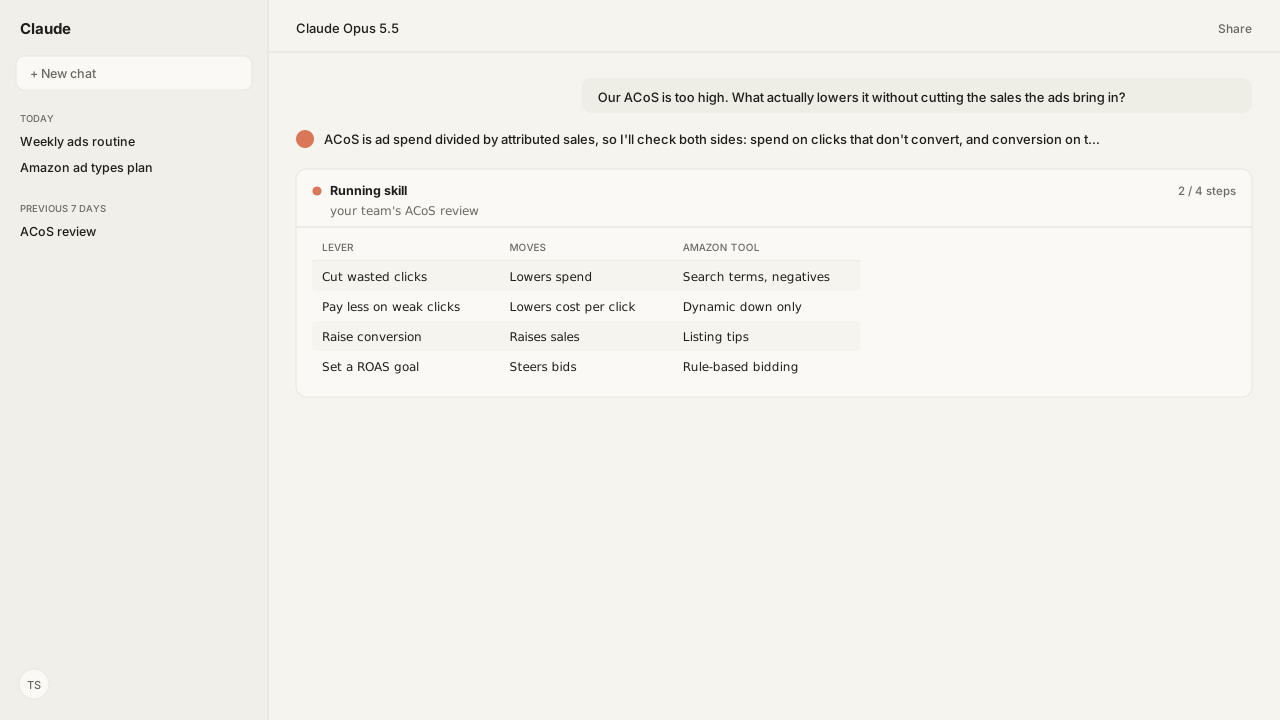
The formula names the only two ways ACoS moves:
| Lever | What it moves | Where the agent looks |
|---|---|---|
| Cut wasted clicks | Lowers spend | Search term report |
| Pay less on weak clicks | Lowers cost per click | Bidding strategy, placements |
| Raise conversion | Raises sales | Listings behind the ads |
Lowering every bid works on spend alone, and it can drop the sales that were worth paying for. The sections below take the levers in the order that protects sales.
The search term report shows which spend to cut
The Search term report for Sponsored Products lists the searches that led to at least one ad click. Amazon suggests using it to find high-performing searches to target, and to add negative keyword or product targets for searches that don't meet your goals.
Add negative keywords or negative products sets two negative match types. Negative phrase blocks searches containing the phrase or close variations, up to 4 words. Negative exact blocks the exact phrase or a close variation, up to 10 words. Both cap at 80 characters.
The search-term Skill returns negative candidates only once the data is sufficient, so a search isn't cut on too few clicks. This is the lever that lowers spend without touching the searches that sell.
Bidding strategy and placements set what a weak click costs
Bidding strategies for Sponsored Products offers a strategy aimed at this problem. Dynamic bids, down only lowers your bid in real time when a click is less likely to convert, and Amazon lists it for advertisers who want to optimize for conversion with a set maximum, and for strict budgets.
Placement adjustments work the other way: they raise a bid, by a percentage, for top of search, rest of search or product pages. Keep them where the placement report shows conversions. A raised bid on a placement that doesn't convert pushes ACoS up.
For the full set of bidding strategies, see the Amazon PPC guides. Safe bid changes, and how to keep an agent from thrashing them, are covered in the agent bidding rulebook.
Listing fixes help the same spend earn more sales
The other side of the formula is sales. Optimize products for advertising shows listing recommendations in campaign manager for advertised products, and Amazon frames them as making advertised products perform better. Its tips include a title of about 60 characters, 4 or more images at least 1,000 pixels on a side, and 3 or more bullet points.
Our reasoning: a listing that converts more of its clicks earns more sales on the same ad spend, so ACoS falls without a bid change. More clicks also mean more spend, so watch conversion, not clicks alone. The agent reads the advertised listings through the Selling Partner MCP and flags the ones short on those tips.
What happens next: set a ROAS goal for the bids, and let budgets follow what works
Once spend and conversion are in shape, two kinds of rule take over:
- Rule-based bidding. On Sponsored Products campaigns that meet Amazon's minimum daily budget, you can set a ROAS goal, and Amazon raises or lowers each bid to try to reach it, up to 5 times the adjusted bid. The goal is optional, Amazon does not guarantee it, and the help page recommends at least two weeks of campaign data before setting one.
- Budget rules. Budget rules only raise a budget, so they scale what already works rather than hold ACoS down. Amazon's Sponsored Products example adds 10% to the budget when ACoS is at or below 20%.
The ACoS target itself is your call. The ACoS formula guide covers computing ACoS from verified ad data and a break-even point from margin. TACoS vs ACoS shows ad spend against total sales, not only ad-attributed sales. The Amazon Agent Data layer keeps the history, so each month's ACoS reads against the last.
Next: finding which Sponsored Products searches to scale, from the search term report.
Lower ACoS from the AI you already use
Bring the campaigns whose ACoS worries you. We will map the Amazon Ads MCP, the search-term and budget pacing Skills, Atlas grounding, and private-beta setup with you.
Get beta accessWhat you need to run Lowering ACoS
- MCP
- Amazon Ads MCP for search term reports, placement and campaign metrics, bids, negatives, and bidding and budget rules, with the Selling Partner MCP for the listings behind the ads
- Skill
- Amazon Ads Skills such as search-term mining, the Sponsored Products campaign audit and budget pacing
- Atlas collection
- amazon_ads, the Amazon rules behind this guide (playbooks: Performance-based rules; Return on ad spend (ROAS); Bidding strategies for Sponsored Products; Add negative keywords or negative products; Search term report for Sponsored Products; Optimize products for advertising)
- Required subscriptions
- An Amazon Ads account with live Sponsored Products campaigns.
FAQ
How do you reduce ACoS on Amazon?
Work both sides of ACoS, which is ad spend divided by attributed sales. Cut spend on searches that don't convert with the search term report and negative keywords, pay less on clicks less likely to convert, and raise conversion with listing fixes so the same spend earns more sales.
What is a good ACoS on Amazon?
Amazon does not publish one. A useful reference point is your profit margin before ad costs: while ACoS stays below it, the ad spend per sale is smaller than the margin on that sale. Brands investing in growth may accept a higher ACoS on purpose.
How are ACoS and ROAS related?
They are inverses when both use the same attributed sales and window. ACoS is ad spend divided by attributed sales, and ROAS is sales divided by ad spend. Amazon's ROAS example, $20 of spend and $100 of sales, is a ROAS of 5, and the same numbers give an ACoS of 20%. Amazon's reports use different sales windows, so compare like with like.
Why is my Amazon PPC ACoS too high?
Spend is going to clicks that don't turn into sales, the bid per click is high for how often those clicks convert, or the listing isn't converting the traffic. The search term report shows the first, placement and campaign metrics the second, and conversion rate the third.
Can Amazon lower ACoS automatically?
Partly. The dynamic bids, down only strategy lowers bids on clicks less likely to convert, and rule-based bidding adjusts bids toward a ROAS goal you set on eligible Sponsored Products campaigns, though Amazon does not guarantee the target. Negatives and listing fixes still need a person or an agent to act.
Does lowering bids always lower ACoS?
No. Lower bids cut cost per click but can also cut the sales that justified the spend. That is why the search term report comes first: it shows which searches to stop paying for, instead of lowering every bid.