
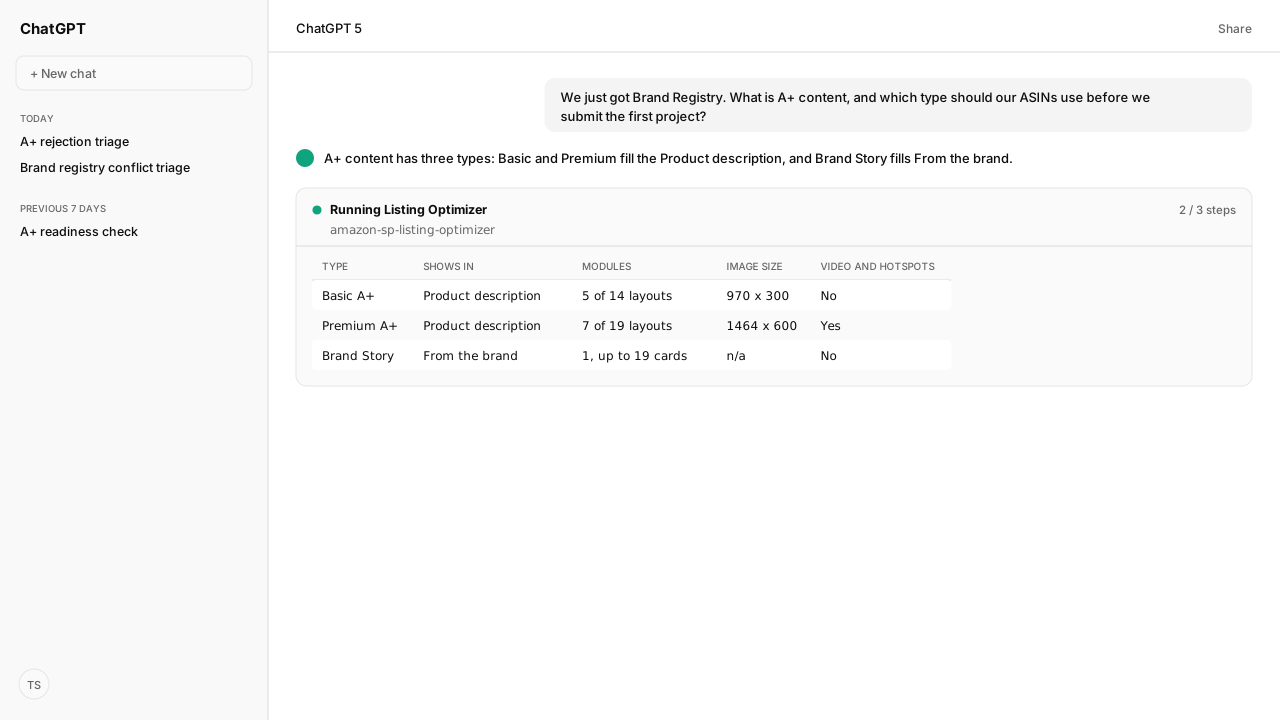
- Amazon A+ content comes in three types: Basic A+ and Premium A+ fill the Product description section, and A+ Brand Story fills From the brand. Basic allows 5 modules at 970 x 300 images; Premium allows 7 at 1464 x 600 and adds video, hotspots and carousels.
- Sellers need a Professional account and a Brand Representative or Reseller role in Brand Registry; vendors need to be the registered brand owner. Basic A+ and Brand Story carry no fee.
- Amazon's guidelines set the rules: RGB images under 2 MB at 72 dpi or more, no pricing or promotion, no guarantees, no competitor comparisons and no unsubstantiated claims.
- Review takes up to seven business days, then up to 24 hours to publish. Once a retail vendor has contributed A+ to an ASIN, sellers cannot add or edit A+ on it.
Amazon A+ content, formerly Enhanced Brand Content (EBC), is the brand-built section of a product detail page: images, text and comparison charts that replace the product description, plus a Brand Story carousel. Sellers and vendors with a Brand Registry role build it in A+ Content Manager, free for Basic A+ and Brand Story, and Amazon reviews each submission against published rules for up to seven business days.
Most teams meet A+ content the week Brand Registry approves, with a catalog to cover and no clear view of which ASINs can carry it. Two of Amazon's own help pages also disagree about who can use the premium tier, so the answer depends on what your account shows.
Whether one ASIN can take A+ is decided by your catalog: its brand mapping, and whether a retail vendor contributed A+ to it first. Through the Selling Partner MCP, an agent asks Amazon to validate a draft against each ASIN before it goes to review. Your legal team's banned claims live in a Skill checked against every module, beside the rules Amazon Agent Atlas retrieves. Amazon's review still decides; the draft just arrives checked.
Amazon A+ content has three types: two replace the description and one tells the brand story
Amazon A+ content has three types: Basic A+, Premium A+ and A+ Brand Story. The former name comes from Amazon's seller design guide; the limits for each type come from Amazon's A+ Content guide:
| Type | Where it shows on the detail page | What it holds |
|---|---|---|
| Basic A+ | Product description | Up to 5 modules chosen from 14 layouts, images at 970 x 300, custom headers, text and product comparison charts |
| Premium A+ | Product description | Up to 7 modules chosen from 19 layouts, images at 1464 x 600, video, interactive hotspots, carousels, Q&A modules and enhanced comparison charts |
| A+ Brand Story | From the brand | One module with up to 19 cards in a carousel: brand history, values, product lines and links to other products and your Brand Store |
Basic and Premium are alternatives for the same section; Brand Story runs alongside either. Publishing Basic or Premium A+ hides the plain-text product description, so move anything customers still need from that field into the modules. Amazon still recommends keeping the description field current.
The From the manufacturer section is reserved for A+ content from Amazon retail vendors, and Amazon gives it priority. In most cases it appears in place of a seller's content, and once a retail vendor has contributed A+ to an ASIN, a seller cannot add or edit A+ on that ASIN.
What A+ layouts look like for three common jobs
These layouts are illustrative, built from the module types Amazon documents:
| Job | Type | Modules, in order |
|---|---|---|
| A product line in three sizes | Basic A+ | A header image with the brand line, three image-and-text modules for the features buyers ask about, a comparison chart of the three sizes (all five modules) |
| One product with features worth demonstrating | Premium A+ | A video of the product in use, a hotspot image labeling each feature, an image carousel of use cases, a Q&A module for common questions, an enhanced comparison chart against the brand's other models |
| A brand with several product lines | A+ Brand Story | Cards for the brand's origin and values, one card per product line linking to its products, a closing card linking to the Brand Store |
Comparison charts may compare only products the same brand owns; a category comparison such as LED against halogen is allowed. Amazon's A+ design guide, listed under Sources, walks through more layouts.
The Selling Partner MCP reads which A+ documents already exist and which ASINs each one is applied to. A plan therefore starts from what is live, deciding between editing a project and creating one.
Brand Registry decides who can use A+ content, and Basic A+ costs nothing
Amazon ties A+ access to the brand, with one exception for generic products. Amazon's A+ Content help pages set out who qualifies:
- Sellers need a Professional selling account and a Brand Representative or Reseller role assigned in the ASIN's brand through Brand Registry. If the brand is registered but A+ is missing, the brand's Administrator assigns the selling role.
- Vendors must be registered as the brand owner of the ASIN in Brand Registry.
- Emerging brands approved for managed selling programs such as Launchpad and Amazon Exclusives also get access.
- The exception: starting January 2024, generic ASINs in a Professional seller's catalog can use Basic A+, and only Basic A+.
- Books, Music, Video and DVD (BMVD) ASINs sold through Seller Central are not yet supported.
Amazon charges no fee for Basic A+ or Brand Story. It says any future fee for new types of A+ content will be announced in the tool ahead of time and will not affect existing content.
When an ASIN is "not recognized as part of your brand", Amazon's FAQ points to listing data: a brand name that does not match Brand Registry exactly (it is case sensitive, and added spaces or hyphens break it), a wrong GTIN or key attribute, or the wrong item type.
The Selling Partner MCP reads the brand name and identifiers on each listing, so the agent flags a mismatch before any module is built. The ASIN error preflight guide covers the listing fix.
Amazon's A+ content guidelines set image specifications and text rules for every module
Amazon's A+ content guidelines apply to every module. Content that breaks them can be rejected, held back from publishing, left collapsed on the detail page, or lead to the ASIN's removal as a restricted product. The image and file rules are fixed limits:
| Rule | Requirement |
|---|---|
| Module image size | 970 x 300 for Basic, 1464 x 600 for Premium; larger images are resized to fit |
| File type | .jpg, .bmp or .png in the RGB color space; CMYK is not supported |
| File size | Under 2 MB per image |
| Resolution | At least 72 dpi |
| Not allowed | Animated images such as GIFs, watermarks, QR codes, HTML tags, hyperlinks, small text unreadable on mobile |
| Uniqueness | Images and text unique to A+, not reused from the image gallery; one brand logo |
| Alt-text | Required for every image and must describe it for screen-reader users |
The text rules are just as specific. Remove or avoid:
- Pricing, promotions, discounts and words such as "affordable", "cheap", "bonus", "free" or "buy now".
- Warranty and guarantee language, including off-Amazon return or refund policies, unless the product itself is a warranty card.
- Comparisons with competitors, named or described as "others".
- Shipping details, contact information, links and any redirect to another site.
- Time-sensitive words such as "new", "latest" or "now". They are allowed in Brand Story only.
- Satisfaction and boastful claims such as "100% satisfaction guaranteed", "#1 rated" or "best-selling", and environmental claims such as "eco-friendly" or "biodegradable".
Some claims are allowed with substantiation. Awards need the granting organization and date, and nothing older than two years. Certification words such as "tested", "certified" or "proven" need the body or study and the year. Quotes are limited to four, from well-known publications or public figures, with the author, the date and, for a publication, its title.
Images and videos showing photorealistic people generated entirely by AI need the contains-synthetic-performer keyword in the file's dc:subject (XMP) field, added with an IPTC-compatible editor. A+ Content Manager can also apply it when you tick "AI-generated people" on upload. The tag does not apply to real people, even when AI tools have edited the image.
Atlas holds these rules, so the agent checks every module against the current guidelines rather than a remembered list. The A+ rejection triage guide covers what to do when a submission comes back rejected.
Creating Amazon A+ content is one project in A+ Content Manager, then Amazon's review
Amazon's Create A+ content pages describe the same project flow for sellers and vendors:
- Open A+ Content Manager: Inventory > A+ Content Manager in Seller Central, or Merchandising in Vendor Central. Click Start creating A+ content.
- Name the project, choose the language and select the modules. Save drafts as you go, because unsaved work is lost on exit.
- Fill the text and image slots from the Media Library or new uploads, add alt-text to every image, and preview on desktop and mobile.
- Apply ASINs. Search any ASIN to find its family, then select parent or child ASINs. Bulk upload is required above 1,000 ASINs.
- Create language variations where customers shop in another language, such as Spanish in the US.
- Review the draft and its applied ASINs, then submit for approval.
Review can take up to seven business days, and publishing completes within 24 hours of approval. An account can hold 20 submissions in review at once. Amazon's Vendor Central pages add that review can run longer at peak times, that Amazon takes no expedited requests, and that an edited project keeps the current content live until the new version is approved.
Three ways to automate A+ content with AI
AI can draft the modules, make the images and run the submission. Each option puts your approval in a different place:
| AI automation | What it does for A+ content | Where you approve |
|---|---|---|
| Amazon's AI Ready modules | Generate text and images for one module from a brand-owned ASIN, inside A+ Content Manager | You edit or accept each module before submitting |
| Listing Optimizer Skill | Audits and edits A+ modules and Brand Story through the Selling Partner MCP, for one listing or a whole catalog | A full draft and a dry-run validation first, then a confirmation before each A+ write |
| Amazon Agent Iris | Generates and audits the image assets A+ modules use, and video shots a Premium video module can use | You approve each image before the Selling Partner MCP adds it to the A+ document; video assembly and upload stay outside Iris |
Each one carries its own conditions. Amazon may limit how often one user can generate with AI Ready per day, generated content can include claims that were not in the input, and the Vendor Central page says Amazon holds the rights to the images it generates, which cannot be edited or used outside A+ content.
Files Iris generates stay in your own asset workflow, subject to the image provider's terms, and follow the same A+ image rules, including the AI-generated people tag.
The Listing Optimizer handles a detail that is easy to miss: A+ writes have no preview mode, and every A+ write persists. The Skill shows the full draft, validates it against the target ASINs without saving anything, and asks before saving the draft and again before submitting it for approval. For a catalog-wide rollout, the A+ content automation guide runs the same checks across every applied ASIN.
What happens next: build an A+ readiness plan before the first project
Before the first project, ask the agent for a readiness plan across the ASINs you want to cover. This is an illustrative plan structure, not a customer result:
| Check | What the agent reads | Decision |
|---|---|---|
| Brand mapping | Brand name against Brand Registry (case, spaces, hyphens), GTIN and key attributes | Fix listing data before building content |
| ASIN eligibility | Amazon's validation result for the draft against each ASIN | Drop ASINs that fail validation |
| Existing content | Your A+ documents and the ASINs each one is applied to | Edit the live project or start a new one |
| Type and modules | Premium option in A+ Content Manager, Brand Story coverage, module count | Choose Basic or Premium and lay out the modules |
| Assets | Format, color space, size, resolution, gallery reuse, alt-text, AI-people tag | Correct the files, or regenerate them with Iris, before upload |
| Copy | Prohibited words, claims, awards, quotes, time-sensitive wording | Rewrite against Amazon's rules and your brand guide |
| Submission | Pending-review count, language variations | Approve and submit, or queue |
Around the plan:
- In Private Cloud, the Amazon Agent Data layer and Agent Flow keep the applied ASINs, custom modules and template configurations that Amazon's A+ Content guide recommends recording, with the validation results and your approval, so the next project starts from the last one.
- You can rerun the same checks whenever you add ASINs or change your brand guide.
- Amazon recommends regular content reviews and says A+ can help discoverability when paired with ads. Where the same ASINs are advertised, the Amazon Ads MCP adds their ad performance before and after publishing to that review.
Managed MCP and Private Cloud are deployment choices for the connected reads and writes; the approval step stays with you. A+ content is free to build and slow to fix, so the checks belong before the first submission rather than after the first rejection.
Next: when a submission comes back rejected, the A+ rejection triage guide maps each documented error to its cause.
Bring your ASIN list to a working session
We will map which ASINs can carry A+ content, the existing documents the Selling Partner MCP can read, and the approval point before anything is submitted to Amazon.
Book a working sessionWhat you need to run A+ content launches
- MCP
- Selling Partner MCP for the A+ Content operations: search existing content documents, list and validate ASIN relations, create a document and submit it for approval. A Seller Central or Vendor Central login is still needed for anything the account does not expose through the API. Amazon Agent Iris for A+ image assets and video shots.
- Skill
- Listing Optimizer Skill (amazon-sp-listing-optimizer v1.2.1, Reference) for A+ module and Brand Story audits and edits, with a dry-run validation and a confirmation before each A+ write; plus a Skill your team saves with its brand guide (claim language, voice, visual rules).
- Atlas collection
- amazon_sellers: A+ Content; A+ Content guide; A+ content guidelines; Create A+ content; A+ content FAQ & troubleshooting. amazon_vendors: A+ content; Create A+ content; Edit A+ content; Content publishing status and content rejection.
- Required subscriptions
- Brand Registry with a Brand Representative or Reseller role (sellers) or brand-owner registration (vendors), or approval in a managed selling program such as Launchpad or Amazon Exclusives. Sellers also need a Professional selling account.
- Last verified
- 2026-10-26
- verificationScope
- Amazon Seller Central and Vendor Central A+ help pages in Atlas, Amazon's A+ Content seller page and design guide, and the Selling Partner MCP operation catalog. The layouts and readiness plan are illustrative; no customer content was submitted.
Keep exploring A+ content launches
Use these companion guides to understand the inputs, follow-on analysis, and adjacent workflows behind this playbook.
FAQ
Is Amazon A+ content worth it?
Amazon's seller site says Basic A+ can increase sales by up to 8% and well-implemented Premium A+ by up to 20%, citing Amazon internal data. Its help pages are more cautious: A+ may raise conversion, reduce negative reviews and returns, and aid discoverability alongside ads, deals or coupons. Test it on your own ASINs.
What is the difference between Basic and Premium A+ content?
Both replace the Product description section. Basic A+ allows 5 modules from 14 layouts with 970 x 300 images; Premium A+ allows 7 modules from 19 layouts with 1464 x 600 images and adds video, interactive hotspots, carousels, Q&A modules and enhanced comparison charts.
What happens to Premium A+ content if Amazon ends the free period?
Amazon's A+ Content help page says it may disable your ability to add Premium A+ modules to new ASINs at the end of the promotional period, but Premium content already published stays on the detail page free of charge. Amazon will not charge a Premium fee without your opt-in.
Is A+ content the same as Amazon Business enhanced content?
No. Amazon says Amazon Business enhanced content is a separate tool that lets you upload separate file documents to the detail page. A+ content is built from modules in A+ Content Manager.
Sources
- Amazon: A+ Content (Sell on Amazon)
- Amazon: A+ Content design guide with examples
- Amazon Seller Central: A+ Content (sign-in)
- Amazon Seller Central: A+ Content guide (sign-in)
- Amazon Seller Central: A+ content guidelines (sign-in)
- Amazon Seller Central: Create A+ content (sign-in)
- Amazon Vendor Central: A+ content (sign-in)
- Amazon Vendor Central: Content publishing status and content rejection (sign-in)
- Amazon Vendor Central: Edit A+ content (sign-in)
- Amazon Selling Partner API: A+ Content API