
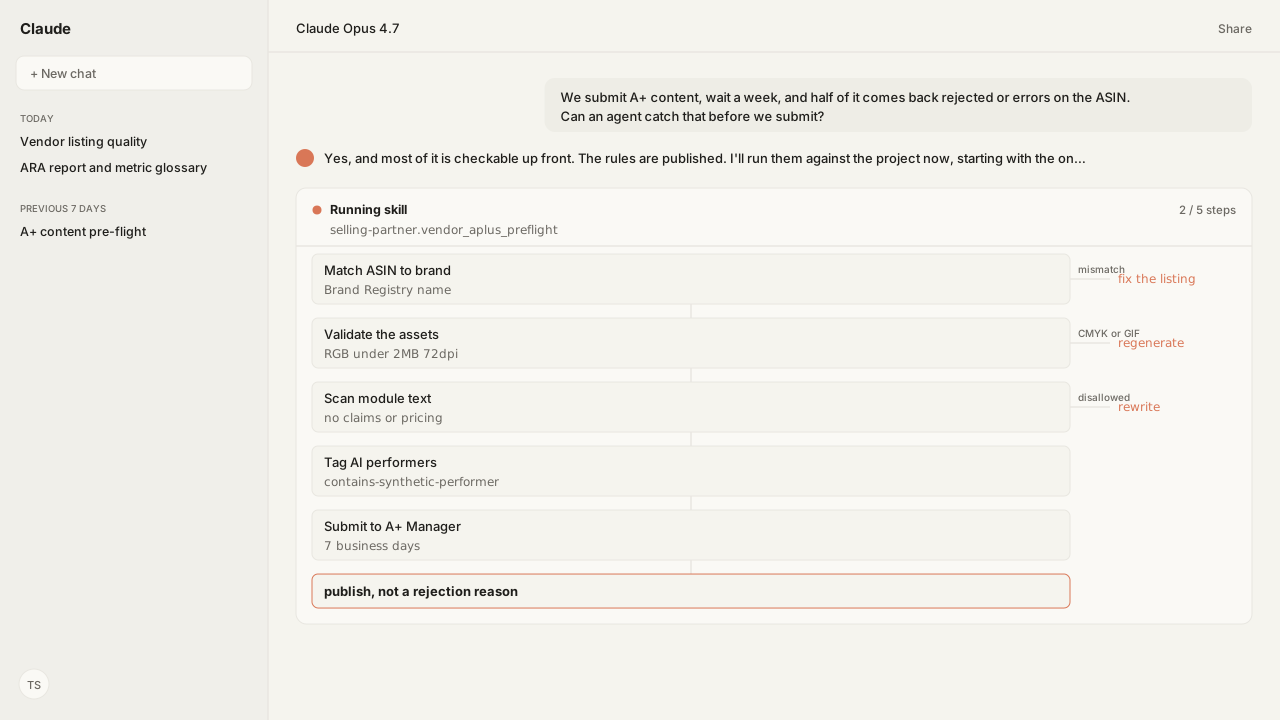
- A+ review takes up to seven business days with no expedited requests, plus up to 24 hours to publish. An avoidable rejection restarts that review cycle.
- The most common error, ASIN not recognized as part of your brand, is a listing data problem: a brand name mismatch against Brand Registry, or an inaccurate GTIN or key attribute.
- Rejection rules are mechanical and published: RGB only, CMYK unsupported, files under 2 MB, at least 72 dpi, no animated images, no claims or guarantees, no pricing, promotion or contact details.
- Amazon says it may cap each user's A+ generation per day without publishing the limit. It also puts accuracy, rights and liability checks on you per item, and Amazon keeps the IP on the images it makes.
- An agent runs the loop at scale: scan the applied-ASIN set, patch what fails, update it, enforcing your brand standards and Amazon's requirements in one pass rather than two review cycles.
The Selling Partner MCP can scan the current A+ documents and applied-ASIN set, let a reusable Skill patch what fails, and hold the corrected submission for approval before Amazon starts its review. Our agent checks the listing data, assets, and module copy in one workflow, applying your brand standards alongside Amazon's published requirements.
Amazon Agent Atlas grounds those Amazon rules in the amazon_vendors corpus, while the MCP supplies the live A+ state and authorized actions.
ChatGPT, Claude, Perplexity, Microsoft Copilot, and whatever comes next know nothing about your business out of the box. Your competitors use those tools too. Kuudo gives those same tools your edge: your data, your rules, and the way your business operates, expressed as your account as it is right now, your judgment running every time, and your call before anything changes. Each part has its own piece:
- The Selling Partner MCP supplies current projects and applied-ASIN context.
- Skills preserve your brand and content standards.
- Amazon Agent Atlas applies Amazon-specific guidance.
- Approval controls keep publishing with you.
The most common A+ error is a listing data problem wearing an A+ costume
A+ content FAQ & troubleshooting is blunt about the top failure. The error that says your ASIN was not recognised as part of your brand means the ASIN is not mapping to your brand, and the cause is inaccurate listing data on the ASIN, which you fix by editing the listing rather than the content.
Two causes account for most of it:
- Brand name mismatch, where the brand name on the ASIN does not exactly match the name approved in Brand Registry. Amazon is explicit that brand names are case sensitive and that added spaces or hyphens will cause a mismatch.
- An inaccurate GTIN or key attribute on the listing itself.
That is the same catalog data surface an agent already audits and repairs through the Listings Items API. The A+ submission is downstream of it. Fixing the listing first turns a recurring weekly rejection into a non-event, which is why this guide and the vendor listing quality workflow are one loop rather than two projects.
A third error is worth knowing because it is not yours to fix: if an ASIN already has A+ content contributed by a retail vendor at Amazon, you will see a retail contribution error, and resubmitting will not clear it.
The rejection rules are published, mechanical, and checkable before submission
A+ Content guidelines is a compliance document, and the useful thing about a compliance document is that it can be evaluated by a machine before you spend a week waiting.
The formatting rules are hard limits:
- Supported file types are JPG, BMP and PNG in the RGB colour space. CMYK is not supported.
- Individual files must remain under 2 MB.
- Resolution should be at least 72 dpi.
- Animated images such as GIF are prohibited.
- Blurry or low-quality images are called out separately.
The text rules are just as concrete. Amazon's own guidance for correcting a rejection says to:
- Remove claims, guarantees or warranty information.
- Remove pricing, promotion or contact details.
- Reduce excessive whitespace.
- Ensure the submission is not blank.
- Make sure text is not blurry and is large enough to read.
Then there is the newest rule, which is easy to get backwards. Photorealistic AI-generated people require an IPTC metadata tag, contains-synthetic-performer, applied before upload. It applies when the people in the image were entirely generated by AI, and specifically does not apply when the image only features real people. An agent that generates imagery has to know both halves of that rule, because over-tagging is its own kind of wrong.
Every item on that list can be flagged before submission. The operator still owns substantiation and final approval, but the first review no longer has to discover mechanical failures one module at a time.
Amazon's generator leaves catalog governance with you
Worth being precise here, because A+ Content Manager already has generative AI built in. Create A+ content walks through authoring a project under Merchandising, and modules carrying the AI Ready badge let you select the text and image fields to generate, enter a brand-owned ASIN, which is required, and add optional prompts. As an authoring aid for one module, it works.
The reason it cannot be the answer for a catalog is the first line of its own terms: Amazon may limit the number of times a user can use the GenAI feature in one day. That is not a footnote about fair use. It is an operational ceiling, and it has three properties that make planning around it impossible.
- You do not know where the wall is. The limit is stated as a possibility rather than a number, so you cannot size a project against it. You discover the ceiling by hitting it, mid-job.
- When imposed, it stops the work rather than slowing it. A rate limit on a batch process costs you throughput. A daily cap on a console tool ends that user's generation session for the day. A 600-ASIN refresh does not merely run slower; the operator has to resume it later.
- The state lives in a person's head. Which ASINs are done, which module variant was used, which prompt produced the copy that got approved. Every interruption is a handoff to yourself, and the larger the catalog the more of the job is remembering rather than doing.
Three more terms compound it:
- The review burden moves to you, per item. You must verify the factual accuracy, substantiation and completeness of all descriptions, claims and visuals, ensure compliance with advertising standards including prohibitions on misleading claims, and confirm no third-party intellectual property is infringed, on content Amazon notes may not be accurate or relevant to your specific product.
- You carry the liability, agreeing to indemnify and hold Amazon harmless against claims, liabilities or losses arising from its use.
- You do not own the image. Amazon holds the intellectual property rights to images the feature generates, and you are not permitted to edit them or use them outside of A+ content, so the asset cannot become your main image, run in an ad, or appear on your own storefront.
None of that is a criticism of the feature. It is a console authoring aid, scoped like one. Its terms do not establish catalog-scale throughput, automated verification, or reusable rights to the images it generates, so those responsibilities remain with the operator.
That is the seam the agent works in. A customer-controlled workflow is not governed by the console generator's undisclosed per-user daily cap; it paces work against the selected image provider and Amazon interfaces, and records which ASINs it has processed in the run log.
The checks Amazon requires on every item become a structured preflight against your brand standards and Amazon's published requirements, with the exceptions and final approval left to you. Imagery generated through Amazon Agent Iris keeps editable source assets in your own workflow, subject to that provider's terms, instead of binding them to Amazon's A+ generator restrictions.
Scan, patch, update: three moves, run across the whole ASIN set at once
A+ Content Manager still organizes authoring and moderation around projects. Its bulk upload can apply existing content to up to 500,000 ASINs, and is required above 1,000, but it moves ASIN relations: it does not decide what the modules should say or preflight the listing data, assets, and policy rules behind each relation. The AI Ready generator produces fields for a brand-owned ASIN, while the operator still reviews each result and tracks whether Amazon imposed its stated daily generation cap.
An agent runs the same job as a loop, and the loop is what scales:
- Scan. Read every applied ASIN in the project. Check brand match against Brand Registry, GTIN and key attributes, then check each module's assets and text against the guidelines: colour space, file size, resolution, format, disallowed claim and pricing language, and whether the synthetic performer tag is required or wrongly applied.
- Patch. Rewrite the text that fails, regenerate the imagery that fails through Amazon Agent Iris, and correct the listing data behind a brand mismatch through the Listings Items API. The fix happens where the fault is rather than where the error surfaced.
- Update. Resubmit the corrected project. An edit re-enters moderation, and usefully, your existing content stays live on the detail page throughout, so iterating is safe as long as nothing is waiting on the new version.
The part that matters for a brand team is that both rule sets are enforced in the same pass. Amazon's requirements are public and identical for every vendor, and Atlas grounds them.
Your brand standards are private, and the Skill applies them: voice, tone, the claim language your legal team has ruled out, and the visual conventions your modules follow, checked at the same moment as colour space and file size across hundreds of ASINs rather than the one on screen.
Two constraints still shape the plan
A+ Content Manager does not offer a direct manual copy from one country to another, so that route requires recreating the page from the designated account. Amazon may separately create language variations or automatically localize eligible content, which is a different path and remains editable after localization.
The system also allows only 20 submissions to sit in review at once. At spreadsheet scale, one bad rule applied across a bulk assignment becomes one rejection reason multiplied by the ASIN count, discovered up to seven business days later.
What happens next: run the pre-flight every time the applied-ASIN set changes
The pre-flight is the artifact: a per-ASIN report of what would be rejected and why, produced before submission rather than after. Brand match against Brand Registry, GTIN and key attributes, image colour space, file size, resolution and format, disallowed text patterns, and the synthetic performer tag where the rule is triggered.
Saved as a reusable Skill, it runs against a project every time the applied-ASIN set changes, and it pairs with the listing quality Skill that repairs the catalog data underneath, since that is where the most common A+ error actually originates. Around it:
- The Amazon Agent Data layer carries the result.
- Imagery that fails the guidelines can be regenerated through Amazon Agent Iris against the same rules rather than sent back to a design queue.
- It is read through the Vendor Central MCP and written through the Selling Partner MCP.
- It sits alongside the Amazon Ads MCP when the question becomes whether the new modules changed conversion. The vendor reporting side of that picture is in the ARA report and metric glossary.
Seven business days is a long time to find out you used the wrong colour space. The rules were published the whole time; the only thing missing was something that read them before you submitted.
Next in this series: every documented A+ submission error, what actually causes each one, and the checks that clear them before the seven-day clock starts.
Preflight the A+ backlog before Amazon does
Connect your Amazon account, run the document and ASIN-relation checks through the Selling Partner MCP, and save the preflight as a reusable Skill.
Run this workflow in betaWhat you need to run A+ content pre-flight
- MCP
- Amazon Selling Partner MCP for live catalog read and gated write, so the listing data behind an A+ error can be corrected in the same workflow
- Skill
- A reusable A+ preflight Skill for brand-match, guideline, module, and approval checks, paired with the listing-quality workflow for the catalog data underneath
- Atlas collection
- amazon_vendors, the rule corpus behind every Amazon requirement here (playbooks: A+ content; Create A+ content; A+ Content guidelines; A+ content FAQ & troubleshooting; Content publishing status and content rejection; Edit A+ content); the Skill applies your separate brand style guide in the same pass
- Required subscriptions
- Brand Registry, or approval in a managed selling program such as Launchpad or Amazon Exclusives. Amazon charges no fee for the standard enhanced product description.
What success and failure look like for A+ content pre-flight
| result | interpretation |
|---|---|
| Error: ASIN not recognized as part of your brand | Listing data, not content. Check the brand name against Brand Registry exactly, including case, spaces and hyphens, then check the GTIN and key attributes. |
| Error: ASIN has a retail contribution | A retail vendor at Amazon has already contributed A+ content for that ASIN. This one is not fixable from your side by resubmitting. |
| Content approved but not on the detail page after 24 hours | Check Applied ASINs. An ASIN showing Error has its own message under Details; an ASIN showing Published with no page content usually means a technical error. |
| Rejected with a formatting reason | Check colour space, file size and resolution first. RGB only, under 2 MB, at least 72 dpi, and no animated images. |
FAQ
How long does A+ content take to be approved and published?
Up to seven business days for review, longer during peak periods, and Amazon does not take expedited requests. After approval it can take up to 24 hours for content to publish to the detail page of the applied ASINs.
Why does my A+ submission fail with ASIN not recognized as part of my brand?
The ASIN is not mapping to your brand, which is usually inaccurate listing data. The two common causes are a brand name that does not exactly match the Brand Registry approved name, including case, added spaces or hyphens, and an inaccurate GTIN or key attribute.
What image formats does A+ content accept?
JPG, BMP and PNG in the RGB colour space. CMYK is not supported, individual files must stay under 2 MB, resolution should be at least 72 dpi, and animated images such as GIF are prohibited.
What text gets A+ content rejected?
Claims, guarantees and warranty information, and pricing, promotion or contact details. Amazon's rejection guidance also calls out blank submissions, blurry or undersized text, low-resolution imagery and excessive whitespace.
When do I need the AI-generated people disclosure tag?
When an image features people who were entirely generated by AI rather than based on a real person. Tag it with the contains-synthetic-performer keyword using an IPTC-compatible editor before uploading. Do not apply it to images that only feature real people.
Can I copy A+ content from one country to another?
A+ Content Manager does not provide a direct manual copy between countries, so that path requires recreating the page from the designated account. Amazon may separately create language variations or automatically translate and publish eligible content in another country, which remains editable after localization.
Does my existing A+ content come down while an edit is being reviewed?
No. An edited submission goes through moderation again, and the existing content stays on the detail page during that review.