
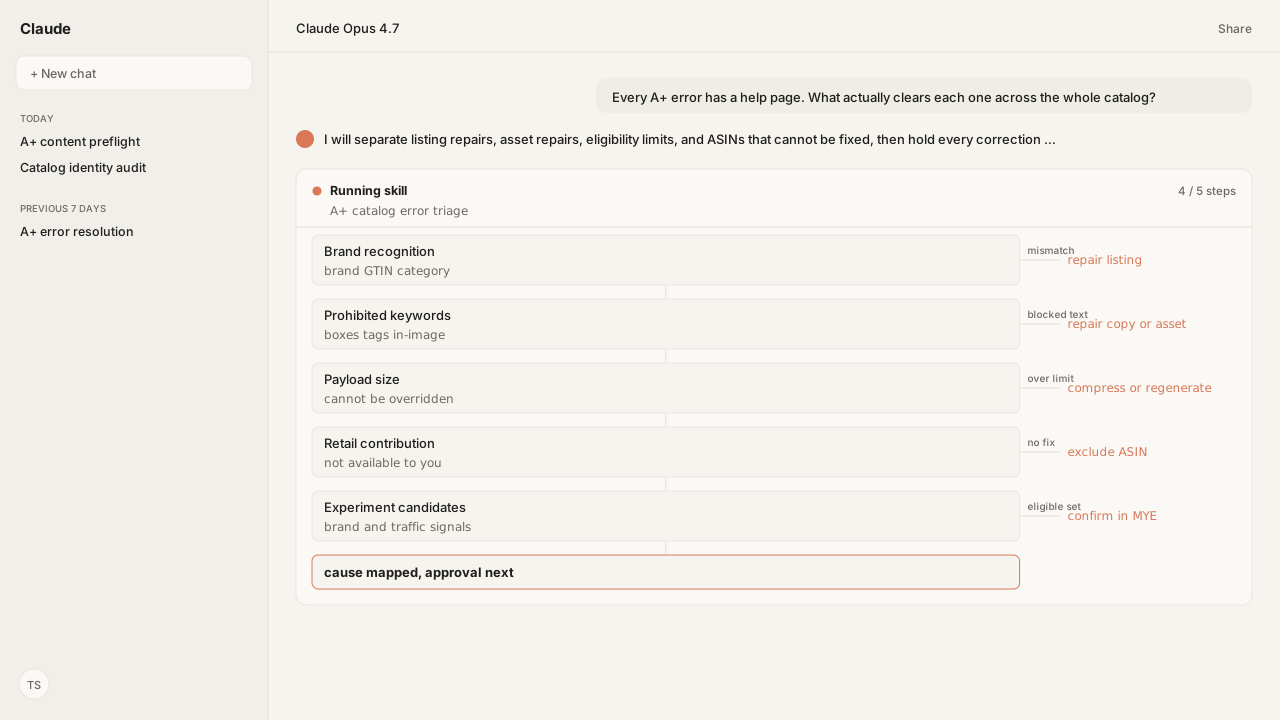
- Amazon names three common checks behind the brand-recognition error: exact brand name, accurate GTIN or key attributes, and correct categorization.
- Prohibited keyword scanning covers text boxes, image keywords, and text embedded inside your images, which is why the blocked word is often invisible in the editor.
- The reduce KB size limit is a system requirement that cannot be overridden, and every template can be fully populated within it if image file sizes are managed.
- An ASIN with a retail contribution cannot take your A+ content at all, so the only correct action is to stop spending effort on it.
- A/B tests need a brand-owned, high-traffic ASIN and cap at 500 ASINs per experiment, so eligibility is a data question before it is a testing question.
The fastest way to clear A+ errors across a catalog is to turn Amazon's A+ content FAQ & troubleshooting list into one triage report: listing-data repairs, asset repairs, eligibility limits, and ASINs that cannot be fixed. The Selling Partner MCP supplies the current projects and applied-ASIN state, and a reusable Skill applies the checks.
Amazon Agent Atlas grounds each decision in the amazon_vendors corpus. I asked for the cause and next action once, across the backlog, rather than another explanation of the error on the ASIN already open.
ChatGPT, Claude, Perplexity, Microsoft Copilot, and whatever comes next know nothing about your business out of the box. Your competitors use those tools too. Kuudo gives those same tools your edge: your data, your rules, and the way your business operates, expressed as your account as it is right now, your judgment running every time, and your call before anything changes. In this workflow:
- The Selling Partner MCP supplies current project, asset, and applied-ASIN context.
- Skills preserve your preflight checks.
- Amazon Agent Atlas applies Amazon-specific guidance.
- Approval controls keep resubmission with you.
| Error or state | Root cause | Queue action |
|---|---|---|
| Brand not recognized | Listing identity | Patch data or escalate |
| Remove keywords | Copy or image text | Scan three text surfaces |
| Reduce KB size | Payload ceiling | Compress or regenerate |
| Retail contribution | Amazon retail content | Exclude the ASIN |
| Experiment ineligible | Brand or traffic | Segment the backlog |
The brand-recognition error starts with three listing-data checks
The brand-recognition error wastes the most time, because it appears at content submission and has nothing to do with content. The ASIN is not mapping to your brand, and Amazon names three common data points to check:
- Brand name mismatch. The brand name on the ASIN does not exactly match the name approved in Brand Registry. Added spaces or hyphens cause a mismatch, and brand names are case sensitive.
- Inaccurate GTIN or key attribute. The listing data must carry a GTIN, meaning a UPC, EAN or JAN, that is correct and consistent with your brand. Amazon lists the key attributes it checks alongside it: UPC, part number, model number, style number and catalog number.
- Categorization. The item type category selected in the listing details should closely match the ASIN product type.
All three are machine-checkable against data you already have. The agent compares the brand string character by character rather than by eye, checks the GTIN and each key attribute for presence and consistency, and verifies the categorization agrees with the product type. Across a catalog that is one pass; by hand it is a spreadsheet nobody finishes.
If all three verify and the error persists, Amazon's own guidance is to contact Brand Registry, and that is worth knowing before a second week disappears into re-checking data that was already correct.
Told to remove keywords you cannot find? They are scanning inside your images
This one reads like a bug until you know the rule. Amazon validates all text entered in A+ content, and it enumerates where: text boxes, image keywords, and text embedded in images. Everything is checked by automated and manual review against a list of prohibited keywords, plus keywords that may be prohibited in certain contexts. When the system finds one, it blocks submission until the word is removed.
So the reason your team cannot find the offending word is usually that it is not typed anywhere. It is set in a graphic a designer produced months ago, or sitting in an image keyword field nobody opens.
An agent checks all three surfaces before resubmission, which means reading the text rendered inside the image rather than only the fields around it. Two rule sets apply at once: Amazon's prohibited list, and the claim language your own brand or legal team has ruled out. Atlas grounds the Amazon rule, while the Skill applies your private brand and legal standards in the same pass.
Seeing "reduce KB size" at preview? It is arithmetic, and it belongs at generation time
Amazon is unusually blunt here: there is a maximum size limit for submitted content, it is a system requirement that cannot be overridden, and you have to fix it before submitting.
The useful detail is the one people miss. Amazon states that every template can have content added to every slot and still stay within the limit, provided image file sizes are adjusted properly. So the ceiling is not a reason to ship a thinner module. It is a reason to control file size upstream.
That is a generation-time constraint rather than a submission-time discovery. Imagery produced through Product Creative and Amazon Agent Iris can be prepared against a size budget, and the agent totals the module payload before resubmission, so the preview is a confirmation rather than the first measurement.
Wondering why your content is collapsed, or which ASINs can even be tested?
Three of the remaining questions are really one question: what does Amazon think of this content, and what is it willing to let you do with it?
- Display. A+ content may be shown collapsed by default, a format Amazon says comes from customer research, expandable in one click. The lever they name is quality: improving content quality against their recommendations increases the likelihood of the content being displayed expanded.
- Evaluation. The assessment examines content readability, information completeness, visual presentation, and conversion effectiveness, using AI that Amazon acknowledges may not be perfect in every case.
- Experimentation. An A/B test through
Manage Your Experimentsneeds an ASIN that belongs to your brand and has taken enough recent traffic, because tests are restricted to high-traffic ASINs so a winner can be determined confidently. A maximum of 500 ASINs applies to one experiment.
Those four evaluation factors are the ranking function for a work queue, so the agent scores the catalog against them and orders the backlog by where quality is weakest and traffic is highest, which is also the set most likely to qualify for a test.
Then there is the case with no fix at all: an ASIN carrying a retail contribution already has A+ content from a retail vendor at Amazon, and access is not available to you. Flagging those is worth as much as fixing the others, because it stops a team spending a quarter on ASINs that were never going to take their content.
What happens next: produce one triage report per project
The artifact is one report per project: every ASIN with the errors it will throw, the cause named rather than the message repeated, and the ASINs that cannot take your content at all separated out. The checks it covers:
- Brand string
- GTIN and key attributes
- Categorization
- Prohibited keywords across all three text surfaces
- Payload size
- Experiment eligibility
Saved as a reusable Skill, it runs whenever the applied-ASIN set changes and chains behind the catalog identity audit, since the brand-recognition error is an identity failure rather than a content one.
The Amazon Agent Data layer carries the result and re-triggers the check on listings-issue notifications, with reporting through the Vendor Central MCP and the Amazon Ads MCP when the question turns to what the corrected content did to conversion.
Amazon documented every one of these failures. What was missing was something that read the whole list before you submitted, instead of one page at a time after you did.
Next: catch Vendor Central chargebacks while the operational decision that causes them is still open.
Clear these errors across the catalog, not one ASIN at a time
Bring us the A+ backlog and the errors it keeps throwing. We will map the Selling Partner MCP, the reusable Skills, Atlas grounding, and private-beta setup with you.
Run this workflow in betaWhat you need to run A+ error triage
- MCP
- Amazon Selling Partner MCP for live catalog read and gated write, so the listing data behind an A+ error is fixable in the same workflow
- Skill
- A reusable A+ error-triage Skill that separates listing-data repairs, asset repairs, eligibility limits, and no-fix exclusions before any resubmission
- Atlas collection
- amazon_vendors, the rule corpus behind every claim here (playbooks: A+ content FAQ & troubleshooting; A+ Content guidelines; Content publishing status and content rejection; Brand guidelines), plus any brand style guide you overlay so your own banned claim language is checked in the same pass
- Required subscriptions
- A Vendor Central account and Brand Registry enrolment. Retail-contribution ASINs remain unavailable regardless of setup.
What success and failure look like for A+ error triage
| result | interpretation |
|---|---|
| Error: ASIN not recognized as part of your brand | Three data points to check: brand name against Brand Registry exactly, a correct GTIN or key attribute, and a categorization that matches the ASIN product type. |
| Error: remove keywords before submitting | The word may not be in a text box. Scanning covers image keywords and text embedded inside images too, which is where the invisible ones hide. |
| reduce KB size at preview | A hard system limit that cannot be overridden. Reduce image file sizes or the number of images; a fully populated template still fits if file sizes are managed. |
| Error: ASIN has a retail contribution | Not fixable from your side. A retail vendor at Amazon already contributed A+ content for that ASIN, so remove it from the work queue. |
FAQ
Why does my A+ content fail because the ASIN is not recognised as part of my brand?
The ASIN is not mapping to your brand. Amazon identifies three common data points to check: a brand name that does not exactly match Brand Registry, an inaccurate GTIN or key attribute, or a categorization that does not match the ASIN product type.
Which key attributes does Amazon check on the ASIN?
The GTIN itself, meaning UPC, EAN or JAN, plus key attributes such as part number, model number, style number and catalog number. They must be correct and consistent with your brand.
Why am I told to remove keywords when I cannot find the word anywhere?
Because scanning is not limited to text boxes. All text in A+ content is validated, including image keywords and text embedded inside the images themselves, so the blocked word is frequently inside a graphic.
What do I do about the reduce KB size error?
Reduce the image file sizes or the number of images. It is a system requirement that cannot be overridden, and Amazon notes every template can have every slot populated and still fit if file sizes are adjusted properly.
Can I add A+ content to an ASIN with a retail contribution?
No. A retail vendor at Amazon has already contributed A+ content for that ASIN, and Amazon states it cannot currently give you access to add content to it.
Which ASINs are eligible for an A+ A/B test?
An ASIN must belong to your brand and have received enough traffic in recent weeks, because experiments are restricted to high-traffic ASINs so a winner can be determined confidently. A maximum of 500 ASINs can be applied to one experiment.
Why is my A+ content collapsed on the detail page?
Amazon may display A+ content collapsed by default based on customer research, with a single click to expand. Improving content quality against their recommendations increases the likelihood of it being displayed expanded.