
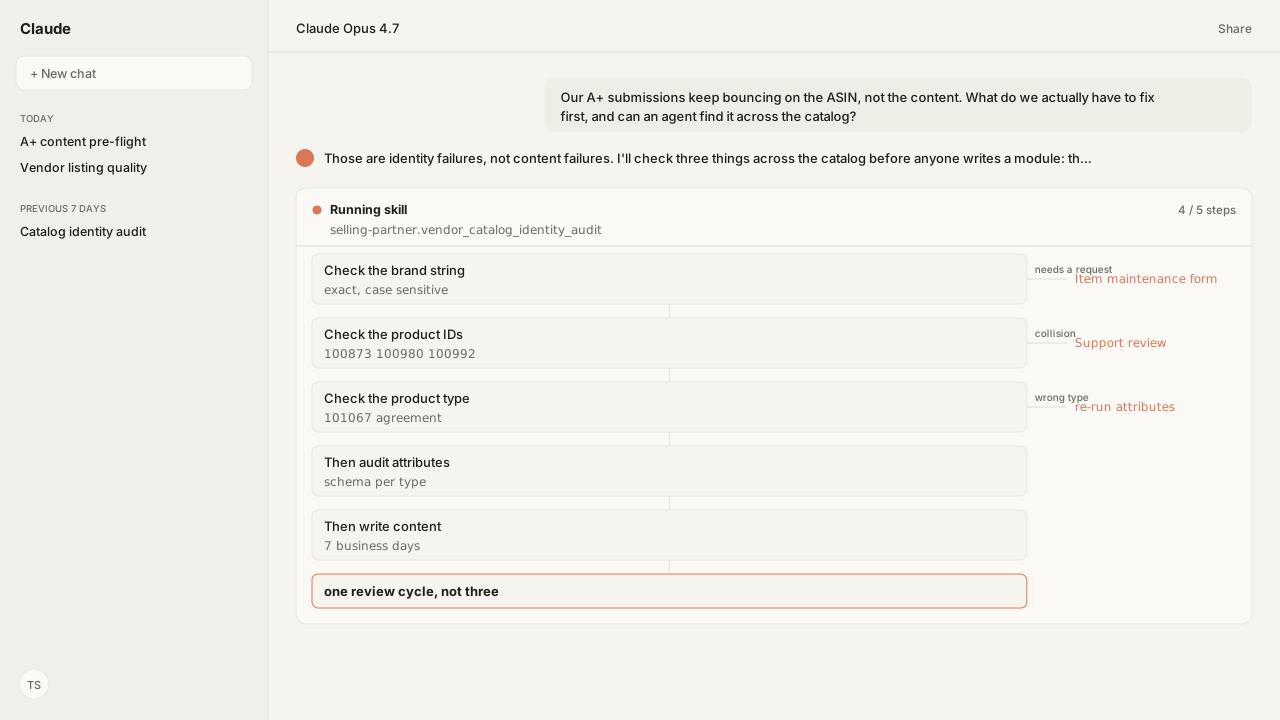
- An A+ submission that fails on the ASIN is almost never a content problem. It is identity: the brand string, the product ID, or the product type.
- Brand verification is case sensitive, must match the Brand Registry application exactly, and requires special characters such as the trademark and registered symbols to be removed.
- Product IDs are unique. Error 100873 means the barcode is already linked to another ASIN, and Error 100992 means the barcode does not belong to your brand, with a stated removal date.
- Error 101067 means the product type disagrees with the rest of the product details, which also poisons the recommended-attribute audit downstream.
- Several of these are resolved through Selling Partner Support rather than an API write, so the agent's job is to find them at scale and assemble the exact evidence the ticket needs.
When an A+ submission bounces in Vendor Central and the error names the ASIN rather than the module, you are not looking at a content problem. You are looking at an identity problem: the brand string, the product ID, or the product type.
Our agent audits all three across the catalog through the Selling Partner MCP, grounded by Amazon Agent Atlas on the amazon_vendors corpus, and it runs before a single module is written.
The ordering is the whole point. A+ content FAQ & troubleshooting traces the most common A+ error back to inaccurate listing data on the ASIN. So a team that writes content first spends seven business days finding out the listing was wrong, fixes the listing, and spends another seven finding out whether the content was. Two review cycles for one problem, and the first one told you the wrong thing.
ChatGPT, Claude, Perplexity, and Copilot know nothing about your business out of the box. Your competitors use those tools too. Kuudo gives those same tools your edge: your data, your rules, and the way your business operates. That means your account as it is right now, your judgment running every time, and your call before anything changes. The Selling Partner MCP supplies current catalog and Brand Registry context, Skills preserve your preflight rules, Amazon Agent Atlas applies Amazon-specific guidance, and approval controls keep catalog changes with you.
Brand verification fails on characters you cannot see
Brand guidelines is precise about what brand verification checks. When a brand name is updated, all attributes are verified, and the discrepancies to remove are exactly the ones that survive a visual review: the brand name is case sensitive and must be entered exactly as it appears in the Brand Registry application, and special characters such as the trademark and registered symbols have to be removed.
That is why this failure mode is so durable. Acme™ and Acme look like the same brand to the person checking the spreadsheet, and a trailing space is invisible in every tool anyone uses to look at it. Across six hundred ASINs, a hand check is not a plan.
The correction path matters just as much, and it is the reason to be honest about what automation does here. Once a brand has been submitted, you can request an update or deletion only by contacting Amazon: Contact us, then Manage my catalog, then Item detail edit, selecting Other product information and supplying the ASIN and vendor code. For multiple ASINs, Amazon points you at the Item maintenance form. That is a request workflow, not a write.
So the agent's job on this claim is not to silently repair a brand string. It is to find every ASIN whose brand attribute deviates from the Brand Registry name, character by character, and produce the populated request with the affected ASIN list attached. Detection at catalog scale, submission by a human.
Product IDs are unique, so most catalog errors are identity collisions
The barcode errors all come from one rule: a product ID, whether you call it a GTIN, a UPC or an EAN, can only be linked to one ASIN at a time. What differs is who else is holding it and why.
| Error | What it means | Why it matters |
|---|---|---|
| 100873 | The barcode is already assigned to a different ASIN | Needs a Support review if the matched product is genuinely different |
| 100980 | The barcode is linked to an ASIN that seems to be a different product | Dispute, or delete and recreate with the correct barcode |
| 100992 | The barcode does not belong to your brand | The message carries a removal date for the listing |
Error 100992 deserves separate treatment because it is the only one with a clock on it. The message tells you the barcode on the listing is incorrect and states the date by which Amazon will remove the listing, so it belongs at the top of a triage queue rather than in a catalog-hygiene backlog. Resolving it means supplying Selling Partner Support with the brand name, the current 14-digit barcode, and the replacement GTIN if one is needed.
That list is the useful part for automation. The evidence Support asks for is structured and knowable, which means an agent can assemble it for every affected ASIN at once rather than a person rebuilding it per ticket.
Product type has to agree with the product, and everything downstream depends on it
Error 101067 is the one that looks cosmetic and is not. It fires when the product type attribute disagrees with the rest of the details you supplied. Amazon's own example is entering Shirt as the product type on a listing whose title describes sunglasses.
The error itself is easy to read. The consequence is the part worth planning around: product type is what determines which attributes Amazon recommends for a listing, and the schema that a valid write has to satisfy. A listing filed under the wrong product type will therefore be audited against the wrong attribute set, pass that audit, and still be wrong. Fixing product type after an attribute audit means running the attribute audit again.
The bulk path has its own version of this. Troubleshoot errors in products uploaded by bulk spreadsheet documents that Product Type column values are pre-populated when the spreadsheet is generated, and editing them produces an error telling you to use the Vendor Central website instead. Other rows in that table follow the same shape: a value that was not taken from the provided drop-down is rejected, and a field marked non-editable has to be returned to its original value.
One loop, in order: identity, attributes, then content
Put together, the three surfaces have a strict dependency order, and running them out of order is what turns one problem into three review cycles.
Identity first. Brand string against Brand Registry, product IDs against collisions and brand ownership, product type against the product. Nothing downstream is trustworthy until these pass, and Error 100992 in particular is time-bound.
Attributes second. Only once product type is correct does the recommended-attribute set mean anything, because product type is what selects it.
Content last. A+ modules, imagery, brand voice. This is the only stage where the seven-business-day review clock applies, which is precisely why it should be the stage with the fewest unknowns left in it.
An agent runs that as one chained workflow rather than three projects owned by different people. It reads reconciled ASIN state through the Catalog Items API, resolves schemas through Product Type Definitions, writes what is writable through the Listings Items API, and splits out the cases that need a Support request with the evidence already assembled. Findings that are time-bound get ranked ahead of findings that are merely untidy.
What happens next: work the ranked identity report before writing a module
The artifact is a ranked identity report: every ASIN whose brand string deviates from Brand Registry, every barcode collision with the error code that will fire, every product type that disagrees with its own listing, split into what the agent can write and what needs a Support request with the evidence attached.
Saved as a reusable Skill, it runs ahead of the A+ pre-flight and the listing quality audit rather than alongside them, and re-runs on the listings-issue notifications the Amazon Agent Data layer subscribes to, so a barcode collision introduced next month surfaces the same week rather than at the next content push. Imagery regenerated through Amazon Agent Iris and reporting through the Vendor Central MCP sit on the same layer, alongside the Amazon Ads MCP when the question becomes what the fixed listings did to traffic. The reporting side of that picture is in the ARA report and metric glossary.
Seven business days is a reasonable price for a review of your content. It is an unreasonable price for finding out a barcode was wrong.
Next in this series: once identity is clean, deciding which attributes actually matter for each product type, and why the answer changes per type.
Audit catalog identity before the clock starts
Bring us the ASIN set your A+ submissions keep bouncing on. We will map the Selling Partner MCP, the reusable Skills, Atlas grounding, and private-beta setup with you.
Run this workflow in betaWhat you need to run catalog identity pre-flight
- MCP
- Amazon Selling Partner MCP for live catalog read and gated write, plus Catalog Items for the reconciled ASIN state Amazon actually holds
- Skill
- vendor-catalog-identity-audit, the reusable brand-string, product-ID and product-type check, chained ahead of vendor-aplus-preflight and vendor-listing-quality-audit
- Atlas collection
- amazon_vendors, the rule corpus behind every claim here (playbooks: Brand guidelines; Troubleshoot errors in products uploaded by bulk spreadsheet; Error 100873; Error 100980; Error 100992; Error 101067; A+ content FAQ & troubleshooting)
- Required subscriptions
- A Vendor Central account and Brand Registry enrolment. Some corrections route through Selling Partner Support rather than a write, and the audit prepares those rather than attempting them.
What success and failure look like for catalog identity pre-flight
| result | interpretation |
|---|---|
| A+ error: ASIN not recognized as part of your brand | Identity, not content. Compare the ASIN's brand string to the Brand Registry name exactly, including case, spaces, hyphens and trademark symbols, then check the GTIN and key attributes. |
| Error 100873 | The barcode is already assigned to a different ASIN. Product IDs are unique, so only one ASIN can hold one at a time. If the matched product is genuinely different, this needs a Support review. |
| Error 100992 | The barcode does not belong to your brand, and the message carries a date by which the listing is removed. Treat this as time-bound rather than a backlog item. |
| Error 101067 | The product type disagrees with the product details, for example a title describing sunglasses under a Shirt product type. Fix this before any attribute audit, because product type determines which attributes are recommended. |
FAQ
Why does my A+ content fail with an error about the ASIN rather than the content?
Because the ASIN is not mapping to your brand. The A+ troubleshooting guidance points at inaccurate listing data, most often a brand name that does not match Brand Registry exactly or an inaccurate GTIN or key attribute.
What exactly has to match for brand verification to pass?
The brand name is case sensitive and must be entered exactly as it appears in the Brand Registry application. Special characters such as the trademark and registered symbols have to be removed, which is where most silent mismatches come from.
What does Error 100873 mean?
The product ID you are using is already assigned to a different ASIN. Product IDs are unique, so only one ASIN can be linked to a given barcode at a time. If Amazon matched a genuinely different product, it needs a Selling Partner Support review rather than a resubmission.
What does Error 100992 mean and how urgent is it?
The barcode on the listing is incorrect or does not belong to your brand, and the error message states a date by which Amazon will remove the listing. It is time-bound, so it should be triaged ahead of cosmetic catalog work.
What does Error 101067 mean?
The product type value disagrees with the rest of the product details, such as a title describing sunglasses submitted under a Shirt product type. It matters beyond the error because product type determines which attributes are recommended for that listing.
Can an agent fix a wrong brand name automatically?
Not directly. Once a brand is submitted, updates go through a request rather than a write: Contact us, Manage my catalog, Item detail edit, with the Item maintenance form for multiple ASINs. The agent finds every affected ASIN and assembles that request.
What order should catalog work run in?
Identity first, then attributes, then content. Identity errors invalidate the work downstream of them, so fixing product type after running an attribute audit means running the attribute audit again.