
- The Amazon Ads API is how advertisers and Amazon Ads partners manage advertising in code: Sponsored Products, Sponsored Brands, Sponsored Display, Amazon DSP, Amazon Marketing Cloud (AMC) and reporting.
- Access takes three steps: create a Login with Amazon (LWA) app, apply for Amazon Ads API access, and assign that access to the app.
- Every request carries a client ID, an OAuth access token and, for most APIs, the advertising profile it acts on. Profiles live in one of three regions: North America, Europe or Far East.
- Your AI can use the same operations as tools through the Amazon Ads MCP, connecting your cloud directly to Amazon, with writes waiting on your approval policy.
The Amazon Ads API is Amazon's programmatic interface to advertising. It lets advertisers and Amazon Ads partners manage Sponsored Products, Sponsored Brands, Sponsored Display, Amazon DSP, Amazon Marketing Cloud (AMC) and reporting in code. Access takes a Login with Amazon app and an approved application, and most requests name the advertising profile they act on.
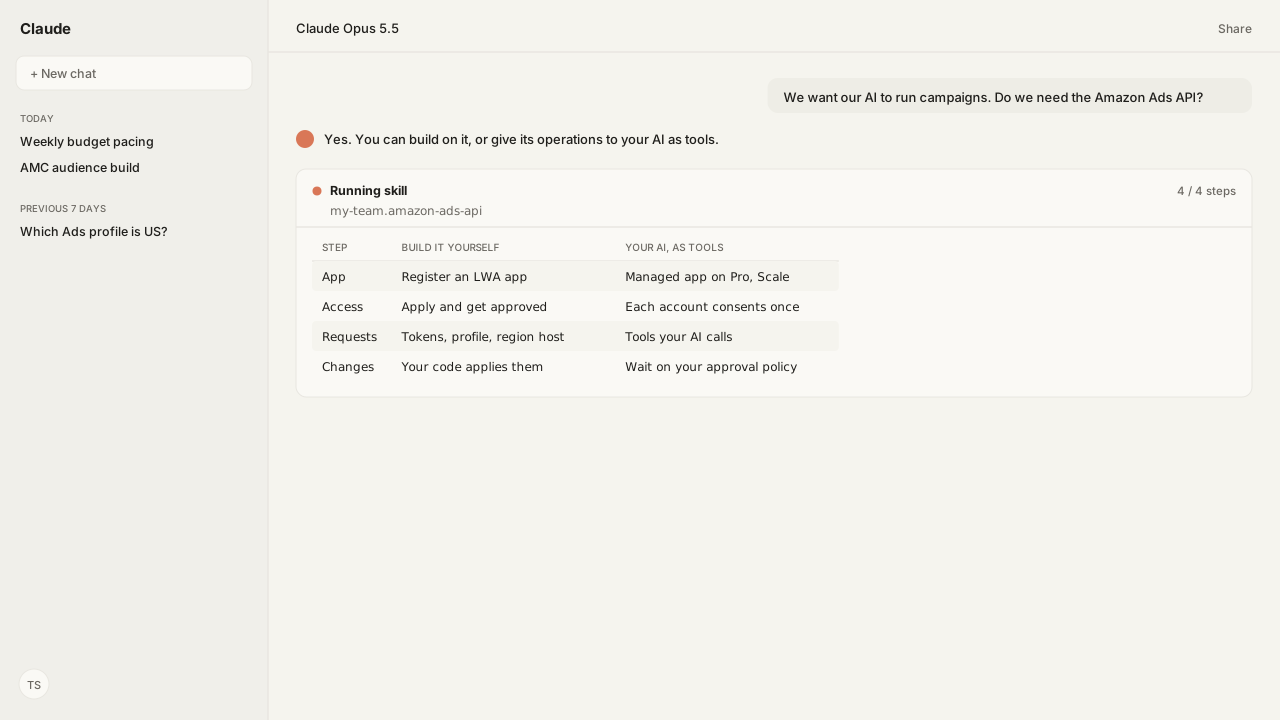
A brand's operations lead put it to me plainly: "We want our AI to run campaigns. Do we need the Amazon Ads API, and what does getting access involve?" The API is built for developers. It wants an app, an approval, tokens per advertiser, the right profile and the right regional host, before the first campaign is touched.
The real decision is whether to build that integration or give the API's operations to your AI as tools. Through the Amazon Ads MCP, your AI client calls those operations from your cloud, and the first job most teams hand it, a report, runs through the Build the Right Amazon Ads Report Skill, which checks each field against Amazon's live reporting catalog before the request is sent.
The Amazon Ads API covers sponsored ads, DSP, AMC, reporting and account management
The Amazon Ads API, sometimes called the Amazon Advertising API, is one of three ways Amazon offers to manage campaigns, alongside the Amazon Ads console and bulk operations. Amazon's help page Amazon Ads API overview says it "enables Amazon advertisers and members of the Partner Network to programmatically manage advertising operations." Amazon Agent Atlas holds that overview and the developer guides behind it.
| Area | What you do through the API |
|---|---|
| Sponsored ads | Campaigns, targeting, bids, budgets, recommendations |
| Amazon DSP (demand-side platform) | Campaigns, audiences, media planning |
| Amazon Marketing Cloud | Queries, workflows, audiences |
| Reporting | Request, wait for, download reports |
| Account management | Accounts and advertising profiles |
| Amazon Marketing Stream | Near-real-time data pushed to AWS |
Amazon documents each API on its developer portal and describes them with OpenAPI specifications, so a developer, or an AI, reads the same contract. Reporting is asynchronous: you request a report, wait for it to generate, and download it, as the Amazon Ads Reporting API Guides hub explains.
Getting Amazon Ads API access takes a Login with Amazon app and an approved application
Amazon's help page Access the Amazon Ads API lists three steps:
- Create a Login with Amazon (LWA) application. Requests to the Amazon Ads API are made by a client application that LWA administers.
- Apply for Amazon Ads API access. You can apply in the Partner Network. The form asks how your business intends to use the API and covers the Amazon Ads API License Agreement and the Data Protection Policy.
- Assign API access to the LWA application.
The signed-in user needs the admin role on both the Partner Network and the LWA app, and Amazon notes that associates can't apply or link existing API credentials. Amazon's overview also sets the expectation: dedicated developer resources, or a third-party partner, an approved API integration, and an active Amazon Ads account.
After approval, each advertiser user authorizes your app through an authorization grant, which produces the access and refresh tokens your requests carry. On Kuudo Pro and Kuudo Scale, your agent uses Kuudo's managed, verified Amazon Ads app instead, so there is no app of your own to register: see Amazon account authorization.
Every Amazon Ads API request names who is calling and which advertiser it acts on
Amazon's Sponsored Display overview names three mandatory headers, and the same pattern runs through the sponsored ads and DSP APIs:
| Header | What it carries |
|---|---|
Amazon-Advertising-API-ClientId | Your registered client ID |
Amazon-Advertising-API-Scope | The advertiser's profile ID |
Authorization | Bearer plus the OAuth access token |
A profile represents an advertiser account in one marketplace. You list the profiles your token can reach with GET /v2/profiles, then send the chosen profile ID as the scope. Some newer APIs also take an Amazon-Ads-AccountId header, such as the DSP advertiser ID that media planning asks for.
Profiles also tie a request to a region. Amazon runs the API on three hosts:
| Region | Host | Example marketplaces |
|---|---|---|
| North America | advertising-api.amazon.com | US, Canada, Mexico, Brazil |
| Europe | advertising-api-eu.amazon.com | UK, Germany, France, India |
| Far East | advertising-api-fe.amazon.com | Japan, Australia, Singapore |
The Resolve the Right Amazon Ads Account Skill picks the right marketplace profile before anything runs, so a change lands on the account your team means.
Your AI can use the Amazon Ads API as tools, under your rules and your approval
The Amazon Ads MCP turns Amazon Ads API operations into tools your AI client calls over the Model Context Protocol (MCP), listed one by one in the Amazon Ads API tools reference. It runs in your own cloud. Kuudo's data processing addendum commits that your cloud resources connect directly to Amazon, so the API requests and Amazon's responses do not pass through Kuudo's infrastructure.
Each Amazon endpoint behaves differently, and Amazon decides the pace. With every call the server passes Amazon's current state to your AI: the rate limit and what remains of it, when to retry after Amazon throttles, and how long a report usually takes, so the AI decides when to wait, retry or move on. See rate limits, throttling and long-running jobs.
Reads return data. Writes validate their input, apply your workspace policy and may require a person's approval before a change reaches Amazon, and every call is recorded with its parameters and approval state, per the MCP servers reference. The automation follows your rules, written as Skills:
- Build the Right Amazon Ads Report turns a metric question into a validated report request.
- Pace Amazon Ads Budgets to Plan proposes budgets from your monthly target and writes only the proposal you approve.
- Create a DSP Performance+ or Brand+ Campaign builds a DSP campaign paused and reads back every write.
- Turn AMC Questions Into Answers and Audiences writes validated AMC SQL and returns answers or audiences.
Amazon Agent Flow, the Amazon Agent Data layer, lands your Ads data, and your seller data from the Selling Partner MCP, in a data lake in your own cloud, so the agent works from your history as well as today's numbers. Amazon also runs its own Amazon Ads MCP Server for partners with active API credentials; Amazon's Ads MCP Server compared sets the two side by side.
What happens next: build on the Amazon Ads API, or give it to your AI
If you have developers and a reason to own the integration, apply for access and build: the LWA app, the authorization grant, profile handling, the regional hosts and report polling. Amazon's onboarding overview is the place to start.
If the goal is for your AI to run the advertising work, connect the Amazon Ads MCP to the client your team already uses, let each account consent once, and write the rules you want followed as Skills. Then start with one weekly job, such as the routine in How to Optimize Amazon Ads, and let the approvals show you what the agent proposes.
Next: how an agent turns a reporting question into the right Amazon Ads report.
Give your AI the Amazon Ads API as tools
We'll set up the Amazon Ads MCP in your own cloud, connected to the AI client your team already uses, with your budget, reporting and campaign rules written as Skills. No Amazon Ads API app to register on Pro or Scale.
Book a working sessionWhat you need to run the Amazon Ads API
- amazonApi
- The Amazon Ads API: sponsored ads, Amazon DSP, Amazon Marketing Cloud, reporting, account management and Amazon Marketing Stream
- access
- A Login with Amazon (LWA) app, an approved Amazon Ads API access application, and API access assigned to that app
- authorization
- An LWA authorization grant per advertiser user, producing access and refresh tokens
- regions
- North America (advertising-api.amazon.com), Europe (advertising-api-eu.amazon.com), Far East (advertising-api-fe.amazon.com)
- kuudoLayer
- Amazon Ads MCP in your own cloud, Kuudo's managed verified Amazon Ads app on Pro and Scale, and Skills such as Build the Right Amazon Ads Report and Pace Amazon Ads Budgets to Plan
- atlasGrounding
- amazon_ads: Amazon Ads API overview and Access the Amazon Ads API (Amazon Ads help), onboarding and authorization grant guides, the profiles reference, and the Amazon Marketing Stream overview
- Last verified
- 2026-10-07
Keep exploring the Amazon Ads API
Use these companion guides to understand the inputs, follow-on analysis, and adjacent workflows behind this playbook.
- How to Optimize Amazon Ads: A Weekly Routine
What to check and change each week once your AI can read the account.
FAQ
What is the Amazon Ads API?
The Amazon Ads API is Amazon's programmatic interface to advertising. Amazon describes it as the way Amazon advertisers and members of the Partner Network can programmatically manage advertising operations: sponsored ads, Amazon DSP, Amazon Marketing Cloud, reporting and account management. It is one of three ways to manage campaigns, alongside the Amazon Ads console and bulk operations.
How do I get access to the Amazon Ads API?
Create a Login with Amazon (LWA) application, apply for Amazon Ads API access, which can be done in the Partner Network, and assign API access to the LWA application. The signed-in user needs the admin role on both the Partner Network and the LWA app. Each advertiser user then authorizes your app with an authorization grant, which produces the access and refresh tokens your requests use.
Where is the Amazon Ads API documentation?
Amazon publishes it on its Amazon Ads API developer portal at advertising.amazon.com/API/docs, with guides per ad product and a reference for each API. The APIs are described with OpenAPI specifications that you can browse on the portal or download.
What is a profile ID in the Amazon Ads API?
A profile represents an advertiser account in one specific marketplace. You list the profiles your access token can reach with GET /v2/profiles, then pass the chosen profile ID in the Amazon-Advertising-API-Scope header on requests that act on that advertiser.
Why does an Amazon Ads API report request return status 425?
Status 425 means you sent a duplicate request with the same parameters while the first report was still generating. Amazon's reporting guide says to wait for the existing request to finish, which can take up to three hours, before making another.
Can I use the Amazon Ads API from ChatGPT or Claude?
Yes, through the Model Context Protocol (MCP). Amazon's own Amazon Ads MCP Server is in open beta for Amazon Ads partners with active API credentials. Kuudo's Amazon Ads MCP runs in your own cloud, connects ChatGPT, Claude or any MCP client to the Amazon Ads API operations, and on Pro and Scale uses Kuudo's managed, verified Amazon Ads app, so there is no app of your own to register.
Sources
- Amazon Ads API overview (Amazon Ads help)
- Access the Amazon Ads API (Amazon Ads help)
- Amazon Ads API reference overview
- Onboarding overview (Amazon Ads API)
- Create an authorization grant (Amazon Ads API)
- Profiles reference (Amazon Ads API)
- Amazon Marketing Stream overview (Amazon Ads API)
- Introducing the Amazon Ads MCP Server, now in open beta (Amazon Ads, February 2, 2026)