
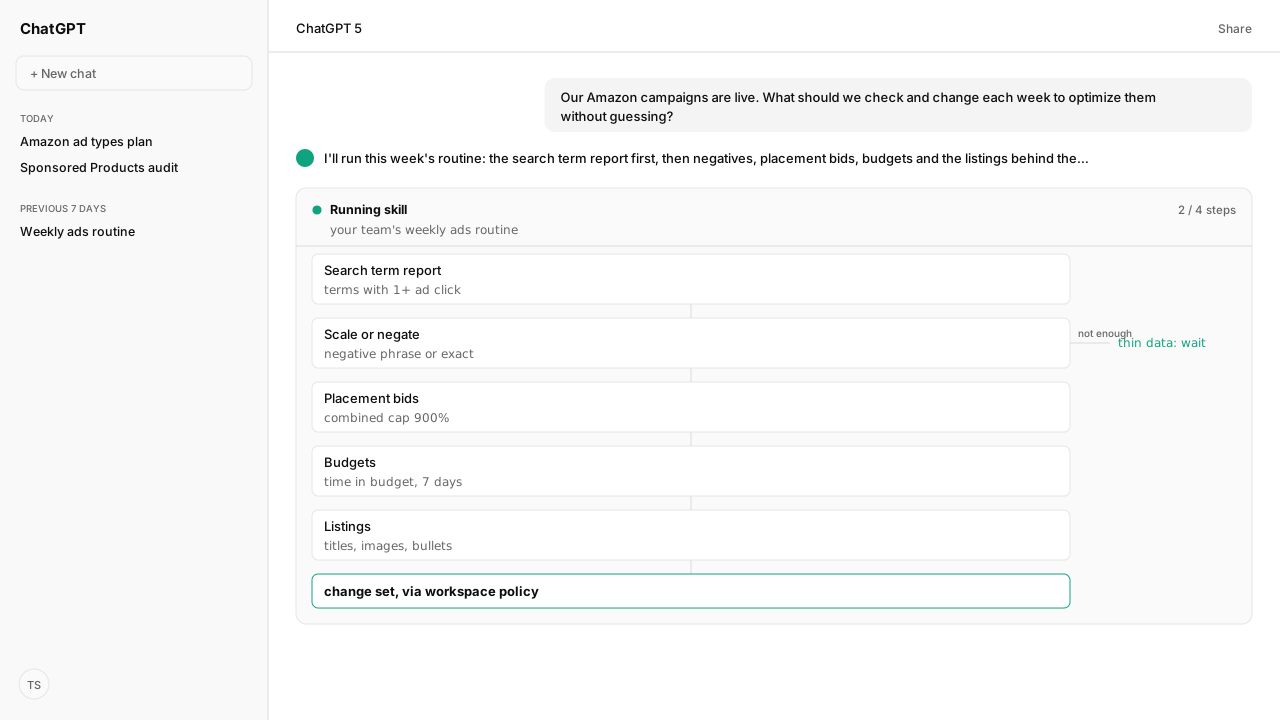
- The search term report lists the searches that led to at least one ad click. Amazon suggests using it to find high-performing searches to target and to add negative keyword or product targets for searches that don't meet your goals.
- Negative phrase keywords take up to 4 words and negative exact up to 10, both within 80 characters.
- Placement bid adjustments raise a bid for top of search, rest of search or product pages, and placement and audience adjustments combine up to a 900% increase.
- Budget recommendations show the share of time a campaign stayed in budget over the past seven days, with estimated missed clicks and sales that are not guaranteed.
- Amazon's listing tips for advertised products: a title of about 60 characters, 4 or more images, and 3 or more bullet points.
To optimize Amazon ads, run the same routine every week: read the search term report, scale the searches that perform and add negative keywords for the ones that don't, raise placement bids where placements convert, keep campaigns in budget, and fix the listings behind the ads. Amazon's own pages set the rules for each step.
A paid ads lead put the question to me: "our campaigns are live, so what should we change each week without guessing?" Most advice is a list of tactics. The work is a routine, run the same way each week, so one week's change can be read against the last.
Our agent ran the routine through the Amazon Ads MCP. It pulled the search term report, split scale candidates from wasted spend with the search-term Skill, and checked each change against the rules Amazon Agent Atlas holds from Amazon's pages. The change set went through the account's workspace policy before anything reached Amazon.
The search term report is where Amazon ads optimization starts
The Search term report for Sponsored Products lists the searches that led to at least one ad click, including terms Amazon inferred as the best match in non-search placements. It is available to sellers, vendors, authors and book vendors running Sponsored Products and Sponsored Brands. Amazon's advice is to use it to find high-performing searches and to create negative keyword or product targets for the searches that don't meet your goals.
The report counts only searches with a click, so Amazon notes its impressions may not match the campaign manager's.
The search-term Skill turns the report into decisions. It returns two scale tables, a negative list once the data is sufficient, rising terms to watch, and a separate stream of product (ASIN) targets. On a thin observation window it holds the negatives rather than guessing.
Negative keywords stop spend on searches that don't convert
Add negative keywords or negative products sets two match types for negatives:
| Negative type | Blocks | Limit |
|---|---|---|
| Negative phrase | Searches containing the complete phrase or close variations | Up to 4 words, 80 characters |
| Negative exact | The exact phrase or a close variation | Up to 10 words, 80 characters |
An existing negative keyword's match type can't be changed, so fixing a wrong match type means adding a new negative. Product targets are a separate lever: the search-term Skill keeps ASIN targets in their own stream instead of treating them as keyword negatives.
Raise placement bids where the placement report shows conversions
Adjust Sponsored Products bids lets you raise a bid by a percentage for each placement, and Amazon frames it as a move for placements you have seen convert better:
- Top of search: the first page's top row, up to the first 5 positions on desktop and 4 on mobile.
- Rest of search: the middle or bottom of shopping results, and page two onward.
- Product pages: detail pages and other non-shopping placements such as the add-to-cart page.
- Amazon Business placements.
Placement and audience adjustments combine, up to a 900% increase on the base bid. Amazon's own example: a $1 bid with 50% for top of search, 100% for Amazon Business and 50% for an audience becomes $4.50. The agent reads each placement's results through the Amazon Ads MCP before it proposes an adjustment.
Bidding strategies for Sponsored Products sets how Amazon moves the bid itself: dynamic down only, dynamic up and down, fixed, or rule-based, where you set a return on ad spend (ROAS) goal and Amazon adjusts each bid toward it without guaranteeing it. The Amazon PPC guides explain each.
Budgets and listings decide whether good bids get to work
Budget recommendations and missed opportunities reports three things for a campaign:
- a recommended daily budget to keep it in budget for the full 24 hours
- the share of time it was in budget over the past seven days
- estimated missed impressions, clicks and sales, which Amazon labels as estimates and not guaranteed
Amazon's own tip: look for high-performing campaigns with less than 100% average time in budget and estimated missed sales, and raise their budget.
The budget pacing Skill compares spend with the month's plan, forecasts the rest of the month, and returns a budget change set that remains a proposal until approved.
Ads send shoppers to listings. Optimize products for advertising shows listing recommendations in campaign manager for advertised products, and its tips include a title of about 60 characters, 4 or more images at least 1,000 pixels on a side, and 3 or more bullet points. The agent reads the listings through the Selling Partner MCP and flags the ones short on those tips. For portfolio structure, the Sponsored Products campaign audit separates serving problems, concentration risk and structural hints.
What happens next: run the routine on the same day each week and compare against last week
Run the five steps in order, on the same day each week, and read each result against the week before. A change you can't compare is a change you can't judge. Saved as a Skill, the routine runs the same way every time, and the Amazon Agent Data layer keeps the weekly history the comparison needs.
The metric that tells you whether the routine is working is ACoS against TACoS, covered in TACoS vs ACoS. If the campaigns aren't live yet, start with Amazon advertising services.
Next: how to reduce ACoS on Amazon across bids, negatives, targeting and listings.
Run the weekly ads routine from your AI
Bring the campaigns you optimize by hand. We will map the Amazon Ads MCP, the search-term, audit and budget pacing Skills, Atlas grounding, and private-beta setup with you.
Get beta accessWhat you need to run Amazon ads optimization
- MCP
- Amazon Ads MCP for search term reports, placement and budget data, and keyword and bid changes, with the Selling Partner MCP for the listings behind the ads
- Skill
- amazon-ads-sp-search-term-explorer 0.4.3 (reference) for the weekly search-term step, with the Sponsored Products campaign audit and budget pacing Skills around it
- Atlas collection
- amazon_ads, the Amazon rules behind this guide (playbooks: Search term report for Sponsored Products; Add negative keywords or negative products; Adjust Sponsored Products bids; Bidding strategies for Sponsored Products; Budget recommendations and missed opportunities; Optimize products for advertising)
- Required subscriptions
- An Amazon Ads account with live Sponsored Products campaigns.
FAQ
How do you optimize Amazon PPC campaigns?
Run the same routine every week: read the search term report, scale the searches that perform and add negative keywords for the ones that don't, raise placement bids where the placement report shows conversions, keep campaigns in budget, and fix the listings behind the ads.
What are negative keywords on Amazon?
Keywords that stop your ad from showing on a search. Negative phrase blocks searches containing the complete phrase or close variations, up to 4 words; negative exact blocks the exact phrase or close variation, up to 10 words. Both have an 80-character limit, and an existing negative keyword's match type can't be changed.
How do placement bid adjustments work on Amazon?
You enter a percentage increase for top of search, rest of search, product pages or Amazon Business placements. Placement and audience adjustments combine: a $1 bid with 50% for top of search, 100% for Amazon Business and 50% for an audience becomes $4.50, and the combined increase caps at 900%.
Why does the search term report show fewer impressions than campaign manager?
The search term report includes only search terms that led to at least one ad click, so Amazon notes its impressions may not match the campaign manager's.
What should an Amazon advertising strategy include?
A goal for each ad type, a weekly optimization routine for the campaigns that run, budgets that keep campaigns in budget, and listings ready for advertising. The ad types and their goals are covered in Amazon Advertising Services: How Each Ad Type Works.
Can an AI optimize Amazon ads?
It can run the routine. Through the Amazon Ads MCP, an AI reads the search term report, placement results and budgets and drafts the changes. Budget changes from the budget pacing Skill stay proposals until approved, and writes go through your workspace policy before anything reaches Amazon.