
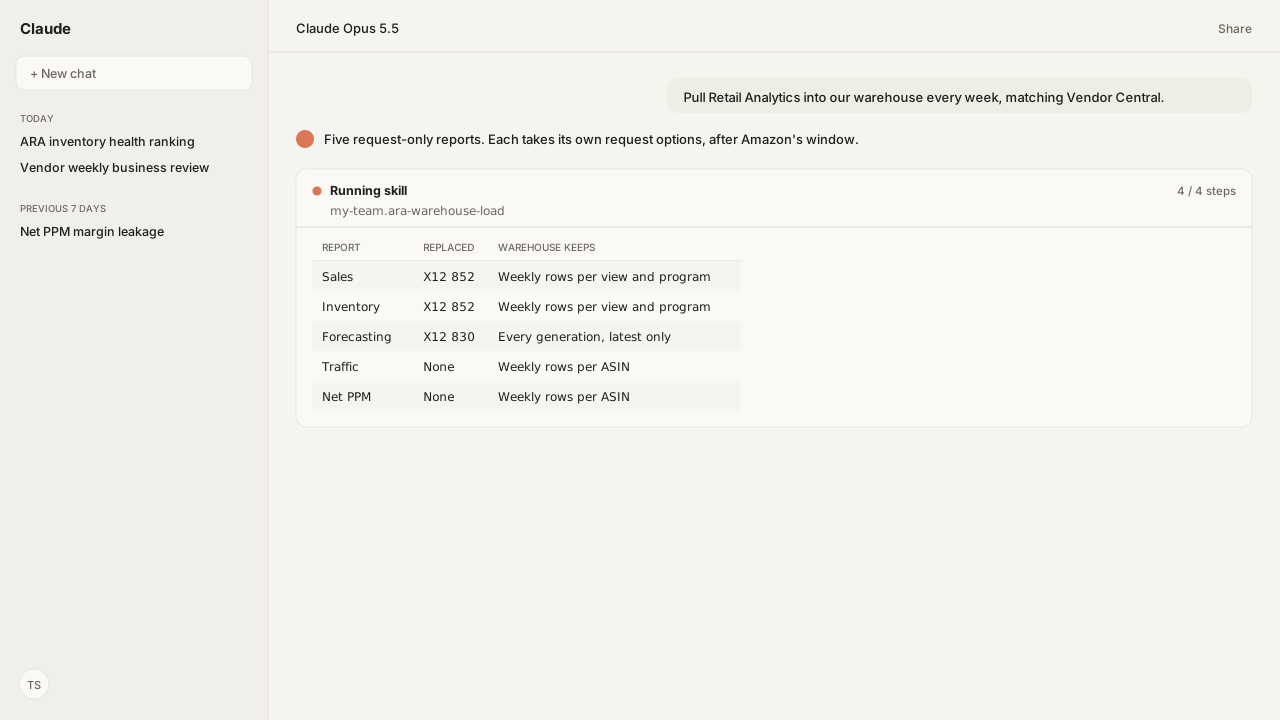
- Five SP-API report types carry the ARA dashboards: sales, inventory, forecasting, traffic and Net PPM. The X12 852 and 830 EDI feeds stopped publishing after June 30, 2022.
- Every report is request-only, so the weekly pull is your own scheduler. A WEEK request runs Sunday to Saturday in Pacific time; sales and inventory also name a view and a selling program, and the forecast takes no period at all.
- Weekly inventory data is due 72 hours after the week closes. Asking earlier returns a FATAL report; when an unavailable period is the cause, request it again after the window.
- Only the latest forecast can be requested. Store every forecast generation, or the history is gone.
- Key each row by report, period, view, program, marketplace and ASIN, and replace a period on rerun, so the warehouse matches the dashboard.
The Amazon Retail Analytics API is a set of Selling Partner API report types that return the ARA dashboards as JSON: sales, inventory, forecasting, traffic and Net Pure Product Margin. A warehouse load requests each report with the options it takes, waits out Amazon's 48 to 72 hour window, stores every forecast, and keys rows to match Vendor Central.
Our vendor manager asked the question every vendor team reaches eventually: "How do I get Retail Analytics out of Vendor Central and into our warehouse, so the agent queries the same numbers every week?" The dashboards are fine for a look. A Monday meeting that compares twelve weeks across two programs needs the rows in one place, and the old electronic data interchange (EDI) feeds that once delivered them are gone.
The decision behind the load is which ARA number the team reports. A manufacturer's brand team quotes the Manufacturing view; the retail team quotes Sourcing. Our rule names both, Retail program first. Amazon Agent Flow requests each report in the views that rule names, after Amazon's window, and keeps every forecast generation. The warehouse then matches the dashboard the meeting opens, and next quarter's forecast comparison has history to compare.
The Amazon Retail Analytics API is five report types that replaced the ARA EDI feeds
Amazon's Retail Analytics data now arrives through five SP-API report types, and Amazon says they mimic the dashboards in Vendor Central. Amazon Agent Atlas holds Amazon's "Amazon Retail Analytics EDI/API integration" page, which maps each retired feed to its replacement:
| Dashboard | Old EDI feed | API report type |
|---|---|---|
| Sales diagnostic | X12 852 | GET_VENDOR_SALES_REPORT |
| Inventory health | X12 852 | GET_VENDOR_INVENTORY_REPORT |
| Forecasting | X12 830 | GET_VENDOR_FORECASTING_REPORT |
| Traffic | None | GET_VENDOR_TRAFFIC_REPORT |
| Net PPM | None | GET_VENDOR_NET_PURE_PRODUCT_MARGIN_REPORT |
The X12 852 and X12 830 feeds have not been published since June 30, 2022. Some 852 elements have no API successor at all: quantity_on_hold, days_supply_daily, weeks_supply_daily, forecast_variance and quantity_in_transit. A warehouse that once loaded them computes those values or drops them.
Amazon also publishes hourly real-time variants for sales, traffic and inventory. Pulling any of these reports requires the Brand Analytics role on your SP-API developer profile. In Vendor Central that starts under Integrations (EDI/API), then API Integration.
Amazon's case for the switch is data parity. The integration page says the API reports come from "the same source used by Amazon retail category teams", with parity to the Vendor Central dashboards and "easy-to-access data backfills for historic data". Our agent makes the requests through the Amazon Vendor Central MCP, which reaches these reports through the shared Selling Partner MCP Reports tools.
Each ARA report takes its own request options, and the forecast takes no period
The five Vendor Retail Analytics reports do not share one request shape. Amazon's report definitions list the reportOptions each one takes:
| Report | reportPeriod | distributorView | sellingProgram | Date boundaries |
|---|---|---|---|---|
| Sales | Required | Required | Required: RETAIL, BUSINESS or FRESH | First and last day of the period |
| Inventory | Required | Required | Required: RETAIL or FRESH | First and last day of the period |
| Traffic | Required | Not taken | Not taken | First and last day of the period |
| Net PPM | Required | Not taken | Not taken | First and last day of the period |
| Forecasting | Not taken | Not taken | Accepted: RETAIL or FRESH | None; it returns the latest forecast generation |
For the four period reports, reportPeriod takes DAY, WEEK, MONTH, QUARTER or YEAR, and the dates must be that period's first and last days: a WEEK starts on a Sunday and ends on a Saturday. distributorView is MANUFACTURING or SOURCING. All of it runs in Pacific Standard Time (PST), whatever the marketplace's local time. The forecasting report covers one marketplace per request; Amazon returns an error when a request names more than one.
This is the request our agent sends through Reports_createReport for one week of Sourcing inventory in the US:
{
  "reportType": "GET_VENDOR_INVENTORY_REPORT",
  "marketplaceIds": ["ATVPDKIKX0DER"],
  "dataStartTime": "2026-09-27T00:00:00Z",
  "dataEndTime": "2026-10-03T23:59:59Z",
  "reportOptions": {
    "reportPeriod": "WEEK",
    "distributorView": "SOURCING",
    "sellingProgram": "RETAIL"
  }
}
The two views are different ASIN sets. Sourcing covers ASINs sourced from your vendor codes. Manufacturing covers every ASIN you manufacture, whoever sourced it to Amazon, and it is only for manufacturers, along with the Traffic, Net PPM and Forecasting dashboards.
Each report also caps how far back a request can start and how many periods one request can span, and the caps differ by report and by period type. A backfill is therefore a series of requests over consecutive windows, each inside its report's limits. Amazon's integration page lists trailing four weeks among its aggregations; the API's period types stop at DAY through YEAR, so the warehouse builds trailing views from weekly rows.
ARA data is ready 48 to 72 hours after a period closes, and the forecast can't be requested later
Each report publishes when a closed period becomes available, so a weekly load runs after that time, not at midnight on Saturday. The windows Atlas holds for the weekly reports:
| Report | Weekly data is ready |
|---|---|
| Inventory | 72 hours after close, end of Tuesday |
| Forecasting | Within 72 hours of week end |
| Net PPM | End of Monday, 48 hours after close |
Amazon says a request for a period that is not available yet "will not be generated" and its processingStatus is FATAL. FATAL ends processing: Amazon's Reports API guide says the report "was stopped due to a fatal error and a reportDocumentId might be present" that explains why.
Our agent polls Reports_getReport, reads that document when there is one, and requests the period again only when it was inside its availability window. Any other cause stops the load for that report and goes to a person, so a broken request is never resubmitted on a loop. The Vendor Central help pages set a looser bar for the dashboards: reports "may take up to a week" to populate, with a 72 hour aim for weekly reports.
Agent Flow schedules each request on a window after the report's availability time, and it retries after throttling. Scheduled flows move the slow report generation into the background, so the agent answers from lake data.
Key each warehouse row by report, period, view, program, marketplace and ASIN
An ARA warehouse matches the dashboard only if every row carries the options that produced it. The same ASIN and week appear once per view and once per program, so a row keyed by ASIN and date alone mixes Manufacturing with Sourcing and Retail with Fresh.
The keys our load writes:
- Report type and period type, so a
WEEKrow never sits beside aMONTHrow of the same dates. - Start and end date of the period, in Pacific time.
- Distributor view and selling program, where the report takes them.
- Marketplace and ASIN.
The reports return an aggregate section across your catalog and an ASIN-level section, such as inventoryAggregate and inventoryByAsin. Load them as separate tables, since they are two different grains. A rerun of the same period replaces its rows instead of appending a second copy.
Amazon's own guidance for third-party developers puts the build at about four to five weeks: SP-API setup, report clients, a periodic fetch into an S3 bucket you own, then a load into a database such as Redshift. Agent Flow covers the fetch and the landing: it delivers the JSON into Iceberg tables in your own cloud, which Snowflake, Athena, DuckDB, Databricks, Power BI and Tableau can read downstream.
What happens next: schedule the weekly pulls and backfill inside each report's lookback
Our team saved its load rules as a Skill that the agent follows on every run. No published Kuudo Skill covers ARA, so this one is ours, and it names three things:
- Which view and program are the reported number.
- The weekly cadence, set after each report's availability window.
- A forecast snapshot every week, keyed by generation date.
Agent Flow runs the inventory pull on Wednesday morning, after the end-of-Tuesday window, and the forecast pull every week so no generation is lost. The backfill runs once, window by window inside each report's lookback, then stops. Agents read the lake through the Amazon Agent Data layer, while the Amazon Ads MCP puts the vendor's advertising beside the same ASINs.
The pattern is simple: request closed periods, wait for the window, keep the forecast, key every option.
Next, the weekly inventory rows feed the inventory health ranking, which sorts ASINs by unhealthy cost rather than units on hand.
Load ARA into your own lake every week
Bring Kuudo the ARA reports your team re-pulls by hand. Kuudo will map the Amazon Vendor Central MCP report requests, the Agent Flow schedule that lands them in your lake, the view and program rules your team writes as a Skill, Atlas grounding, and private-beta setup.
Run this workflow in betaWhat you need to run ARA warehouse loads
- MCP
- Amazon Vendor Central MCP for the Vendor Retail Analytics report requests, reached through the shared Selling Partner Reports tools: Reports_createReport, Reports_getReport and Reports_getReportDocument
- Skill
- No published Kuudo Skill covers ARA loads. Save your team's rules (which view and program are the reported number, the weekly cadence, forecast snapshots) as a Skill your team writes.
- Atlas collection
- amazon_vendors and amazon_sellers (playbooks: Amazon Retail Analytics EDI/API integration; Amazon Retail Analytics; the Selling Partner API Vendor Retail Analytics report reference)
- dataLayer
- Amazon Agent Flow schedules the requests and delivers the JSON into Iceberg tables in your own lake, which a warehouse or BI tool can read downstream
- Required subscriptions
- A Vendor Central account and the Brand Analytics role on the SP-API connection for GET_VENDOR_* reports. Manufacturing view, which carries traffic, Net PPM and forecasting, is for manufacturers and is enabled by retail stakeholders.
- Last verified
- 2026-10-06
What success and failure look like for ARA warehouse loads
| result | meaning |
|---|---|
| Report processingStatus is FATAL | Read the report document if Amazon attached one; it explains the cause. An unavailable period is the usual one: weekly inventory data is due 72 hours after close, so request again after the window. Any other cause needs the request fixed, not a retry. |
| Warehouse sales differ from the dashboard | Check the view first. Manufacturing and Sourcing are different ASIN sets, and a row keyed without its view mixes them. |
| Last month's forecast cannot be requested | Expected. Only the most recent forecast is available; history exists only if each generation was stored. |
| Weekly rows don't line up with the dashboard | Check the dates. A WEEK period starts on a Sunday and ends on a Saturday, in Pacific time. |
| Traffic, Net PPM or forecast rows missing | Those dashboards are shown only to manufacturers. Check Manufacturing view access with your retail contacts before debugging the load. |
| Rerun doubles a week | The load appended. Replace the rows for the same report, period, view and program instead. |
Keep exploring ARA warehouse loads
Use these companion guides to understand the inputs, follow-on analysis, and adjacent workflows behind this playbook.
Know what each ARA metric means before you load it.
Run the inventory ranking on the weekly rows this load keeps.
Request Vendor Retail Analytics reports through the vendor side of the Selling Partner API.
FAQ
Is there an API for Amazon Retail Analytics?
Yes. The Selling Partner API (SP-API) Reports API returns ARA data as JSON report types: GET_VENDOR_SALES_REPORT, GET_VENDOR_INVENTORY_REPORT, GET_VENDOR_FORECASTING_REPORT, GET_VENDOR_TRAFFIC_REPORT and GET_VENDOR_NET_PURE_PRODUCT_MARGIN_REPORT, plus hourly real-time sales, traffic and inventory reports. They need the Brand Analytics role.
Can I schedule Amazon Retail Analytics reports through the SP-API?
No. Amazon lists every Vendor Retail Analytics report as request-only, so a recurring load is your own scheduler issuing one request per period. Schedule it after the availability window, for example 72 hours after the week closes for inventory.
Why does my GET_VENDOR report come back FATAL?
FATAL means processing stopped on an error, and Amazon may attach a report document that explains why. The usual cause is a period that is not available yet: Amazon says such a request is not generated and its processingStatus is FATAL, so request again after the report's availability window. For any other cause, fix the request rather than retrying it.
How do I get historical ARA forecasts?
You can't request them. Amazon says only the most recent forecast data is available and historical forecast data cannot be requested, so forecast history exists only if you store each forecast generation as it arrives.
What replaced the EDI 852 and 830 feeds for vendors?
The vendor retail analytics report types. Amazon stopped publishing the X12 852 sales and inventory feed and the X12 830 forecast feed after June 30, 2022. Some 852 elements, such as quantity_on_hold and weeks_supply_daily, have no API successor.
Do ARA API numbers match the Vendor Central dashboards?
They are built to. Amazon says the API reports come from the same source its retail category teams use, with data parity to the dashboards. A mismatch usually means a different view, program or period boundary.
What time zone are ARA API reports in?
Pacific Standard Time (PST), whatever the vendor's location or the marketplace's local time zone, so a Sunday-to-Saturday week closes in Pacific time.
Sources
- Report type values: Analytics (Selling Partner API)
- Vendor Retail Analytics reports migration guide (Selling Partner API)
- Amazon Vendor Inventory Report schema
- Verify that report processing is complete (Selling Partner API Reports API)
- Amazon Retail Analytics EDI/API integration (Vendor Central help, sign-in required)