
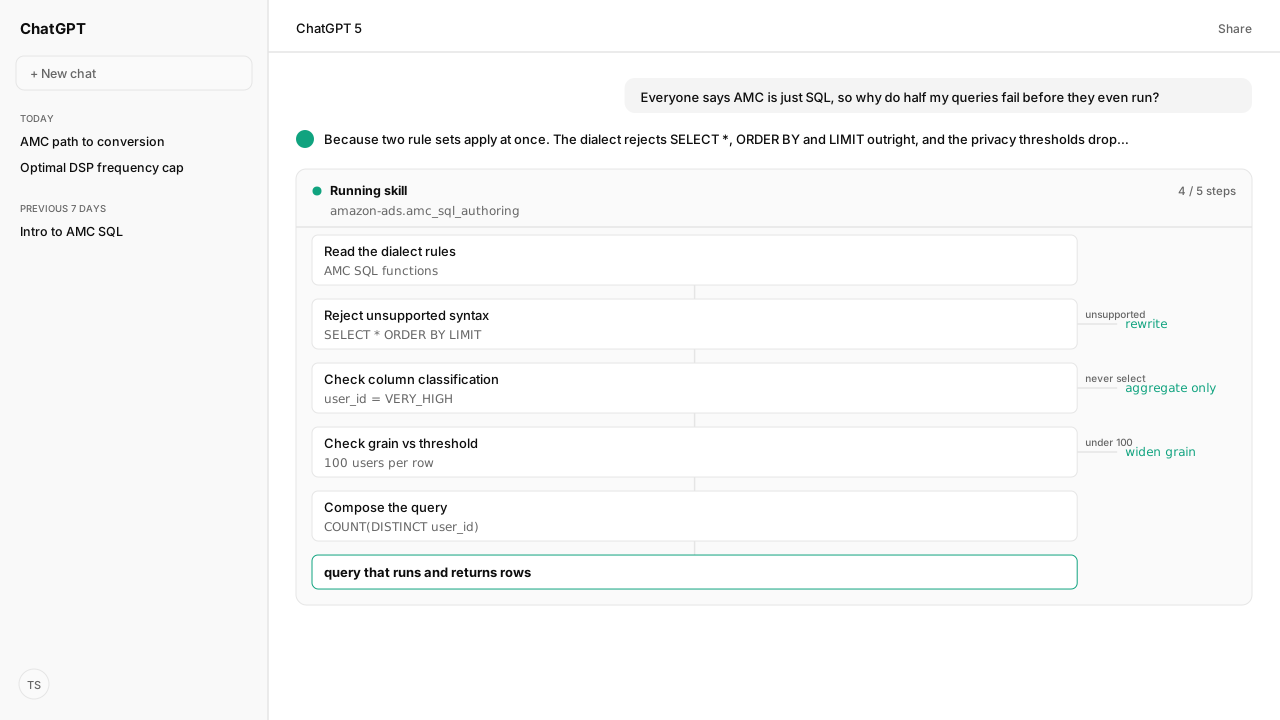
- AMC SQL is a documented dialect, not the SQL you already know.
SELECT *,ORDER BY,LIMIT,RIGHT JOINandGETDATE()are all unsupported. - A valid query can return nothing. Columns classified HIGH or MEDIUM need at least 100 distinct
user_idvalues per output row; LOW needs 2. user_idis classified VERY_HIGH. You can aggregate it withCOUNT DISTINCT, but you can never select it, andWHERE user_id IN (111,222)is rejected.- Sorting happens after the query.
ORDER BYis only legal inside aPARTITION BYclause; otherwise you sort the downloaded output. - The agent reads the function catalog and the threshold rules from Atlas before it writes, so the first query it hands you runs.
Amazon Marketing Cloud (AMC) SQL is a documented, privacy-constrained dialect rather than unrestricted warehouse SQL. Queries cannot rely on patterns such as SELECT *, ORDER BY, or LIMIT, and valid-looking output can disappear below aggregation thresholds. This guide explains the checks an agent should perform before it writes or runs the first query.
Amazon Marketing Cloud (AMC) SQL is a restricted dialect running inside a privacy clean room, so two things are true at once: the query you already know how to write will be rejected, and the query that gets accepted can still return nothing. SELECT *, ORDER BY, LIMIT, RIGHT JOIN and GETDATE() are all unsupported, and any output row describing fewer than 100 distinct shoppers gets dropped before you see it. Our agent checks both rule sets through the Amazon Ads MCP, grounded by Amazon Agent Atlas, before it writes a line.
The Amazon Marketing Cloud software keeps those dialect checks, privacy rules, and run artifacts together when the query becomes a repeatable operating workflow.
I learned the second half the hard way. An analyst pinged me with a query and a shrug: "It runs. It returns four rows. There should be ninety." Nothing was broken. She had grouped purchases by postal_code, and AMC had silently withheld every postal code with fewer than 100 shoppers behind it. The SQL was correct, the result was censored, and nothing in the output said so.
ChatGPT, Claude, Perplexity, Microsoft Copilot, and whatever comes next know nothing about your business out of the box. Your competitors use those tools too. Kuudo gives those same tools your edge: your data, your rules, and the way your business operates. That means your account as it is right now, your judgment running every time, and your call before anything changes. The Amazon Ads MCP reads and tests against your authorized instance, Skills preserve the rules your team expects, Amazon Agent Atlas supplies Amazon-specific guidance, and approval controls keep activation and other consequential changes with you.
AMC SQL is a documented dialect, not the SQL you already know
The first thing the agent does is stop treating this as generic SQL. Atlas retrieves the Introduction to AMC SQL playbook and the AMC SQL functions catalog from the amazon_ads corpus, which together define the grammar, the data types, the logical operators, and the exact function list AMC accepts.
What is supported is narrower than it looks: SELECT <column> FROM <table>, WHERE, GROUP BY, aggregates like SUM, AVG, COUNT and COUNT DISTINCT, conditionals like CASE, IF, IN and NOT IN. What is not supported is documented just as precisely in Limitations and unsupported functions: no SELECT *, no LIMIT, no RIGHT JOIN, no GETDATE().
So a working query names its columns and nothing more:
SELECT
  campaign_id,
  campaign,
  campaign_start_date,
  campaign_end_date,
  SUM(impressions) AS impressions
FROM
  dsp_impressions
GROUP BY
  1,
  2,
  3,
4A valid query can return nothing, and AMC will not tell you
This is the rule that costs people days. AMC assigns every column an aggregation threshold, and rows that fall below it are removed from your output rather than flagged. The classifications run NONE, LOW, MEDIUM, HIGH, VERY_HIGH and INTERNAL. In practice you need 2 distinct users behind a row for a LOW column and 100 distinct users for a MEDIUM or HIGH one.
postal_code is a HIGH column, which makes it the clearest demonstration. This is the query my analyst ran:
SELECT
  postal_code,
  SUM(purchases) AS purchases,
  COUNT(DISTINCT user_id) AS customers
FROM
  amazon_attributed_events_by_conversion_time
GROUP BY
  1
In Amazon's own worked example of this pattern, 91 rows come back complete because each postal code had at least 100 users behind it. Four more rows come back with the postal_code value blank and the purchases still showing, because those postal codes had fewer than 100 shoppers. Nothing errors. The rows just quietly stop identifying themselves.
The agent knows the fix before you hit it, because the Data aggregation thresholds in AMC playbook lists the remedies: extend the time window, broaden a restrictive filter, or group by a less granular dimension. A week instead of a day. A region instead of a postal code. More distinct users per row, more rows that clear the floor.
user_id is the column you build on and never select
user_id is classified VERY_HIGH, the strictest level. Values from a VERY_HIGH column can never appear in workflow output, and no threshold will reveal them, because a single row would expose one shopper's events.
That does not make the column unusable. You can join on it, filter on it relationally, and aggregate it, which is why COUNT(DISTINCT user_id) appears in almost every AMC query worth writing, including the threshold example above. What you cannot do is put it in the final SELECT, and you cannot filter it against literal values. WHERE user_id IN (111,222) is rejected, because picking specific IDs out of a clean room is precisely what the classification exists to prevent.
The distinction is small in syntax and total in effect: user_id is how you count customers, never how you list them.
Sorting and row limits happen after the query, not inside it
ORDER BY is not a supported top-level clause in AMC, and neither is LIMIT. This surprises people more than the threshold rules, because sorting feels like part of asking the question rather than part of reading the answer.
There is exactly one place ORDER BY is legal: inside a PARTITION BY clause, where it orders rows within a window function rather than the result set. For everything else, you sort the downloaded output file. Amazon's own instructional queries carry that note inline as a pro tip, which is a fair signal of how often it trips people up.
The practical consequence for an agent workflow is that ranking is a post-processing step, not a query clause. The query returns the aggregate; the Amazon Agent Data layer sorts, formats and routes it.
What happens next
Once the dialect rules and the threshold rules are both loaded from Atlas, writing AMC SQL stops being trial and error and becomes a check-then-write loop. The agent reads the function catalog, checks the classification of every column you want to group by, warns you when a grain will not clear 100 users, and only then composes the query. It runs the workflow through the Amazon Ads MCP and returns the result rather than the SQL, so the failure modes above never reach you.
That loop is worth saving. Turned into a reusable Skill it becomes the front door to every AMC question your team asks, and it composes with the workflows you already run through the Selling Partner MCP and the rest of the Amazon Agent Data layer. The same pattern is what turns a one-off analysis into something scheduled, as in the AMC agent workflows guide.
The dialect is small enough to learn in an afternoon. The thresholds are what quietly cost you a week, and they are invisible in the output.
Next in this series: your first real AMC queries, where the tables live and how to scope one to your own campaigns.
Put an Atlas-grounded agent on your AMC instance
Bring us the AMC question your team keeps rewriting by hand. We will map the Amazon Ads MCP, the reusable Skill, and Atlas grounding with you, and get you into the private beta.
Run this workflow in betaWhat you need to run this
- MCP
- Amazon Ads MCP for AMC workflow creation, execution and result retrieval against your instance
- Skill
- amc-sql-authoring, the reusable check-then-write loop that reads the dialect and threshold rules before composing a query
- Atlas collection
- amazon_ads, the rule corpus behind every claim here (playbooks: Introduction to AMC SQL; AMC SQL functions; Limitations and unsupported functions; Data aggregation thresholds in AMC)
- Required subscriptions
- A standard AMC instance. Paid datasets such as Flexible Shopping Insights are not required for anything in this guide.
What success and failure look like
| result | interpretation |
|---|---|
| Rows return with a dimension value blank but the metrics populated | Threshold suppression, not missing data. Fewer than 100 distinct user_id values sat behind that group. Widen the grain or the time window. |
| Query is rejected on submit before any rows come back | Dialect, not privacy. Check for SELECT *, ORDER BY, LIMIT, RIGHT JOIN or GETDATE() against the Limitations and unsupported functions playbook. |
| filteredMetricsDiscriminatorColumn reads TRUE on a row | That row had values removed by threshold rules. FALSE means the row is complete as returned. |
| Row count is far below the number of groups you expected | Healthy for a high-cardinality dimension. Most postal codes, hours and ASINs will not clear 100 users on their own. |
Keep exploring this topic
Use these companion guides to understand the inputs, follow-on analysis, and adjacent workflows behind this playbook.
FAQ
Why does my AMC query return NULL or no rows when the SQL is valid?
Aggregation thresholds removed them. A column classified HIGH or MEDIUM needs at least 100 distinct `user_id` values behind each output row, so a `postal_code` with 40 shoppers is dropped rather than returned. The query was fine; the output was filtered.
Why can't I use SELECT * in AMC?
AMC does not support `SELECT * FROM <table>`. Name the columns you want. This is documented in Limitations and unsupported functions alongside `LIMIT`, `RIGHT JOIN` and `GETDATE()`.
How do I sort results in AMC when ORDER BY is unsupported?
You sort the downloaded output file. `ORDER BY` is only legal inside a `PARTITION BY` clause for window functions, never as a top-level clause on the query.
Can I select user_id in an AMC query?
No. `user_id` is classified VERY_HIGH, so it can never appear in workflow output. You can use it for intermediate joins and aggregate it with `COUNT` or `COUNT DISTINCT`, which is how nearly every AMC query counts customers.
Why is WHERE user_id IN (111,222) rejected?
Filters using literal static values cannot be applied to a VERY_HIGH column. Filtering on specific user IDs would isolate individual shoppers, which is exactly what the classification prevents.
How do I tell whether a row was filtered or genuinely had no activity?
Enable Append aggregation threshold columns in the query editor. It adds `filteredMetricsDiscriminatorColumn`, a Boolean that reads TRUE when values in that row were removed by threshold rules and FALSE when the row is unchanged.
What do I change when too many rows come back NULL?
Widen the grain. Extend the time window, broaden restrictive filters, or group by a less granular dimension: a week instead of a day, a region instead of a postal code. More distinct users per row means more rows clear the threshold.