
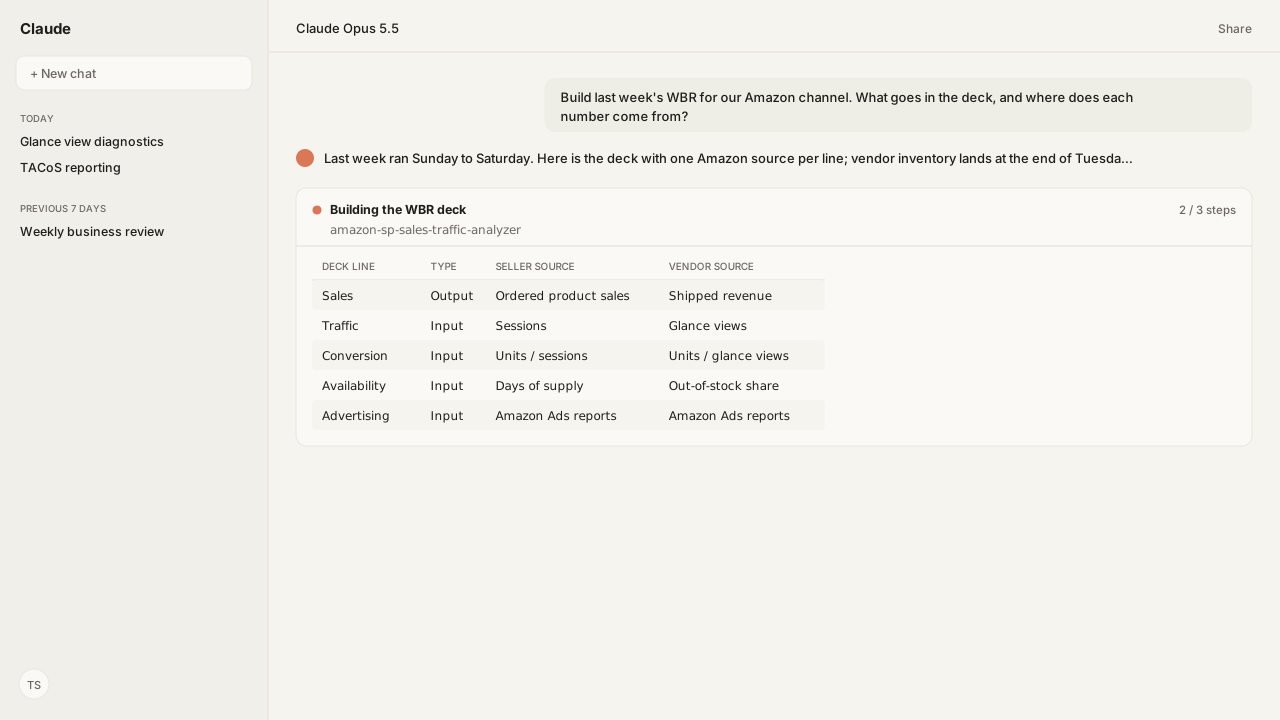
- A weekly business review (WBR) is Amazon's weekly operating meeting: each owner walks a fixed deck of metrics, compares the week with last year and explains what moved. Most of the deck is controllable input metrics, not results.
- For an Amazon channel, the deck comes from Business Reports and the Sales and Traffic report (sellers), Amazon Retail Analytics (vendors) and Amazon Ads reports. Seller and vendor weeks run Sunday to Saturday in Pacific time; ad reports arrive as daily rows summed into the same weeks.
- Build the vendor lines after Tuesday: Amazon's API documentation has weekly Retail Analytics sales and traffic ready by the end of Monday and inventory by the end of Tuesday. Treat last week's ad sales as provisional, because Amazon restates ad conversions 1, 7 and 28 days after they happen.
- To stop building the deck by hand, connect Kuudo's Selling Partner, Vendor Central and Amazon Ads MCPs to an AI client such as Claude or ChatGPT: one request builds the week's deck from your own reports. For live charts, Claude Dashboards reads the same weekly reports from a warehouse.
A weekly business review (WBR) is Amazon's weekly operating meeting: each owner walks a fixed deck of metrics, compares the week with last year and explains what moved. For an Amazon channel, the deck comes from Seller Central Business Reports or Vendor Central's Amazon Retail Analytics, plus Amazon Ads reports. An AI client connected to Kuudo's Amazon MCPs builds it on request, and Claude Dashboards can chart it from a warehouse.
The hard part of a WBR for an Amazon channel is the deck, not the meeting. Someone exports Business Reports, downloads Retail Analytics, pulls an ads report and lines up the dates in a spreadsheet, and the meeting opens with a debate about whose week the numbers cover.
The decision a WBR exists to make is which input metric gets work this week, and that depends on thresholds only your team holds: the conversion dip your category treats as noise, the in-stock level your vendor manager escalates. Saved in a Skill, those thresholds run against your own reports through the Selling Partner MCP and the Vendor Central MCP, so owners arrive knowing which lines crossed your rule.
A weekly business review reads a fixed deck of input and output metrics against last year
Amazon's weekly business review is the same deck of metrics, read in the same order, every week. Colin Bryar and Bill Carr, the former Amazon executives who wrote Working Backwards, describe it on their site as "a powerful process-control tool" that answers three questions: how the business did last week, whether it is on track to hit its targets, and what customers experienced last week.
The deck holds two kinds of metric:
- Output metrics are results, such as revenue. The authors call them lagging indicators.
- Controllable input metrics are the drivers a team can act on directly, which produce those results. Jeff Bezos's 2009 shareholder letter puts the same idea in Amazon's own words: "focusing our energy on the controllable inputs to our business is the most effective way to maximize financial outputs over time."
Most metrics get the same chart, the 6-12 chart: the trailing six weeks on the left, the trailing twelve months on the right, and the same periods last year plotted behind them, with a goal line where there is one. Because the format does not change, the authors write, "you can review hundreds of them in a one-hour meeting."
Each metric has an owner who speaks to it. When a line shows routine variation, the owner says "nothing to see here" and the meeting moves on; time goes to exceptions and what is being done about them. Cedric Chin of Commoncog, who learned the practice from Bryar, is firm that the meeting is operational: no strategy and no problem solving in the room.
An agent on Kuudo's MCPs draws each 6-12 chart from your own account's reports, so the line behind this week is your own last year, not a category benchmark.
An Amazon WBR deck takes each metric from the report Amazon publishes it in
An Amazon WBR deck has one line per metric, and each line has one Amazon source. This is a starting deck built from Amazon's report definitions, not a template Amazon publishes; keep the lines your team can act on. The vendor lines follow the Amazon Retail Analytics help page and its metric glossary:
| Deck line | Seller source | Vendor source |
|---|---|---|
| Sales (output) | Ordered product sales, from Business Reports or the Sales and Traffic report | Shipped revenue; ordered revenue in the Manufacturing view |
| Units (output) | Units ordered | Shipped units; ordered units in the Manufacturing view |
| Traffic (input) | Sessions and page views | Glance views, in the Manufacturing view |
| Conversion (input) | Unit session percentage: units divided by sessions | Ordered units divided by glance views (see below) |
| Offer (input) | Featured Offer percentage of page views | Not in ARA: Amazon no longer supports Lost Buy Box, and its replacement is in development |
| Availability (input) | Days of supply, from the Fulfillment by Amazon (FBA) Inventory report | Out-of-stock (OOS) share in the Manufacturing view, and sellable on-hand units |
| Customer (input) | Units returned, from the FBA Customer Returns Report, and refund rate in Business Reports | Customer returns, by original sales date |
| Advertising (input and output) | Spend, ad-attributed sales and advertising cost of sales (ACOS), from Amazon Ads reports | The same Amazon Ads reports |
| Margin (output) | Not a Business Reports metric | Net pure product margin (Net PPM), in the Manufacturing view |
Three lines need care:
- Conversion has three formulas. Amazon's Business Reports glossary divides units by sessions. The Amazon Retail Analytics (ARA) help page divides ordered units by glance views in its sales section, and ordered revenue by glance views in its traffic section. Put units per glance view beside unit session percentage, and keep seller and vendor lines separate.
- The Manufacturing view decides half the vendor deck. Amazon's glossary limits ordered revenue, ordered units and the out-of-stock share to the Manufacturing view, and only manufacturers see the Traffic, Net PPM and Forecasting dashboards. A sourcing-only vendor builds the deck on shipped revenue, shipped units and customer returns.
- Out-of-stock measures differ. Amazon says ARA's out-of-stock share covers procurable ASINs, a larger set than replenishable out-of-stock (Rep OOS) uses, so it usually reads lower. Name the measure on the deck before anyone compares it with a vendor manager's figure.
The agent requests the seller lines as Sales and Traffic, FBA Inventory and customer returns reports through the Selling Partner MCP, the vendor lines as Retail Analytics sales, traffic and inventory reports through the Vendor Central MCP, and the advertising line through the Amazon Ads MCP.
The Sales and Traffic Analyzer Skill computes the sales, traffic, conversion and Featured Offer lines in a script, not in the model: portfolio conversion is total units over total sessions, never an average of per-ASIN percentages, and Featured Offer is weighted by page views. The Refund and Return Monitor Skill reads the FBA Customer Returns Report for the customer line.
Amazon's reporting week runs Sunday to Saturday, and each source closes on its own schedule
Amazon's reporting week runs Sunday to Saturday in Seller Central, in the Selling Partner API and in Retail Analytics, and each source draws it a little differently:
- Business Reports define a week as "Sunday 00:00:00 to the following Saturday 23:59:59 PT".
- The Sales and Traffic report expands a
WEEKrequest to start on Sunday and end on Saturday. - Retail Analytics reports need a
WEEKrequest to start on a Sunday and end on a Saturday, in Pacific Standard Time wherever the vendor is. - Sponsored ads reports arrive as daily rows dated by the ad interaction, in the advertising account's time zone, which the agent sums into the same weeks.
Each source also finishes last week at a different time, according to Amazon's Business Reports FAQ, its report documentation and the Amazon Ads Reporting frequently asked questions:
| Source | Last week is ready | What still changes |
|---|---|---|
| Business Reports, Seller Central | By the end of Sunday | The by-date reports refresh every hour with the past few days, including cancellations |
| Sales and Traffic report, Selling Partner API | Not stated in the report documentation | An end date in the future returns a partial week |
| Retail Analytics reports, Vendor Central | Sales, traffic and Net PPM by the end of Monday (48 hours); inventory by the end of Tuesday (72 hours) | A request for a period not yet available is not generated |
| Sponsored ads reports, Amazon Ads | Clicks within 12 hours, conversions within 24 hours | Clicks can change for three days; conversions are restated 1, 7 and 28 days after they happen |
That table sets the schedule:
- Vendor lines: request sales and traffic after Monday and inventory after Tuesday, the windows in Amazon's report documentation. The ARA help page sets a looser bar for the dashboards: reports may take up to a week, with a 72-hour aim. A report that is not generated yet is a retry, not an empty week; the Retail Analytics warehouse guide lists every report's window.
- Ad lines: mark last week provisional and refresh the weeks before it. Amazon dates a conversion by the ad interaction and restates it 1, 7 and 28 days later, so a day's numbers can move for the attribution window plus 28 days: 42 days with a 14-day window.
- Time zones: Business Reports and Retail Analytics weeks run on Pacific time, while an ads report uses the advertising account's time zone. Check it before ads and retail share a chart.
Amazon's request limits shape the WBR's long view:
- Trailing weeks: a Retail Analytics
WEEKrequest can start no more than 7 weeks back, which covers the trailing six weeks. - Trailing months:
MONTHrequests reach back 36 months and span up to 15 months each, so the trailing year and the year before it take two requests. - Last year's weeks: these are out of
WEEKrange. They come fromDAYrequests, which reach back 1,460 days and span 15 days each, summed into Sunday-to-Saturday weeks, or from history you stored.
Two more rules keep the deck honest:
- Use the standard traffic report, not the real-time one. Amazon says the glance view count in its real-time traffic report "is not the same as the Glance Views count in the Vendor Central dashboard" and is less accurate for concluded days.
- Move any deck built on console reports before December 17, 2026. Amazon's Migrate your sponsored ads and Amazon DSP reports page says new report creation and editing stop on December 17. On December 31 the old sponsored ads and Amazon DSP (demand-side platform) report centers close, and the saved reports, schedules and historical data still on them are deleted. Amazon notes the dates are subject to change. Unified reporting replaces them; the Ads Reporting Skill maps a familiar Sponsored Products, Sponsored Brands or Sponsored Display report to its unified version.
Amazon Agent Atlas retrieves these rules from Amazon's help pages and API documentation, so the agent can check when each source closes before it requests, instead of relying on the request to spell it out.
An AI client connected to Kuudo's MCPs builds the deck, and Claude Dashboards can keep it live
The same Amazon reports can feed a WBR in two ways: a deck the agent builds in chat, and a dashboard that stays current.
Build the WBR deck in your AI client
With the Selling Partner, Vendor Central and Amazon Ads MCPs connected to Claude or ChatGPT, one request produces the week's deck. Every call is a read: requesting a report starts a job at Amazon and changes nothing in the account. A request looks like this:
Build last week's WBR for our US marketplace from the closed Sunday-to-Saturday week. Seller lines: the Sales and Traffic report by week and by month, the FBA Inventory report and FBA customer returns. Vendor lines: Retail Analytics sales, traffic and inventory in the Manufacturing view. Ad lines: Sponsored Products by day, summed into the same weeks. For each line, show the trailing 6 weeks and 12 months against last year, and flag anything past our thresholds.
The connector guides for Seller Central and Claude, Vendor Central and Claude and Amazon Ads and Claude set up the three connections in Private Cloud. With Managed MCP, the other deployment choice, Kuudo hosts the same MCPs.
Keep the WBR live in Claude Dashboards
Anthropic launched Claude Dashboards in beta on October 8, 2026, for Pro, Max, Team and Enterprise plans. You ask a question in plain language and Claude writes a query for each chart. Each chart shows its query and when its data was last refreshed, and clicking a number shows the query behind it.
A dashboard reads from a data warehouse, such as Amazon Redshift, BigQuery, ClickHouse, Databricks or Snowflake, or from other apps you have connected to Claude.
For a WBR, the warehouse is the steadier source. Some Amazon reports take minutes or hours to generate, Retail Analytics weeks reach back only 7 weeks, and Amazon lets you schedule the seller Sales and Traffic report but says each Retail Analytics report "can only be requested". In Private Cloud, Amazon Agent Flow closes those gaps:
- A schedule requests each report after its source closes the week.
- The results land as Iceberg tables on storage you own, so every past week stays at weekly grain.
- Snowflake reads those tables as external tables, and Databricks reads them through Unity Catalog, without a copy.
- Claude Dashboards connects to that Snowflake or Databricks account and charts the WBR from your own weekly history.
Use the dashboard for owners' preparation and mid-week checks, and freeze the week's deck for the meeting. Commoncog is blunt that the WBR deck is static: waiting for dashboards to load in the room is "simply unacceptable".
What happens next: give every input metric an owner and a threshold
Before the first meeting, write the deck down once. For each input line, record:
- The owner who speaks to it every week.
- The threshold that makes a variance worth discussing, against last year and against the trailing weeks.
- The source and when it is final, from the schedule above.
That definition becomes the deck's Skill. Each week the agent builds the deck from it, flags the lines that crossed their threshold, and drafts one question for each owner.
Then run the meeting the same way every week. Commoncog describes Amazon's rhythm: the prior week's metrics are generated after midnight on Sunday, owners review them on Monday, departmental WBRs meet on Tuesday and the company-level WBR on Wednesday. Because the vendor inventory line lands at the end of Tuesday, build the deck early on Wednesday and meet once owners have read it. In the room:
- Open on the outputs. Commoncog notes that Amazon's WBRs open with the financials before the first owner speaks.
- Each owner speaks to their lines. Routine variation moves on in seconds; an exception gets a cause, or "still investigating" with a follow-up noted.
- Record one action per exception, with its owner, and keep strategy for another meeting.
The next deck opens with last week's actions beside what the numbers did afterward.
A WBR is only as good as the week it reads. Pin the week, the sources and the owners first, and the deck becomes something an agent builds while the team prepares the answers.
Next: the traffic line of the deck, read properly, is in the glance views and conversion rate guide.
Bring last week's deck to a working session
We will map each line of your WBR to the Amazon report behind it, connect the Selling Partner, Vendor Central and Amazon Ads MCPs to your AI client, and set the day each week's deck is built.
Book a working sessionWhat you need to run weekly business reviews
- MCP
- Selling Partner MCP for the Sales and Traffic report (request or schedule), the FBA Inventory report and the FBA Customer Returns Report; Vendor Central MCP for the Retail Analytics sales, traffic and inventory reports; Amazon Ads MCP for sponsored ads reports in unified reporting. Every call is a read.
- Skill
- Sales and Traffic Analyzer Skill (amazon-sp-sales-traffic-analyzer v0.5.1, Reference) for the seller sales, traffic, conversion and Featured Offer lines; Refund and Return Monitor Skill for FBA customer returns; Ads Reporting Skill for mapping console reports to unified reporting; plus a Skill your team saves with the deck definition: metrics, order, owners and thresholds.
- Atlas collection
- amazon_sellers: Business Reports FAQ; Business reports glossary; FBA Inventory overview; report type values for GET_SALES_AND_TRAFFIC_REPORT and FBA reports. amazon_vendors: Amazon Retail Analytics; Amazon Retail Analytics metric glossary; Vendor Retail Analytics report types; Quicksight analytics. amazon_ads: Reporting frequently asked questions; Reporting overview; Ad campaign attribution; Migrate your sponsored ads and Amazon DSP reports.
- Required subscriptions
- A Professional selling plan for Business Reports and the Brand Analytics role for the Sales and Traffic report; Vendor Central with Retail Analytics (the Manufacturing view for traffic, Net PPM and forecasting); an Amazon Ads account. Claude Dashboards needs a Pro, Max, Team or Enterprise plan; Amazon Agent Flow runs in Private Cloud.
- Last verified
- 2026-10-26
- verificationScope
- Amazon Seller Central, Vendor Central and Amazon Ads help pages and report documentation in Atlas; Anthropic's Claude Dashboards help and launch pages; the Working Backwards authors' site and Commoncog for the WBR method. The deck and the request are illustrative; no customer account was read.
Keep exploring weekly business reviews
Use these companion guides to understand the inputs, follow-on analysis, and adjacent workflows behind this playbook.
FAQ
What does WBR stand for at Amazon?
Weekly business review: the weekly meeting where each metric owner walks a fixed deck of input and output metrics against last year and explains what moved. The authors of Working Backwards call it a process-control tool.
What is a 6-12 chart in a WBR?
A chart that plots the trailing six weeks on the left and the trailing twelve months on the right, with the same periods last year behind them and a goal line where there is one. Every metric in the deck uses the same format, which is what lets a team review hundreds of metrics in an hour.
How is a WBR different from a monthly or quarterly business review?
A WBR reads the last complete Sunday-to-Saturday week and stays operational: owners explain variances and record actions, and strategy waits for another meeting. Amazon's help for its vendor dashboards sets monthly reviews on the full calendar month and quarterly reviews on complete quarters.
Can Claude Dashboards read Amazon Seller Central data?
Anthropic says a dashboard reads from a data warehouse such as Snowflake, Databricks or BigQuery, or from other apps connected to Claude. Land the weekly Amazon reports in a warehouse first, for example with Amazon Agent Flow in Private Cloud, and the dashboard queries them there.
Sources
- Working Backwards: Input metrics and the Amazon WBR
- Working Backwards: WBR App and the 6-12 chart
- Commoncog: The Amazon Weekly Business Review
- Amazon: 2009 Letter to Shareholders
- Anthropic: Build live dashboards and animate explainers with Claude
- Claude Help Center: Get started with Claude Dashboards
- Amazon Seller Central: Business Reports FAQ (sign-in)
- Amazon Vendor Central: Amazon Retail Analytics (sign-in)
- Amazon Selling Partner API: Report type values, analytics
- Amazon Ads API: Reporting frequently asked questions
- Amazon Ads: Migrate your sponsored ads and Amazon DSP reports