
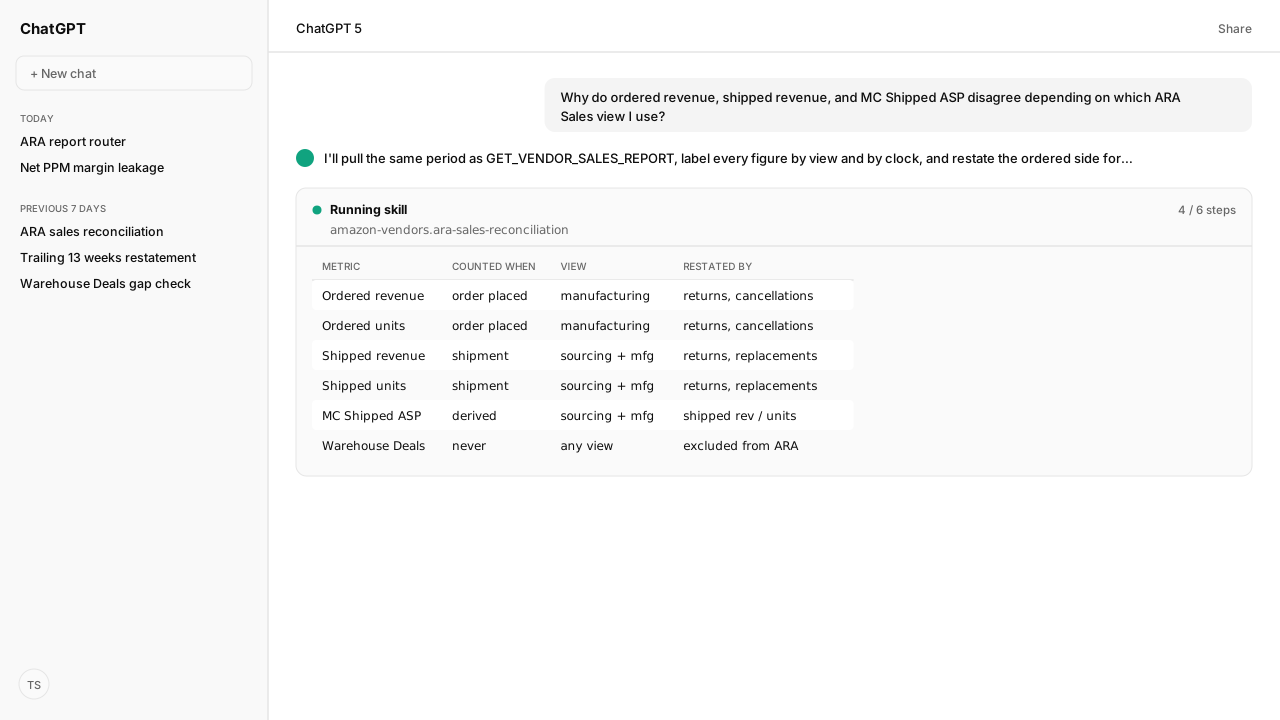
- Ordered revenue and ordered units are Manufacturing-view metrics. The Sourcing view carries shipped revenue and shipped units but no ordered metrics, so the two views were never reporting the same number.
- Ordered metrics count when the customer orders and restate when returns and cancellations post to the original date of the sale. Shipped metrics count at shipment and absorb returns and free replacements.
- MC Shipped ASP is shipped revenue divided by shipped units, a derived metric, and the glossary's MCP prefix on it has nothing to do with Model Context Protocol.
- Warehouse Deals sales never enter ARA because the vendor does not collect those proceeds, while the internal tools your retail partner reads may include them.
- GET_VENDOR_SALES_REPORT carries orderedRevenue, shippedRevenue, and customerReturns with dashboard parity, at daily through yearly and trailing four-week aggregations.
Amazon Retail Analytics sales figures disagree because you are reading two clocks in two views, so the fix is one reconciliation report rather than another definition. The agent pulls the same period through the Vendor Central MCP as GET_VENDOR_SALES_REPORT and labels every figure by the view that carries it and the clock that counts it.
The report also restates the ordered side for returns posted to the original date of the sale, and flags what ARA never counts. A reusable Skill applies those rules on every run, and Amazon Agent Atlas grounds each one in the Amazon Retail Analytics playbook and its metric glossary inside the amazon_vendors corpus.
The question that started it came from our vendor manager:
"Why do ordered revenue, shipped revenue, and MC Shipped ASP disagree depending on which ARA Sales view I use?"
Three numbers, two views, one week, and none of them matched the deck finance had already sent. I asked our agent for the reconciliation once, across the whole ASIN set, rather than a fourth explanation of what ordered revenue means.
ChatGPT, Claude, Perplexity, and Microsoft Copilot know nothing about your business out of the box. Your competitors use those tools too. Kuudo gives those same tools your edge: your data, your rules, and the way your business operates, expressed as your account as it is right now, your judgment running every time, and your call before anything changes.
- The Vendor Central MCP supplies the report and view entitlements. It is built on the vendor side of the Selling Partner API, and a brand that also sells on Amazon connects the Selling Partner MCP beside it.
- Skills preserve how your team reconciles a period.
- Amazon Agent Atlas applies Amazon's metric definitions.
- Approval controls keep the restated number with you.
| Metric | Counted when | View | Restated by |
|---|---|---|---|
| Ordered revenue | Order placed | Manufacturing | Returns, cancellations |
| Ordered units | Order placed | Manufacturing | Returns, cancellations |
| Shipped revenue | Shipment | Sourcing and Manufacturing | Returns, free replacements |
| Shipped units | Shipment | Sourcing and Manufacturing | Returns, free replacements |
| MC Shipped ASP | Derived from shipped figures | Sourcing and Manufacturing | Whatever moves shipped figures |
| Warehouse Deals | Never | Any | Excluded from ARA |
Pick the view first, because Sourcing carries no ordered metrics and Manufacturing adds them
Every vendor gets the Sourcing view of the Sales dashboard. It shows sales data for ASINs with a product cost that have an offer from a vendor code listed in your vendor group.
A manufacturer also gets the Manufacturing view, which shows ASIN-level data for any ASIN manufactured by the vendor code holding the manufacturing role, regardless of who sourced the product to Amazon. Turning that view on or off belongs to retail stakeholders, so if you believe you should have it and do not, the route is your retail partner or a Contact Us case, not a settings page.
The part that explains most of the argument is in the metric glossary, not the dashboard help.
- Ordered Revenue and Ordered Units carry a Manufacturing View access level.
- Shipped Revenue, Shipped Units, Customer Returns, Shipped COGS (the product cost of goods sold), and Sales Discount carry Sourcing and Manufacturing View.
- Net Ordered GMS and Net Shipped GMS are Manufacturing view as well.
So a Sourcing-view export has no ordered column to disagree with; the person quoting ordered revenue and the person quoting shipped revenue were reading different views before they were reading different metrics.
Two more view rules the agent checks before it compares anything:
- The Program view for retail already includes the other selling programs such as Amazon Business and Amazon Fresh, and seeing those programs as separate views is managed by vendor group permissions, so a login without those rights sees the total but cannot split it.
- An ASIN appears in a dashboard only when it has data on at least one metric in the selected period, which is why an ASIN can sit in the Inventory dashboard and be absent from Sales in the same week.
Ordered and shipped run on different clocks, and returns restate the ordered clock at the original sale date
Ordered Revenue is price times ordered units, with adjustments made for prior sales such as returns or cancellations, and Ordered Units is the same count with the same adjustments.
Shipped Revenue is the gross price the customer paid for the shipment item at the time of the order, and Shipped Units is the quantity shipped, with Try Before You Buy units excluded until purchased. ARA accounts for customer returns and free replacements in shipped units and revenue, so free replacements show up on the shipped side.
Which week a return belongs to
The rule that catches people is timing. Customer returns and cancellations are applied to ordered revenue based on the original date of the sale, and the Customer Returns metric itself is defined as units returned based on the original sales date. A return processed this week rewrites the week the order was placed, not the week the box came back.
I did not believe a closed month could move until I diffed two exports of the same trailing thirteen weeks pulled a fortnight apart and found three weeks in the older half had changed.
That is why the reconciliation is built by period rather than by pull. The agent keeps the prior pull, restates each closed week against the new one, and attributes the movement to returns and cancellations on the ordered side and to returns and replacements on the shipped side.
ASP is derived from the shipped side, and Warehouse Deals never enter ARA at all
Amazon calls conversion and average sale price derived metrics, meaning they can be calculated from figures already in the Sales dashboard, and it defines ASP as shipped revenue divided by shipped units. The glossary entry reads MCP Shipped Avg Selling Price, defined as the average selling price of shipped items excluding sales tax or value-added taxes, with the formula written as revenue over shipped units. Two things follow:
- MC Shipped ASP will not track a price list, because it moves with returns and replacements on the shipped side.
- The MCP in that glossary label is Amazon's prefix for the metric, nothing to do with Model Context Protocol, the protocol the agent is running on, which is worth saying once so nobody on the team searches for a connector that does not exist.
Conversion deserves its own warning, because Amazon's overview page defines it two ways in two sections. The ARA glossary guide carries both formulas and the flag the router attaches, so this guide does not restate them. What it does is refuse to compute a conversion figure without naming which formula produced it.
Then there is the number that will not reconcile no matter how carefully you read the views. ARA does not include Warehouse Deals in reported metrics, because proceeds from those sales are not collected by the vendor. The internal tools your retail partner reads may include them.
Amazon states ASIN-level data parity between ARA and those internal tools otherwise. No ARA report carries a Warehouse Deals figure to subtract, so when the finance deck and the dashboard disagree by a stubborn amount on a handful of ASINs, the agent isolates the residual and flags it for the retail partner to confirm as Warehouse Deals, usually the last thing anyone had considered.
GET_VENDOR_SALES_REPORT reproduces the Sales dashboard, so the warehouse and the tab finally agree
The Sales dashboard's Selling Partner API (SP-API) report type is GET_VENDOR_SALES_REPORT. Amazon's mapping from EDI (electronic data interchange) to API names the fields:
orderedRevenueandorderedUnitsreplace the old X12 852 ordered-sales and customer-ordered-unit elements.shippedUnitsandcustomerReturnscarry over from the sales and inventory report.shippedRevenueandshippedCogsexist only in the API.
The report shares its source with Amazon retail category teams, carries data parity with the dashboards, supports daily, weekly, monthly, quarterly, yearly, and trailing four-week aggregations, and backfills history.
Timing is the constraint the schedule has to respect. ARA data may take up to a week to populate after a reporting period closes, and Amazon targets weekly reports within 72 hours, so a Monday pull of last week is a draft.
The dashboard offers trailing four-week, thirteen-week, and twelve-month frames plus year-to-date, quarter-to-date, month-to-date, and week-to-date. The report shares only the trailing four-week frame with that list, so the other dashboard frames are assembled from its daily and weekly rows.
Pulling the report through the MCP
Through the Vendor Central MCP the agent calls Reports_createReport for the report type and period, waits on Reports_getReport, and reads the payload with Reports_getReportDocument. The Skill then produces the artifact the vendor manager wanted in the first place:
{
  "report": "ara_sales_reconciliation",
  "period": { "frame": "trailing_4_weeks", "week_ending": "2026-08-29" },
  "view": { "distributor_view": "Manufacturing", "program": "Retail" },
  "source": {
    "dashboard": "Sales",
    "sp_api_report_type": "GET_VENDOR_SALES_REPORT",
    "mcp_tools": ["Reports_createReport", "Reports_getReport", "Reports_getReportDocument"]
  },
  "asins": [
    {
      "asin": "B0EXAMPLE12",
      "ordered": {
        "clock": "order_placed",
        "view": "Manufacturing",
        "revenue": 48210.00,
        "units": 1607
      },
      "shipped": {
        "clock": "shipment",
        "view": "Sourcing and Manufacturing",
        "revenue": 46035.00,
        "units": 1535,
        "customer_returns": 41
      },
      "mc_shipped_asp": 29.99,
      "restated_from_prior_pull": {
        "ordered_revenue": -870.00,
        "cause": "returns_original_sale_date"
      },
      "unexplained_residual": {
        "shipped_revenue": -2190.00,
        "confirm_with_retail_partner": "warehouse_deals_excluded"
      }
    }
  ],
  "caveat_flags": [
    "sourcing_view_has_no_ordered_metrics",
    "returns_post_to_original_sale_date",
    "warehouse_deals_excluded",
    "data_may_lag_up_to_7_days"
  ]
}
Each ASIN row says which clock and view produced each figure, what moved since the last pull and why, and what residual against the retail partner's number remains for them to confirm as Warehouse Deals, since ARA carries no figure to subtract. The caveat flags travel with the report, so whoever reads it in the warehouse sees the rules before the totals.
What happens next: run the report weekly after the 72-hour window
The report becomes a recurring Skill that runs after the 72-hour window each week, restates the trailing frames, and raises a notification only when a closed period moves by more than the threshold your team sets.
- The Amazon Agent Data layer lands each run beside the spend the Amazon Ads MCP pulls, so shipped revenue and advertising cost sit in the same table with the same week-ending key.
- The Vendor Central MCP supplies the purchase-order side when the question turns to fill rate.
- When the reconciled shipped revenue, shipped COGS, and sales discount are trusted, the margin question moves to the Net PPM guide.
Amazon documented every one of these rules. What was missing was one report that read the view, the clock, and the exclusions before it read the total.
Next: pull every ARA report into your warehouse by SP-API, on a schedule that respects the one-week window.
Reconcile the Sales dashboard once, then every week
Bring us the ARA numbers your team keeps arguing about. We will map the Vendor Central MCP report pulls, the reconciliation Skill, Atlas grounding, and private-beta setup with you.
Run this workflow in betaWhat you need to run ARA sales reconciliation
- MCP
- Amazon Vendor Central MCP for the Vendor Retail Analytics report pulls, reached through the shared Selling Partner Reports tools: Reports_createReport, Reports_getReport, and Reports_getReportDocument against GET_VENDOR_SALES_REPORT
- Skill
- A reusable ARA sales reconciliation Skill that labels every figure by view and by clock, restates the ordered side for returns posted to the original sale date, and flags what ARA excludes
- Atlas collection
- amazon_vendors, the rule corpus behind every claim here (playbooks: Amazon Retail Analytics; Amazon Retail Analytics metric glossary; Amazon Retail Analytics EDI/API integration)
- Required subscriptions
- A Vendor Central account with the Sales dashboard, plus the Brand Analytics role on the Selling Partner API developer profile for report pulls. Manufacturing view is enabled by your retail partner.
- Last verified
- "2026-09-05T00:00:00.000Z"
What success and failure look like for ARA sales reconciliation
| result | interpretation |
|---|---|
| Ordered revenue column is blank in the export | The export came from the Sourcing view, which carries no ordered metrics. Ordered revenue and ordered units exist in the Manufacturing view, and a manufacturer whose Manufacturing view is off needs the retail partner to enable it. |
| A closed week's ordered revenue dropped since last pull | Returns and cancellations post to the original date of the sale, so a return processed this week restates the week the order was placed. Diff the two pulls by period, not by pull date. |
| ARA shipped revenue is below the retail partner's number | Check for Warehouse Deals. ARA excludes them because the vendor does not collect the proceeds; the internal tools your retail partner reads may include them. Everything else is at ASIN-level parity. |
| Last week's numbers are missing from the dashboard | Reports can take up to a week to populate after a period closes, with weekly reports targeted within 72 hours. An ASIN also needs data on at least one metric in the period to appear at all. |
Keep exploring ARA sales reconciliation
Use these companion guides to understand the inputs, follow-on analysis, and adjacent workflows behind this playbook.
- The ARA Report and Metric Glossary for Vendors
Routes a question to the right ARA dashboard and report type before this guide reconciles the Sales numbers inside it.
- Amazon Net PPM Analysis: Find ASIN Margin Leakage
Once shipped revenue, shipped COGS, and sales discounts reconcile, this is where the margin question goes.
FAQ
Why does ordered revenue not match shipped revenue in Amazon Retail Analytics?
They run on different clocks. Ordered revenue is price times ordered units, counted when the customer orders and adjusted for returns and cancellations on the original date of the sale. Shipped revenue is the gross price paid for the shipment item, counted at shipment, and ARA books returns and free replacements into shipped units and revenue.
Why can't I see ordered revenue in the Sourcing view of the ARA Sales dashboard?
Ordered Revenue and Ordered Units carry a Manufacturing View access level in the ARA metric glossary. The Sourcing view carries Shipped Revenue, Shipped Units, Customer Returns, Shipped COGS, and Sales Discount. Manufacturing view is enabled by your retail partner for the vendor code holding the manufacturing role.
What is MC Shipped ASP in the ARA glossary?
The average selling price of shipped items excluding sales tax and value-added tax, calculated as revenue divided by shipped units. It is a derived metric, and the MCP prefix on the glossary entry is Amazon's label for it, not a reference to Model Context Protocol.
How do I reconcile ARA shipped revenue with the number my retail partner shows?
Amazon states ASIN-level data parity between ARA and the internal tools your retail partner uses, with one documented exception: ARA excludes Warehouse Deals sales because the vendor does not collect those proceeds, while internal tools may include them. No ARA report carries that figure, so isolate the residual and confirm it through your retail partner or a Contact Us case.
Which SP-API report type mirrors the ARA Sales dashboard?
GET_VENDOR_SALES_REPORT. It carries orderedRevenue, orderedUnits, shippedRevenue, shippedUnits, shippedCogs, and customerReturns, with data parity to the dashboard, at daily, weekly, monthly, quarterly, yearly, and trailing four-week aggregations.
Why are last week's ARA Sales numbers missing, and why did an old week just change?
Reports may take up to a week to populate after a reporting period closes, with weekly reports targeted within 72 hours. An ASIN must have data on at least one metric in the selected period to appear. A closed week changes when returns or cancellations post, because they are applied to the original date of the sale.