
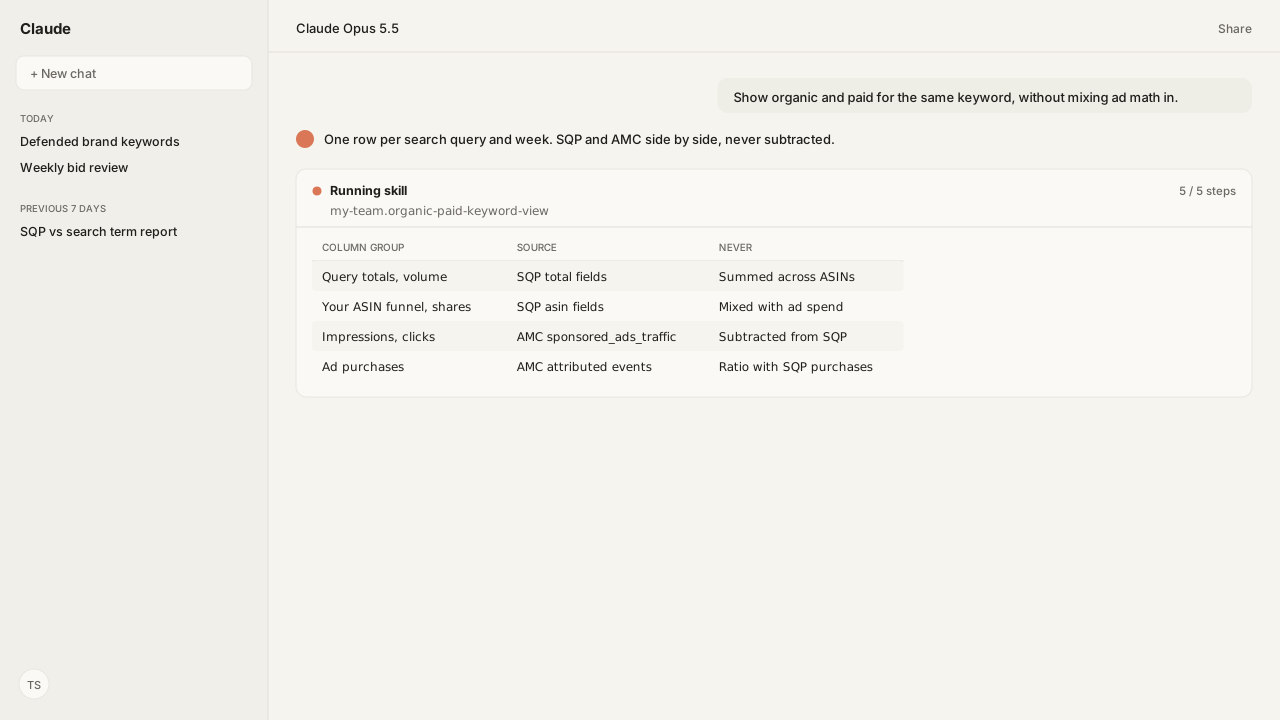
- Search Query Performance (SQP, GET_BRAND_ANALYTICS_SEARCH_QUERY_PERFORMANCE_REPORT) counts impressions, clicks, cart adds and purchases per search query for the ASINs (Amazon Standard Identification Numbers) you request. It has no ad spend field and doesn't split sponsored from organic, so organic can't be computed by subtracting your ad numbers from it.
- Amazon Marketing Cloud (AMC) carries customer_search_term on every sponsored ads impression in sponsored_ads_traffic, including impressions nobody clicked. The Sponsored Products search term report keeps only terms with at least 1 ad click.
- Aggregate each side to one row per search query and week before the join. SQP's total fields describe the whole query and repeat on every ASIN row, and paid rows repeat per campaign and keyword.
- Ad spend and ad-attributed sales stay in the paid columns. SQP purchases and ad-attributed purchases count different things, so no ratio mixes them.
Amazon organic vs paid keywords can't be split by subtracting one report from another. Put Brand Analytics Search Query Performance beside your paid search-term traffic instead: aggregate each to one row per search query and week, join on the query, and keep ad spend and ad-attributed sales in the paid columns only.
A brand manager asked me for the "organic version" of our top keywords. The tempting shortcut was SQP clicks minus ad clicks, which assumes the two reports measure the same thing on the same calendar. They don't. Search Query Performance vs. Search Terms covers which report is which; this guide builds the view that puts them on one row.
The decision on the table was whether to cut bids on queries where we already win the search funnel. That depends on which queries our team defends no matter what, and a generic keyword report doesn't know that list. Our agent pulls SQP through the Selling Partner MCP, runs the paid side in Amazon Marketing Cloud through the Amazon Ads MCP, and checks our defended list before it marks any query as a bid-cut candidate.
Search Query Performance counts the whole search funnel, so organic can't be backed out of it
Search Query Performance is GET_BRAND_ANALYTICS_SEARCH_QUERY_PERFORMANCE_REPORT, and Amazon Agent Atlas holds Amazon's definition of it. It returns impressions, clicks, cart adds and purchases per search query for a space-separated list of ASINs, capped at 200 characters. It needs the Brand Analytics Selling Partner API role and Amazon Brand Registry, and it can only be requested, not scheduled through the API.
Each row carries two kinds of numbers:
| Field family | Example fields | Describes |
|---|---|---|
| Query totals | totalQueryImpressionCount, totalClickCount | The whole query, every product |
| Your ASIN | asinClickCount, asinPurchaseCount | One requested ASIN |
| Shares | asinClickShare, asinPurchaseShare | ASIN count over query total |
| Demand | searchQueryVolume, searchQueryScore | How often, how important |
Nothing in that schema holds ad spend or ad-attributed sales, and nothing separates sponsored placements from organic results. So "organic" can't be derived from SQP by removing your ad clicks: Amazon doesn't document that the ad clicks sit inside these counts, on the same week, for the same ASINs.
AMC sponsored_ads_traffic gives the paid side per search term, including impressions nobody clicked
Amazon Marketing Cloud records the keyword and the customer_search_term on every sponsored ads impression in sponsored_ads_traffic, including impressions from users who didn't click. That matters for the join. The Sponsored Products search term report includes only search terms that resulted in at least 1 ad click, so a query your ad showed on without a click never appears there.
This query is adapted from Amazon's instructional query in the AMC playbook "Use case: How to query sponsored ads keywords", with spend added. The agent runs it through the Amazon Ads MCP for the same Sunday-to-Saturday week as the SQP request:
/* Adapted from the instructional query: Traffic by keyword and search term */
SELECT
  targeting AS keyword,
  customer_search_term,
  match_type,
  campaign,
  ad_product_type,
  SUM(impressions) AS impressions,
  SUM(clicks) AS clicks,
  SUM(spend) AS spend_microcents
FROM
  sponsored_ads_traffic
WHERE
  match_type IN ('PHRASE', 'BROAD', 'EXACT')
GROUP BY
  1,
  2,
  3,
  4,
  5
The match_type filter keeps keyword-targeted traffic only. That leaves out automatic and product-attribute targeting, where Amazon's search term report shows alphanumeric ASIN strings in place of typed queries; those are product pages, not searches. AMC holds Sponsored Products keywords and search terms from the instance's creation date or 12.5 months back, whichever is sooner. The Ads API search term report keeps 65 days, at most 31 days per request.
Paid purchases and sales come from the same playbook's second query, with total_product_sales added, attributed to the search term the ad served on:
/* Adapted from the instructional query: Attributed conversions by keyword and search term */
SELECT
  targeting AS keyword,
  customer_search_term,
  match_type,
  campaign,
  ad_product_type,
  SUM(total_detail_page_view) AS total_dpv,
  SUM(total_purchases) AS total_purchases,
  SUM(total_product_sales) AS total_product_sales
FROM
  amazon_attributed_events_by_traffic_time
WHERE
  match_type IN ('PHRASE', 'BROAD', 'EXACT')
GROUP BY
  1,
  2,
  3,
  4,
  5
Aggregate each side to one row per query and week before the join, or the join multiplies SQP
Both outputs repeat rows the join can't see. The AMC results carry one row per keyword, match type and campaign for each search term. SQP carries one row per requested ASIN for each query, and its total fields describe the whole query, so they repeat identically on every ASIN row.
Join the raw rows on the search query and every SQP row fans out across every paid row for that query. The agent applies these rules, from the grain Atlas grounds for each report, before it writes a single joined row:
| Step | SQP side | AMC paid side |
|---|---|---|
| Grain | Query, week | Search term, same week |
| Your-ASIN counts | Sum across your ASINs | Sum across campaigns, keywords |
| Query totals | Take once, never sum | Not applicable |
| Shares | Sum across your ASINs | Not applicable |
| Join key | Search query, normalized | Search term, normalized |
Normalizing the key means the same case and spacing on both sides before matching. A query that exists on only one side stays in the view with the other side empty; a missing side is evidence, not an error.
Ad spend and ad-attributed sales stay in the paid columns
The joined row keeps two sets of columns that never feed each other. SQP's columns describe the search funnel and carry no cost. The paid columns carry impressions, clicks, spend, ad-attributed purchases and ad-attributed sales, and any cost or return ratio is computed there and only there.
Two units matter:
spendis in microcents. Divide it by 100,000,000 to get your currency.total_product_salesis already in local currency, and it includes brand halo sales: other products from the same brand bought after the ad.
SQP purchases and AMC's total_purchases count different events. One is a purchase SQP counts in the query's search funnel; the other is a purchase attributed to an ad that served on that search term. They don't share a denominator, so the view shows both and computes no blended rate.
The SQP side has its own published Skill. The SQP ASIN N-gram Skill (a Reference Skill) scores each query and ASIN pair and tags every action as organic, operational or advertising, and its scope note rules out paid-search bid rules. The Sponsored Products Search Terms Skill (also Reference) works the paid report. No published Skill builds the joined view, so the agent runs it on request or from a Skill your team writes.
What happens next: refresh the joined view every week after SQP lands
Amazon Agent Flow, the Amazon Agent Data layer, schedules both pulls and lands them in your private lake. Brand Analytics data is generally available within 72 hours of a period's close, so the weekly run goes in this order:
- Request SQP for last week's Sunday-to-Saturday period, for the ASINs you track.
- Run both AMC queries for the same window through the Amazon Ads MCP.
- Re-run the attributed-conversions query for every earlier week that ended within the last 30 days, and replace those weeks' paid purchase and sales columns.
amazon_attributed_events_by_traffic_timecan add conversions up to 30 days after a window closes, so a week's paid conversions are provisional until then. - Aggregate each side to query and week, then join them in the lake with
query_lake_sql. - List queries where the brand's SQP share is strong and paid clicks are high, and check each against the team's defended list. Treat a week still inside its 30 days as provisional.
Any bid change that comes out of step 5 goes through the Amazon Ads MCP and, depending on your workspace policy, may wait for your approval. Two reports, one row, no subtraction: that's the whole pattern.
Next: how a query from this view becomes a bid rule that doesn't thrash, in The Agent Bidding Rulebook That Prevents Bid Thrash.
See organic and paid evidence for the same query, on your own data
Bring us the keywords you defend and the ones you are paying for. In a private-beta session we'll map the Selling Partner MCP and Amazon Ads MCP pulls, the Amazon Marketing Cloud query, and the Agent Flow schedule that keeps the side-by-side view current in your own lake.
Run this workflow in betaWhat you need to run organic vs paid keyword views
- MCP
- Selling Partner MCP for GET_BRAND_ANALYTICS_SEARCH_QUERY_PERFORMANCE_REPORT; Amazon Ads MCP for the Amazon Marketing Cloud sponsored_ads_traffic and attributed-events queries (and the Sponsored Products search term report when AMC isn't provisioned)
- Skill
- No published Kuudo Skill builds the joined view. The SQP ASIN N-gram Skill (amazon-sp-sqp-asin-ngram) works the SQP side per ASIN and query; the Sponsored Products Search Terms Skill (amazon-ads-sp-search-term-explorer) works the paid search term report and routes ASIN-shaped terms to product targeting.
- Atlas collection
- amazon_sellers and amazon_ads (playbooks: Use case: How to query sponsored ads keywords; Search term report for Sponsored Products; Search term reports; Analytics report type values)
- dataLayer
- Amazon Agent Flow schedules both pulls, lands them in your private lake, and runs the join with query_lake_sql
- access
- SQP needs the Brand Analytics Selling Partner API role and Amazon Brand Registry; the AMC queries need an AMC instance with Sponsored Products or Sponsored Brands keyword-targeted campaigns
- Last verified
- 2026-10-04
What success and failure look like for organic vs paid keyword views
| condition | interpretation |
|---|---|
| Joined row shows SQP impressions several times the query's real volume | The join ran before aggregation. SQP rows fanned out across paid rows per campaign and keyword, or total fields were summed across ASIN rows. Aggregate each side to query and week first. |
| Query has SQP clicks and purchases but no paid columns | No sponsored ad in the AMC instance served an impression on that query in the week. AMC omits search terms that never triggered one of your impressions. That's a coverage gap to review, not an organic win to subtract. |
| Paid columns exist but the query has no SQP row | The ASIN wasn't in the SQP request, the account lacks Brand Analytics access, or the query isn't among that ASIN's SQP queries. The paid side is the only evidence for this query. |
| A paid search term is an alphanumeric ASIN string | It's a product detail page an ad displayed on, from an automatic campaign or a product-attribute-targeted ad group, not a typed query. Drop it from any join keyed on search query; the AMC query's match_type filter (PHRASE, BROAD, EXACT) keeps to keyword-targeted traffic. |
Keep exploring organic vs paid keyword views
Use these companion guides to understand the inputs, follow-on analysis, and adjacent workflows behind this playbook.
Which report is which, and who can request each one, before you join any of them.
Where a side-by-side organic and paid view feeds an actual bid rule.
FAQ
Can I calculate organic clicks on Amazon by subtracting ad clicks from Search Query Performance?
No. Search Query Performance counts impressions, clicks, cart adds and purchases per search query, and Amazon's schema doesn't split sponsored from organic activity. Subtracting ad clicks assumes the ad clicks are inside those counts, on the same window and the same ASINs, and none of that is documented.
Why are search terms missing from my Sponsored Products search term report?
The report includes only search terms that resulted in at least 1 ad click, so a query your ad showed on without a click never appears. Amazon Marketing Cloud's sponsored_ads_traffic carries customer_search_term on every impression, including users who didn't click.
How far back can I compare SQP with paid search term data?
The Amazon Ads API keeps Sponsored Products search term data for 65 days, with a 31-day maximum per request. AMC holds Sponsored Products keywords and search terms from the instance's creation date or 12.5 months back, whichever is sooner.
What week does Search Query Performance use?
A WEEK request must start on a Sunday and end on a Saturday, and a request can't span two periods. Set the AMC query's time window to the same Sunday-to-Saturday week before joining.
Why does my joined SQP and paid table show impossible numbers?
The join probably ran on raw rows. Paid rows repeat per campaign, keyword and match type, and SQP's total fields repeat on every ASIN row, so a raw join multiplies them. Aggregate each side to one row per search query and week, then join.
Can I compute ACoS for organic keywords?
No. ACoS (advertising cost of sales) needs ad spend. Search Query Performance has no ad spend or ad-attributed sales fields, so any cost or return ratio belongs to the paid columns only. SQP purchases and ad-attributed purchases are different counts and don't share a ratio.