
- Search Query Performance (SQP) is the GET_BRAND_ANALYTICS_SEARCH_QUERY_PERFORMANCE_REPORT: impressions, clicks, cart adds and purchases per query for the ASINs you request, in WEEK, MONTH or QUARTER periods. It needs the Brand Analytics role and Brand Registry, and can only be requested.
- Amazon Marketing Cloud (AMC) carries the search term behind your sponsored ads as customer_search_term in sponsored_ads_traffic and amazon_attributed_events_by_traffic_time.
- SQP has no shopper-level rows and AMC returns aggregates, so the only join key is the query text plus the reporting week.
- Run AMC's instructional search-term queries with an EXPLICIT time window that matches the SQP week, then join both aggregates in your own lake, or upload SQP to AMC as an advertiser dataset.
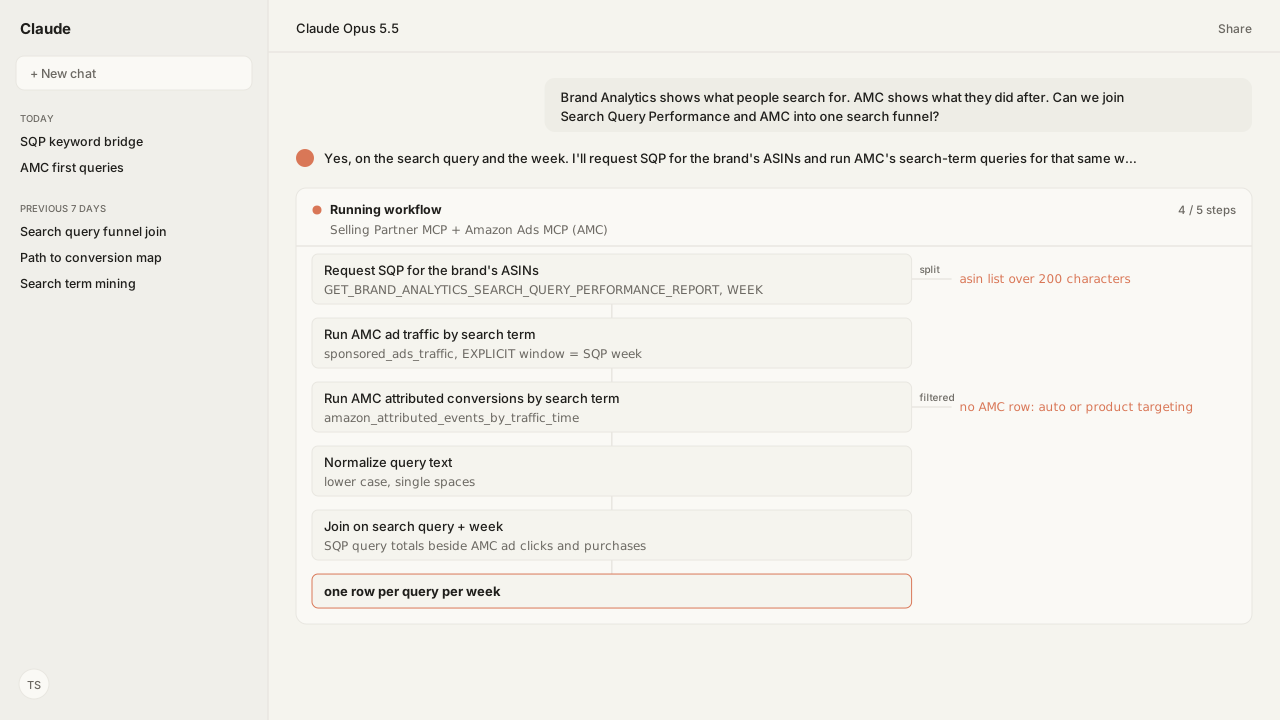
Search Query Performance and AMC join on one key: the search query plus the reporting week. Search Query Performance (SQP) is an aggregated Brand Analytics report, and Amazon Marketing Cloud (AMC) records your sponsored ads by customer_search_term. So the agent requests SQP, runs AMC's search-term queries for that same week, and joins the two aggregates.
The request came in from a brand manager on a Monday: "Brand Analytics shows what people search for. AMC shows what they did after. Can we join them?" The honest answer starts with what each side can't do. SQP has no shopper-level rows. AMC returns aggregates, and it only sees traffic your ads touched. A join on shoppers was never on the table.
The decision behind the join is whether a query's sponsored clicks add coverage or only buy clicks the search funnel already delivers. That takes many weeks of your own history. Amazon lists the SQP report as request-only, one period per request, so the trend exists only if every week is requested and kept. Amazon Agent Flow lands each week's SQP report in your private lake, so the join reads the account's own trend, not one request.
SQP counts the search funnel for a query; AMC counts only your sponsored ads on it
SQP and AMC answer different questions about the same search query. SQP describes the whole search results page for a query. AMC describes what happened to the shoppers your sponsored ads reached on a search term. Amazon Agent Atlas holds Amazon's documentation for both, so the agent requests the exact sources below.
| Source | Read through | What a row is | Access |
|---|---|---|---|
| SQP report | Selling Partner MCP | One query, one requested ASIN, one period | Brand Analytics role, Brand Registry |
sponsored_ads_traffic | Amazon Ads MCP (AMC) | Ad impressions and clicks by search term | Your AMC instance |
amazon_attributed_events_by_traffic_time | Amazon Ads MCP (AMC) | Ad-attributed views and purchases by search term | Your AMC instance |
The SQP report is GET_BRAND_ANALYTICS_SEARCH_QUERY_PERFORMANCE_REPORT. The Selling Partner MCP requests it with Reports_createReport and reads it back with Reports_getReport and Reports_getReportDocument. Amazon lists it as request-only, in JSON, for WEEK, MONTH or QUARTER periods, and a request cannot span two periods.
Each SQP row carries searchQueryVolume, the query's total impressions, clicks, cart adds and purchases, and your ASIN's share of each stage. Nothing in the schema splits sponsored from organic, and nothing holds ad spend. The Search Query Performance vs. Search Terms guide covers those fields and the two other search reports that share the name.
Amazon's instructional AMC queries return the ad side of the funnel by search term
AMC's half of the join comes straight from Amazon's playbook Use case: How to query sponsored ads keywords. The first query counts ad traffic by keyword and the search term the shopper typed:
/* Instructional Query: Traffic by keyword and search term */
SELECT
  targeting AS keyword,
  customer_search_term,
  match_type,
  campaign,
  ad_product_type,
  SUM(impressions) AS impressions,
  SUM(clicks) AS clicks
FROM
  sponsored_ads_traffic
WHERE
  match_type IN ('PHRASE', 'BROAD', 'EXACT')
GROUP BY
  1,
  2,
  3,
  4,
  5
The second counts what those ad-attributed shoppers did next, by the same keys:
/* Instructional Query: Attributed conversions by keyword and search term */
SELECT
  targeting AS keyword,
  customer_search_term,
  match_type,
  campaign,
  ad_product_type,
  SUM(total_detail_page_view) AS total_dpv,
  SUM(total_purchases) AS total_purchases
FROM
  amazon_attributed_events_by_traffic_time
WHERE
  match_type IN ('PHRASE', 'BROAD', 'EXACT')
GROUP BY
  1,
  2,
  3,
  4,
  5
The Amazon Ads MCP runs both with AMCWorkflow_createWorkflowExecution, setting timeWindowType to EXPLICIT with timeWindowStart and timeWindowEnd on the SQP week. AMCWorkflow_getWorkflowExecutionDownloadUrls returns the result files. The Amazon Marketing Cloud Skill reads the matching playbook before it writes or adapts any SQL.
Both queries keep only PHRASE, BROAD and EXACT match types. Automatic and product-targeted ad traffic is left out, so a query SQP shows as busy can have no AMC row at all.
The join key is the search query and the reporting week, never a shopper
The join key is the query text and the week, because neither source exposes anything finer. SQP rows are per query and ASIN, so a multi-ASIN request repeats each query's totals on every ASIN row. The agent first collapses SQP to one row per query and week, keeping the ASIN shares in their own table. Otherwise an AMC total joined to each ASIN row is counted once per ASIN.
Before matching, the agent normalizes both sides to lower case with single spaces, then sums AMC's campaign rows per search term.
| Joined column | From | What it tells you |
|---|---|---|
| Query volume, total clicks | SQP | How much demand the query had |
| Total cart adds, total purchases | SQP | How the whole funnel converted |
| Ad impressions, ad clicks | AMC traffic query | What your ads collected |
| Detail page views, purchases | AMC conversions query | What ad-touched shoppers did |
Reading the joined row is your team's call, not Amazon's. Dividing your AMC ad clicks by SQP's total query clicks is a ratio you compute yourself, a rough view of how much of the query's click volume your ads collected. SQP counts every click on the results page, sponsored or organic, so the ratio stays an indicator rather than an attribution.
The join runs in your own lake, or inside AMC with SQP uploaded
The join can run in two places, and the documented Kuudo route is outside AMC. Amazon Agent Flow, the Amazon Agent Data layer, keeps the weekly SQP history in your private lake, where Snowflake, Athena, DuckDB or Databricks can read it. The agent pulls each AMC run's result files from the download URLs and joins them against the matching SQP week.
The other route brings SQP into AMC. AMC's advertiser data upload supports two dataset types:
- FACT datasets need a
TIMESTAMPorDATEcolumn, and queries evaluate only the rows inside the query's time range. A weekly SQP table fits here. - DIMENSION datasets hold static tables with no event time. Each upload fully replaces the last, and AMC always reads the most recent file.
The upload itself runs through AMC's advertiser data upload API. Kuudo's documented MCP tools don't include it, so this guide's workflow keeps the join outside AMC.
What happens next: schedule the weekly SQP and AMC pulls
The agent schedules both sides on the same week. Agent Flow runs the SQP request for your brand's ASINs through the Selling Partner MCP, and AMCWorkflow_createSchedule repeats both AMC queries through the Amazon Ads MCP. Each week, the agent joins the new AMC results to that week's SQP query totals, one row per query.
No published Kuudo Skill joins SQP to AMC, so the join is one the agent runs on request, or a Skill your team writes. The SQP ASIN N-gram Skill ranks the SQP gaps worth joining first.
Next: what ad-touched shoppers did before they bought, across Amazon DSP (demand-side platform) and sponsored ads, in Map AMC Paths Across DSP and Sponsored Ads.
Join your search funnel to your ad results every week
Bring one brand and one week of SQP. In a private-beta session we'll map the Selling Partner MCP request, the Amazon Ads MCP run of AMC's search-term queries for the same week, and the Agent Flow schedule that keeps the SQP history in your own lake for the join.
Run this workflow in betaWhat you need to run SQP and AMC search joins
- MCP
- Selling Partner MCP for the GET_BRAND_ANALYTICS_SEARCH_QUERY_PERFORMANCE_REPORT (Reports_createReport, Reports_getReport, Reports_getReportDocument); Amazon Ads MCP for AMC workflow executions and their result files
- Skill
- No published Kuudo Skill joins SQP to AMC. The Amazon Marketing Cloud Skill (amazon-ads-marketing-cloud) runs the AMC side, and the SQP ASIN N-gram Skill (amazon-sp-sqp-asin-ngram) ranks SQP gaps per ASIN; the join is one the agent runs on request, or a Skill your team writes
- Atlas collection
- amazon_ads and amazon_sellers (playbooks: Use case: How to query sponsored ads keywords; Sponsored ads traffic; Prepare data; Manage workflow executions; the Selling Partner API Brand Analytics report entries)
- dataLayer
- Amazon Agent Flow lands each week's SQP report document in your private lake; AMC result files come from AMCWorkflow_getWorkflowExecutionDownloadUrls
What success and failure look like for SQP and AMC search joins
| condition | interpretation |
|---|---|
| SQP request rejected or empty for an ASIN you sell | Check the asin option: it is required, space-separated, and limited to 200 characters. The account also needs the Brand Analytics Selling Partner API role and Brand Registry. |
| SQP query has high total clicks, no AMC row for the same term and week | No sponsored ad of yours served on that search term in the window, or it ran on automatic or product targeting, which the instructional queries filter out with match_type. |
| AMC term has clicks, no matching SQP query | SQP returns queries for the ASINs you requested. Add the advertised ASIN to the request, and normalize case and spacing before matching the text. |
| AMC and SQP totals look out of step | Check the AMC time window first. Run it EXPLICIT with timeWindowStart and timeWindowEnd set to the exact SQP week; a request cannot span two SQP periods. |
Keep exploring SQP and AMC search joins
Use these companion guides to understand the inputs, follow-on analysis, and adjacent workflows behind this playbook.
What each of the three search reports contains, and why SQP is the search-funnel one.
FAQ
Can I join Search Query Performance with Amazon Marketing Cloud?
Yes, at the grain both share: search query plus reporting week. SQP is an aggregated Brand Analytics report with no shopper-level rows, and AMC returns aggregates, so collapse SQP to one row per query and week, then match its query text to AMC's customer_search_term for the same week rather than joining on users.
Where is the search term in AMC?
In the customer_search_term column. Amazon's instructional queries read it from sponsored_ads_traffic for impressions and clicks and from amazon_attributed_events_by_traffic_time for detail page views and purchases, filtered to PHRASE, BROAD and EXACT match types.
Is Search Query Performance data available inside AMC?
SQP is a Brand Analytics report, delivered through the Selling Partner API as GET_BRAND_ANALYTICS_SEARCH_QUERY_PERFORMANCE_REPORT. To query it inside AMC, upload it as an advertiser dataset; otherwise join the two outside AMC on search query and week.
How do I match the AMC date range to an SQP week?
Execute the AMC workflow with timeWindowType EXPLICIT and set timeWindowStart and timeWindowEnd to the same week the SQP request covered. An SQP request cannot span two reporting periods, so one week of SQP lines up with one AMC run.
Why does my SQP report request fail?
The most common causes are the asin option, which is required, space-separated, and capped at 200 characters, and access: the account needs the Brand Analytics Selling Partner API role and Brand Registry. The report is request-only, so a report schedule for it is not available.
Should I upload SQP to AMC as a fact or a dimension dataset?
A FACT dataset needs a TIMESTAMP or DATE column and is evaluated only within the query's time range, which suits a weekly SQP table. A DIMENSION dataset is a static table with no event time, and each upload fully replaces the last one.
Sources
- Use case: How to query sponsored ads keywords (Amazon Marketing Cloud)
- Sponsored ads traffic data source (Amazon Marketing Cloud)
- Prepare data for advertiser data upload (Amazon Marketing Cloud)
- Execute a workflow (Amazon Marketing Cloud)
- Analytics report type values (Selling Partner API)
- Search Query Performance report schema