
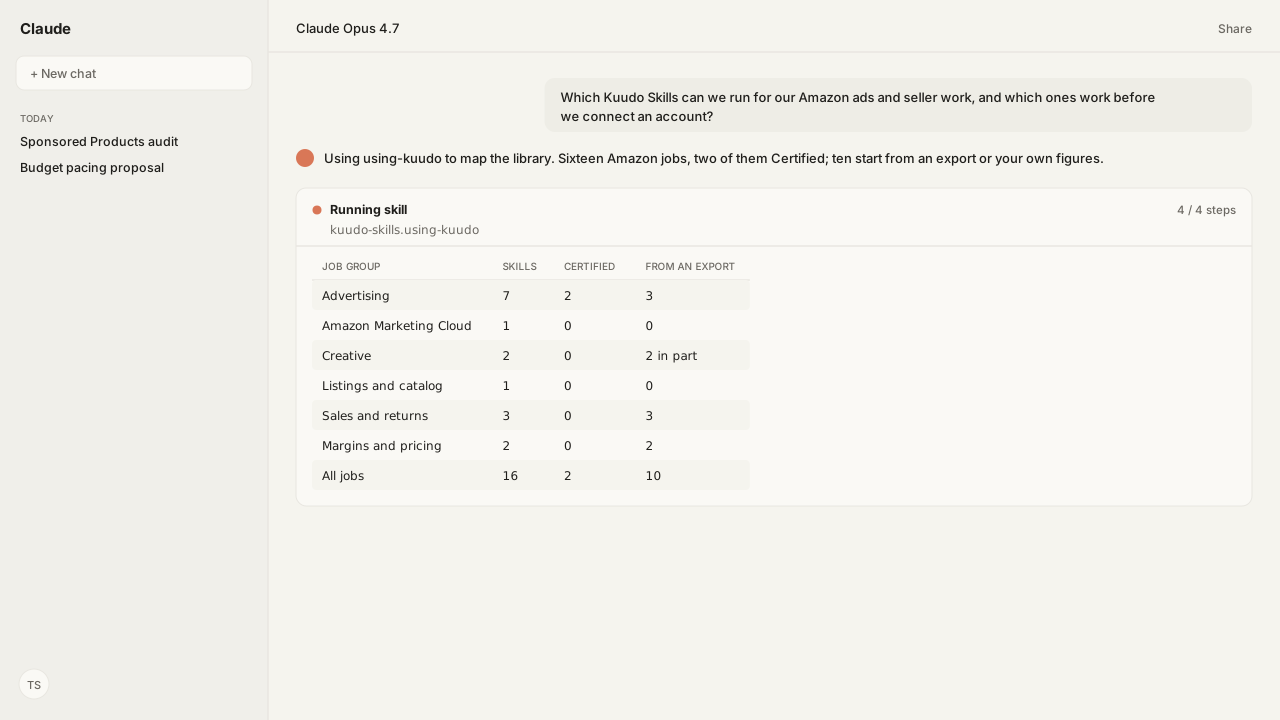
- KuudoAI/skills is a public library of 17 Agent Skills: 16 Amazon jobs across advertising, Amazon Marketing Cloud, creative, listings, sales and margins, plus a router Skill that picks the right one.
- Two are Certified, budget pacing and reporting. The other 15 are Reference: first-party Skills that have not completed certification.
- Ten of the 16 jobs start from an export, an upload or figures you supply. The Sponsored Products audit, search-term mining, AMC, DSP launches, listing edits and account selection need a live connection.
- The campaign audit never changes a campaign, and budget pacing writes only after you approve that exact proposal.
- PolyForm Shield 1.0.0 lets you use the Skills on your own or your clients' Amazon accounts, paid work included. It forbids repackaging them as a competing product.
Claude Skills for Amazon ads and operations exist as a public library: KuudoAI/skills on GitHub gives Claude, Codex and any Agent Skills client 16 Amazon jobs, from Sponsored Products audits and budget pacing to Amazon Marketing Cloud analysis, listings, returns, profit and repricing. Each SKILL.md states what the Skill needs and refuses, and the license permits paid client work.
The questions reach me in the same three forms. Is there a Claude skill for our pay-per-click (PPC) work? Can we use it on client accounts? And does it need our Seller Central login before it does anything useful? Every answer is in the repository, in files anyone can read before installing: a catalog of 17 entries, a license notice, and one SKILL.md per job.
A generic skill pack hands Claude someone else's method. The budget pacing Skill works the other way. It will not run until you confirm your monthly plan, one target return on ad spend (ROAS) rule per ad type, strategy and product line, and your product-line ceilings, because "a target rule from another product line is not a fallback." Connected through the Amazon Ads MCP, your live budgets meet your rules, and nothing changes until you approve that exact proposal.
Kuudo's Amazon Skills library covers 16 jobs across advertising, AMC, creative, listings, sales and margins
The KuudoAI/skills catalog lists 17 Skills. Sixteen do Amazon work; the seventeenth, using-kuudo, is the router that loads with the suite and tells the agent to announce Using [skill] to [purpose]. before it starts. Two carry the Certified label and 15 are Reference. There is no Vendor Central Skill: Vendor Central work runs through the Amazon Vendor Central MCP.
| Skill | Job | Status | Without an account |
|---|---|---|---|
| Advertising | |||
| amazon-ads-accounts | Resolve advertiser, profile and marketplace IDs | Reference | No: reads live accounts |
| amazon-ads-reporting | Build Ads reports without guessing fields | Certified | Yes: request generation |
| amazon-ads-sp-campaign-auditor | Audit Sponsored Products portfolio structure | Reference | No: needs Amazon Ads MCP |
| amazon-ads-sp-search-term-explorer | Mine search terms, negatives and winners | Reference | No: builds its own report |
| amazon-ads-sb-performance-review | Review Sponsored Brands campaign performance | Reference | Yes: CSV upload or export |
| amazon-ads-budget-pacing | Pace daily budgets to a monthly plan | Certified | Yes: offline JSON proposals |
| amazon-ads-create-dsp-campaign | Launch DSP Performance+ or Brand+ campaigns | Reference | No: creates live campaigns |
| Amazon Marketing Cloud | |||
| amazon-ads-marketing-cloud | AMC SQL, workflows and audiences | Reference | No: runs through MCP tools |
| Creative | |||
| amazon-ads-creative-assets | Ad images and copy built for review | Reference | Partly: specs and policy |
| amazon-product-image | Create and review listing images | Reference | Partly: audits supplied images |
| Listings and catalog | |||
| amazon-sp-listing-optimizer | Audit, then edit listings and A+ Content | Reference | No: needs Selling Partner MCP |
| Sales and returns | |||
| amazon-sp-sales-traffic-analyzer | Sales and Traffic health by ASIN | Reference | Yes: Sales and Traffic export |
| amazon-sp-sqp-asin-ngram | Search Query Performance by ASIN | Reference | Yes: per-ASIN exports |
| amazon-sp-refund-return-monitor | Refund and return monitoring | Reference | Yes: provided exports |
| Margins and pricing | |||
| amazon-profitability-calculator | Margins and break-even prices | Reference | Yes: labelled manual mode |
| amazon-sp-repricing | Price floors before Buy Box price | Reference | Yes: advisory mode |
So the best Claude Skills for Amazon depend on the job, and the table is the shortlist. For a PPC team the first three to install are the campaign auditor, the search-term explorer and budget pacing. For an operations team they are the Sales and Traffic analyzer, the returns monitor and the profitability calculator. Each job Skill also has a page under Kuudo Skills with starter prompts and the systems it touches.
The Sponsored Products audit and budget pacing never change a campaign on their own
The Sponsored Products campaign auditor is read-only by definition. Its SKILL.md says "Do not create, update, pause, archive, or otherwise mutate campaigns," and an audit counts as complete only when it "leaves the Amazon Ads account unchanged." It resolves the advertiser and marketplace, creates a report through the Amazon Ads MCP, then measures spend concentration, budget use, delivery gaps and targeting mix. Zero-delivery campaigns come back as an investigation queue, because eligibility, targeting, bids, budgets, seasonality, launch timing and inventory can all affect delivery. The audit page shows the report it returns.
The budget pacing Skill does write, and its safety rules say how. A bundled allocator, scripts/allocate.py, owns the arithmetic, and the agent may not adjust its dollar outputs by hand. Approval binds to the proposal ID, the advertiser account, profile, marketplace, currency, run date and the displayed changes. Before a write, the Skill re-reads the live state and aborts on drift, and it never represents a pause as a zero-dollar budget. It covers daily Sponsored Products, Sponsored Brands and Sponsored Display budgets, not Amazon DSP (demand-side platform), lifetime or portfolio budgets. The pacing page walks through a proposal.
Amazon's own documentation, retrieved through Amazon Agent Atlas, explains the two checks the Skill makes before it proposes anything. The Understand budgets in Sponsored ads page defines a daily budget as the most you will spend "on average, each day over a calendar month," so a single day can run above it and the Skill reads the account's overdelivery setting. The Sponsored ads budget rules overview says rules can raise budgets "for specific dates or based on performance." The allocator does not model those increases, so it stops when an active rule is present.
Ten of the 16 Skills start from a report or your own figures before any account is connected
A Skill does not need a live connection when its SKILL.md accepts an export. The returns monitor "works from provided tabular exports without a live integration." Amazon's page on the Fulfillment by Amazon (FBA) returns report, FBA Customer Returns report (overview), says the report carries a customer comment that "explains their reasons for returning a product," which is the evidence the Skill reads. The same page notes that refunds given without a return do not appear in that report, and the Skill's own limits match: it is not for "financial refund totals without transaction data." The returns page lists the files it takes.
The other exports work the same way. The Sales and Traffic analyzer reads the Sales and Traffic export. Amazon's Business Reports FAQ says the sessions and page views behind that report "include mobile app and browser traffic data" since March 29, 2022, so app and browser visits are counted together. The Sponsored Brands review takes "any ingest path: CSV upload, Ads API export, warehouse table." The per-ASIN Search Query Performance (SQP) Skill builds on per-ASIN SQP exports. Budget pacing proposes from bundled JSON inputs, and reporting generates report requests offline.
Two Skills degrade honestly rather than refuse. Without the Selling Partner MCP, the profitability calculator runs "in manual mode on seller-supplied fees and labels the output as such," and repricing drops to advisory mode, where floors depend "entirely on seller-supplied figures." Creative is partial: ad specs and policy work standalone, while registering an asset or uploading a listing image needs a connection.
Six need a live account. The search-term explorer is the clearest case. Amazon's Search term report for Sponsored Products shows "the search terms that customers use," but the Skill does not accept a hand-uploaded console CSV; it creates its own report through the Amazon Ads MCP so every column arrives with the field IDs its parser expects. Account resolution, AMC, DSP launches and listing edits through the Selling Partner MCP complete the six. Once connected, Amazon Agent Flow lands your Ads and Selling Partner data in a lake you own, so last month's export becomes a query.
One command loads the library in Claude Code or Codex, and the license allows paid client work
Installation follows the repository's plugin guide. Clone it once, then load the whole suite, which brings the router with it:
git clone https://github.com/KuudoAI/skills.git ~/code/kuudo-skills

# Claude Code: load the suite for this session
claude --plugin-dir ~/code/kuudo-skills

# Codex: register the local marketplace, then add the plugin
codex plugin marketplace add ~/code/kuudo-skills
codex plugin add kuudo-skills@kuudo-skills-dev
For any other Agent Skills client, install one portable Skill by name. A portable install brings that Skill without the suite's startup router:
npx skills add KuudoAI/skills --skill amazon-ads-budget-pacingChoose one mode per client; installing both makes the same Skill appear twice. The packages follow the open Agent Skills specification, which is why one SKILL.md travels between clients.
The license is PolyForm Shield 1.0.0, and LICENSE.md adds a permission for customers: using the content "to operate, analyze, advertise, or manage Amazon selling or vendor accounts, whether the accounts are your own or belong to clients you serve as an agency, consultant, or service provider, is a permitted purpose." An agency can run the Skills on paid client work. What the license forbids is repackaging the content as a competing skill library, agent plugin or software product. Anyone passing on a copy keeps each Skill's LICENSE.txt and the required notice.
A custom Skill is one SKILL.md, and the Certified label is earned by review and trigger tests
A Skill starts with a SKILL.md that says when to use it and how to do the work: the inputs it needs, the steps, and what a useful result looks like. References and scripts go alongside only where they help. That is the whole format, and it is how an agency's method becomes a file the agent follows every time: your team's judgment, executable. The budget pacing Skill is a good model, because its operator controls are your rules, and a missing one stops the run.
Inside the repository, npm run skill:new -- <skill-name> creates the package, a catalog entry and an evaluation file. CONTRIBUTING.md asks authors to follow the Agent Skills specification and its best-practices guide for authoring, then run npm run catalog:build and the aggregate npm test before a pull request. New work starts as Reference. If you would rather describe the job than write it, the README invites a skill request with an example of the result you want.
Certification is a KuudoAI trust label, "not a format feature." It needs owner review, passing repository validation, and at least one positive and one negative trigger case in evals/<skill-name>/trigger-cases.json: proof the Skill activates when it should and stays quiet when it should not. Budget pacing and reporting carry it today. Third-party contributions are labelled Community and must not be represented as certified.
What happens next: install the suite and run the read-only audit first
Install the suite in the AI client your team already uses, then start with the job that cannot change anything. "Audit my Sponsored Products campaigns" runs the campaign auditor and returns a portfolio health report with every threshold stated. Next, run budget pacing offline against your real plan in its JSON input, and read the proposal before any account is connected.
Connect the Amazon Ads MCP when the offline proposals match how your team paces, then let the Skill read live budgets and propose. Write your first custom Skill from the correction your team makes most often.
The pattern holds across the library: the Skill carries the method, and your inputs carry the rules.
Next: how one AMC analysis becomes a Skill of its own, in Turn AMC Workflows into Agent Skills.
Run the Skills on your own Amazon accounts
The library is public today. When you want the Skills on live accounts, bring us the jobs your team runs and we'll set up the Amazon Ads MCP, the Selling Partner MCP and Atlas grounding in your cloud during the private beta. Your rules stay yours.
Book a working sessionWhat you need to run Amazon agent Skills
- MCP
- Amazon Ads MCP for the Sponsored Products audit, search-term mining, Amazon Marketing Cloud, DSP launches and live budget writes; Amazon Selling Partner MCP for listing edits, live fees, pricing and report retrieval
- Skill
- The KuudoAI/skills library: 16 Amazon job Skills plus the using-kuudo router, each a SKILL.md with its references and scripts. Pinned for this guide: amazon-ads-budget-pacing v0.2.1 (Certified)
- Atlas collection
- amazon_ads and amazon_sellers, grounded in Sponsored ads budget rules overview, Understand budgets in Sponsored ads, Search term report for Sponsored Products, Business Reports FAQ, and FBA Customer Returns report (overview)
- requiredAccess
- None to read or install the Skills. A local Python 3.10+ runtime for the Skills that ship scripts. Amazon Ads or Selling Partner API access through the matching MCP for the six Skills that need a live connection
- Last verified
- 2026-09-23
What success and failure look like for Amazon agent Skills
| result | interpretation |
|---|---|
| Budget pacing stops and reports active budget rules | The allocator does not model the increases Amazon budget rules add. Disable the rules with separate authorization, or stop and explain the conflict. |
| The search-term Skill will not read a console CSV | It works only from reports it creates itself through the Amazon Ads MCP, because its parser expects the v1 field IDs in those downloads. |
| The same Skill appears twice in Claude Code or Codex | Both the whole suite and a portable copy are installed. The repository asks for one installation mode per client. |
| An approved pacing proposal will not commit the next morning | An approved proposal cannot run after its account-local as_of date. Generate a fresh proposal and approve that one. |
Keep exploring Amazon agent Skills
Use these companion guides to understand the inputs, follow-on analysis, and adjacent workflows behind this playbook.
FAQ
Are there Claude Skills for Amazon sellers and Amazon PPC?
Yes. KuudoAI/skills on GitHub holds 16 Amazon job Skills that work in Claude and other Agent Skills clients, including a Sponsored Products campaign audit, search-term mining, budget pacing, Sponsored Brands review, Amazon Marketing Cloud analysis, listing optimization, returns monitoring, a profitability calculator and repricing.
Is there an open-source skill library for Amazon Ads automation?
KuudoAI/skills is public and source-available under the PolyForm Shield License 1.0.0, which is not an OSI open-source license. You can read, install, modify and use every Skill, including for paid work on Amazon accounts. You cannot repackage it as a competing skill library, agent plugin or software product.
How do I install Amazon Skills in Claude Code or Codex?
Clone the repository, then load it as a plugin: claude --plugin-dir with the clone's path in Claude Code, or codex plugin marketplace add followed by codex plugin add kuudo-skills@kuudo-skills-dev in Codex. For any other Agent Skills client, npx skills add installs one Skill. Pick one installation mode per client to avoid duplicates.
Which Amazon Skills work without connecting my Amazon account?
Ten of the 16 start without a live connection: budget pacing, report request generation, Sponsored Brands review, returns monitoring, Sales and Traffic analysis, the per-ASIN Search Query Performance Skill, the profitability calculator, repricing, and, in part, ad creative specs and product-image audits. The rest need the Amazon Ads MCP or the Selling Partner MCP.
Can I use Kuudo Skills for paid client work?
Yes. The repository's license notice grants an additional permission: using the content to operate, analyze, advertise or manage Amazon selling or vendor accounts, your own or clients' as an agency, consultant or service provider, is a permitted purpose. Keep each Skill's LICENSE.txt and the required notice with any copy you pass on.
What is the difference between Certified and Reference Skills?
Certified is a KuudoAI trust label: owner review, passing repository validation, and at least one positive and one negative trigger case. Reference Skills are first-party implementations that have not completed certification. Budget pacing and reporting are Certified today; the other 15 catalog entries are Reference.
How do I turn my agency's process into a custom Skill?
Write a SKILL.md that says when to use the Skill, the inputs it needs, the steps and what a useful result looks like. In the repository, npm run skill:new scaffolds the package, catalog entry and evaluation file; npm test validates it before a pull request. You can also open a skill request with an example of the result you want.