
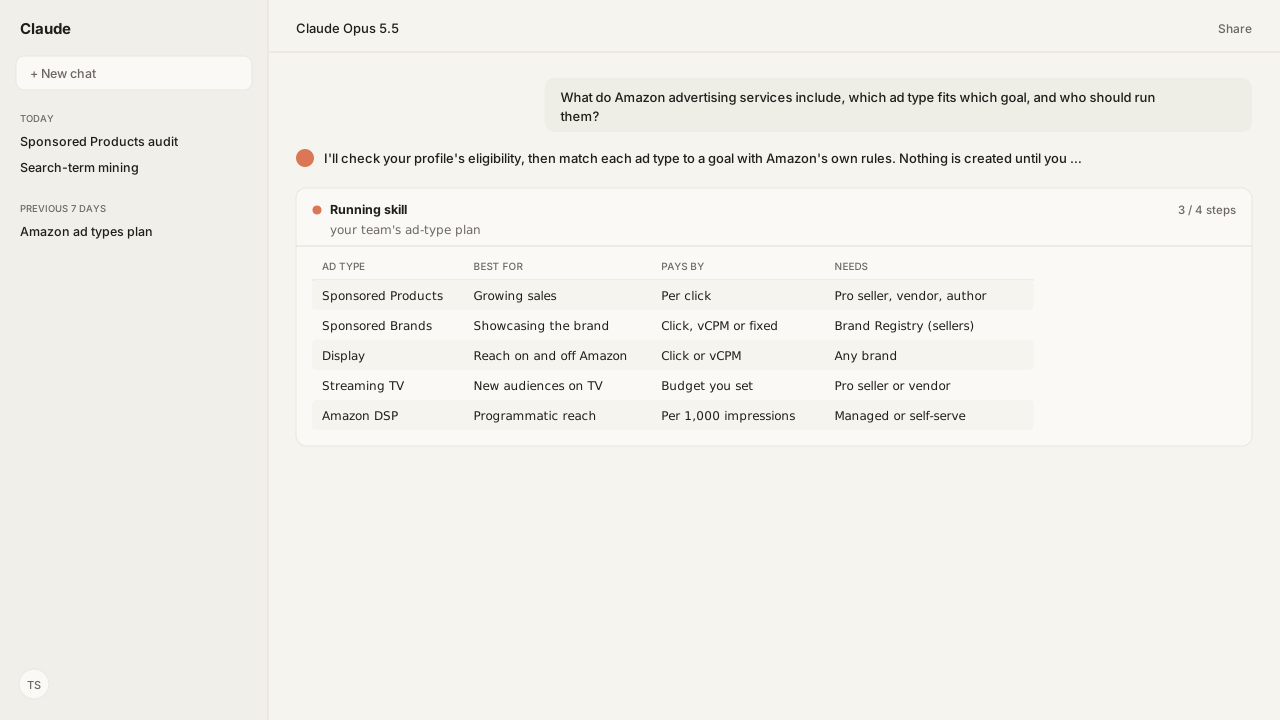
- Amazon's sponsored ads are Sponsored Products, Sponsored Brands, Display and Streaming TV. Amazon DSP buys display, video and audio ads programmatically, on and off Amazon.
- Sponsored Products is cost-per-click: you pay only when a shopper clicks, and you set the budget and the bid.
- For sellers, Sponsored Brands and Stores require Amazon Brand Registry; vendors qualify as approved vendors, and authors through Author Central. Sponsored Brands can charge per click, per 1,000 viewable impressions, or a fixed upfront amount.
- For sponsored ads, Amazon asks for a professional seller, vendor, author or advertising agency, in good standing, able to ship to the country, with a valid payment method. Display also takes brands that do not sell on Amazon, and Amazon DSP has its own access routes.
- Amazon's own path to a first campaign has six steps, from learning the terms to creating the campaign.
Amazon advertising services are the ad products Amazon Ads sells to sellers, vendors, authors and agencies: Sponsored Products, Sponsored Brands, Display and Streaming TV as self-service sponsored ads, plus Amazon DSP (demand-side platform) for programmatic display, video and audio. For growing sales, Amazon points advertisers to Sponsored Products, which charges only when a shopper clicks.
A founder moving onto Amazon put the question to me: "what does Amazon advertising actually include, which ad type fits which goal, and who should run it?" The answers sit across Amazon's help pages one product at a time, and most explainers stop at a list.
Our agent answered from the account instead of a list. Through the Amazon Ads MCP it checked the profile's program and product eligibility, and Amazon Agent Atlas supplied Amazon's eligibility and Brand Registry rules. Its plan started with one Sponsored Products campaign and waited for approval before creating anything.
Amazon advertising services split into sponsored ads and Amazon DSP
Amazon's sponsored ads are self-service products you run from the advertising console, and Amazon DSP buys ads programmatically. The agent checks a profile's program and product eligibility through the Amazon Ads MCP, so the plan starts from the account. The five differ on where the ad shows, how you pay, and what you need first:
| Ad type | Where it shows | How you pay | What you need |
|---|---|---|---|
| Sponsored Products | Amazon placements; US premium publishers | Per click | Pro seller, vendor or KDP author |
| Sponsored Brands | Top of, beside, within shopping results | Click, vCPM or fixed upfront | Brand Registry (sellers) |
| Display | Amazon pages; third-party sites; Amazon Business | Per click or vCPM | Any brand, on Amazon or not |
| Streaming TV | Prime Video, Twitch, Fire TV Channels | A campaign budget you set | Pro seller or vendor |
| Amazon DSP | Amazon.com, IMDb, Twitch, exchanges | Per 1,000 impressions | Self-, partner- or Amazon-managed |
vCPM is cost per 1,000 viewable impressions. Understand bidding describes the model underneath: an auction, where your bid is the most you will pay for a click or for 1,000 viewable impressions.
When sellers say Amazon PPC, they mean the cost-per-click sponsored ads. It is paid search inside Amazon's store: a keyword targets your ad to the shopping queries shoppers type.
Each Amazon ad type fits a different goal
Get started with sponsored ads frames the choice as a goal, not a format, and Atlas holds each product's page, so the agent matches a goal to a product in Amazon's own terms. For growing sales and product engagement, Amazon points to Sponsored Products. The rest line up the same way:
- Sponsored Products to sell specific products.
Understand Sponsored Productsdescribes it as a cost-per-click solution in highly visible placements, where you set the budget and the bid. - Sponsored Brands to showcase the brand.
Understand Sponsored Brandsdescribes a logo, a custom headline and products or a Store, above, beside or within shopping results. - Display to reach shoppers on and off Amazon, including brands that do not sell in Amazon's store.
- Streaming TV to reach new audiences with full-screen video on Prime Video, Twitch, live sports and Fire TV Channels.
- Amazon DSP for programmatic display, video and audio across Amazon properties and third-party exchanges.
A first Sponsored Products campaign can use automatic targeting, where Amazon picks keywords and products for you. Amazon recommends it if you are new to Sponsored Products. Manual targeting lets you choose keywords or products and set a bid for each.
Amazon's own path to a first campaign has six steps
Get started with sponsored ads, updated April 30, 2026, sets the order:
- Learn the terms. Bid, impression, keyword, placement, conversion, and the Featured Offer.
- Check sponsored ads eligibility. Be a professional seller, vendor, author or advertising agency, in good standing, able to ship to the country, with a valid payment method.
- Choose the ad product that matches the goal.
- Get product detail pages ready. Amazon's six tips: a title of about 60 characters, at least four images, a rating of 3.5 stars or more with 15 reviews, a competitive price, stock on hand, and at least three bullet points.
- Link accounts. Vendors can link Vendor Central. Sellers need Amazon Brand Registry for Sponsored Brands and Stores.
- Create the campaign from the advertising console.
An AI assistant connected to Amazon shortens steps 3, 4 and 6. It reads the listings through the Selling Partner MCP and flags the ones short on step 4's tips for title, images, bullets, price and stock. Through the Amazon Ads MCP it drafts the first campaign with suggested keywords and bids. Writes go through your workspace policy, which can require your approval before anything reaches Amazon. Once your workspace is set up, it connects to Claude or ChatGPT.
An agency, an in-house lead, or software can run Amazon advertising
Once campaigns are live, someone has to run them every week: bids, budgets, search terms and negatives. There are three ways to staff it:
- An agency. An Amazon agency runs the work for the brand, and the best ones run it on written playbooks.
- An in-house lead. A paid ads lead owns the account, and Amazon PPC management is the weekly loop they run.
- Software. Amazon PPC software automates bids and budgets, each tool deciding in its own way.
Kuudo is the playbook any of the three can run. The Amazon Ads Skills turn the weekly work into runs your AI repeats the same way each time.
What happens next: launch one Sponsored Products campaign, then read its search terms
Start with one Sponsored Products campaign on automatic targeting, as Amazon recommends for advertisers new to it. Once it has run, read its search terms: the search-term mining Skill sorts them into terms worth scaling, a negative list once the data is sufficient, and rising terms to watch. Terms worth a bid of their own move to a manual campaign.
Reading the results starts with the right metric: TACoS vs ACoS covers what each one measures. The Amazon Agent Data layer keeps the campaign history, so each week's decision starts from the account's record rather than a fresh export. The ad type was the easy decision. Running it well is the work that follows.
Next: how to optimize Amazon ads once the first campaigns are running.
Start Amazon advertising from the AI you already use
Bring the goal, and we will map the Amazon Ads MCP, the Ads Skills, Atlas grounding, and private-beta setup with you, from a first Sponsored Products campaign to the reporting behind it.
Get beta accessWhat you need to run Amazon ad types
- MCP
- Amazon Ads MCP for profiles, eligible ad products, campaign creation, keyword suggestions and reporting, with the Selling Partner MCP for the listing checks in step 4
- Skill
- Amazon Ads Skills once campaigns run, such as the Sponsored Products campaign audit, search-term mining and budget pacing
- Atlas collection
- amazon_ads, the Amazon rules behind this guide (playbooks: Get started with sponsored ads; Understand Sponsored Products; Understand Sponsored Brands; Understand bidding; Understand Streaming TV; Amazon Brand Registry for advertising; Amazon DSP Description of Methodology)
- Required subscriptions
- An Amazon Ads account. Sellers also need Amazon Brand Registry for Sponsored Brands and Stores.
FAQ
What are Amazon advertising services?
The ad products Amazon Ads sells: Sponsored Products, Sponsored Brands, Display and Streaming TV as self-service sponsored ads, plus Amazon DSP, which buys display, video and audio ads programmatically on Amazon properties such as Amazon.com, IMDb and Twitch and on third-party exchanges.
How much does Amazon advertising cost?
You set the budget. Sponsored Products charges only when a shopper clicks. You set the bid, and the up-and-down dynamic bidding strategy can raise it. Sponsored Brands can charge per click, per 1,000 viewable impressions, or a fixed upfront amount, and Amazon sets no minimum budget for it.
Who can advertise on Amazon?
For sponsored ads, Amazon's getting-started page lists professional sellers, vendors, authors and advertising agencies, with an active account in good standing, the ability to ship to the country they advertise in, and a valid payment method. Sponsored Products also needs listings eligible to be the Featured Offer. Display also lets brands that do not sell on Amazon reach Amazon audiences, and Amazon DSP is available through self-, partner- or Amazon-managed access.
What is the difference between Sponsored Products and Sponsored Brands?
Sponsored Products promotes individual products in highly visible placements and charges per click. Sponsored Brands showcases the brand itself, with a logo, a custom headline and several products or a Store, and, for sellers, requires Amazon Brand Registry.
Why does my account fail to create a Sponsored Brands campaign?
For a seller, the most common cause is Brand Registry: Sponsored Brands and Stores require the seller to be the registered brand owner. Enrollment needs a brand name with an active registered trademark, the trademark number, and the product categories the brand sells in. Sponsored Products has no such requirement. If you are enrolled and still see an error, Amazon asks you to contact support.
Is Amazon PPC the same as Amazon advertising?
Amazon PPC usually means the cost-per-click sponsored ads, above all Sponsored Products: paid search inside Amazon's store, shown for the terms shoppers type. Amazon advertising is wider, adding Streaming TV and Amazon DSP.