
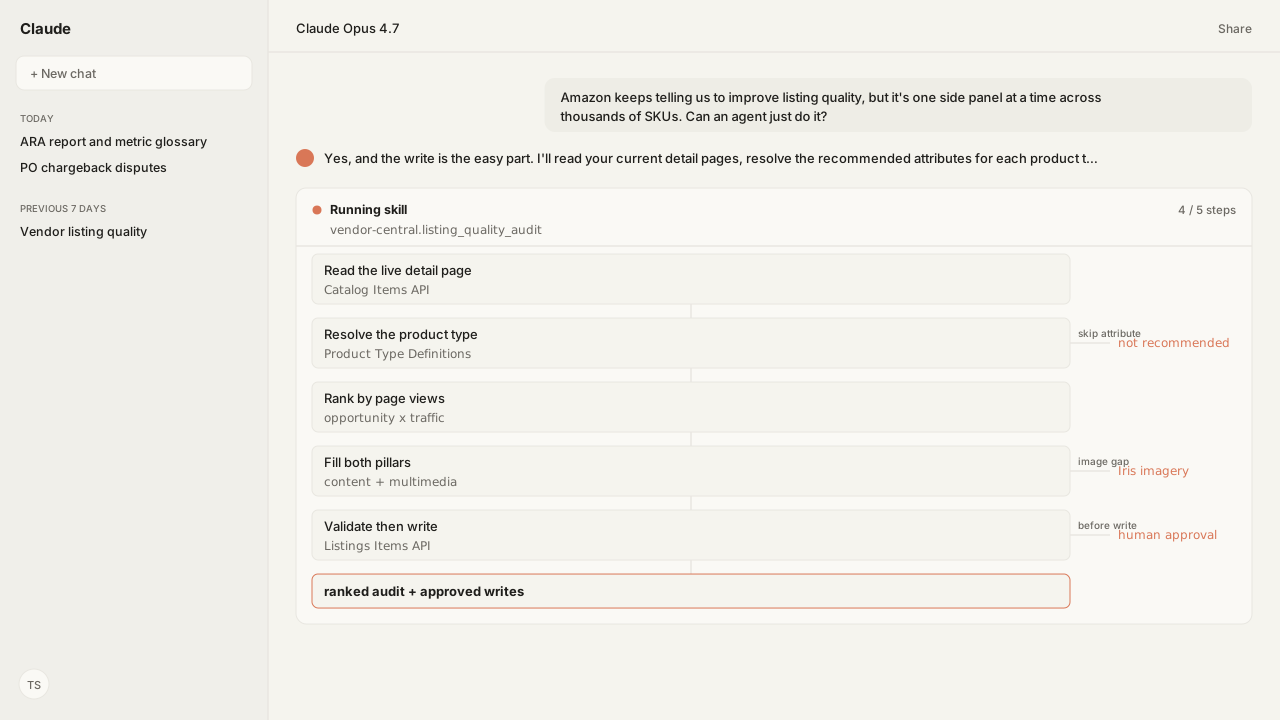
- An agent ranks vendor ASINs by glance views from the Vendor Central MCP, reads each listing and its product type schema through the Selling Partner MCP, and checks Amazon's rules with Atlas before proposing a fix.
- The Listing Quality Indicator grades two pillars: content quality (titles, bullets, key attributes) and multimedia quality (images and A+). Requirements vary by product type.
- Amazon's write paths, from the Improve listing quality panel to bulk upload and the Listings APIs, are mechanisms. Its AI suggestions come one ASIN at a time and need your review.
- Product Type Definitions supplies the schema format behind Listings Items, Catalog Items and the bulk feed, and the Listings Items API can preview Amazon's validation before a submission.
- A selected image can take up to 24 hours to appear. The agent checks Amazon's image rules and your brand guide before generating, and writes run under your workspace policy.
An agent on Kuudo can audit vendor listing quality across a catalog. It ranks ASINs by glance views from the Vendor Central MCP, reads each listing and its product type schema through the Selling Partner MCP, checks Amazon's rules with Amazon Agent Atlas, and proposes validated fixes that your workspace policy may hold for approval.
The hard part was never the write. It is deciding which attributes matter for each product type, what a correct value looks like, and which SKUs deserve attention first. Amazon's tools suggest fixes one ASIN at a time and leave checking each suggestion against your product facts and brand rules to you.
The ranked audit appears before any write is proposed:
| Priority signal | Agent finds | Agent returns |
|---|---|---|
| Glance views | Missing or invalid attribute | Ranked content fix |
| Current image stack | Image gap or non-compliant main image | Multimedia fix |
| Listing issues | New issue on a SKU | Fix plan for review |
A bulk spreadsheet solves only the upload. Someone still has to identify the product type, resolve its attributes, and supply a valid value for every row. The mechanism is not the bottleneck.
ChatGPT, Claude, Perplexity, Microsoft Copilot, and whatever comes next know nothing about your business out of the box. Your competitors use those tools too. Kuudo gives those same tools your edge: your data, your rules, and the way your business operates, expressed as your account as it is right now, your judgment running every time, and your call before anything changes.
The Vendor Central MCP supplies glance views, the Selling Partner MCP supplies current catalog and listing-issue context, Amazon Agent Flow lands your vendor, seller and ads data in a data layer you own, Skills preserve your content and brand standards, Atlas applies Amazon-specific guidance, and approval controls keep the write with you.
Atlas grounds the Listing Quality Indicator, whose two pillars vary by product type
Amazon's definition, from the Enhance listings help page in Atlas: the Listing Quality Indicator measures how complete and correct a detail page is across two pillars. Content quality evaluates titles, bullet points and key attributes for correctness, completeness and policy compliance. Multimedia quality reviews image and A+ content quality and completeness. Each listing lands in one of five categories, from Poor to Optimized.
Two things follow. First, requirements vary by product type, so no single checklist covers a catalog. Amazon publishes a recommended attribute list per product type and updates it monthly, while noting the recommended tags are not yet available for every product type. Second, the score is directional: it compares your listing with the best listings in similar categories and ignores offer price, fulfillment and seasonality.
Two experiences on the Catalog page surface these opportunities per ASIN:
- Improve listing quality recommends missing attributes, lets you use page views to prioritise, and saved changes take up to one and a half hours to show.
- Enhance listings shows the factors behind each listing's quality and, where available, AI-generated suggestions. Its indicator refreshes within 15 minutes of publishing. Amazon warns that the suggestions can include features and claims that were not in the original listing, and that reviewing them is your responsibility.
The Catalog Items and Listings Items APIs do not return the Listing Quality Indicator. The agent works from what the APIs do return: each listing's attributes, its issues, its images, and the product type schema.
Amazon's write paths leave the decision to you; the Selling Partner MCP removes the build
Vendor Central documents several ways to change a listing, and each one is a mechanism:
| Path | What it costs | What it still needs from you |
|---|---|---|
| Improve listing quality or Enhance listings | One ASIN per side panel | Your review of every value, including Amazon's AI suggestions |
| Improve listing quality in bulk | A report download, then Upload status checks | A value for every row; AI suggestions are not supported in bulk |
| Listings APIs, direct integration | A five-step build | The values, plus an application to maintain |
| Listings APIs, catalog service provider | A third party, at additional cost | The values; maintenance depends on the provider's package |
The direct path is the one people underestimate. Amazon states it plainly: register a developer profile, create the required AWS resources and Selling Partner API (SP-API) application, develop the functionality, test the application, then release and maintain.
An agent on Kuudo is another route to the same APIs. Amazon documents the Listings APIs as available to vendors, and the Selling Partner MCP exposes Catalog Items, Product Type Definitions and Listings Items, called under your vendor code. The Vendor Central MCP carries the vendor side: purchase orders, shipments and Retail Analytics, including the glance views the audit ranks by.
The Selling Partner MCP turns Product Type Definitions into a schema the agent validates against
The foundational API is the one nobody markets. The Product Type Definitions API searches product types by marketplace and keyword, then returns the definition and schema for a product type: its attributes and data requirements, split into required, conditionally required and optional, with allowed values where a selection list applies.
The same schema format backs the Listings Items API, the Catalog Items API and the bulk JSON_LISTINGS_FEED. The Listings Items API also accepts a VALIDATION_PREVIEW mode, so the agent sees Amazon's validation errors on a proposed patch without changing the listing. Neither step guarantees publication: Amazon can still raise processing, contribution or policy issues afterward.
The read side pairs with it. The Catalog Items API returns reconciled information for an ASIN, equivalent to what the detail page displays, including images, product type and identifiers. getListingsItem adds your listing's own attributes and issues. Read the current state, resolve the schema, then compute the gap.
Writes run under your workspace policy
The cold-open table is the artifact: gaps ranked by glance views, with every content fix tied to the product type schema that produced it. patchListingsItem and putListingsItem are write tools, so they apply your workspace policy and may require explicit approval before a change reaches Amazon.
Iris and Atlas apply Amazon's image rules before a file exists, not after upload
Multimedia is one of the indicator's two pillars, so filling text attributes alone leaves image and A+ gaps untouched. In Vendor Central, Image Manager uploads individual images, deletes them, copies a media set to sibling products, and previews whether images are live. It moves files. Deciding whether a file was the right one happens somewhere else.
Amazon is direct about the consequence. Uploading an image does not guarantee it is displayed, because Amazon selects and arranges images from multiple selling partners, and meeting the image requirements improves the odds. Files are checked against technical requirements at upload; policy problems surface afterward as image suppression. If your image is selected, it can take up to 24 hours to appear.
The rules vary by product and format. Three from the amazon_vendors corpus:
Multipack imaging standards: the main image shows the total quantity delivered, with the product in its packaging, and the title states the same count.Technical image file requirements: RGB is accepted; CMYK is not preferred and should be converted to RGB before upload.Image suppression: every ASIN requires a main image, so replace a non-compliant main image by uploading with the MAIN variant code rather than deleting it.
The newest rule is the sharpest. How to tag media that contains an AI-generated person exists because some jurisdictions require disclosure. Amazon requires the contains-synthetic-performer keyword in the file's XMP dc:subject field before upload. Its instructions cover Preview on macOS, File Explorer on Windows (the Tags field, not Subject), and a command-line option. In A+ Content Manager, a checkbox applies the metadata for you.
An agent changes the order. It reads the current image stack through the Catalog Items API and resolves which rules apply from Atlas before anything is produced. Amazon Agent Iris then generates from the live listing and your real product references, and checks pack count and variant consistency against the listing. The Selling Partner MCP submits an approved image and verifies Amazon ingested it.
Two steps stay explicit. A generated image that contains an AI-generated person still needs its disclosure tag before upload, so your Skill flags it for that step. And the multipack case shows why ordering matters: the fix is an image and a title together, and doing one without the other leaves the listing non-compliant in a new way.
Your brand rules run in the same pass
Amazon's requirements are public and identical for every vendor. Your brand rules are not. Atlas grounds the Amazon rules; your private style guide supplies the palette, framing, voice, and tone. A Skill that carries both applies them in the same pass, so compliant and on-brand stop being separate review cycles.
What happens next: re-run the audit on every listing issue notification
The audit is worth running once. The loop is worth keeping. Amazon sends LISTINGS_ITEM_ISSUES_CHANGE when an issue on a listings item you own is created, fixed or updated, and vendors can subscribe. Issues flag problems that can make a listing inactive or search suppressed, or cause other quality problems.
To keep the loop running:
- Subscribe to
LISTINGS_ITEM_ISSUES_CHANGEthrough the Notifications API in the Selling Partner MCP, with an Amazon EventBridge destination. - When a notification arrives, it carries the listing's basic information. Re-run the audit on that SKU:
getListingsItempulls the issues, Product Type Definitions re-resolves the schema, and the fix runs under your workspace policy. - Subscribe to
PRODUCT_TYPE_DEFINITIONS_CHANGEas well, so a new product type or schema update prompts the same re-check.
Kuudo publishes no vendor listing-quality Skill today, and the published listing Skill is written for Seller Central. A vendor team saves this loop, its ranking rules and its brand guide as its own Skill. It composes with the ARA report and metric glossary and sits beside the Amazon Ads MCP when the question turns to what the traffic did.
The mechanism was never the hard part. Deciding what to write, per product type, across a catalog nobody has time to read, is the hard part, and it is the part an agent can now take on.
Next in this series: the same catalog-scale review loop applied to A+ content.
Put an agent on your vendor catalog
Bring us the catalog work your team is doing one side panel at a time. We will map the Vendor Central and Selling Partner MCPs, a Skill for your catalog rules, Atlas grounding, and private-beta setup with you.
Run this workflow in betaWhat you need to run vendor listing quality audits
- MCP
- Amazon Selling Partner MCP for Catalog Items, Product Type Definitions, Listings Items and Notifications under your vendor code; Amazon Vendor Central MCP for the Vendor Traffic report's glance views
- Skill
- No published Kuudo Skill covers vendor listing quality; save the rank, resolve-schema, fill, validate and submit loop as your own Skill and re-run it on listing issue notifications
- Atlas collection
- amazon_vendors for Amazon's listing, schema, and image rules; your private brand guide supplies the separate voice, tone, palette, and framing rules applied in the same pass
- Required subscriptions
- A Vendor Central account you authorize for Kuudo's MCPs. No catalog service provider contract and no SP-API application of your own are required.
What success and failure look like for vendor listing quality audits
| result | interpretation |
|---|---|
| A SKU shows a listing quality opportunity but no obvious missing field | Check the multimedia pillar. The Listing Quality Indicator scores images and A+ content alongside titles, bullets and attributes. |
| An attribute you filled does not change the score | Requirements vary by product type. An attribute that matters for one product type may not be recommended for another; resolve the schema for that specific product type. |
| A bulk upload completes but the listing is unchanged | Check the Upload status column. In progress means processing is not finished; only Completed reflects the applied result. |
| Edits saved in the side panel do not appear on the detail page | Check which experience you used. Improve listing quality changes can take up to one and a half hours. Contributions verified through the listing form show within 48 hours, and Amazon may display another contributor's information instead. |
FAQ
What does the Listing Quality Indicator actually measure?
Two pillars. Content quality evaluates product data such as titles, bullet points and key attributes for correctness, completeness and policy compliance. Multimedia quality reviews image and A+ content quality and completeness. Requirements vary by product type.
How long do listing quality edits take to appear?
Improve listing quality changes can take up to one and a half hours to appear. In Enhance listings, the Listing Quality Indicator refreshes within 15 minutes after you publish updates. Contributions verified through the listing form show within 48 hours, and bulk uploads report their state in the Upload status column.
Do I need to build an SP-API integration to automate vendor listings?
Amazon's direct-integration path is five steps: register a developer profile, create the required AWS resources and Selling Partner API (SP-API) application, develop the integration, test it, then release and maintain it. Its other route is a catalog service provider, at additional cost. On Kuudo you authorize your own Vendor Central account and the agent calls the Listings APIs through the Selling Partner MCP, with no application to maintain.
How do I know which attributes to fill for a given product?
Requirements vary by product type. The Product Type Definitions API returns the schema and data requirements for a product type in a marketplace. Amazon also publishes a recommended attribute list per product type, updated monthly, though the recommended tags are not yet available for every product type.
Why does my listing update fail on submission?
A guessed attribute name or value that misses the product type requirements can fail validation. Retrieve the Product Type Definitions schema first, and use the Listings Items API's VALIDATION_PREVIEW mode to see Amazon's validation errors without changing the listing. Amazon can still surface processing or policy issues afterward.
Can an agent generate and update listing images, not just text?
Yes. The Listings Items API submits images for listings, and vendors can call it. On Kuudo, Amazon Agent Iris generates from the live listing and your product references, and the Selling Partner MCP submits an approved image and verifies Amazon ingested it. An image with an AI-generated person still needs its disclosure tag before upload, and display can take up to 24 hours.
How does the agent know when a listing develops a problem?
The Notifications API sends LISTINGS_ITEM_ISSUES_CHANGE when an issue on a listings item is created, fixed or updated, and vendors can subscribe. Issues flag problems that can make a listing inactive or search suppressed, or cause other quality problems.