
NanoClaw puts that agent in a messaging app. Ask from WhatsApp, Telegram, Slack, or Discord and it runs the Amazon work on hardware you control — inventory checks, campaign pulls, listing fixes — and answers in the thread.
Use NanoClaw when you want a personal agent that answers from a messaging app rather than a terminal, and you want it running on hardware you control. NanoClaw is open source (MIT), runs each agent inside a container, and is built on Anthropic's Agents SDK.
For the official reference, see NanoClaw, the skills index, and the repository.
Your MCP server hostname is private to your deployment. It comes from your cloud provider, belongs to your environment, and is not shared across customers. Replace {your-private-mcp-host} with the private host shown in your dashboard.
Before you start
- Install Node.js 20+, pnpm 10+, Docker, and Claude Code.
- Use macOS, Linux, or Windows with WSL2.
- Create an API key from the dashboard Keys tab.
- Keep the key in
MCP_API_KEYor another local secret source. - Confirm the private MCP endpoint ends with
/mcp.
https://{your-private-mcp-host}/mcpInstall NanoClaw
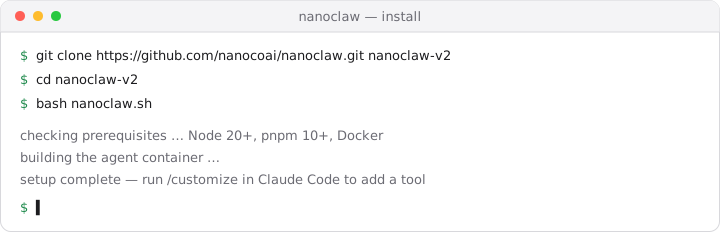
git clone https://github.com/nanocoai/nanoclaw.git nanoclaw-v2
cd nanoclaw-v2
bash nanoclaw.sh
The installer resolves missing dependencies, registers credentials, builds the container, and walks you through connecting a first messaging channel. Channels are added on demand with their own skills, such as /add-telegram or /add-slack.
Know which config you are editing
NanoClaw has two separate MCP surfaces, and they are easy to confuse.
| Surface | Who reads it | Shape |
|---|---|---|
.mcp.json in the repo root | Claude Code, while you work in the repo | Standard mcpServers client config |
container/agent-runner | The running agent, inside its container | Registered stdio servers plus forwarded env vars |
Editing the repo root file gives you the tools while customizing. It does not give them to the agent answering in your messaging app. That agent loads servers registered in the container runner, whose config takes command, args, and env — a stdio contract, with no field for a remote URL or headers.
So a remote HTTPS endpoint reaches the agent through a stdio bridge. That is what the fast path below sets up for you, and what the manual form spells out.
Fast path: the customize skill
Run Claude Code from the cloned repository and start the interactive skill:
cd nanoclaw-v2
claude/customizeAsk for a remote MCP integration and give it three things:
- the endpoint,
https://{your-private-mcp-host}/mcp - the auth header,
Authorization: Bearer ${MCP_API_KEY} - which agents should get the tools
The skill writes the bridge into the agent-runner tree, registers the server, and forwards the key into the container. It is an interactive skill, so the prompts adapt to what you ask for rather than following a fixed menu.
Manual form
Use this when you want to script the setup, review the diff before it lands, or debug a fast-path run that did not take.
Register the server with a stdio bridge. mcp-remote speaks stdio to the agent and HTTP to your endpoint:
{
  "mcpServers": {
    "kuudo": {
      "command": "npx",
      "args": [
        "-y",
        "mcp-remote",
        "https://{your-private-mcp-host}/mcp",
        "--header",
        "Authorization: Bearer ${MCP_API_KEY}"
      ],
      "env": {
        "MCP_API_KEY": "mcp_live_..."
      }
    }
  }
}
Two details decide whether this works:
- The key has to reach the container. Setting
MCP_API_KEYin your shell is not enough. The host process forwards named variables into the container, so the variable must be forwarded there as well as set locally. - The tool allow-pattern follows the server name. Registering the server as
kuudoexposes its tools asmcp__kuudo__*. Rename the server and the pattern changes with it.
Verify
Ask the agent something only your account can answer, from whichever messaging app you connected:
List my Amazon advertising campaigns and show the three with the highest spend last week.A grounded answer means the bridge, the key, and the endpoint are all correct. A generic answer, or a refusal that mentions missing tools, means the server registered but its tools never loaded.
Troubleshooting
The agent replies but has no tools
The server was registered in the repo root rather than the container runner, or the container was not rebuilt after the change. Rebuild, then confirm the agent lists tools under mcp__kuudo__*.
Authentication fails inside the container
MCP_API_KEY is set on the host but not forwarded. Confirm the variable is in the forwarding list, not only in the shell that launched the installer, then restart the container.
The endpoint does not connect
Confirm the endpoint uses your private host and the normal bearer-auth path:
https://{your-private-mcp-host}/mcpDo not use a Claude-only signed connector URL such as /mcp/connect/{signed-token} here. The bridge sends a standard Authorization header.
Tools work in Claude Code but not from the messaging app
That is the two-surfaces problem. Claude Code is reading the repo root config; the messaging agent is reading the container runner. Register the server in the runner.